Zillow gets about 45M visits a month from Google in the US, and it wins them with a page for every place, plus a robots.txt file that tells Google which pages to skip.
7 of its top 10 pages are built around a place, like New York. One of them ranks #1 for "apartments for rent".
We ran Zillow through our SEO tools. Its bot shield turned some of our checks away, and that's a lesson too.
Here are 9 lessons you can copy, plus the part you can't.
Build a page for every city
We started with our Organic Traffic Checker. It estimates a site's organic traffic, meaning the people who find it on Google without ads.
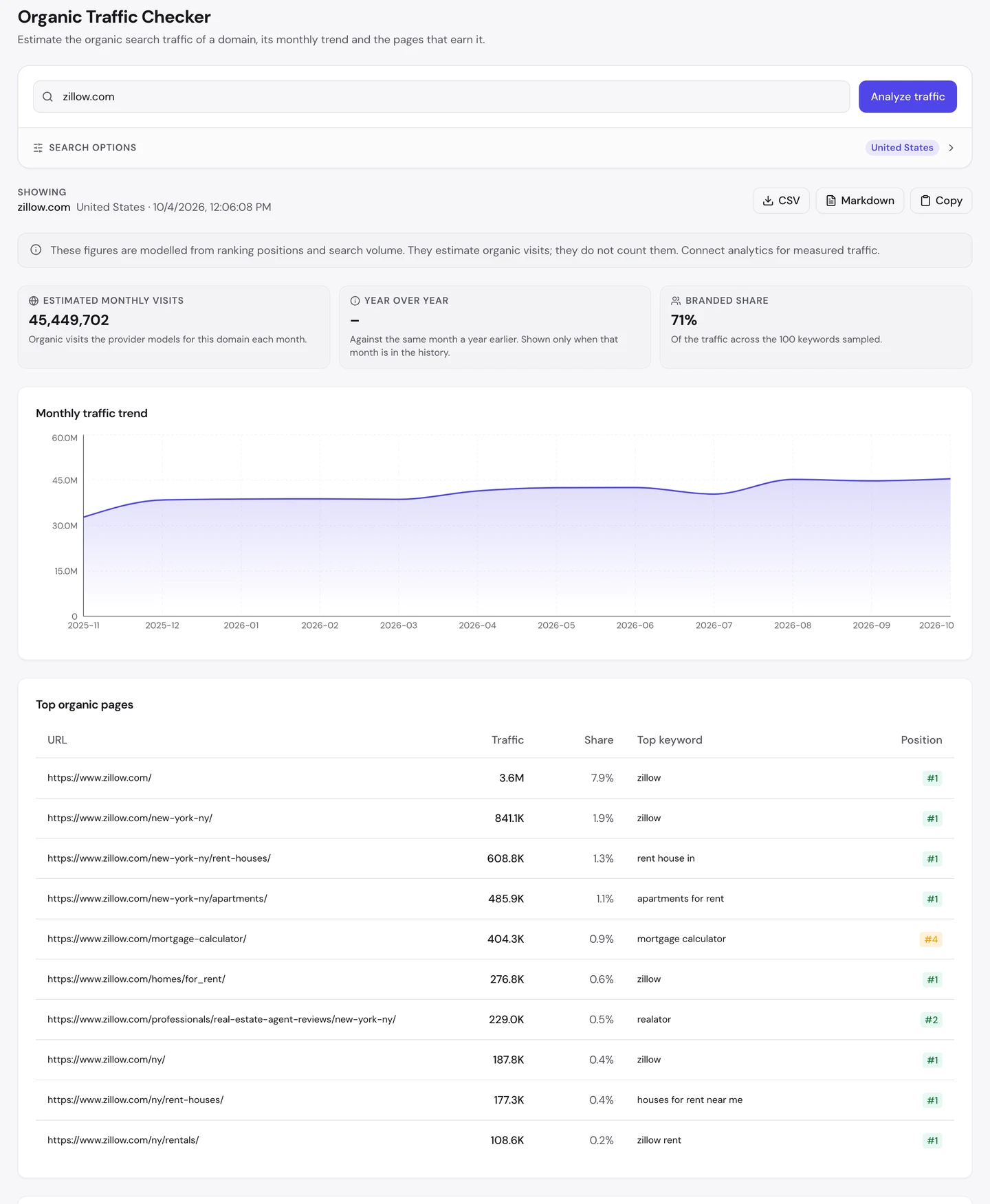
That's about 45M visits a month, from the US alone. The homepage brings in the most, about 3.6M.
But look at what comes next. It's the New York page, with about 841K visits.
Then come New York's houses for rent and New York's apartments. 7 of the top 10 pages are built around a place.
This is programmatic SEO. It means building many pages from one template and a list of data, like a list of cities.
Our Domain Overview shows how far that reaches.
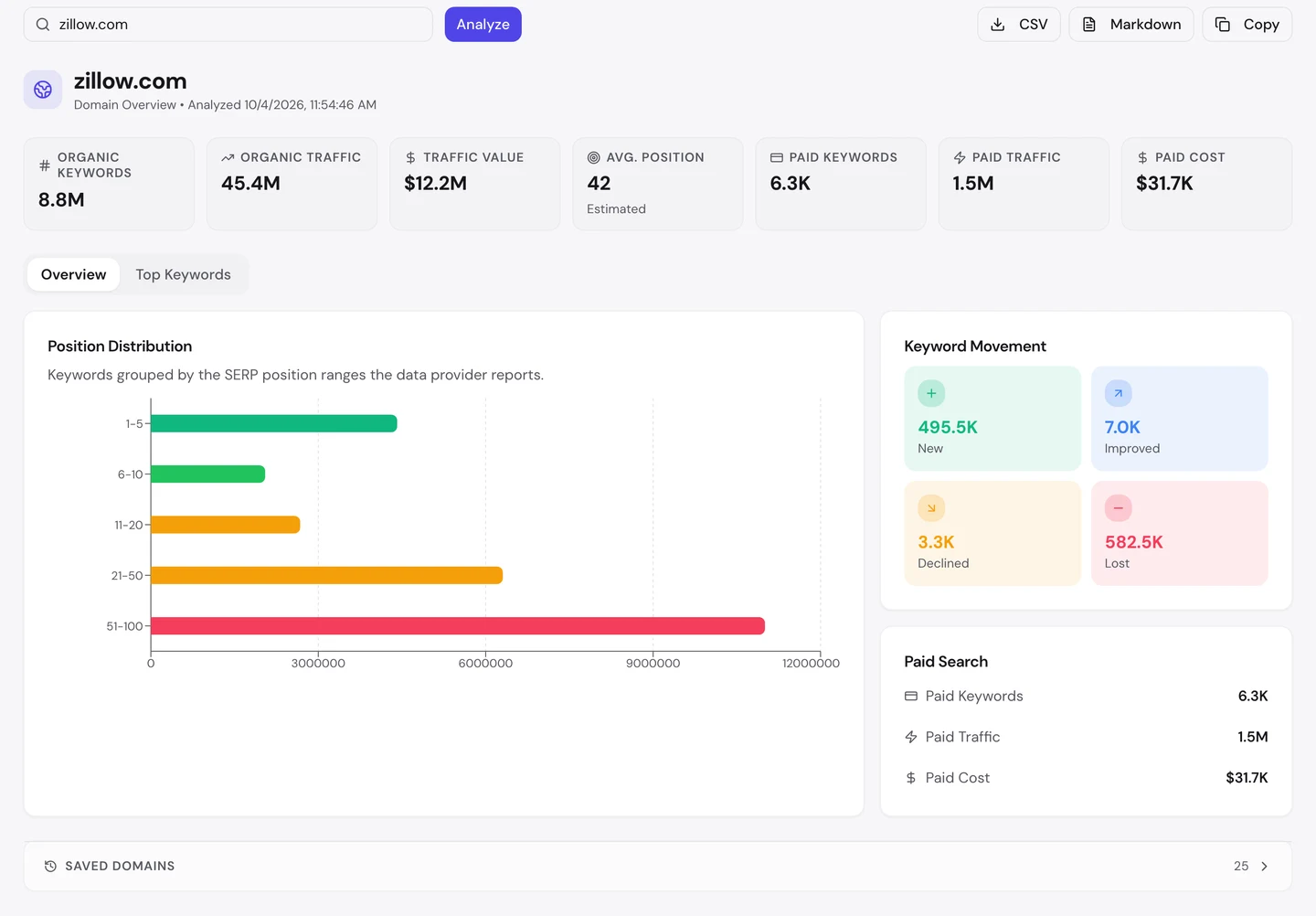
Zillow ranks for about 8.8M searches. You can't write a page for each of those by hand, but a template and a list of places can.
Its average spot is 42, and the longest bar is spots 51 to 100. With millions of pages, most will sit low, and that's normal.
Booking.com, which we studied too, does the same with a page for each city's hotels. Eventbrite, another site we studied, is worth a look next to it.
So list the places your customers search for, and give each one its own page. Then see which pages earn visits with our Organic Traffic Checker.
Put the search in the address
Now look at the addresses of those pages. Each one tells you what's on it before you even click.
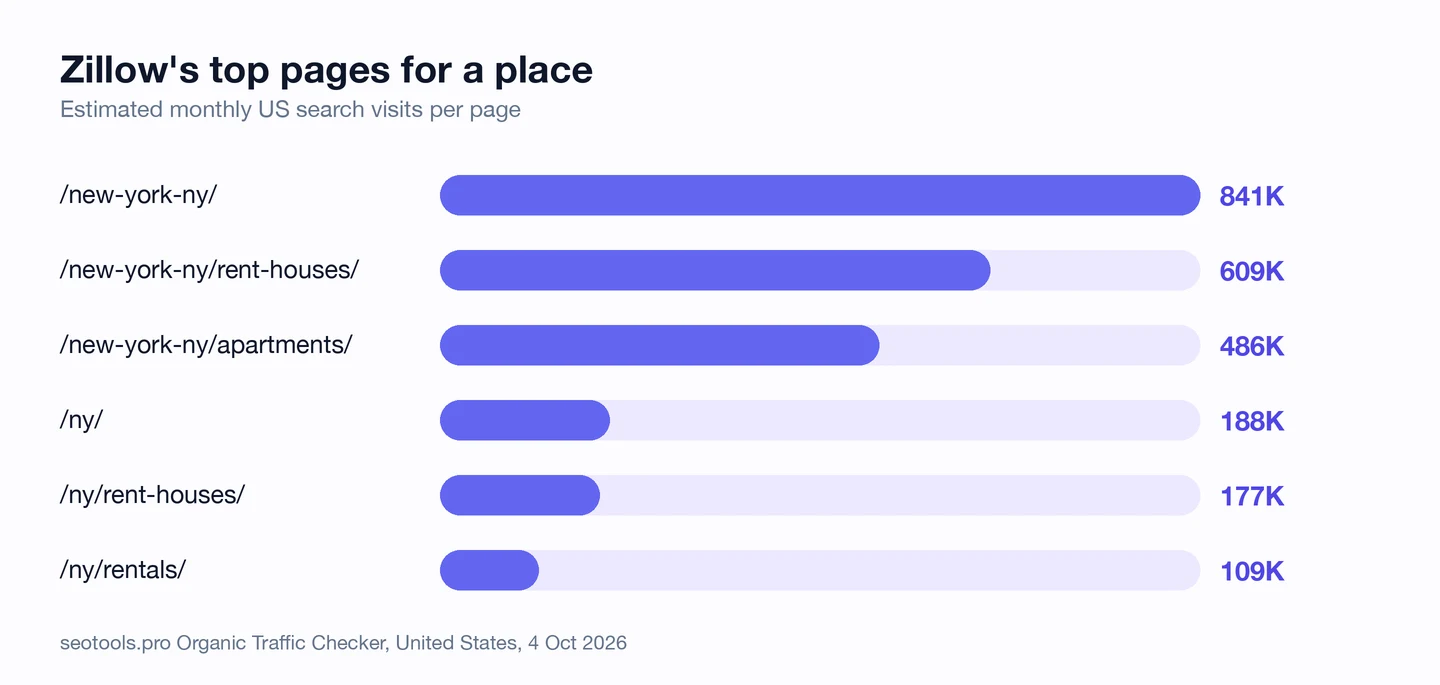
Take zillow.com/new-york-ny/rent-houses/. It's houses for rent in New York, and it ranks #1 for "rent house in".
The apartments page ranks #1 for "apartments for rent". And the New York state page for houses ranks #1 for "houses for rent near me".
It's one simple pattern: the place, then the kind of home. Swap New York for Dallas, and you get zillow.com/dallas-tx/apartments/.
You don't need to guess what that page is about, and neither does Google. The address, the page and the search all say the same thing.
So give each page a short address made of the place and the words people search for. Find those exact words with our Keyword Research tool.
Answer the searches around a move
When you buy a home, you need more than a list of houses. You need a loan, and you need an agent.
Zillow has a page for each of those, too. The audit's Keywords tab shows how well they rank.
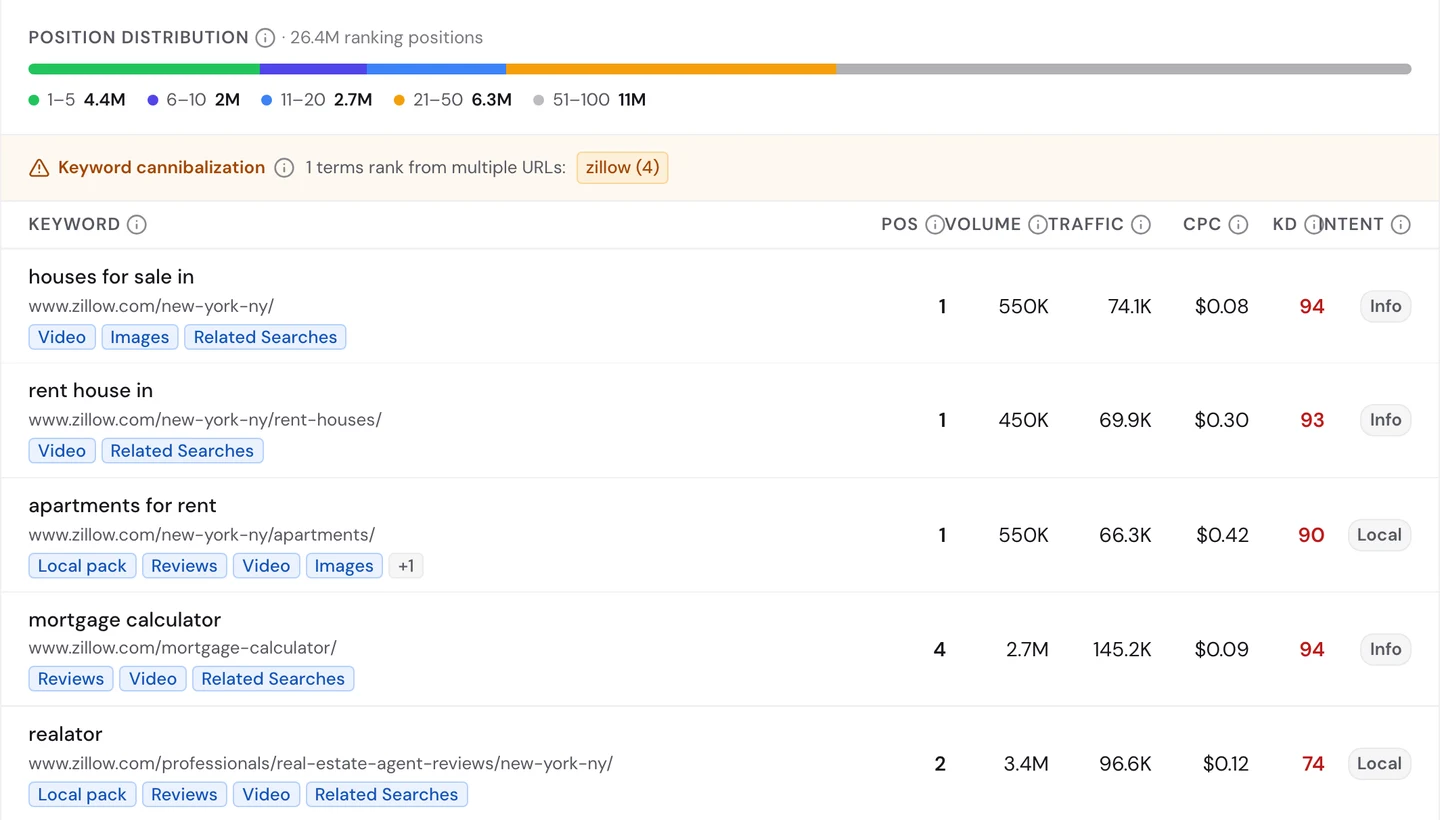
First, the loan. Zillow's free mortgage calculator ranks #4 for "mortgage calculator", a search people make about 2.7M times a month.
Calculator.net, which we studied too, is built almost entirely on small free tools like this one.
Next, the agent. Zillow has a page of agent reviews for each city, and the New York one ranks #2 for "realator".
Yes, that's a typo. About 3.4M searches a month spell it that way, and Google sends them to the page that answers the real question.
You don't need to stuff typos into your pages. You just need the page that answers what people meant.
So map every step your customer takes, and build a page or a free tool for each one. Then watch how those pages rank with our Rank Tracker.
Block the endless filter pages
A listings site has a hidden problem. Every filter you click, like beds, price or sort order, can make a brand new address.
Robots.txt is a file that tells crawlers what they may read. A crawler is a program that visits pages the way Google does.
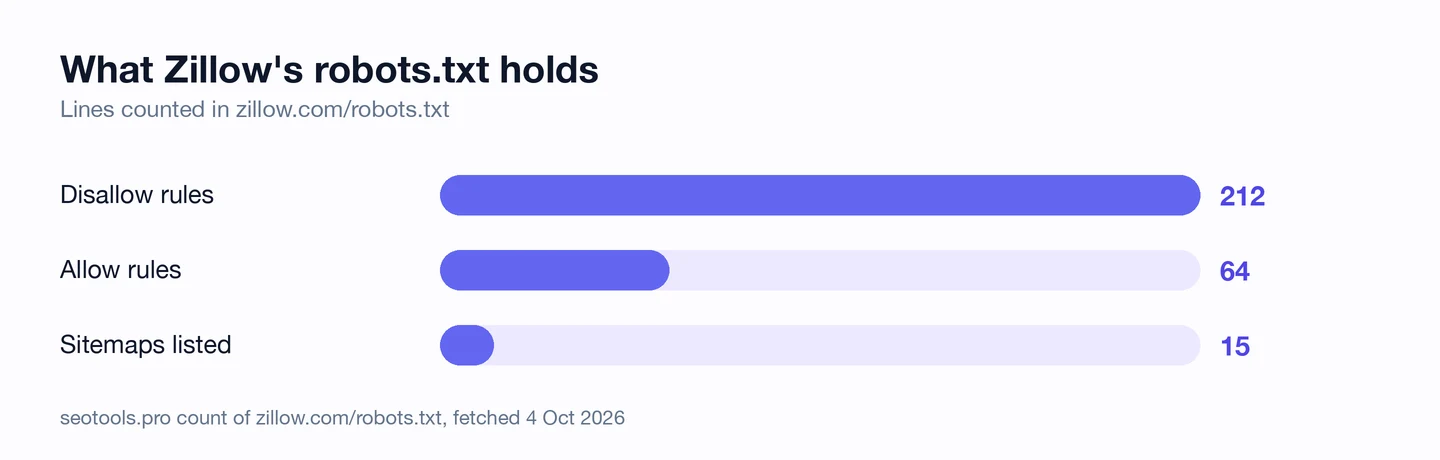
Zillow's file has 212 rules that block paths, and 64 that let paths back in. Here are a few of them.
User-agent: *
Allow: /homes/for_sale/$
Allow: /homes/for_rent/$
Disallow: /homes/
Disallow: /*_rect
Disallow: /*_sort/
Disallow: /*?searchQueryState=*
The first line speaks to every crawler. Then the file blocks the whole /homes/ folder, but lets in the clean pages for homes for sale and for rent.
The $ means "this exact address, and nothing after it". So /homes/for_rent/ is open, but the same address with a filter on the end isn't.
The other lines block bits like _rect, _sort and searchQueryState. They pile up as you move the map, sort or filter a search.
Google only spends so much time on each site. These rules keep it on the clean city pages, not on endless copies of them.
The file also points to 15 sitemaps. A sitemap is the file that lists a site's pages for Google, and Zillow splits its sitemaps by kind, like for sale by owner or new builds.
Our sitemap study, which we ran too, shows how big sites set those files up.
So block the filter and sort addresses in your robots.txt, and leave the clean pages open. Our Robots.txt Generator writes the rules for you.
Choose which AI bots get in
Robots.txt talks to AI crawlers too. These are the bots that collect pages for AI tools and chatbots.
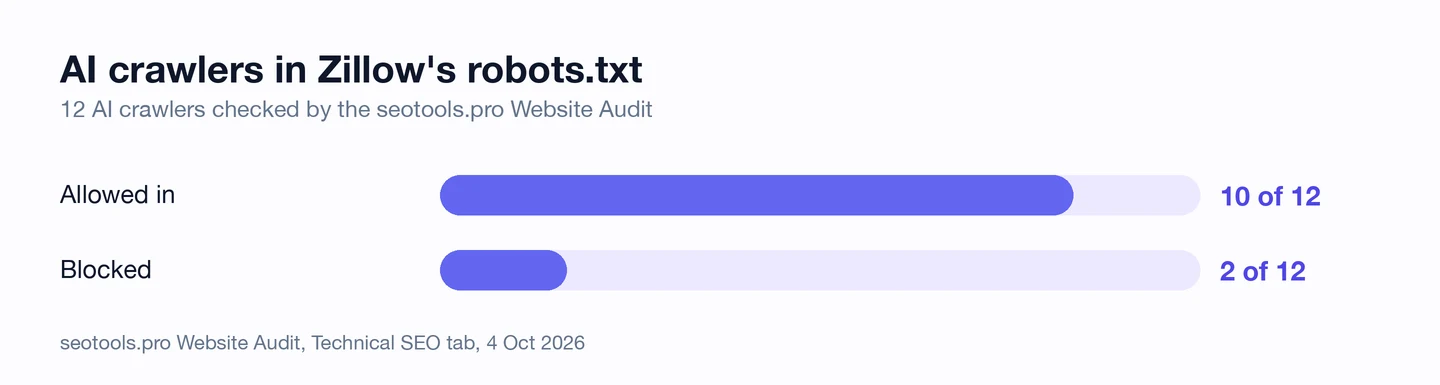
Our Website Audit checked 12 of them. 10 are allowed in, including GPTBot and ClaudeBot.
2 are blocked, Applebot-Extended and meta-externalagent. The file puts Amazonbot in that same group.
But it's not a full block. That group may still read Zillow's guides and research, like the /blog/ and /research/ folders, just not the listings.
One way to read it: the listings are the data Zillow guards, while the guides are made to be shared. You can draw the same line on your own site.
Our robots.txt study, which we ran too, looks at which big sites block AI crawlers.
So decide, folder by folder, what AI tools may read, and put it in your robots.txt. Then see if AI answers name you with our AI Visibility Checker.
Audit your page templates
Next, we ran our Website Audit. It sent our crawler through 261 pages, including ones from Zillow's sitemaps.
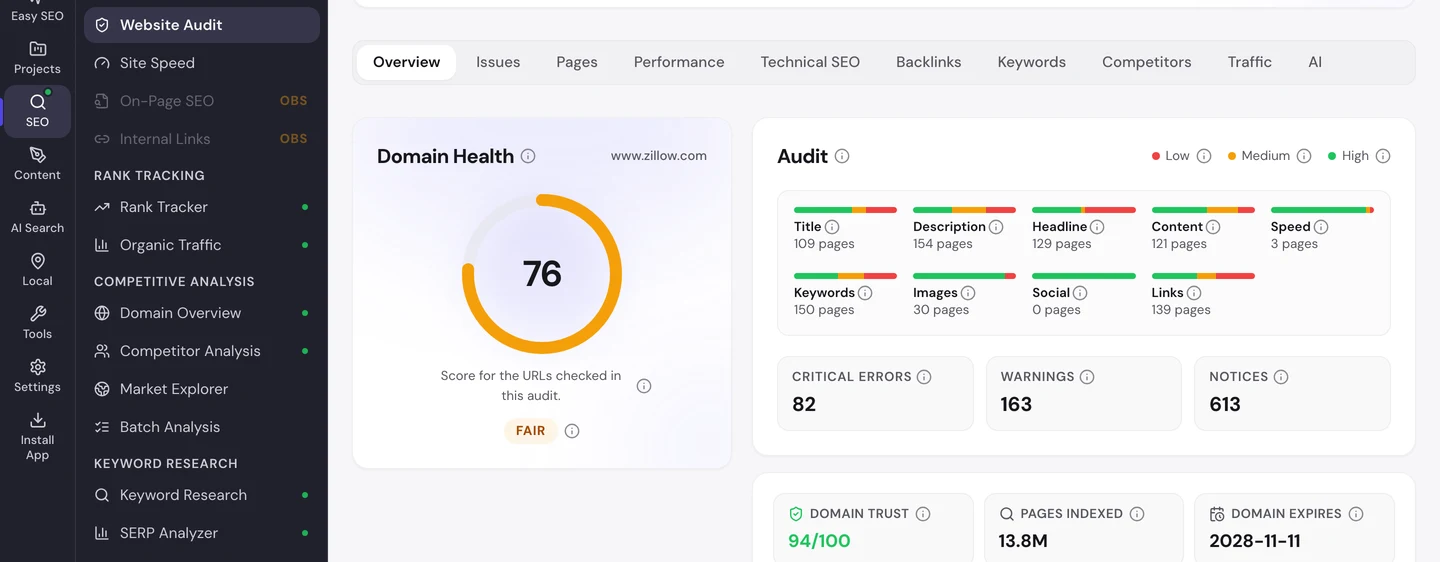
The site scored 76 out of 100, which the audit rates as fair. Google has about 13.8M of its pages in its index.
Now the issues list. Some of it is real and some of it isn't, so let's sort it.
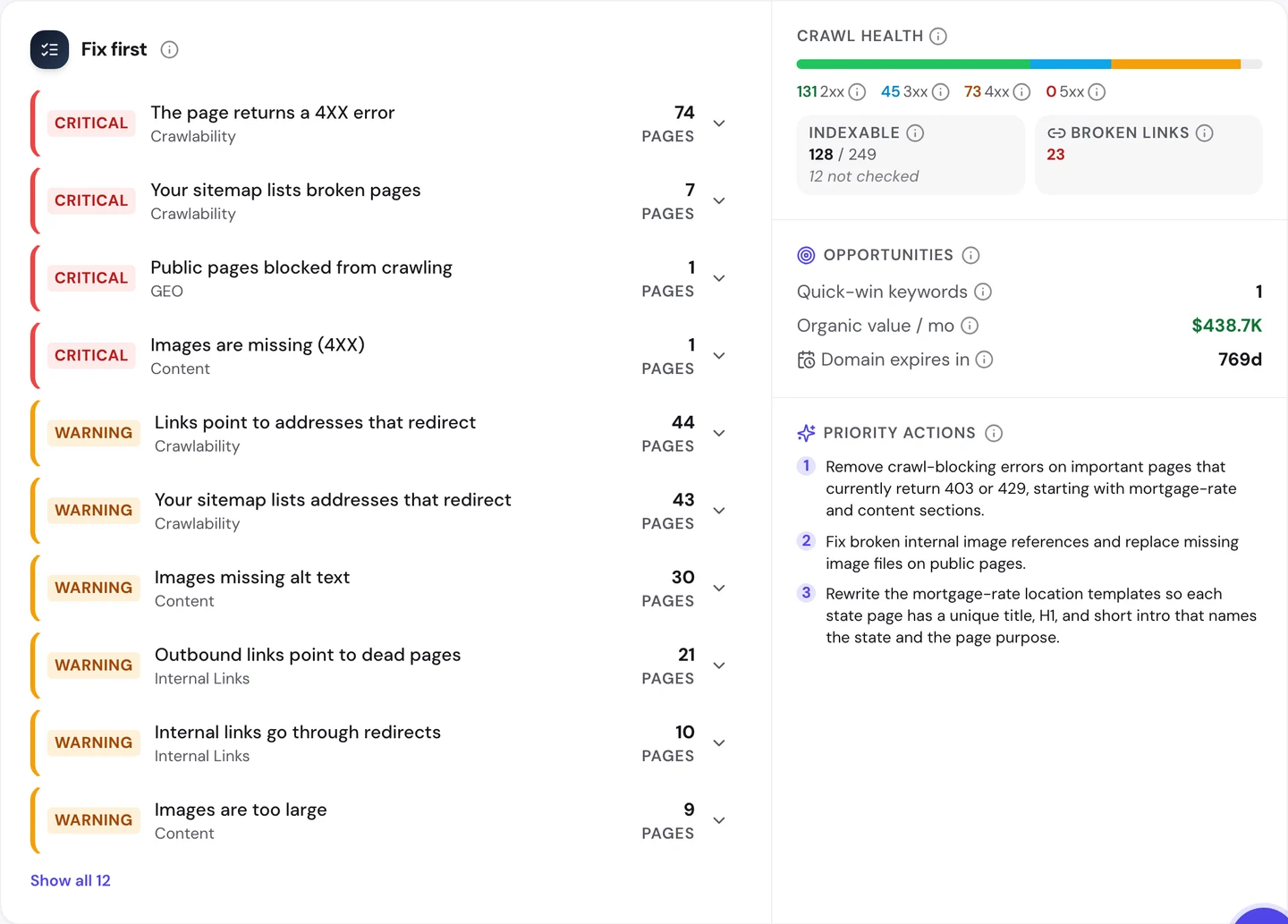
The real one first. 43 addresses in the sitemaps redirect, meaning they send you on to a new address.
Google wants the final address in a sitemap, not one that bounces. And 44 pages link to redirects too, which adds an extra hop.
Use one number consistently (74 or 73) in both sentences., but most of them aren't broken at all.
Zillow's bot shield showed our crawler a block page on 61 of them. We'll come back to that in the next lesson.
The same goes for the 7 "broken pages" in the sitemap. They may be the block page too, so we won't count them.
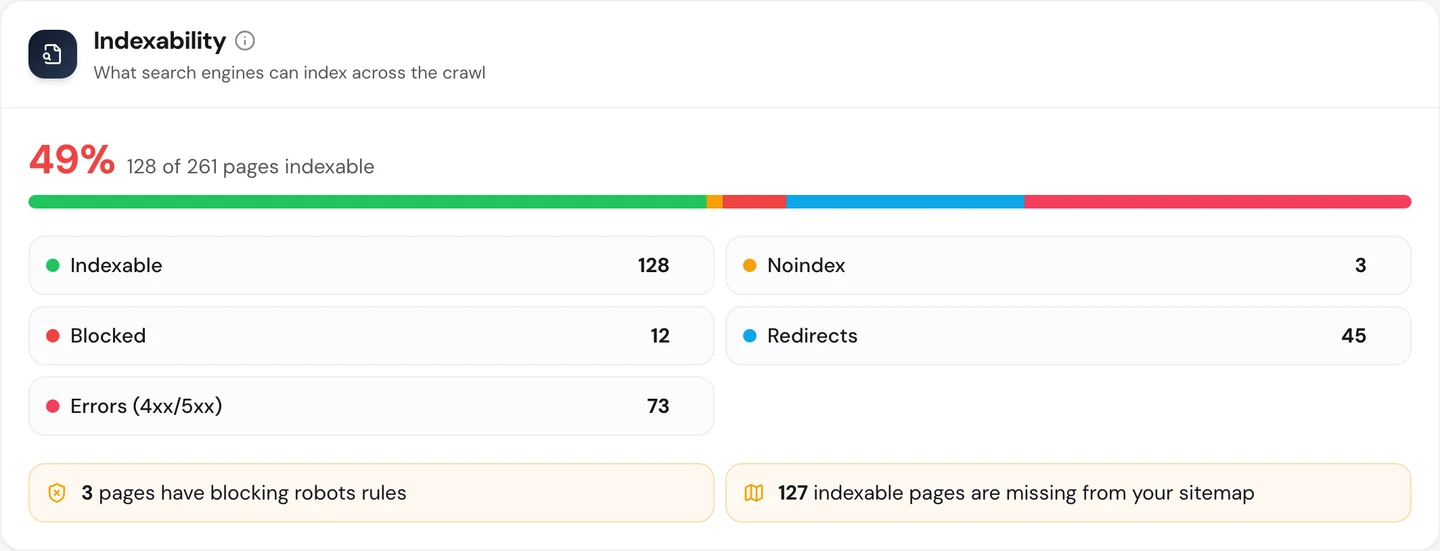
That's also why only 49% of the pages look open to Google. The 73 errors drag that number down, and most are the block page.
Then we read the AI plan, which turns the audit into a to-do list.
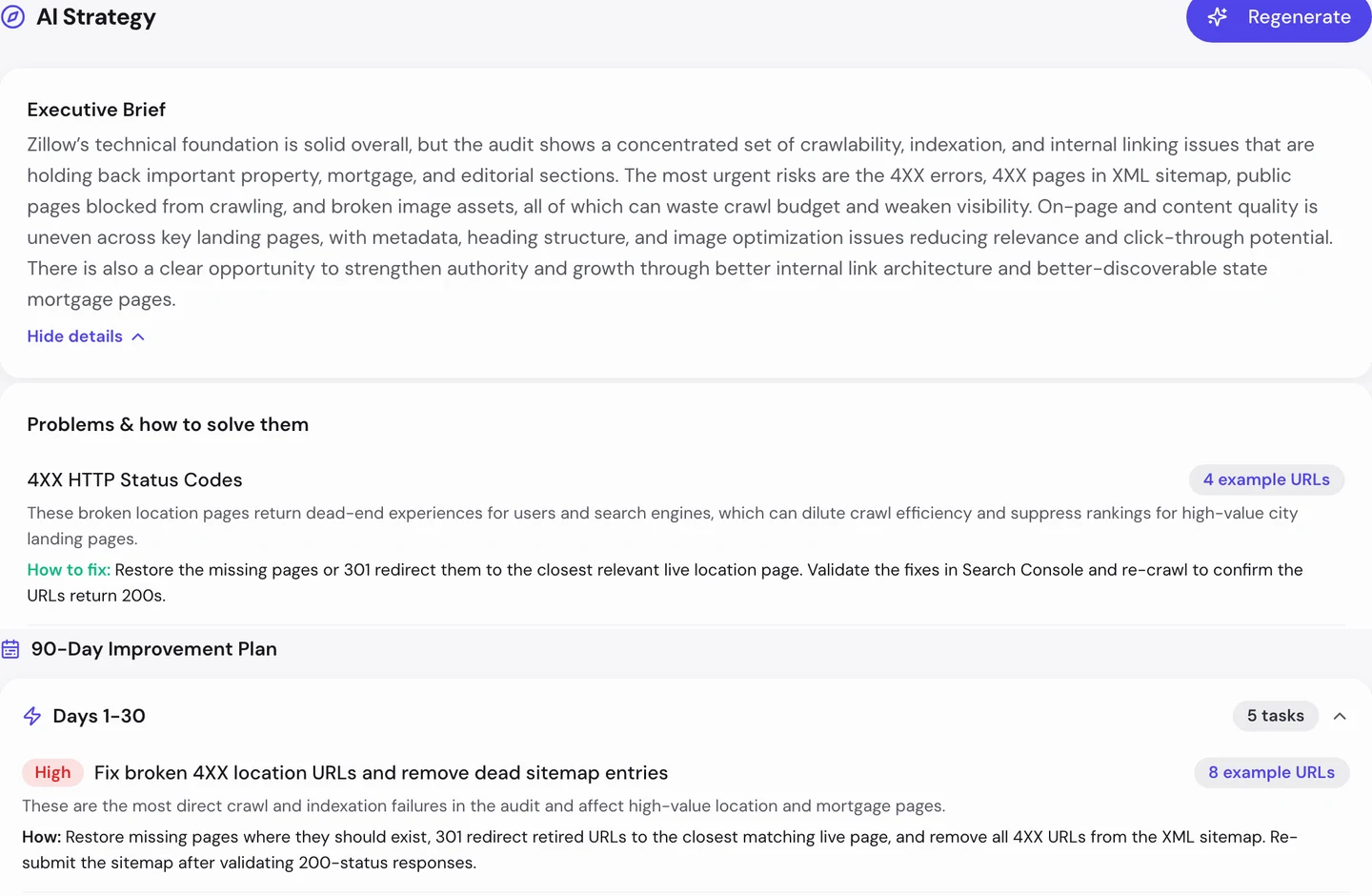
It starts with the error pages and the dead sitemap entries. On most sites that's the right place to start.
Here, though, you'd check a few by hand first, since many of them are the block page. That's why you read an issue before you act on it.
The sitemap redirects are a different story. On a template site, a problem like that usually comes from one rule, so you fix the rule and every page is fixed.
So run our Website Audit, check each issue before you trust it, and fix the real ones once, in the template.
Check what your bot shield blocks
Here's the twist. The audit found 61 pages with the very same title, "Access to this page has been denied".
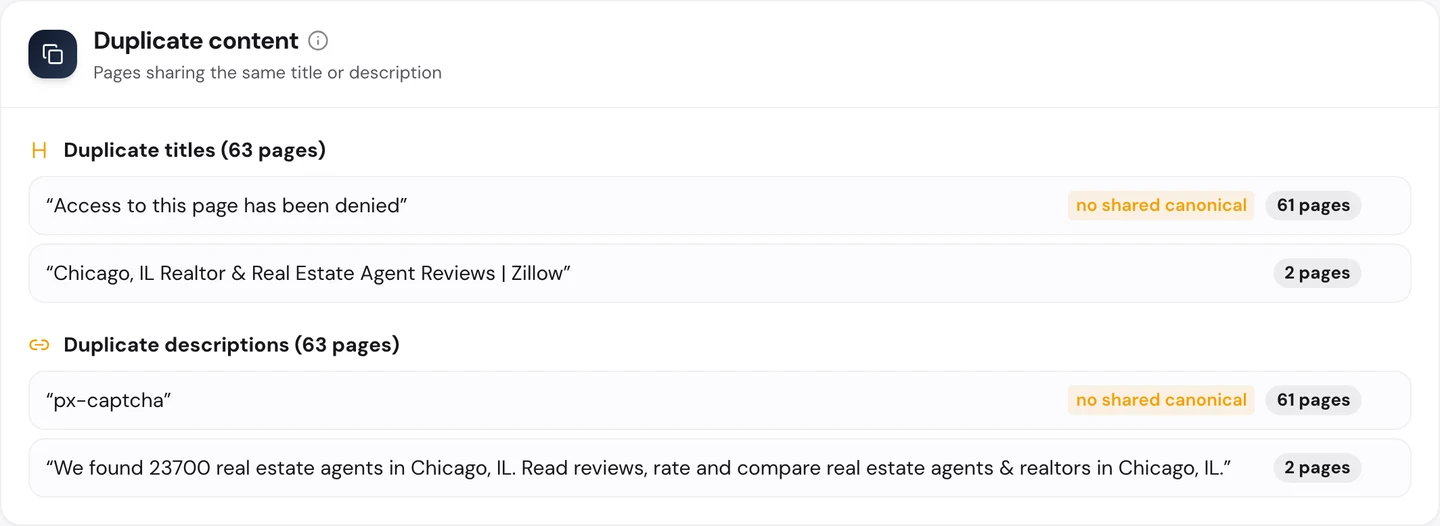
Their description is just "px-captcha". A CAPTCHA is a test that tells people and bots apart, and our crawler got one.
Those 61 pages include city pages like Omaha and Oklahoma City. Zillow's bot shield took our crawler for a scraper and shut the door.
Our free browser extension hit the same wall. Zillow showed our test browser a CAPTCHA, and we never try to get past those.
That's fine for Zillow, since it wants to stop scrapers. But a shield that's too strict can also turn away crawlers you want, like Google's or an AI tool's.
And you'd never notice, because your own browser gets in just fine. You only see it when a crawler tries.
So crawl your own site with our Website Audit and look for block-page titles. Then open those pages with our free browser extension and click the seotools.pro icon to see what came back.
Zillow's bot shield turned our crawler away on 61 pages, and its robots.txt keeps endless filter pages out. We check what your shield, robots.txt and sitemaps let through, then fix them so Google and AI tools reach the pages you want found.
- We find the pages your bot shield hides from crawlers
- We write robots.txt rules that block filter and sort pages
- We clean redirects and dead pages out of your sitemaps
- SEO and GEO, so AI answers can quote you too
Keep every template fast
Speed is where Zillow shines. Core Web Vitals are Google's 3 checks of how fast a page loads, how fast it reacts and whether it stays still.
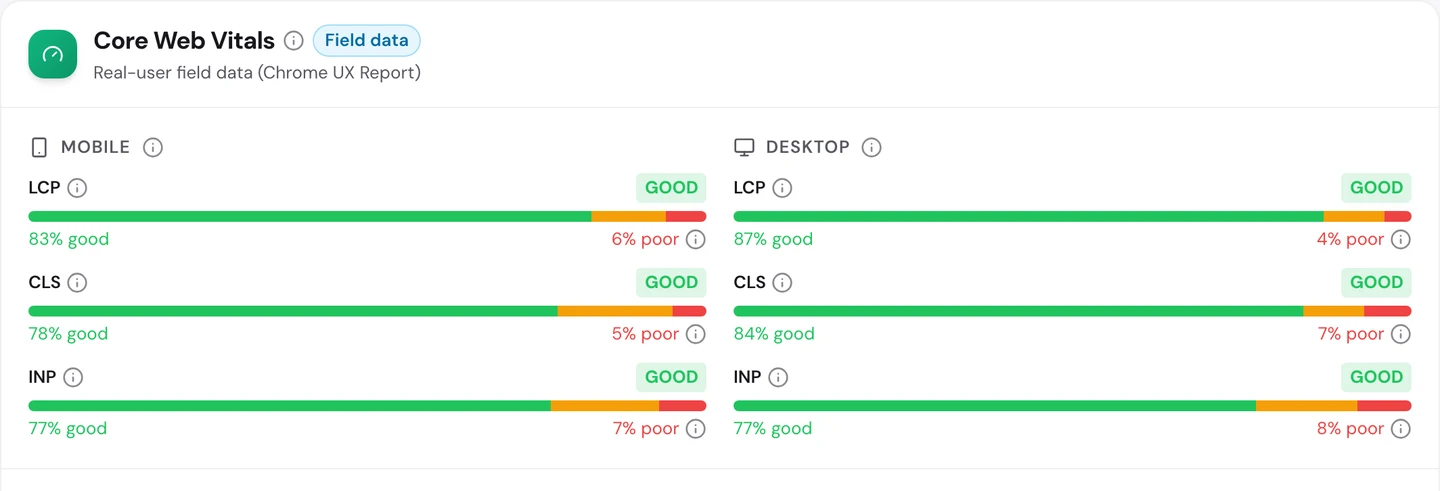
Real Chrome users give Zillow a pass on all 3, on phones and on computers. On phones, 83% of page loads count as good for loading.
Our crawler timed the homepage at 95 out of 100 on mobile. City pages it timed, like Dallas apartments, all weigh about 586 KB.
That's what a shared template gives you. Make one page fast, and every city page built from it is fast too.
So make your template light first, then test a few pages built from it with our Site Speed tool.
Win your home market first
Last, the audit's Traffic tab shows where Zillow's visitors come from, all over the world.
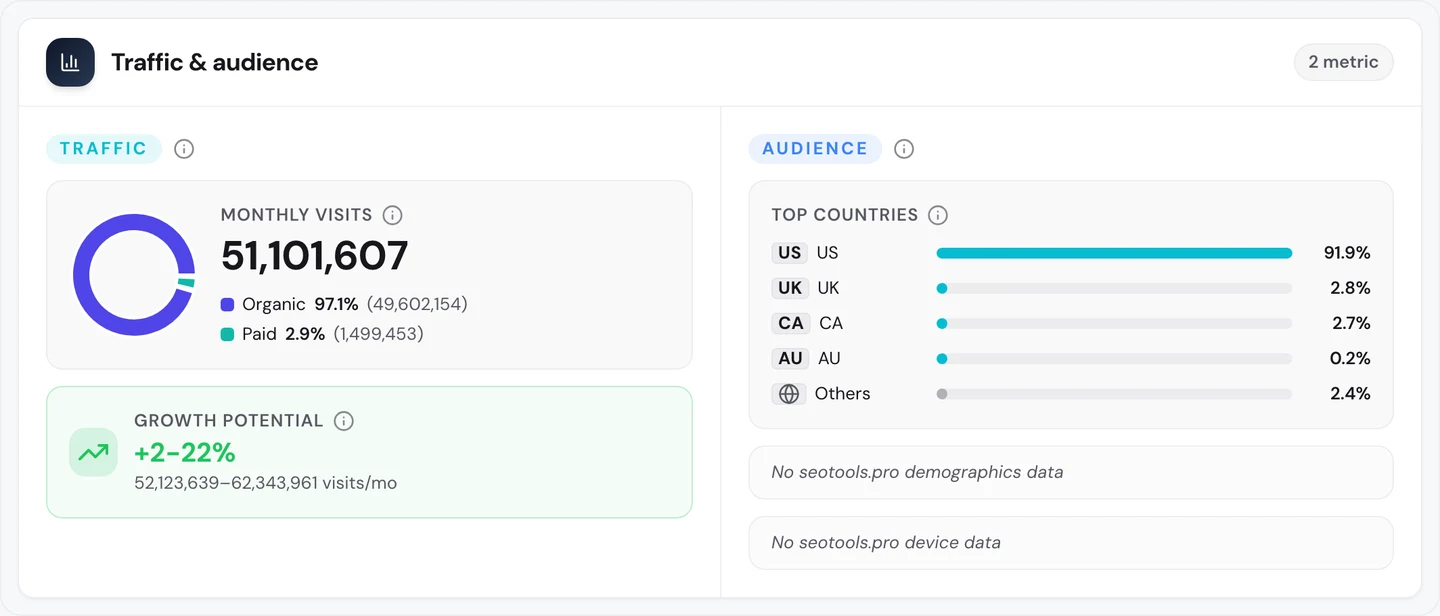
It counts about 51M visits a month, and about 92% of them come from the US. Zillow plays almost entirely in one country.
Who else fights for those searches? The Competitors tab lists 6 rivals, and they're all home sites.
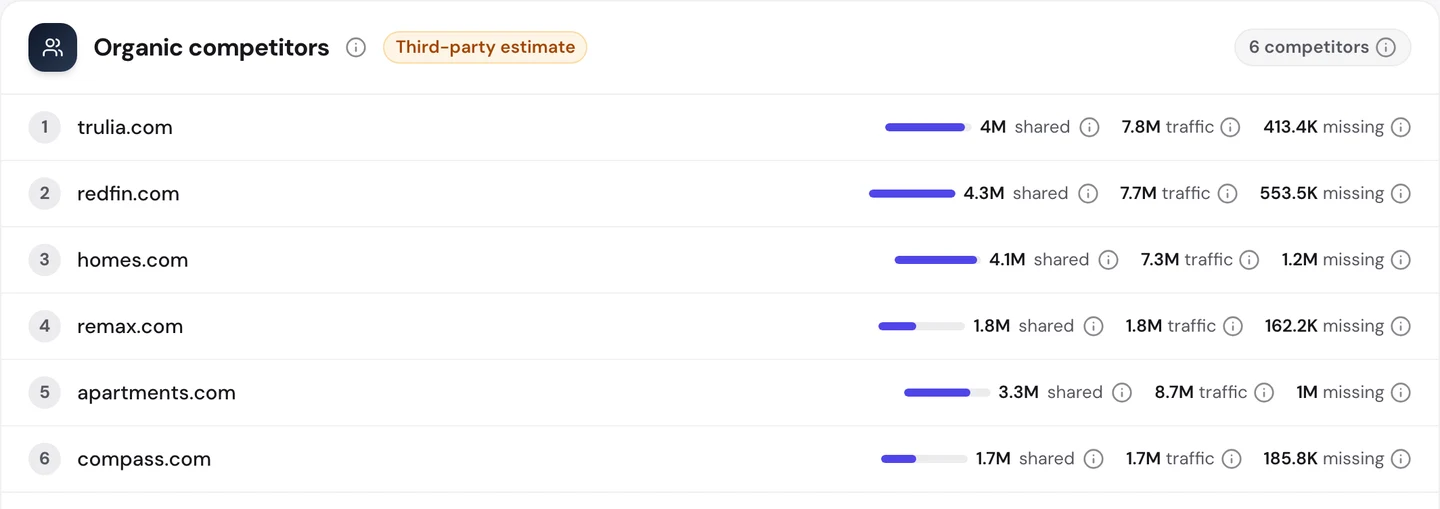
Redfin shares about 4.3M keywords with Zillow, and Trulia about 4M. Apartments.com gets the most traffic of the group, about 8.7M.
None of them comes close to Zillow's 45M. Going deep in one market, with a page for every place in it, is a big part of that gap.
So pick the market you serve best, and cover every place in it before you go wide. See who shares your searches with our Competitor Analysis tool.
Zillow's city pages share one address pattern, one robots.txt and one set of issues. Run our Website Audit on your site to see what your templates repeat, and what your bot shield hides.
- The same checks we ran on Zillow's pages
- Sitemap redirects, block pages and duplicate titles
- An AI plan for what to fix first
What you cannot copy
First, the part you can't copy: the name. About 71% of Zillow's traffic, across the 100 keywords we sampled, comes from people typing "zillow".
The word "zillow" alone gets about 20.4M searches a month. Zillow ranks #1 for it, of course.
A backlink is a link from another website to yours. Our audit counts about 32M of them pointing at Zillow, and that takes years to earn.
You can still see who links to you, and to your rivals, with our Backlink Analyzer.
Then there's the data. Each city page is full of real homes for sale and for rent, and no template can make that up.
Now a few honest notes on the numbers.
Update the publish/updated date to on or after 4 Oct 2026. The 45M figure counts US searches only.
The audit's Traffic tab gives its own estimate, about 51M a month for the whole world. Both are estimates, worked out from rankings and search volume, since nobody outside Zillow can count its real visits.
The 71% branded share comes from a sample of 100 keywords, not every search. Take it as a rough guide.
Our audit read 261 pages. That's a tiny slice of a site with about 13.8M pages in Google's index.
On 61 of those pages, Zillow's bot shield showed our crawler a CAPTCHA. So most of the "4XX errors" and the shared titles in the audit are our crawler being blocked, not broken Zillow pages.
For the same reason, there are no browser extension shots here. Zillow showed our test browser a CAPTCHA, and we don't get around those.
The one number to take away
212.
That's how many rules in Zillow's robots.txt tell crawlers to stay out. Many of them block the filter and sort pages that would copy the same homes over and over.
The other half of the story is what's left open. That's one clean page for each place, with an address that says what's on it.
That's the lesson for you. Build the pages people search for, and block the rest.
Which list could your site turn into pages? Start with the places your customers already search for.
You can run every one of these checks on your own site, and on your rivals', and see the same numbers for yourself.
Frequently asked questions
Will blocking a page in robots.txt keep it out of Google?
Not always. Google can still list a blocked address if other sites link to it. If you want a page gone, let Google read it and add a noindex tag, which tells Google not to list it.
Should I block filter pages or point them to the main page?
Many sites do both. A canonical tag points a filter page to its main page, while robots.txt stops crawlers from wasting time on endless mixes of filters.
How can I tell if my bot shield blocks Google?
Use the URL Inspection tool in Google Search Console. It shows the page Google really got, so you'll see a block page if your shield sent one.
Should my page addresses include the city and state?
Yes, if you serve places that share a name. Adding the state keeps each address unique and tells people which place they'll land on.
How many city pages should I start with?
Start with the places your customers search for most, and make those pages great. Add more once the first ones start to rank.
Should I let AI crawlers read my whole site?
It depends on what you sell. If your data is the product, you may keep it closed and open only your guides. If you want AI answers to name you, let them in.
What belongs in a sitemap for a listings site?
Only live pages you want in Google, with their final addresses. Split it into files by page type so you can spot problems in one kind of page fast.
Will Google see my city pages as thin content?
Not if each page holds real, useful data, like homes, prices or reviews for that place. Pages that only swap the city name can look thin.