wikiHow gets 6.1M visits a month from Google in the US by ranking for 12M different searches, one simple how-to at a time.
Its biggest page brings in less than 1% of those visits. Only 2% of visitors search for the name wikiHow.
Everyone else just wants to know how to do something, the way you might search how to fix a sticky zip. We ran wikiHow through our whole SEO toolkit to see how it wins those searches.
Here are 9 lessons you can copy, plus the part you can't.
Answer millions of small questions
We started with our Organic Traffic Checker. It estimates a site's organic traffic, meaning the people who find it on Google without ads.
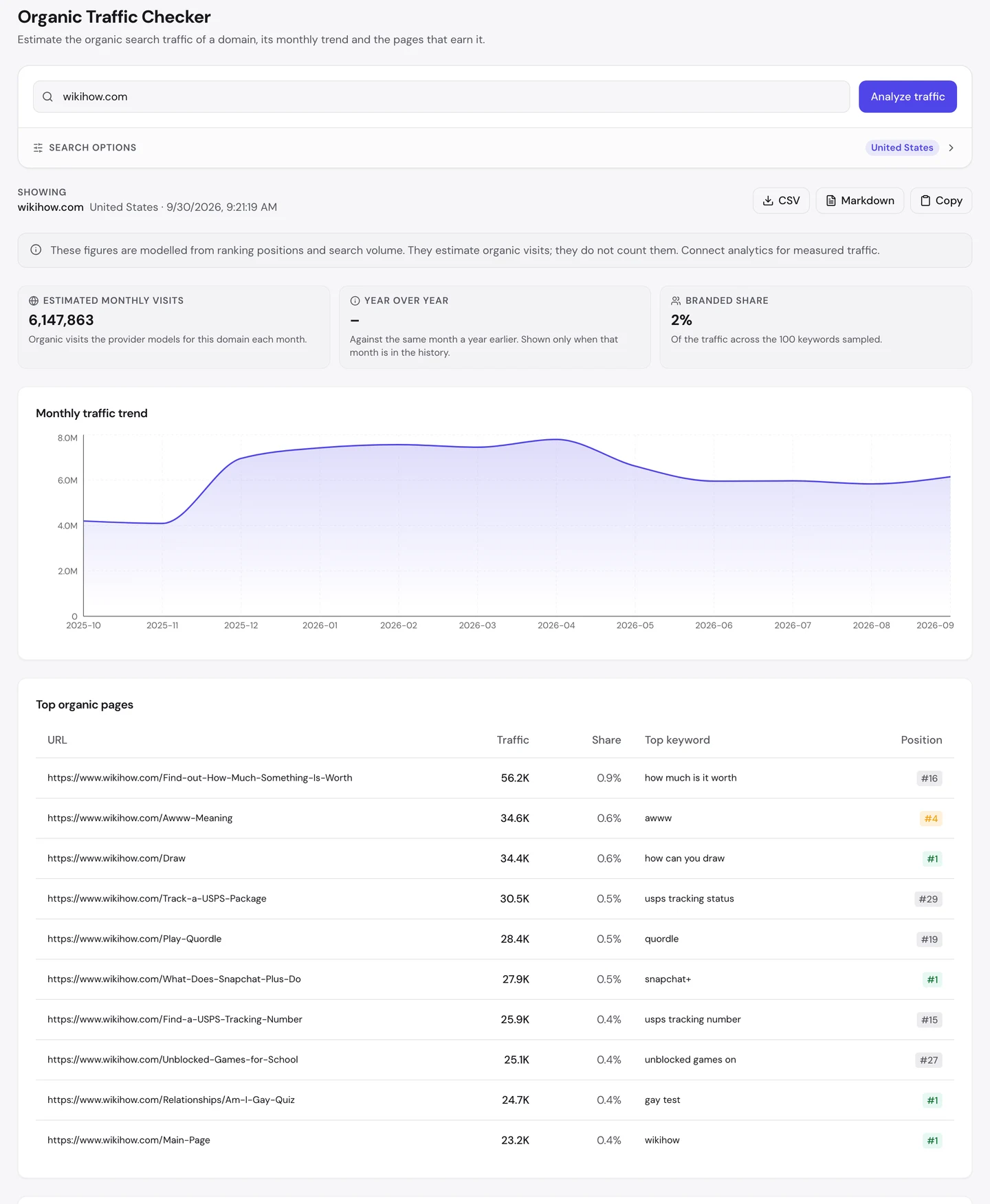
For wikiHow, that's about 6.1M visits a month in the US. The biggest page, on how to find out what something is worth, brings in under 1% of them.
The rest is spread across drawing, parcel tracking, word games, slang and thousands of other small jobs you might search on any given day. No single page carries the site.
Healthline, the health site we studied on its own, works the same way. When one page drops in Google, the site barely notices.
So list every task your customers try to do, and give each one its own page with clear steps.
Show who wrote each guide
Anyone can write "how to draw". So when you search it, Google looks for signs that a real expert stands behind the steps.
wikiHow puts those signs right at the top.
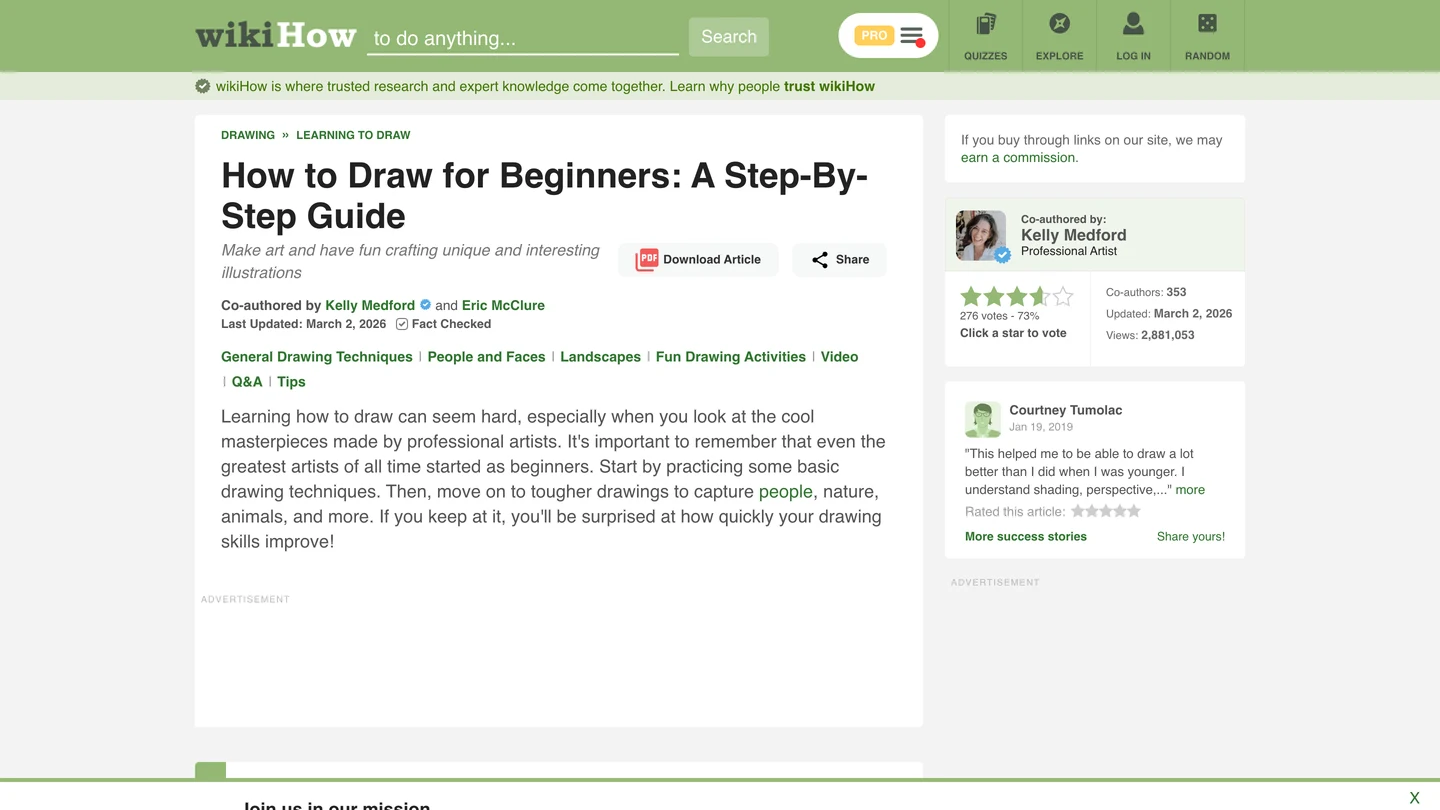
This guide is co-written by an artist who draws for a living, marked as fact-checked and updated this year. More than 350 people have helped improve it, and readers can vote on whether it helped.
NerdWallet, the money site we also studied, does the same with its writers and fact checkers.
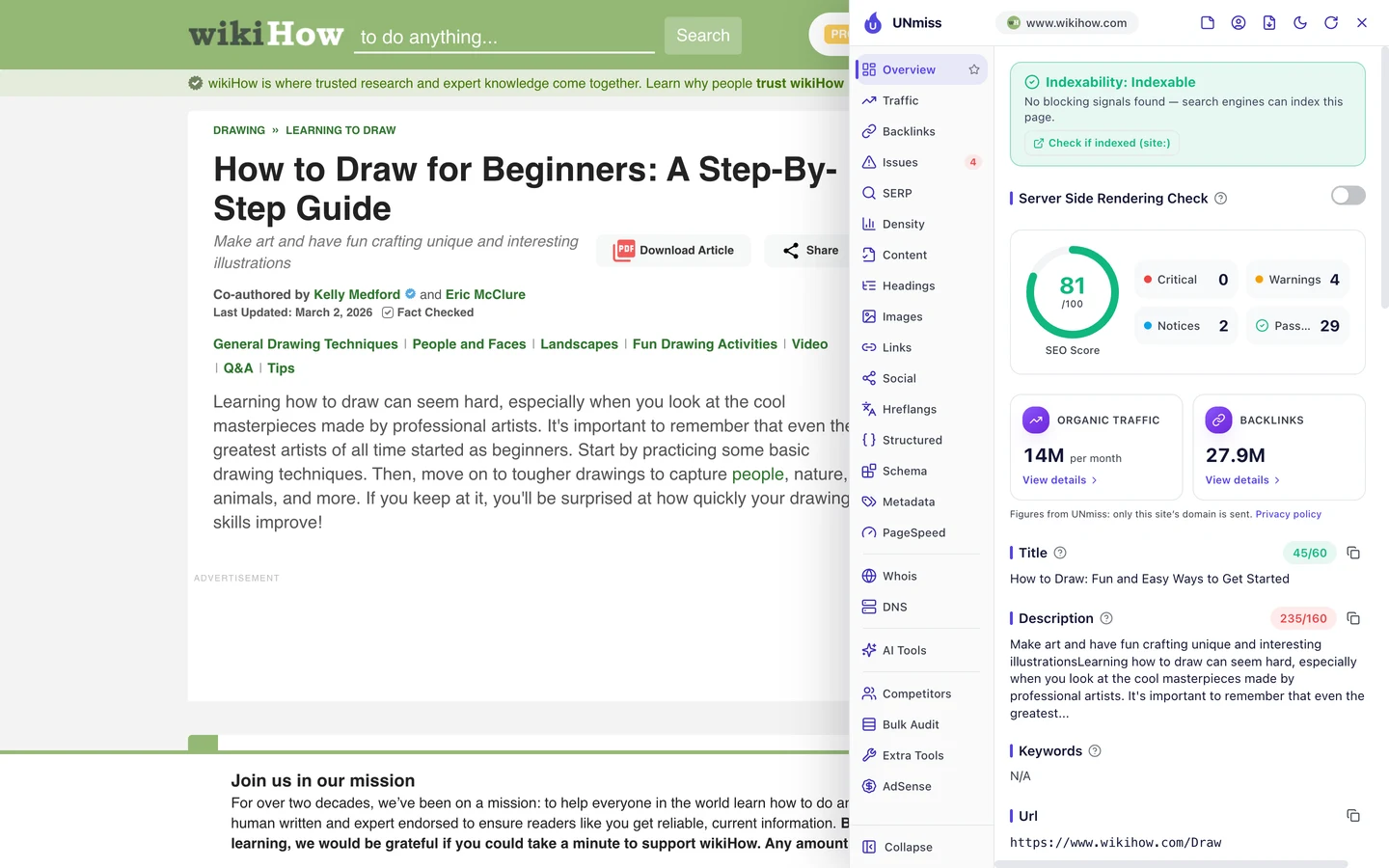
Our free browser extension shows the rest in one click. Open the page, click the seotools.pro icon, and a panel opens beside it.
It runs 35 SEO checks and scores this guide 81 out of 100, with no critical problems.
So name a real expert on every guide you publish, and show your readers the date you last checked it.
wikiHow wins millions of searches with clear steps and a real expert on every page. We find the tasks your buyers search for and write guides they can follow, with your experts' names on them.
- We map the tasks your buyers search for
- We write one clear guide for each
- We add expert review and pictures that help
- SEO and GEO, so AI answers can quote you too
Tell Google each page is a how-to
The extension's Structured tab shows the part readers never see. Structured data is code that tells Google what each part of a page is.
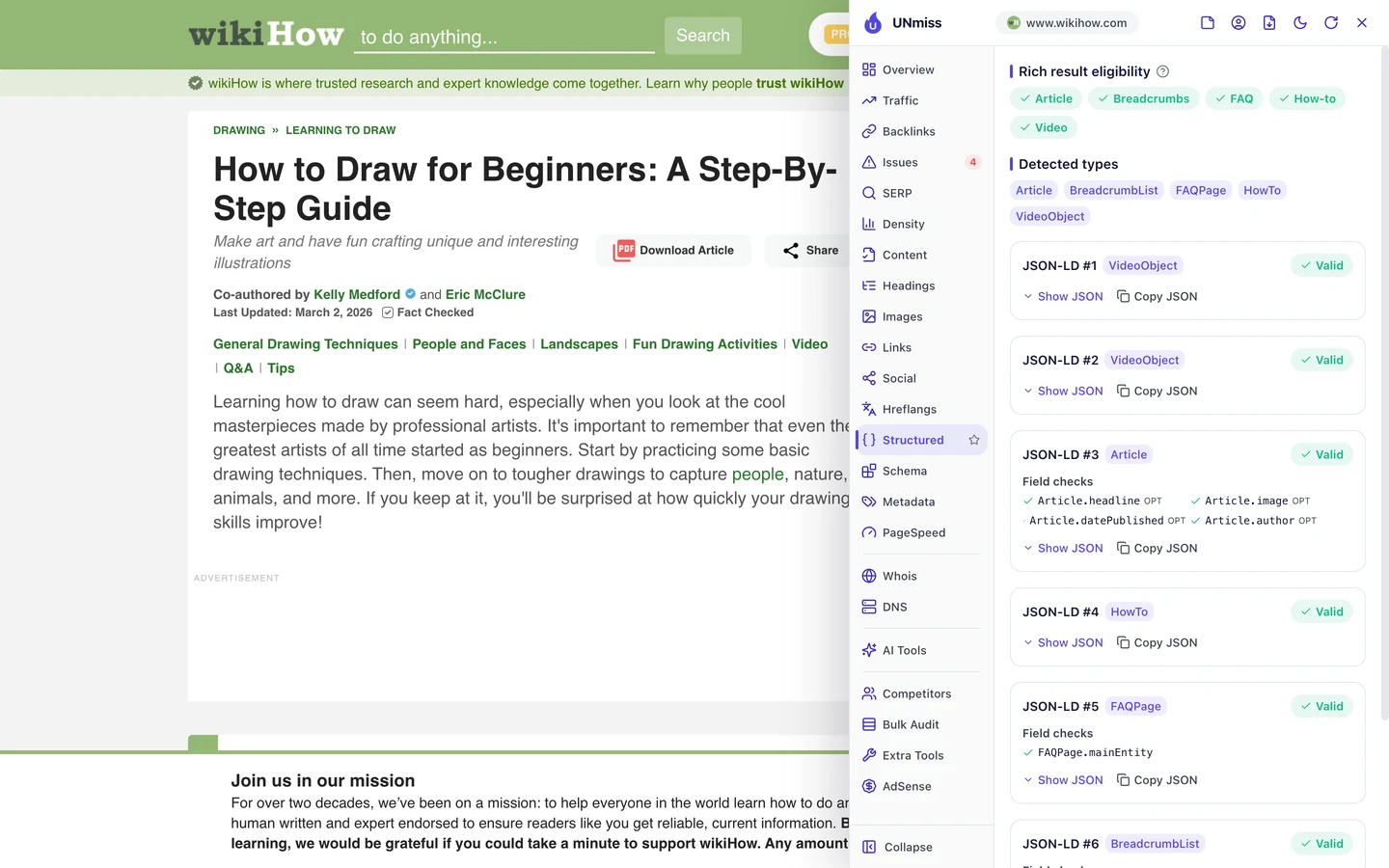
The drawing guide carries 5 kinds: it's an article, it has steps, it answers questions, it has a video and it sits in a section of the site.
Google doesn't show every one of these as a special result anymore. But the code still helps it understand the page, which matters when millions of pages compete for the same search.
You can write the same code for your pages with our Schema Markup Generator.
Chase what people search this week
Look again at wikiHow's top pages. Many aren't classic how-tos at all.
The Keywords tab of our Website Audit lists every search a site ranks for, where it ranks and how many visits each one sends.
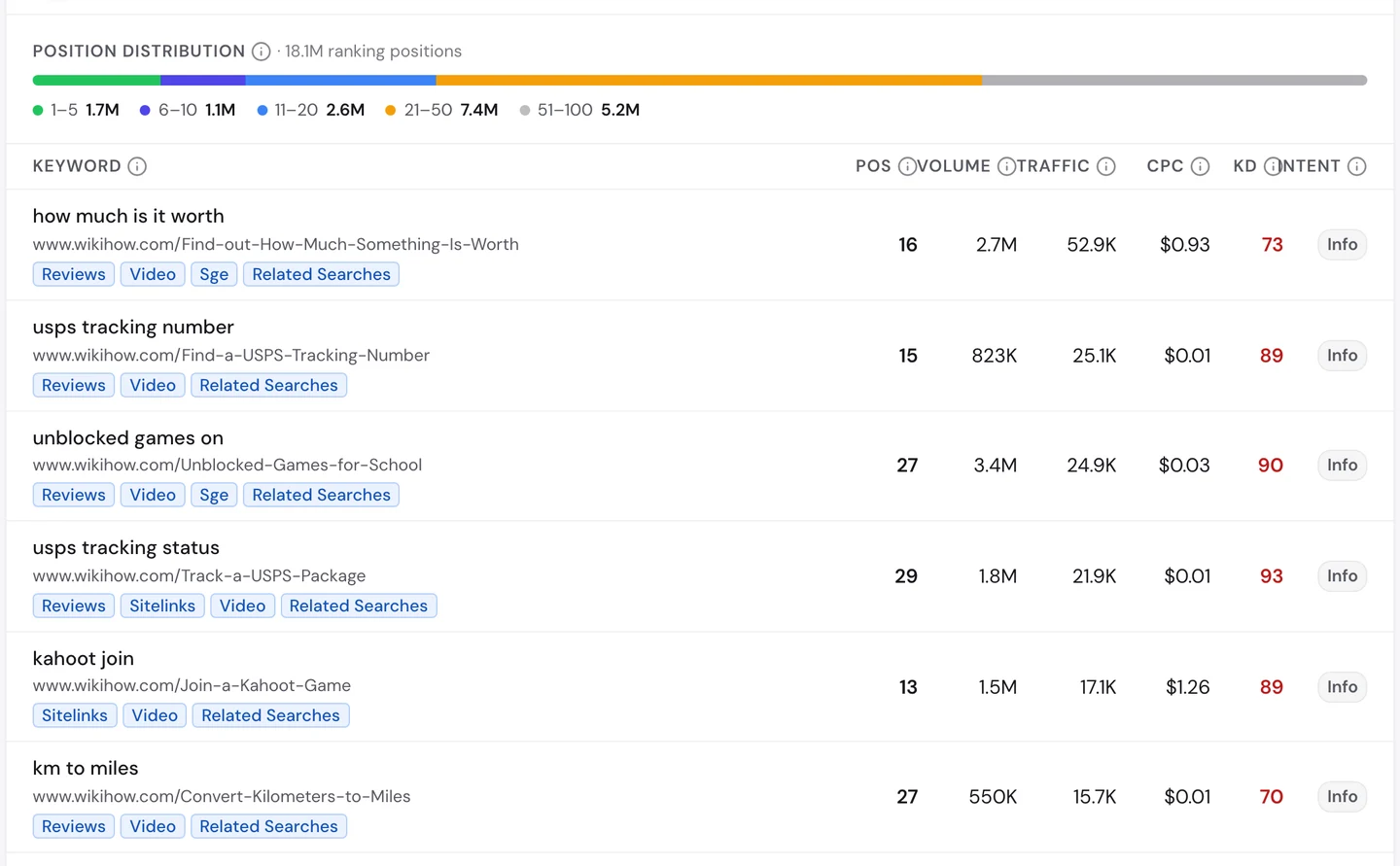
Quordle, Kahoot, Contexto and Snapchat+ are all new games and apps. The moment you start asking how one works, wikiHow has a page ready.
"Unblocked games" alone is searched about 3.4M times a month. wikiHow isn't even on page 1 for it, and the page still sends thousands of visits.
The Competitors tab shows who else is chasing these searches.
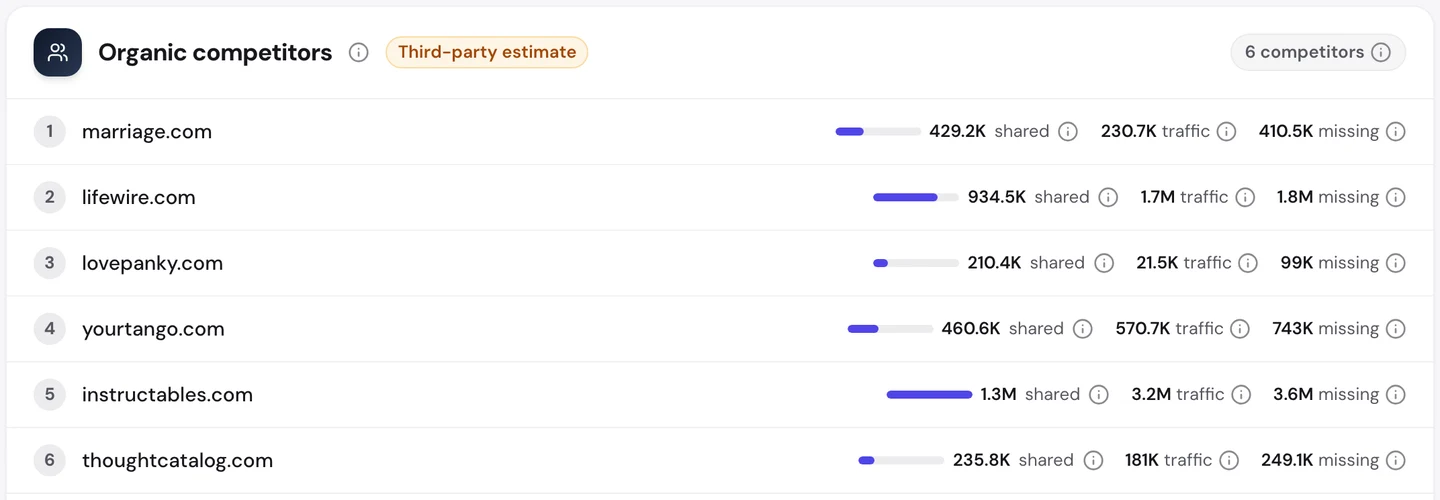
Instructables, the step-by-step project site, shares about 1.3M searches with wikiHow. Lifewire, which explains tech, comes next.
So watch for new questions in your own field with our Keyword Research tool. Be the first clear answer when a new product or trend appears.
Write the page others link to
A backlink is a link from another website to yours. Google treats each one a bit like a vote of trust.
The Backlinks tab of our audit shows the same data as our Backlink Analyzer.
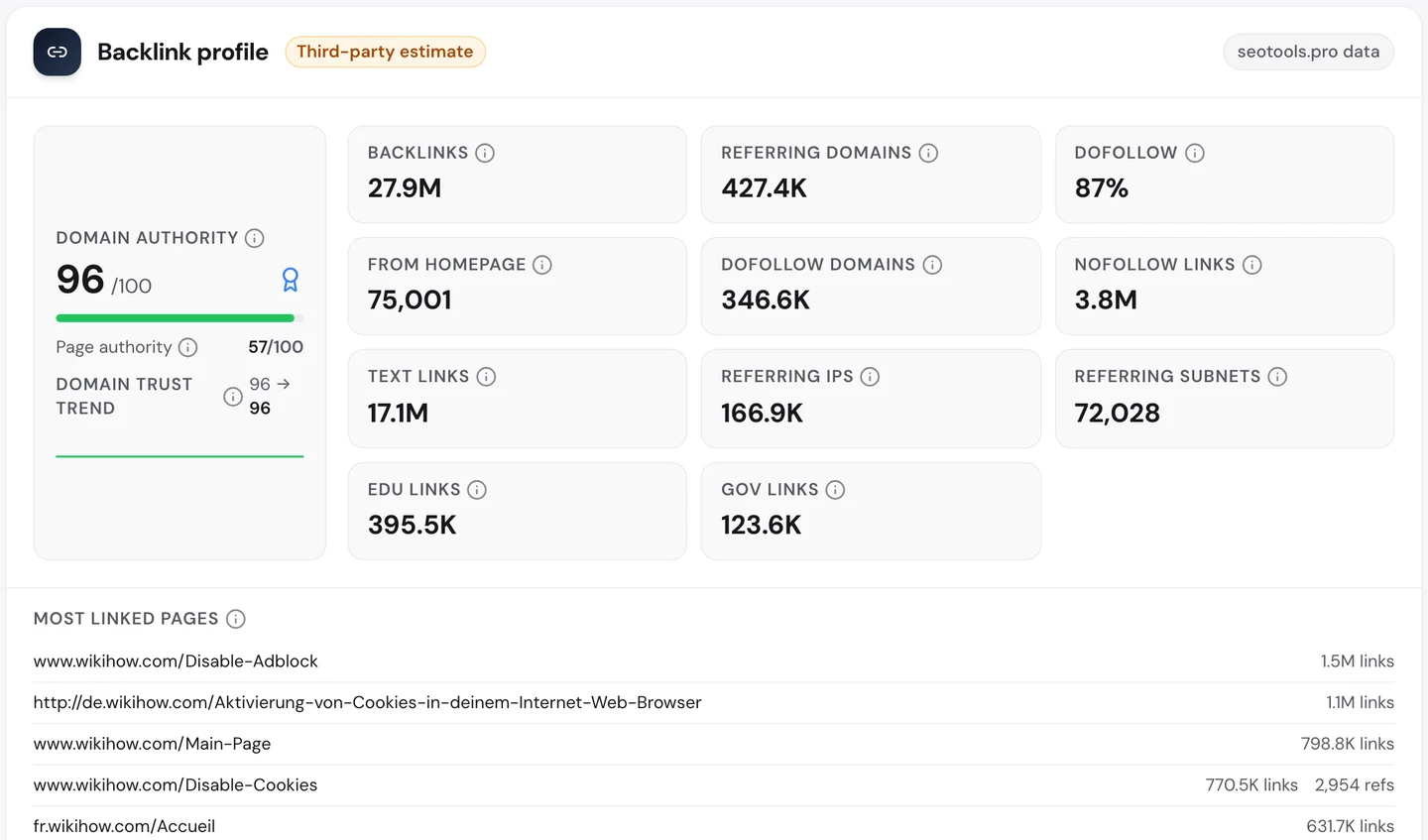
wikiHow has about 28M links from more than 400K websites. Now look at the most linked pages.
The top one is a guide to turning off your ad blocker, with about 1.5M links. Guides to turning cookies on and off come next.
Why? When a site asks you to turn off your ad blocker, it often links to wikiHow's steps instead of writing its own.
Every one of those links sends trust back to wikiHow.
So write the page other sites send their own visitors to. A clear fix for a common problem can earn links for years.
Link each language version back
The Traffic tab of the same audit shows wikiHow's visits worldwide.
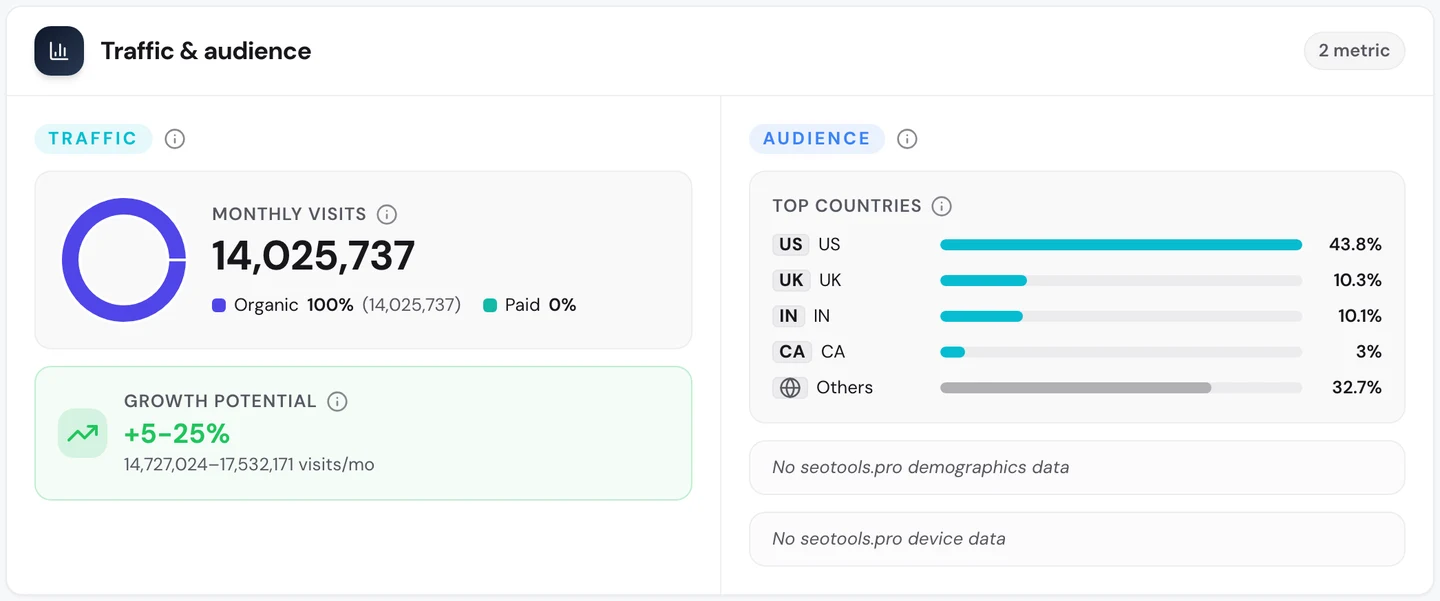
That's about 14M search visits a month, and less than half come from the US. Part of that comes from copies of each guide in other languages, so you can read it in your own.
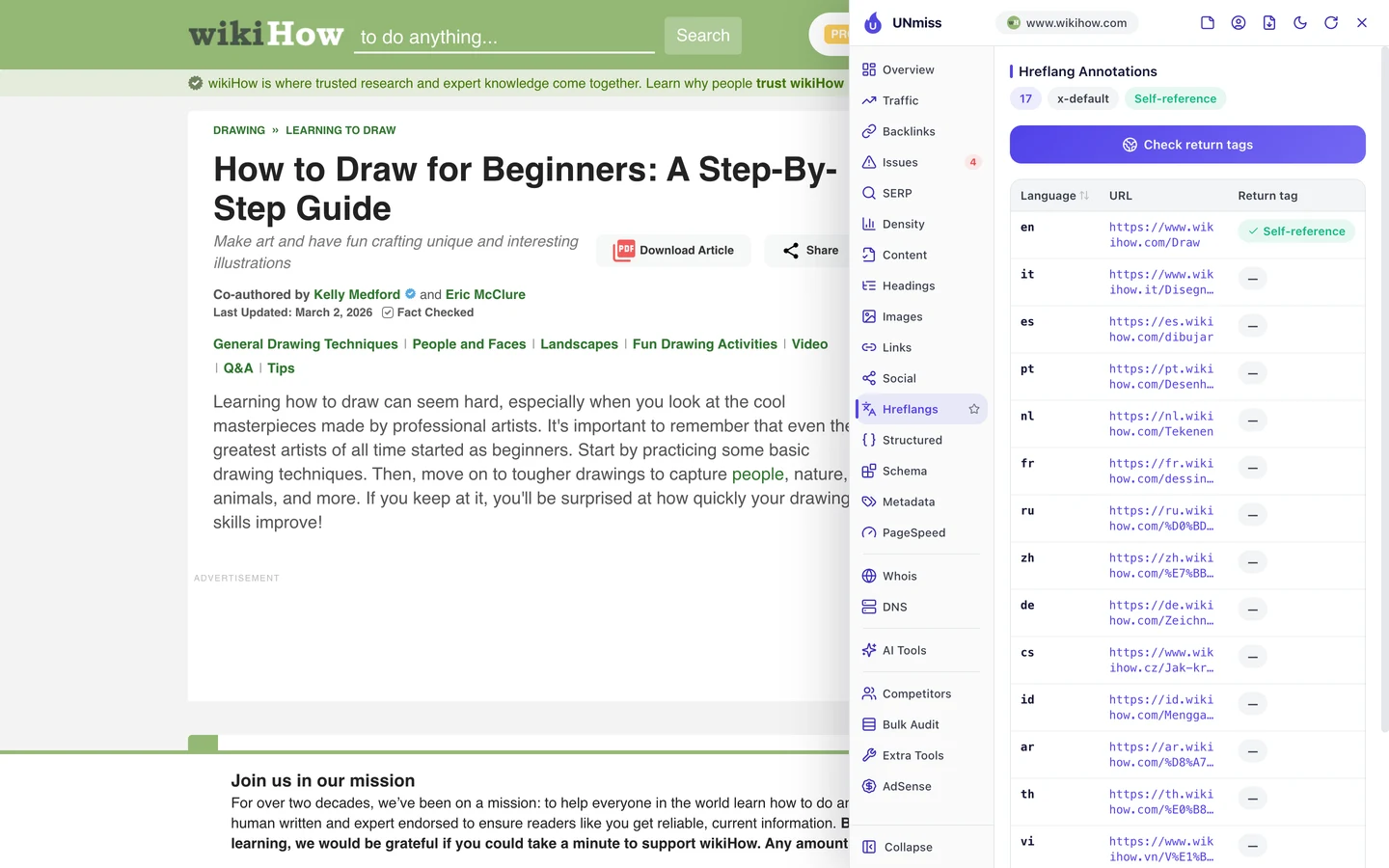
Hreflang is a tag that tells Google which language each version is in, so it can show the right one. The drawing guide has 17 versions, from Italian to Vietnamese.
IKEA, which we studied for the same reason, runs its versions in more than 100 countries. The rule for both is simple: every version must link back to the others.
wikiHow misses that on some pages. We'll see how in the next lesson.
Audit the templates behind pages
When you build millions of pages from a few templates, one mistake spreads fast. So we checked wikiHow with our Website Audit.
It crawls a site the way Google does. It opens each page, follows the links to the next ones, and tests every page against a long list of checks.
We had it crawl 250 pages. wikiHow scored 83 out of 100, which the report rates as good.
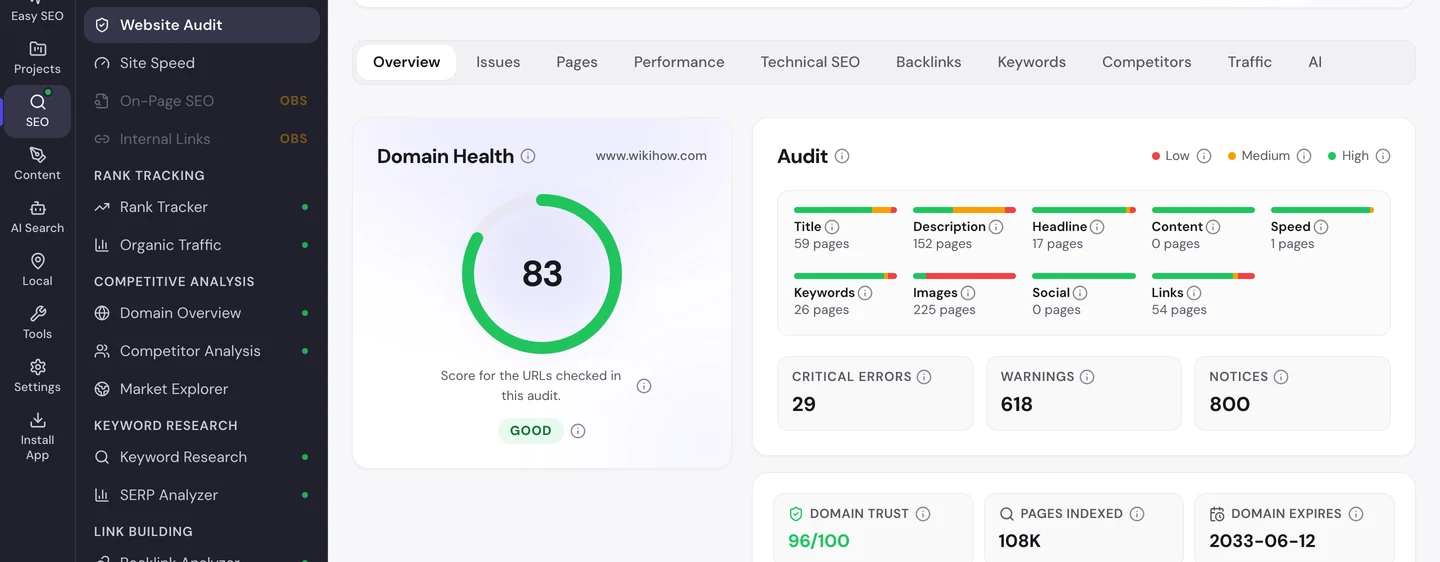
The Issues tab sorts the problems by how much they matter to you.
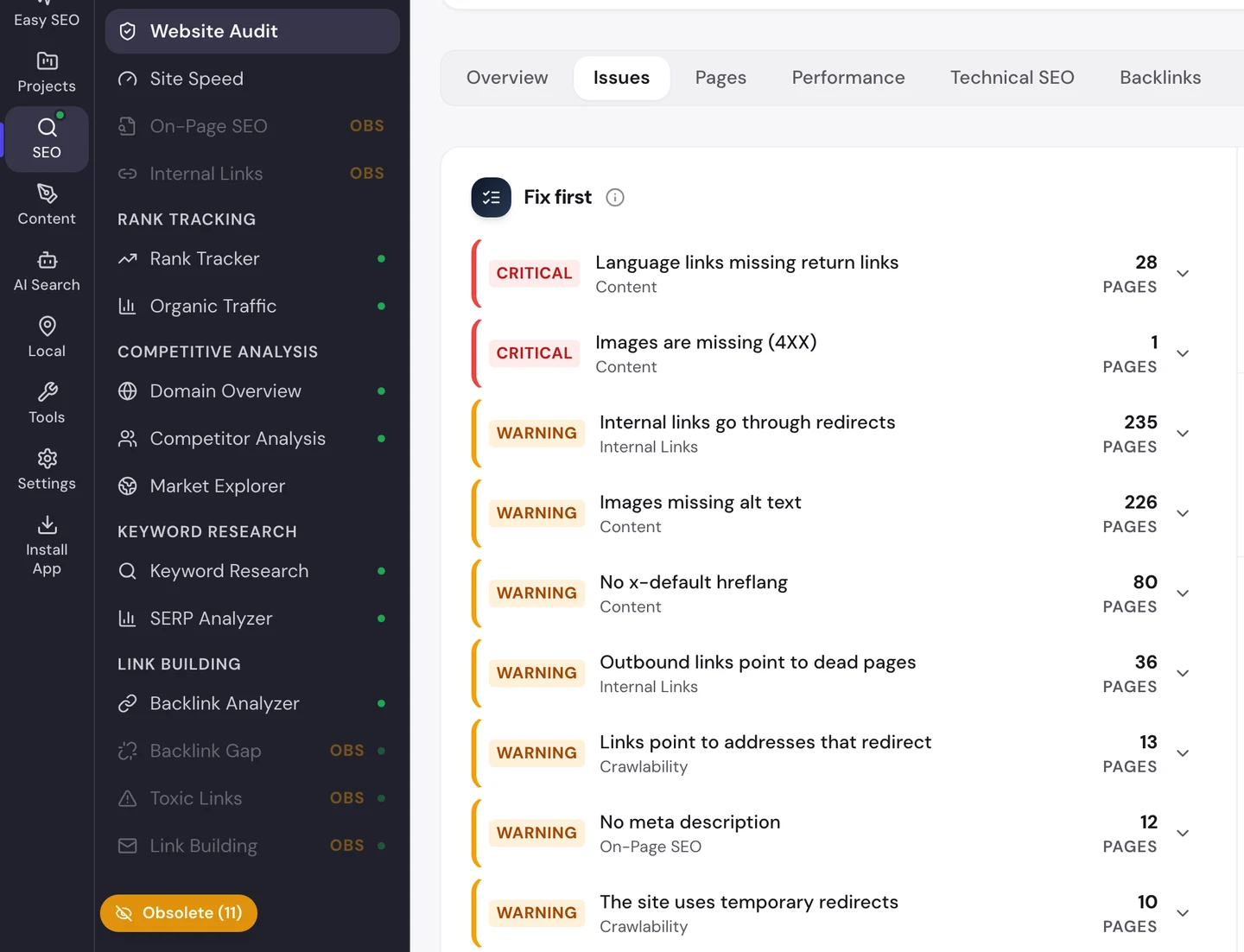
The top error is the one we just met. On 28 pages, the language versions point to each other in only one direction, so Google may ignore them.
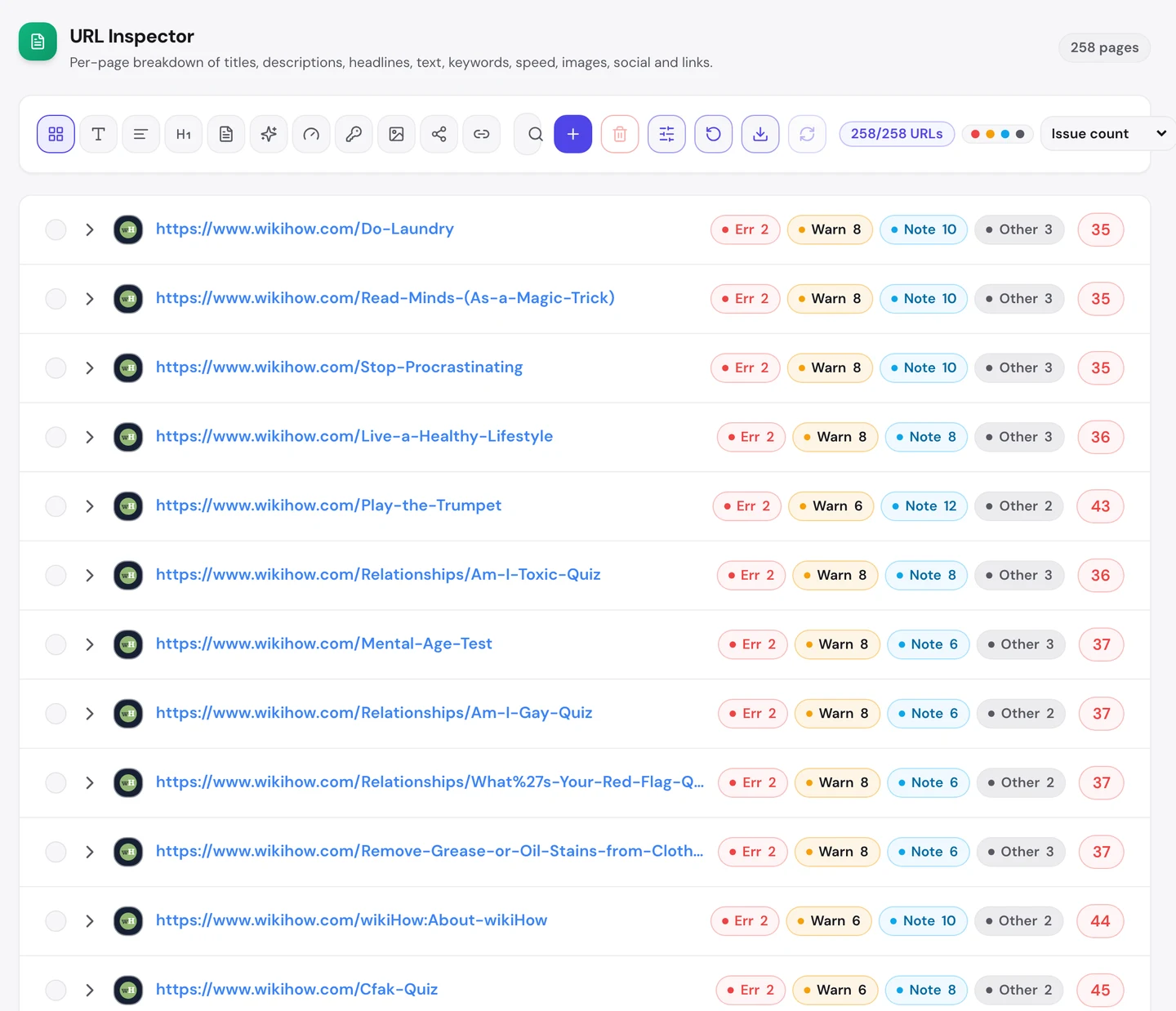
The Pages tab shows how far it spreads. Guide after guide shows the same 2 errors.
Our extension found one more template slip on the drawing guide.
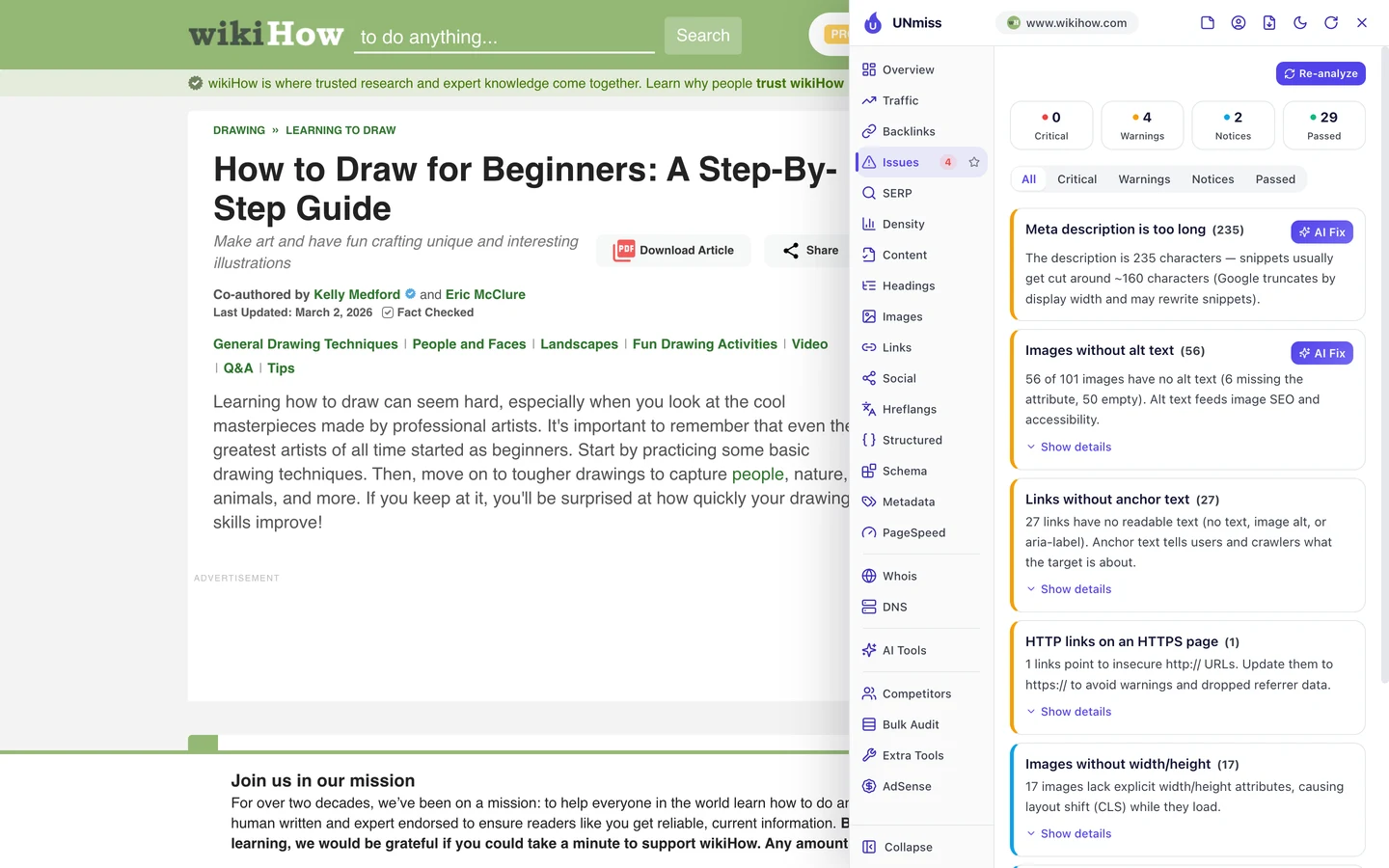
Its description, the short summary Google may show under the title, runs to 235 characters. It's built by gluing the subtitle to the first paragraph, with no space: "illustrationsLearning how to draw".
Google cuts it off after about 160 characters anyway. You can write tighter ones with our Meta Tag Generator.
The Technical SEO tab adds a smaller find.
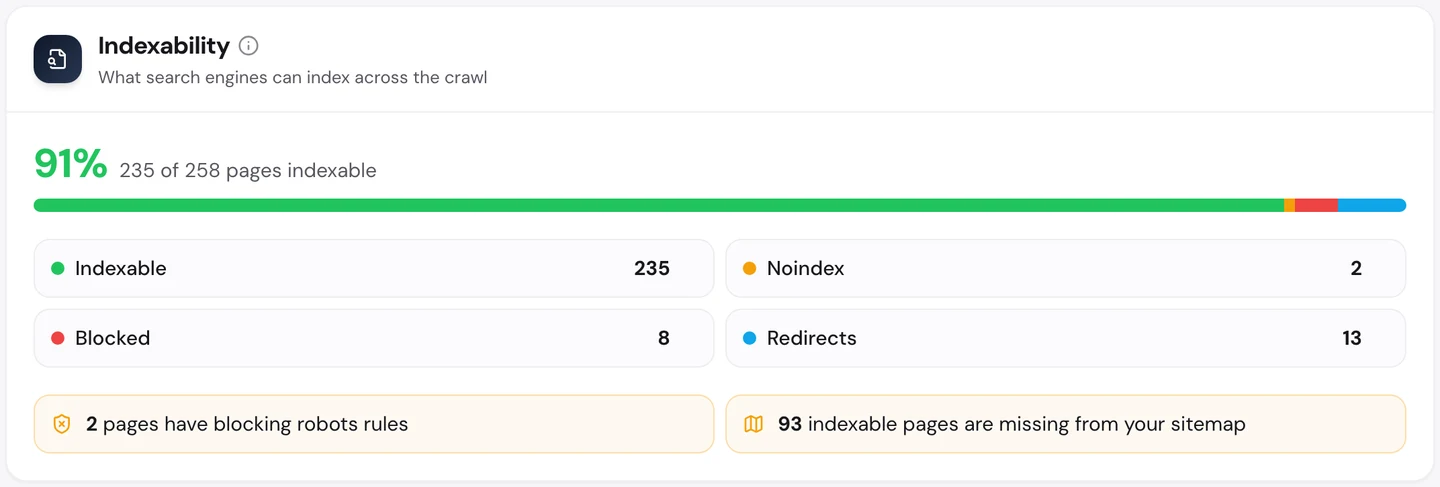
93 pages that Google may list are missing from the sitemap, the file that lists a site's pages for Google.
The good news is speed. The Performance tab shows Core Web Vitals, Google's 3 checks of how fast a page loads, how fast it reacts and whether it stays still, measured on real visitors' devices.
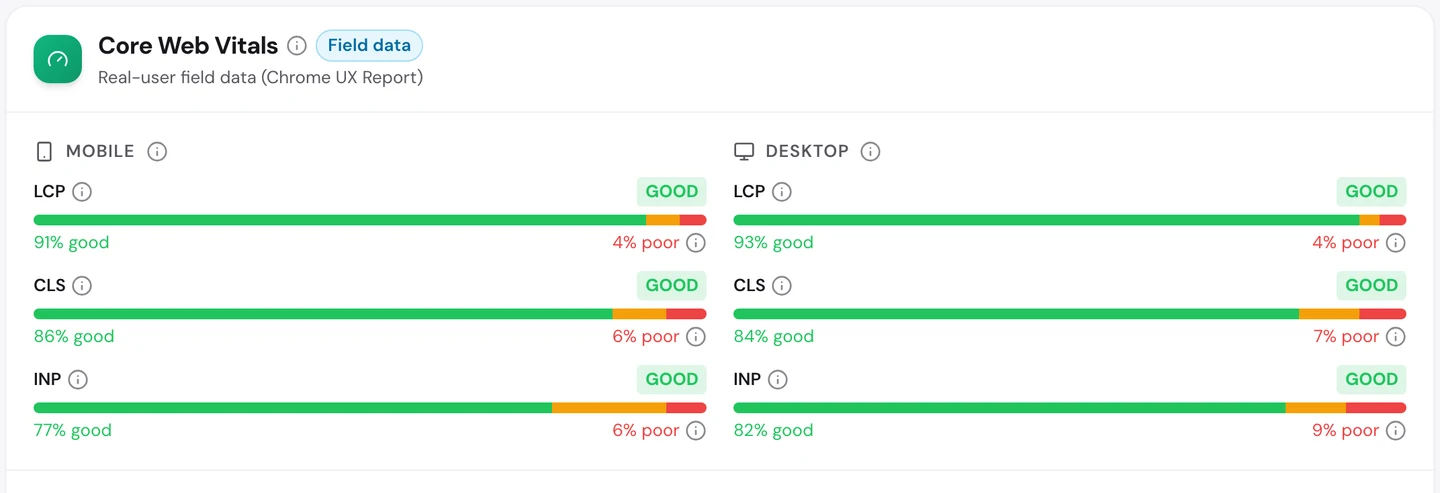
wikiHow passes all 3, even with about 100 pictures on the drawing guide.
You don't have to work out what to fix first. The audit's AI tab writes the plan: a short summary, each problem with how to fix it, and a 90-day to-do list.
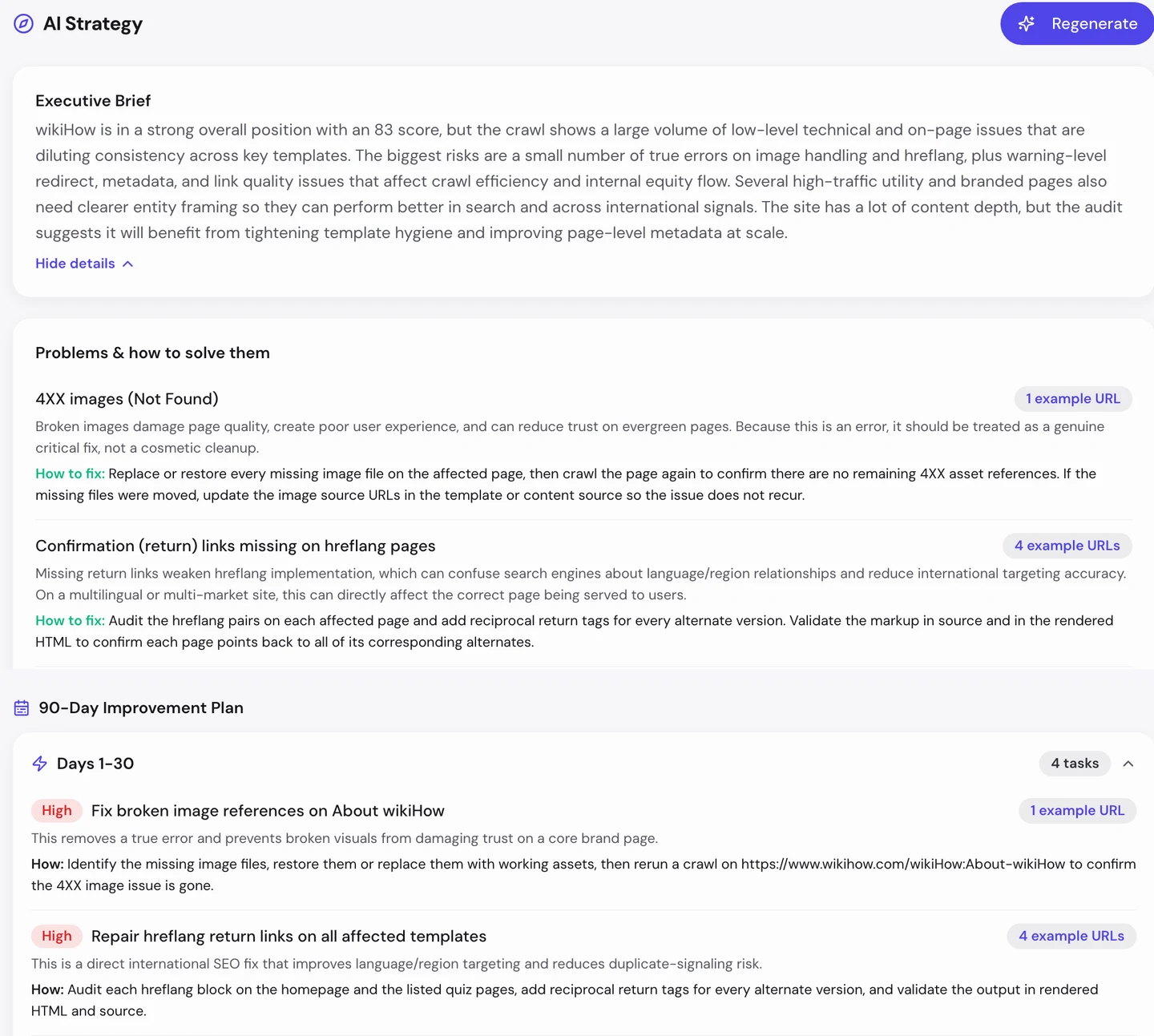
For wikiHow, the first month goes to a few broken images and the language links.
Watch the trend, not the total
Go back to the traffic chart in the first lesson. wikiHow climbed to about 8M US visits a month in April, then slid back to about 6M.
Our Domain Overview shows what's happening underneath.
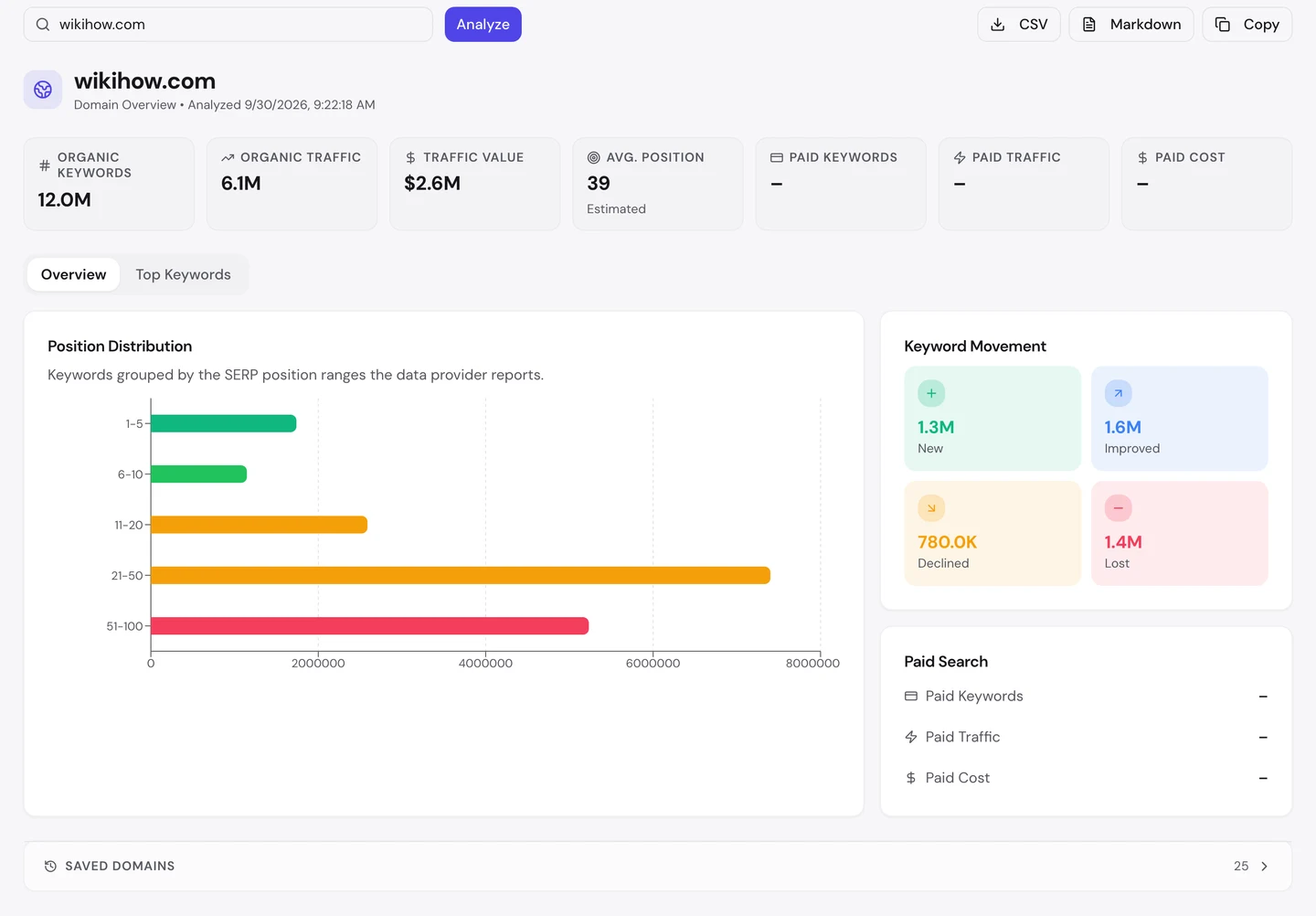
More of wikiHow's keywords arrived or moved up than dropped away. But the total still fell, because trends fade and word games come and go, just like the ones on your phone.
That's the cost of chasing what people search this week. Pages that ride a trend lose visits when it ends.
So track your most important searches in our Rank Tracker, and keep your steady pages as fresh as your trendy ones.
Choose which AI tools may read you
More and more people now ask ChatGPT or Claude how to do things, instead of searching Google. So we checked which AI tools may read wikiHow.
Each of those tools sends a crawler, a program that visits pages and reads them. The rules for crawlers live in robots.txt, a file that tells crawlers what they may read, and our extension reads it for you.
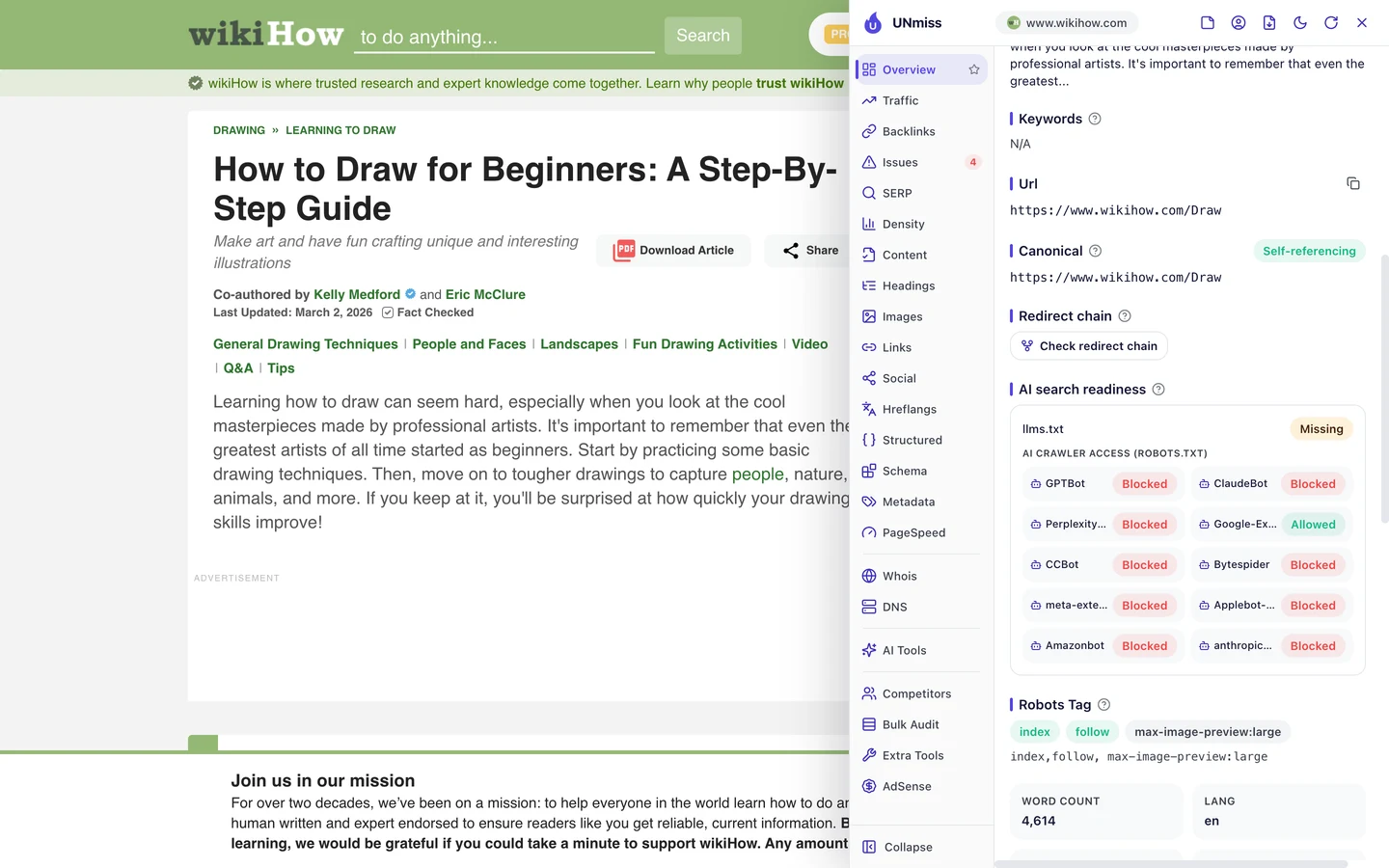
wikiHow blocks every AI crawler on the list except Google's. So ChatGPT and Claude can't read its guides to quote them.
That keeps 20 years of work from being copied for free. But it also means that when you ask an AI tool, it sends you somewhere else.
Healthline made a similar choice. Wise, the money app we studied, lets every AI crawler in.
Make your choice on purpose. Write your rules with our robots.txt generator, then check whether AI tools mention you with our AI Visibility Checker.
wikiHow's biggest page brings in less than 1% of its visits. Our Organic Traffic Checker shows your top pages and the share each one brings, so you can see if a few pages are carrying your site.
- The same report that measured wikiHow
- Each top page's traffic, share and top search
- Run it on any rival's domain too
What you cannot copy
First, the part you can't copy: 20 years of guides, written and improved by a huge crowd of helpers.
That took wikiHow since 2005 to build. A small site can start with its 20 most common customer tasks and one expert to check them.
Now a few honest notes on the numbers.
Update the publish/updated date to on or after 30 Sep 2026. The 6.1M figure counts US searches, and the 14M worldwide figure comes from the audit's Traffic tab.
Both are estimates. Nobody outside wikiHow can count its real visits, so tools work them out from rankings and search volume.
We set the crawl to 250 pages, a sample of a very big site. So we used it to find problems that repeat, not to count every error.
The one number to take away
12M.
That's how many different searches wikiHow ranks for. Most send only a few visits each, but together they add up to millions.
That's the lesson for any business. You don't need one giant page, you need a clear answer for every small job your customers try to do.
Know a task your customers ask you about every week? That could be your next guide.
You can run every one of these checks on your own site, and on your rivals', and see the same numbers for yourself.
Frequently asked questions
Can I use AI to write how-to guides?
For a first draft, yes. But a real person should follow the steps, fix what's wrong and add what only experience teaches. Google rewards pages that show someone has actually done the task.
Do I need a picture for every step?
No. Add one where a step is hard to picture, like a tricky fold or a hidden setting. A clear photo of that one step helps more than 10 decorative ones.
How long should a how-to guide be?
As long as the task needs, and no longer. Changing a setting might take 5 steps. Learning to draw might need a few sections. Cut anything the reader doesn't need to finish the job.
Does Google still show how-to steps in search results?
Not as a special result. Google stopped showing how-to rich results in 2023, and FAQ results now appear for only a few trusted sites. The code still helps Google understand your page.
How do I find an expert to co-write my guides?
Ask people who do the task for a living, like a trainer, a mechanic or an accountant. A short interview is often enough. Credit them with their name, their job and a line on why they know the topic.
How often should I update old guides?
Whenever the steps change, for example after an app update. Check your most visited guides every few months, and change the date only when you've changed the content.
Is it worth writing about trends?
Yes, if you can publish fast. Trend pages bring quick visits that fade when the trend ends. Balance them with steady guides that people will search for every year.
What happens if my language versions don't link back?
Google may ignore the link between them. Then it can show the wrong language to searchers, like the English page to someone in Spain. Fix it by adding the tags on both sides.