Only 7 of the 15 big-site sitemaps we could read follow the rules, and the rest add fields Google ignores or skip the one date it uses.
A sitemap is the file that lists a site's pages for Google. We read the main one from 17 well-known sites, like Shopify, Stripe and The Guardian.
2 of those sitemaps didn't even load. The rest show you what to copy and what to skip.
Here are 7 lessons you can copy, plus the part you can't.
Make sure your sitemap loads
First we asked each site for its sitemap. We looked where a crawler, a program that visits pages the way Google does, would look.
That's the address listed in robots.txt, a file that tells crawlers what they may read. If there's none, it's the usual address, /sitemap.xml.
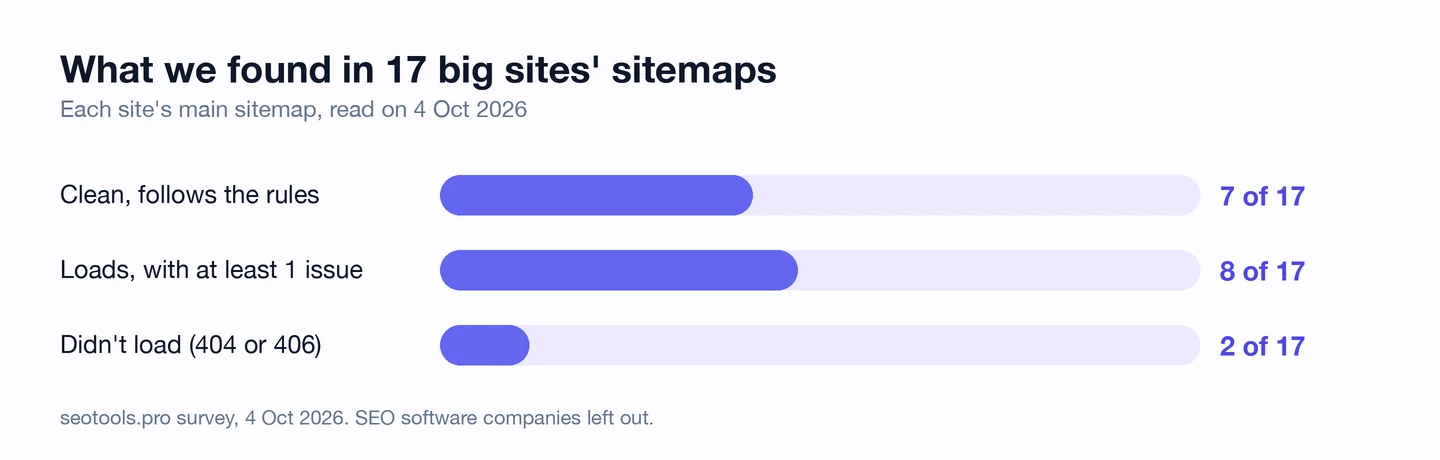
15 of the 17 sitemaps loaded. Etsy's address answered 404, the code for "page not found".
GitHub's answered 406, a code that means the server refused to send it to us.
These are huge sites, and Google may well get their sitemaps another way. But any new crawler that knocks on the usual door finds nothing.
And a sitemap won't help if your robots.txt shuts crawlers out. Our free browser extension reads that file for you.
Open any page and click the seotools.pro icon. It shows you which crawlers may come in.
Our robots.txt study, which we ran too, looks at which big sites block AI crawlers.
So open your own sitemap address in a browser today, and make sure your robots.txt points to it. Our robots.txt generator adds the Sitemap line for you.
Cut changefreq and priority
The 7 clean sitemaps have something in common. Each page gets its address and a lastmod, the date it last changed, and nothing else.
The others often add 2 more fields. Changefreq guesses how often a page changes, and priority ranks it from 0 to 1 against your other pages.
Google says it ignores both. Here's the start of Zapier's sitemap, fetched the same day.
<url>
  <loc>https://zapier.com/</loc>
  <changefreq>daily</changefreq>
  <priority>1.0</priority>
</url>
<url>
  <loc>https://zapier.com/about</loc>
  <changefreq>daily</changefreq>
  <priority>1.0</priority>
</url>
Every one of Zapier's 36 pages says "daily" and the top priority. When every page is top priority, none of them is.
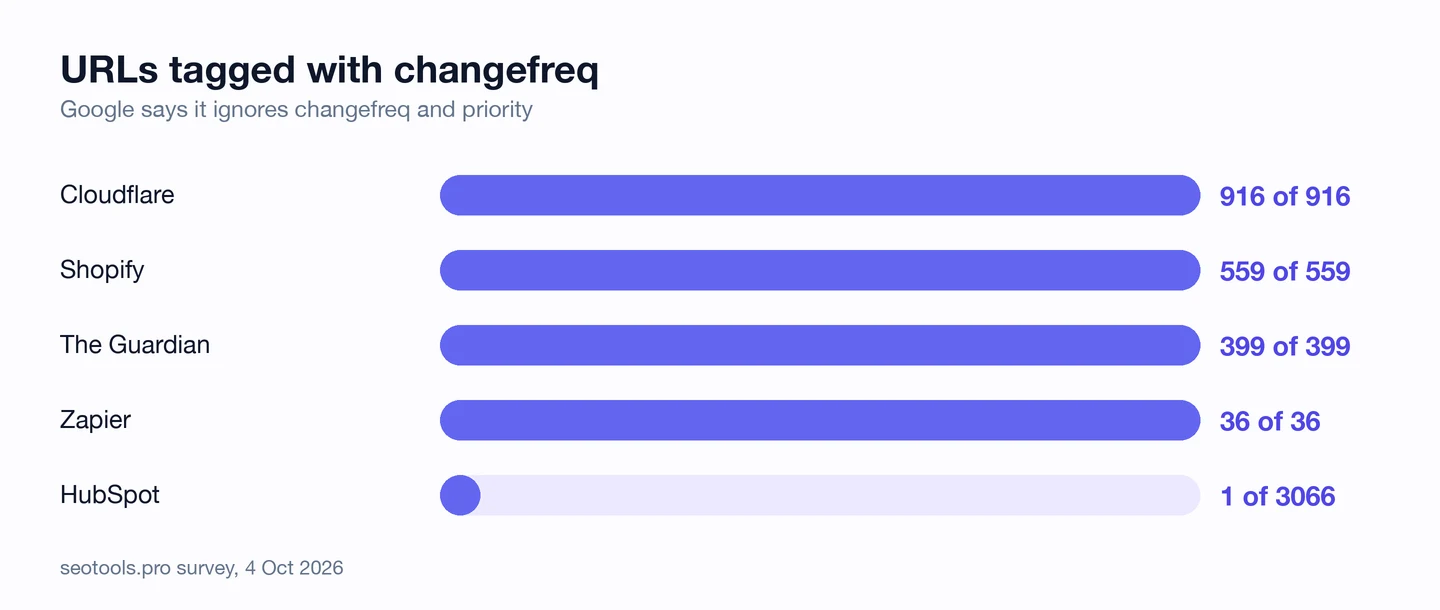
Cloudflare and Shopify tag every URL too. So does The Guardian, with changefreq on each news page.
HubSpot is the odd one out. It tags only 1 page out of about 3K.
These fields don't hurt you. They just make the file bigger and give you one more thing to keep up, for nothing.
So leave them out of your sitemap. Our XML Sitemap Generator puts them in a "Legacy fields" box you can skip.
Give every URL a lastmod
Lastmod is the one optional field Google does use. It tells Google when a page last changed, so it knows what to visit again.
But Google only uses it when your dates are right, time after time. We'll come back to that.
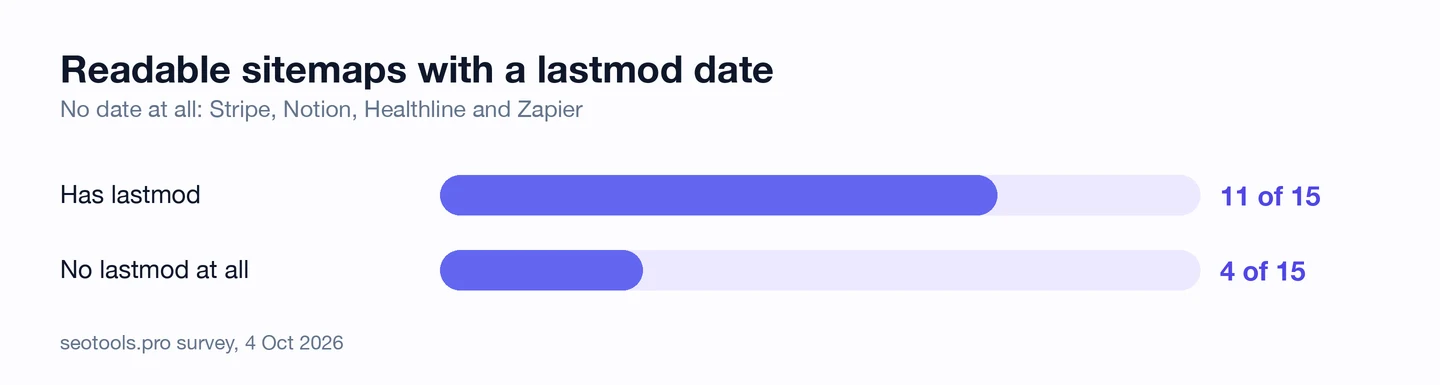
11 of the 15 readable sitemaps include it. Stripe, Notion, Healthline and Zapier leave it out.
Healthline and Zapier, which we studied too, are big names. Yet their sitemaps don't tell Google which pages are new.
Without a date, Google has to guess. On a big site, that guess can mean a slow update for the page you just fixed.
So add a lastmod to each page in your sitemap, taken from the day you last edited it. Our XML Sitemap Generator gives every URL its own date box.
Use real dates, not today's
Here's the catch. A date only helps if Google can trust it.
This is the start of Shopify's sitemap on the day we checked it.
<url>
  <loc>https://www.shopify.com</loc>
  <lastmod>2026-10-04</lastmod>
  …
Every page in the file said it changed that same day. Cloudflare's file did the same thing.
Maybe those pages really did change. But when every date is today, Google can't tell which pages are new, so it may stop trusting your dates.
The good news is that none of the 11 sitemaps with dates had a broken one. The format is easy, and you'll find honesty is the hard part.
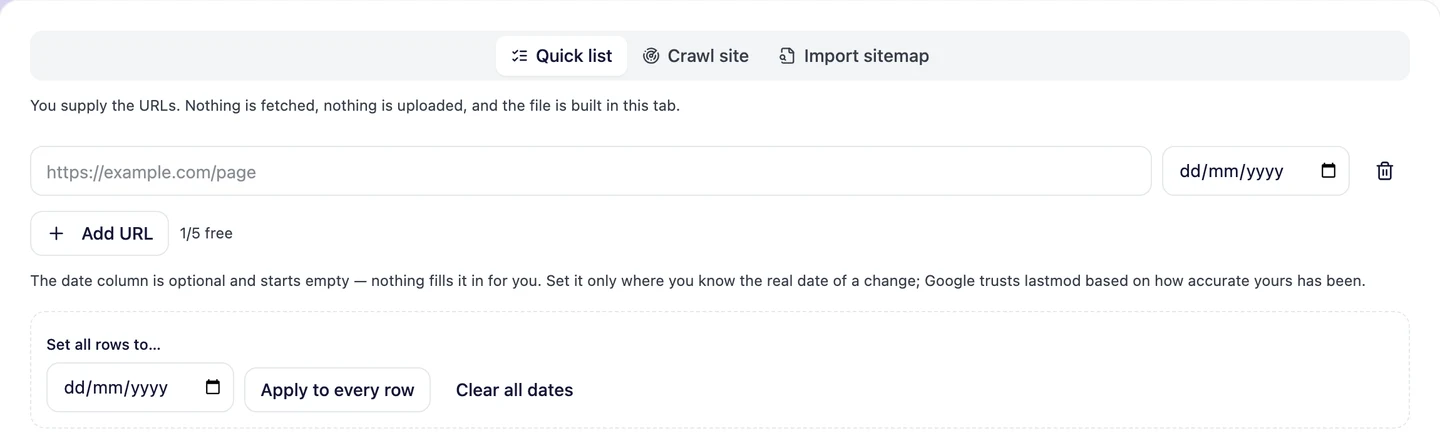
Our generator works this way on purpose. The date box starts empty, and you fill it in only where you know the real date of a change.
So take lastmod from the day your content last changed, not the day the file was built. If you don't know the real date, leave it out, and build the file with our XML Sitemap Generator.
About half the big sitemaps we read send Google fields it ignores, or no dates at all. We set yours up so every page you care about is listed, and every date is real.
- We list the pages you want in Google, and nothing else
- We pull real change dates from your site
- We split big sites into one sitemap per page type
- SEO and GEO, so AI answers can find you too
Keep every URL in scope
Next we checked the basic rules. Most sites keep them without any trouble.
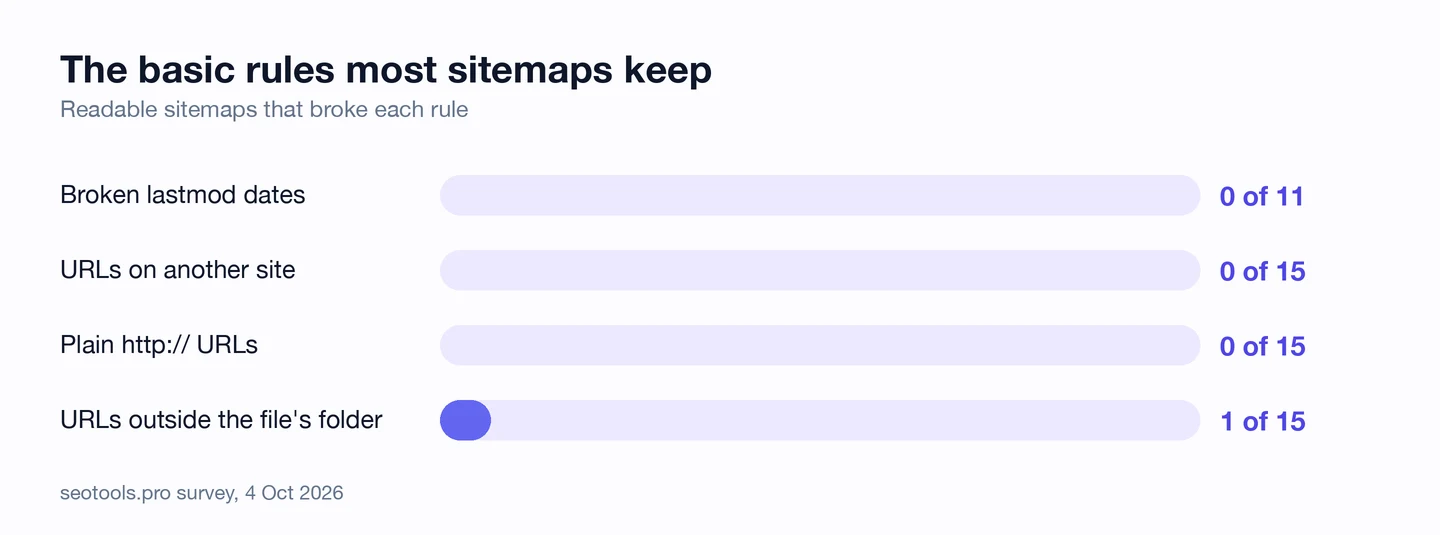
No site listed pages on another domain. None used old http:// addresses either.
The one slip was The Guardian. Its news sitemap lives in a /sitemaps/ folder, but all 399 pages it lists sit outside that folder.
The sitemap rules say a file covers only pages in its own folder or below. The Guardian points to the file from its robots.txt, so search engines may accept it anyway.
You don't need that risk. A sitemap at the root of your site, like /sitemap.xml, can list any page on it.
So put your sitemap at the root, and list only pages on that same domain. Our XML Sitemap Generator warns you when your URLs span more than one domain.
Split big lists with an index
A sitemap index is a sitemap of sitemaps. It lists smaller sitemap files instead of pages.
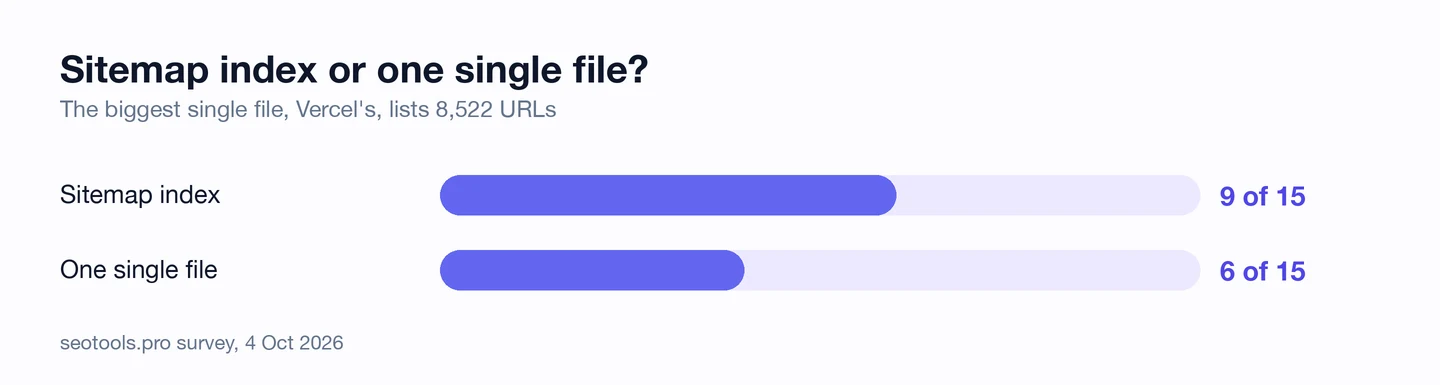
9 of the 15 readable sites use an index. Booking's index covers just airport pages, and eBay's covers just auction listings.
That makes problems easy to spot. Google reports on each file you send it, so you'll see which kind of page is having trouble.
wikiHow, which we studied too, keeps a tidy index of just 2 files. It's one of the 7 clean sitemaps.
One big file works too. Vercel lists about 8.5K pages in a single file, and it's clean.
So once your list grows, split it by page type, like products, articles and categories. Our XML Sitemap Generator writes the index for you when a list gets too big for one file.
Audit your sitemap's coverage
A sitemap can follow every rule and still miss pages. To catch that, you have to compare the file with the site itself.
Our Website Audit does that. It crawls your site, and its Technical SEO tab counts the pages Google could list that are missing from your sitemap.
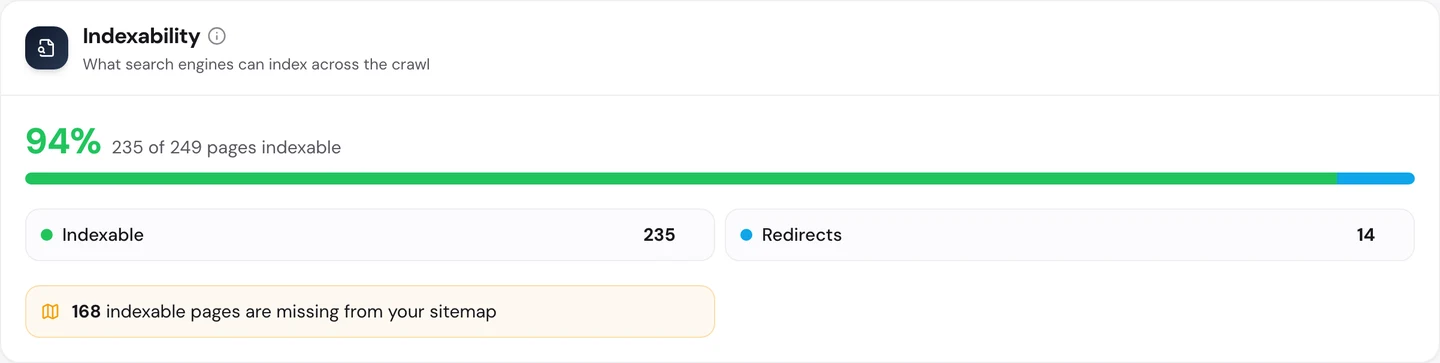
On Docker Hub, which we studied too, it found 168 of those pages. On PHP.net, another site we studied, it found 238.
Google can still find those pages through links. But your sitemap is where you tell Google which pages matter, and these were left off the list.
You can check the file on its own too. Our generator's "Import sitemap" tab reads your live file and checks it against the rules.

It flags pages outside the file's folder, changefreq and priority, and dates it can't read. Those are the same checks we ran on these 17 sites.
So run both checks every few months: the file against the rules, and your site against the file. Start with our Website Audit.
Only 7 of the 15 big-site sitemaps we read were clean. Paste in your own sitemap's address and see how yours does.
- Reads any published sitemap, yours or a rival's
- Flags fields Google ignores and dates it can't read
- Builds a fresh file with only the dates you know
What you cannot copy
First, the part you can't copy: Google already visits sites like Shopify and The Guardian all the time.
For them, a messy sitemap costs little, because Google finds their pages anyway. If your site is small or new, your sitemap matters a lot more than theirs.
Now a few honest notes on the numbers.
Update the publish/updated date to on or after 4 Oct 2026. Sitemaps change often, so yours may look different by the time you check it.
We read only each site's main sitemap. When it was an index, we checked the index itself, not every file inside it.
Etsy and GitHub may hand their sitemaps to Google in other ways. A failed request from us doesn't prove Google can't read them.
We can't tell from outside whether a date is true. The point about Shopify's and Cloudflare's dates comes from our own look at their files that day.
We left out SEO software companies, our own included, so nobody grades their own homework. That's why you see 17 sites here.
These are counts from real files, not estimates. But 17 well-known sites is a small sample, not the whole web.
The Docker Hub and PHP.net numbers come from our crawls of those sites, in those separate studies.
The one number to take away
7.
That's how many of the 15 readable sitemaps follow the rules cleanly. None of them do anything clever.
They list each page and the date it really changed, and then they stop. That's what a good sitemap looks like: short, honest and a little boring.
Does yours look like that? It only takes a minute to find out.
You can run every one of these checks on your own site, and on your rivals', and see the same numbers for yourself.
Frequently asked questions
Do I need a sitemap if my site is small?
Google can find a small site with good links without one. But a sitemap is quick to make, and it helps new pages get found sooner.
Where should I submit my sitemap?
Add a Sitemap line to your robots.txt, then submit the address in Google Search Console. Bing has its own webmaster tools for the same job.
Does a sitemap get my pages into Google?
No, it only helps Google find them. Google still decides which pages to list, based on their quality and whether they're worth showing.
Should my sitemap list pages with a noindex tag?
No. A noindex tag tells Google not to list a page, so putting it in your sitemap sends 2 signals that fight each other.
What about pages that redirect or break?
Take them out. List only the final address of each page, and only pages that load without an error.
How often should my sitemap update?
Whenever you add, remove or really change a page. Most sites build it with code, so it updates the moment you publish.
Are there special sitemaps for images, videos or news?
Yes. Each one adds extra details, like a video's length or a news story's publish date, and you can list them all in one index.
Is an HTML sitemap the same thing?
No. An HTML sitemap is a page of links for people to browse, while the XML one is for crawlers. You can have both.