PyPI gets about 153K visits a month from Google in the US, and it wins them with one plain page per Python package, named exactly what coders type.
PyPI, the Python Package Index, is where coders get packages, ready-made add-ons for the Python language. Every package gets its own page.
We ran PyPI through our whole SEO toolkit. We found what makes those pages win, and how PyPI keeps its many old copies from getting in the way.
Here are 9 lessons you can copy, plus the part you can't.
Give every package its own page
We started with our Organic Traffic Checker. It estimates a site's organic traffic, meaning the people who find it on Google without ads.
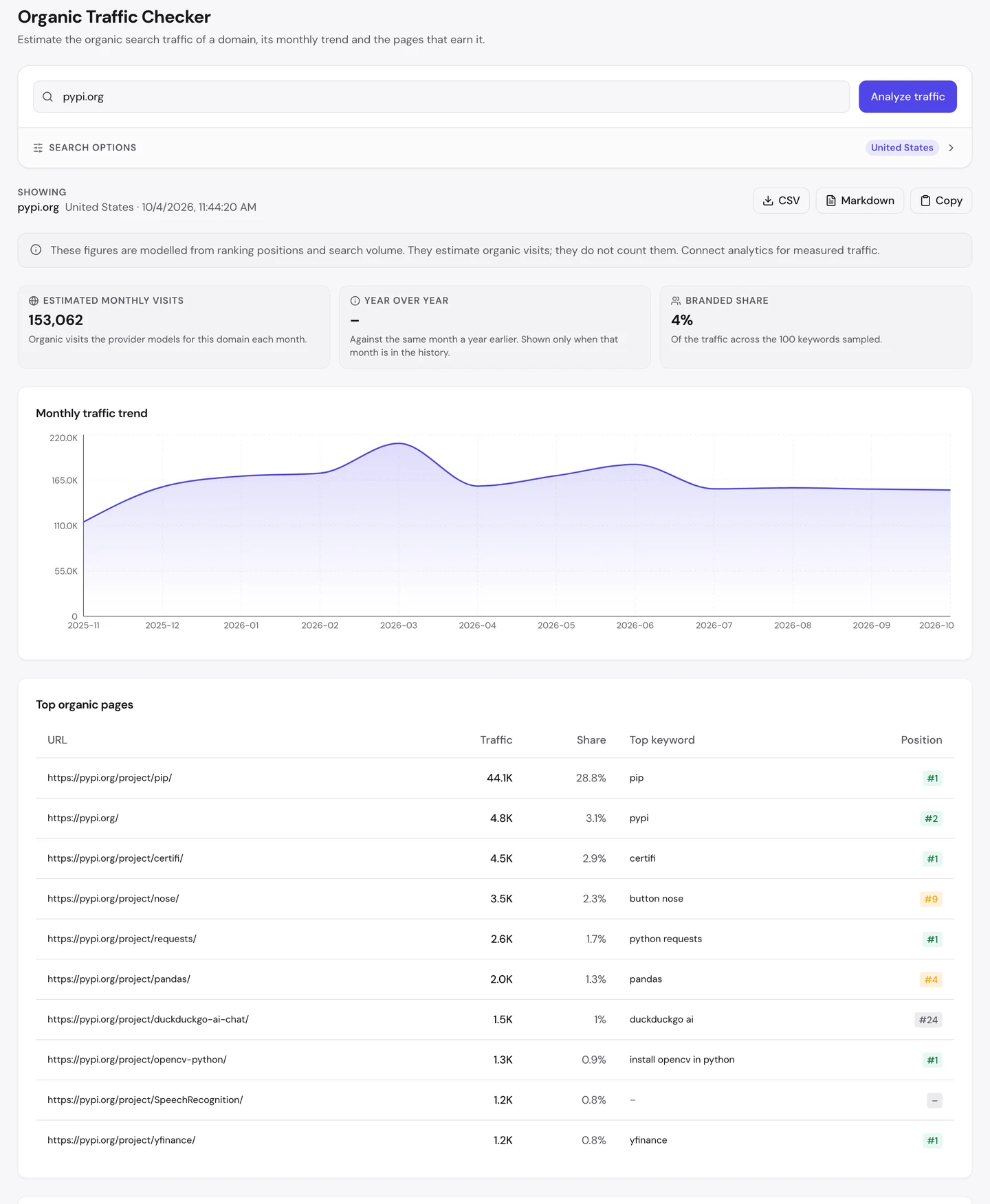
For pypi.org, that's about 153K visits a month in the US. Only 4% of them come from people typing the name PyPI.
So about 24 in 25 visitors weren't looking for PyPI at all. They typed the name of a package, and Google sent them to its page.
One page stands out. The page for pip earns about 44K visits, close to 1 in 3 of the total.
Pip is the tool coders use to install packages. Here's its page.
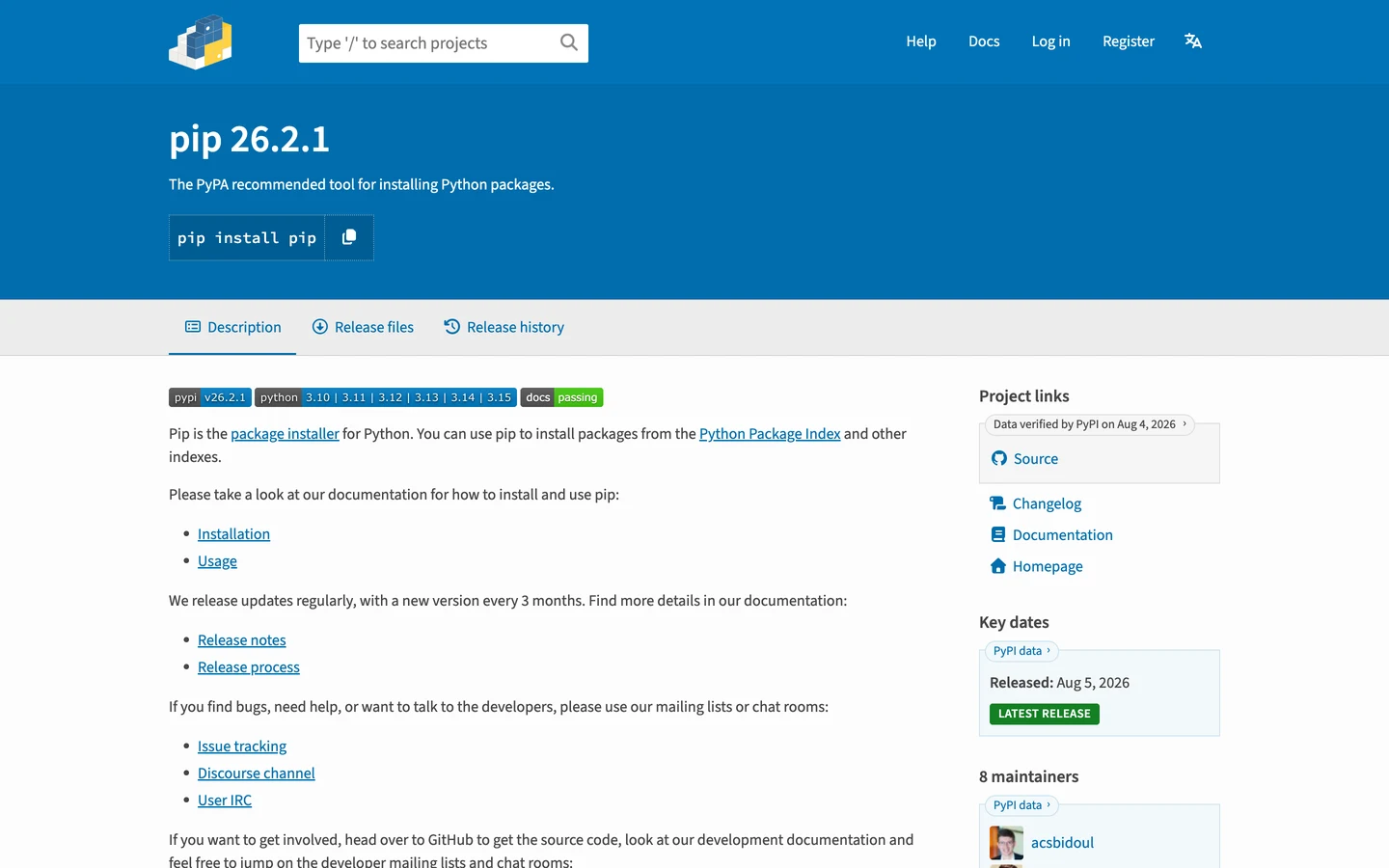
It has the name, a one-line summary and the command you'd copy to install it. That's all you need if you came to install it.
The Traffic tab of our Website Audit shows the whole world, not just the US.
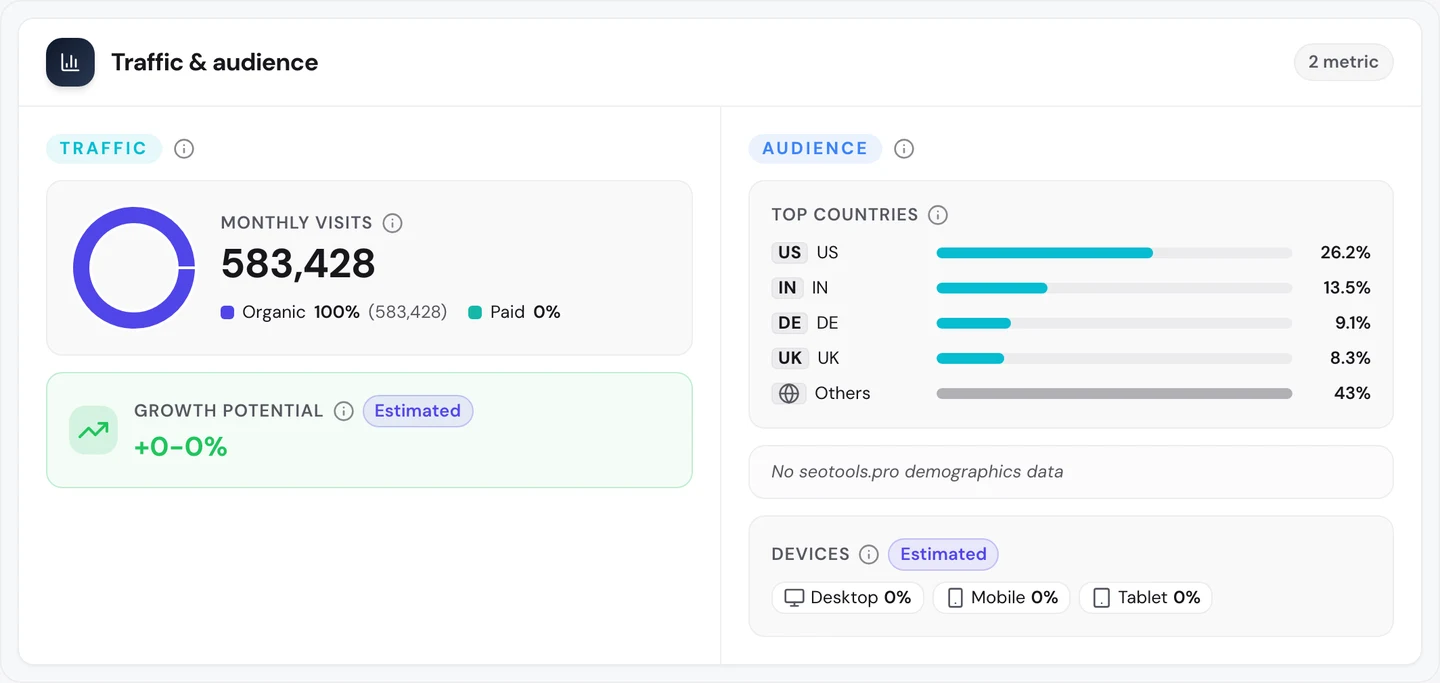
Worldwide, PyPI gets about 580K search visits a month, and it pays for none of them. The US sends about 1 in 4, and India comes next.
Docker Hub, which we studied too, is built the same way, with one page for each piece of software.
So give each thing you offer its own page, named after it. Then see which of your pages earn the visits with our Organic Traffic Checker.
Name each page what people type
The Keywords tab of our audit lists the searches a site ranks for. A keyword is just a search people type, and the tab shows where you rank and how many visits each one sends.
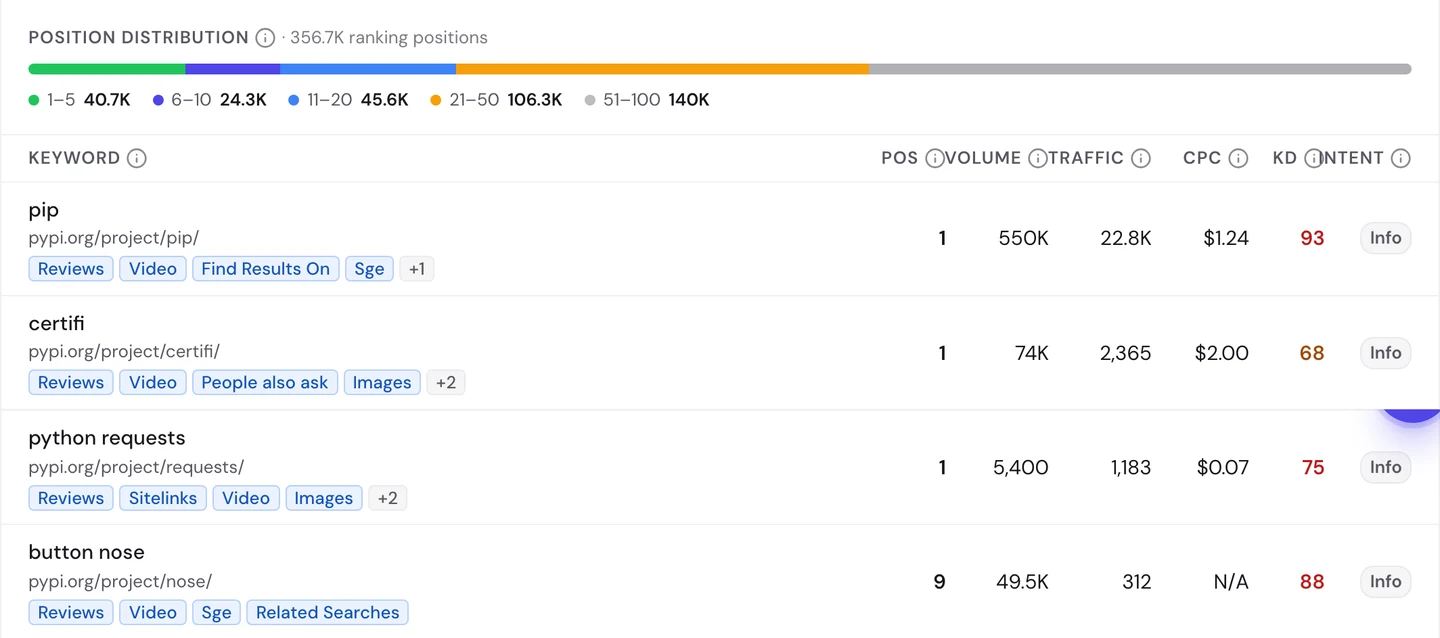
Look at the first row. Somebody types "pip", and PyPI's pip page is the top result.
That search happens about 550K times a month. The page wins because its name and its address match what you typed, word for word.
The same goes for certifi, a package that helps Python check secure websites. It ranks first for its own name too.
The requests page ranks first for "python requests". Requests is a package for talking to websites from your code.
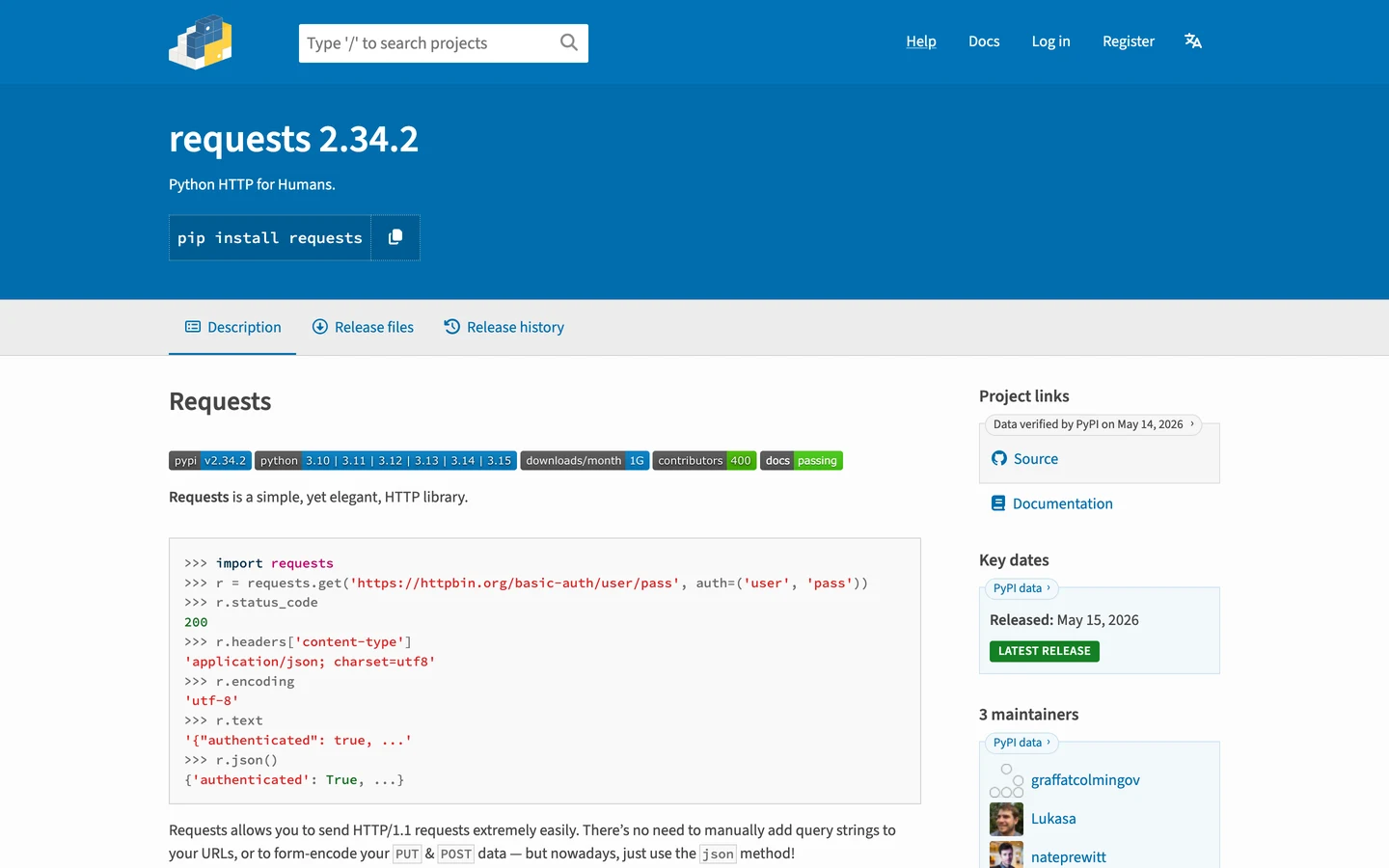
It's built just like the pip page. The same template, a page layout every package shares, makes every one of them.
Our Organic Traffic Checker found more of the same. The opencv-python page ranks first for "install opencv in python", and yfinance ranks first for its own name.
But name matching cuts both ways. The page for nose, an old testing package, ranks 9th for "button nose".
That search gets about 50K a month. Those people wanted a cute nose, not a piece of code.
If you run a site for coders, PHP.net, the home of another coding language that we studied too, is a good next read.
So name each page after the exact word people type, and check which searches each page really wins. Our Keyword Research tool shows the words people use.
Write a fuller title and summary
Ranking is half the job. Once you're on the results page, your title and description decide whether people click.
Our free browser extension shows how a page is built. Open the page, click the seotools.pro icon, and a panel opens beside it with 35 SEO checks.
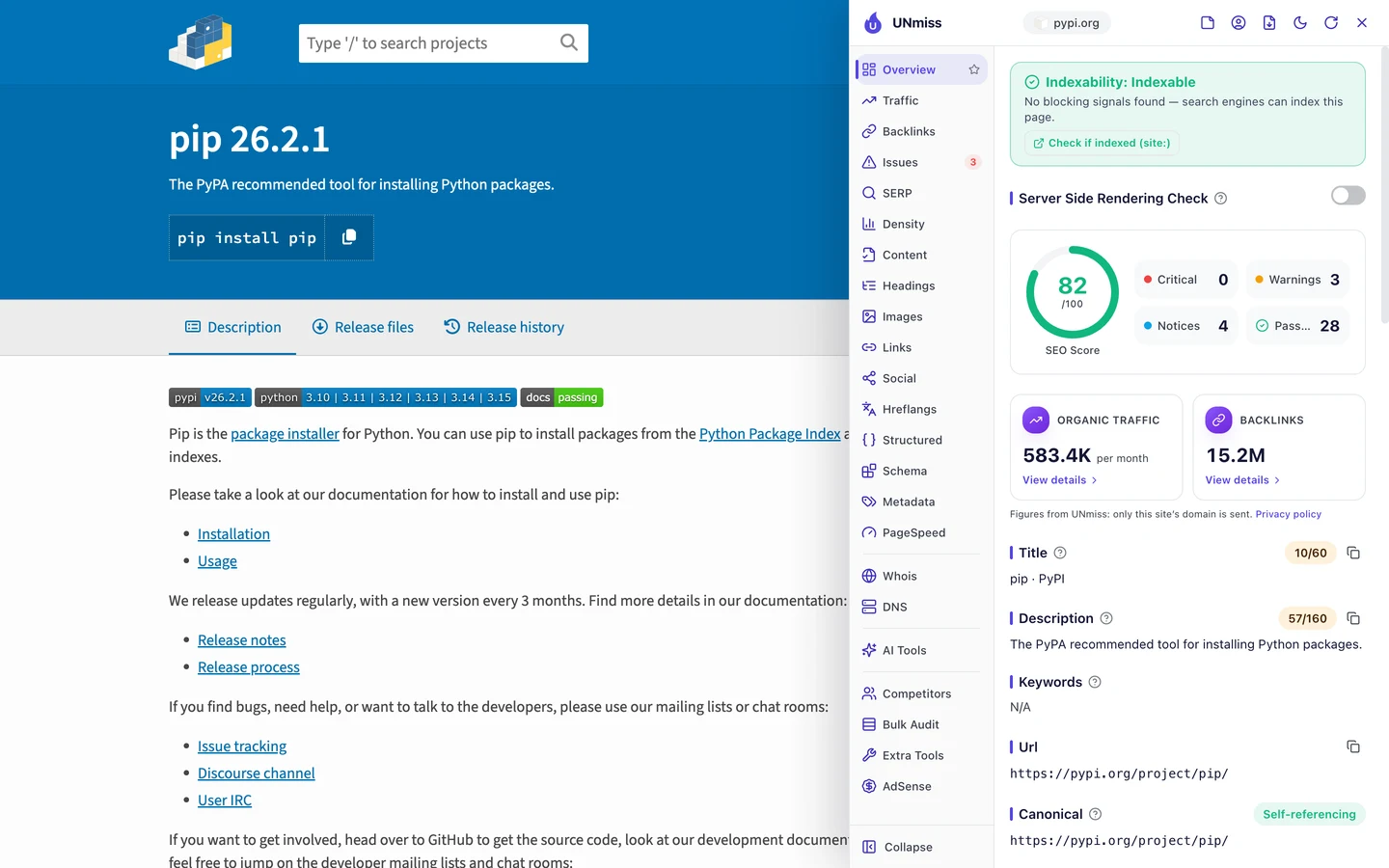
The pip page scores 82 out of 100. Its title, "pip · PyPI", is only 10 characters.
The description is the short summary Google may show under your title. Here it's the one line the package's makers wrote for it, "The PyPA recommended tool for installing Python packages."
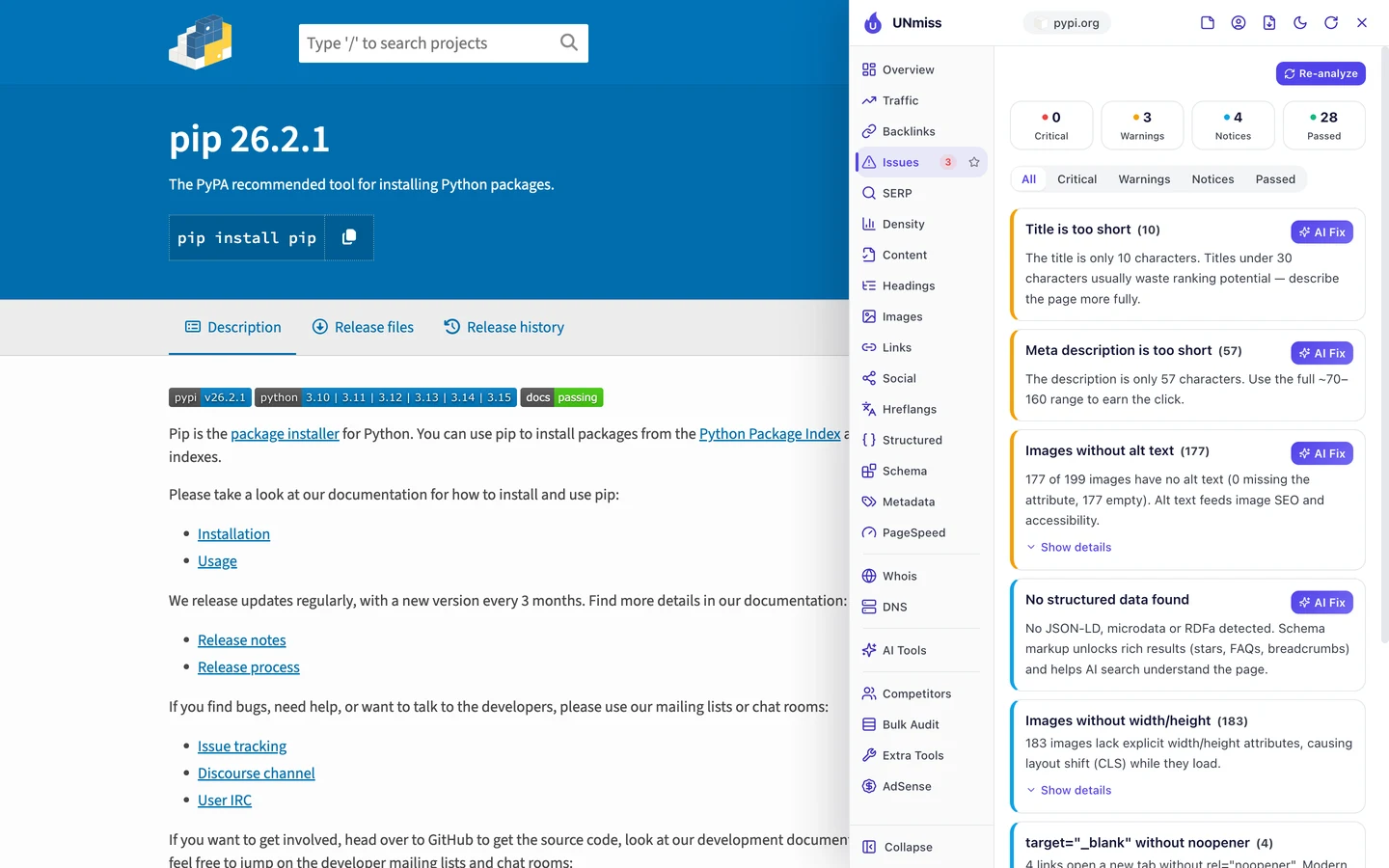
The Issues tab puts both at the top. The title could say what pip does, and the description has room for 100 more characters.
Now compare the requests page. It uses the same template.
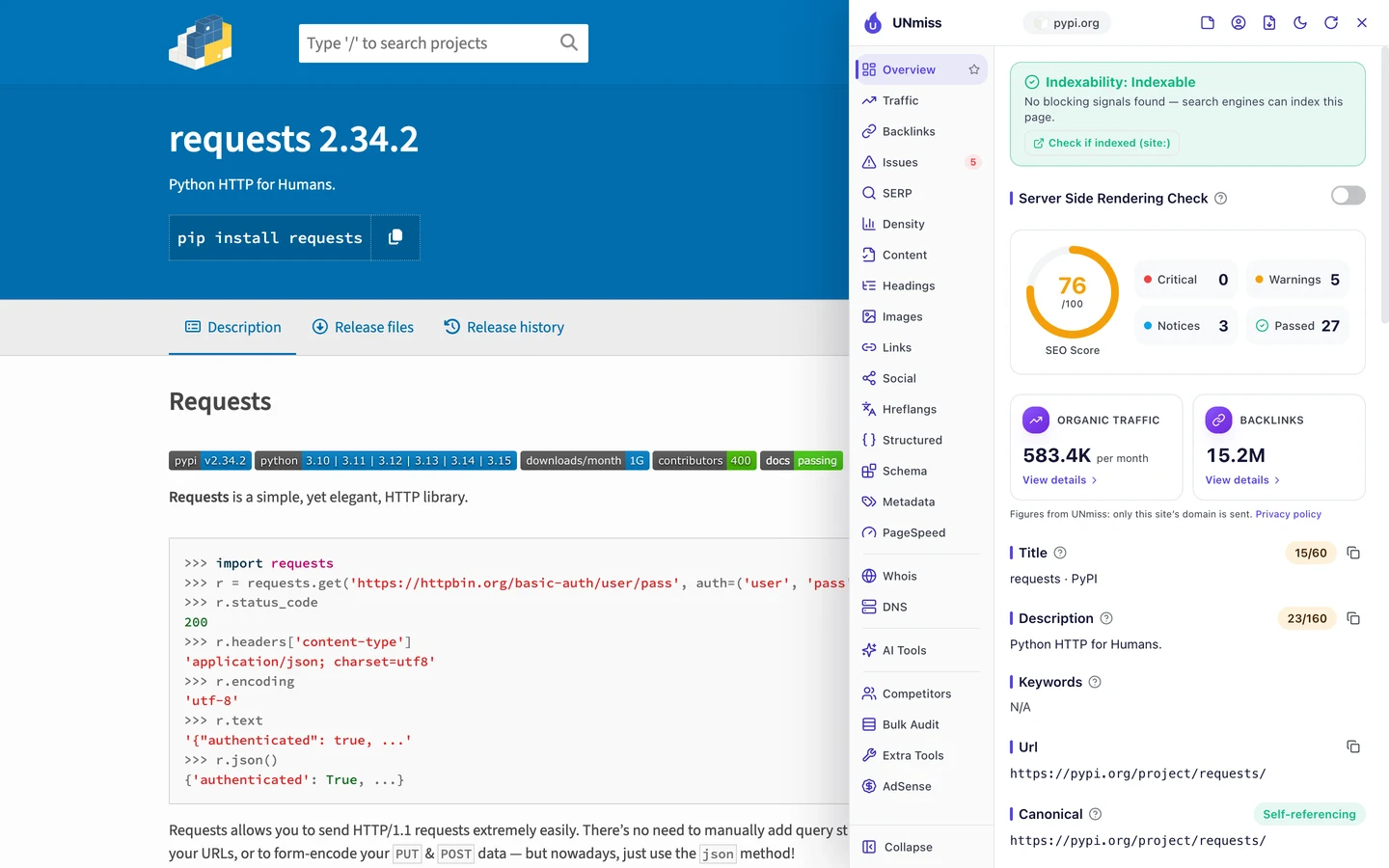
It scores 76. Its description, "Python HTTP for Humans.", is a fun motto, but it's just 23 characters when Google can show about 160.
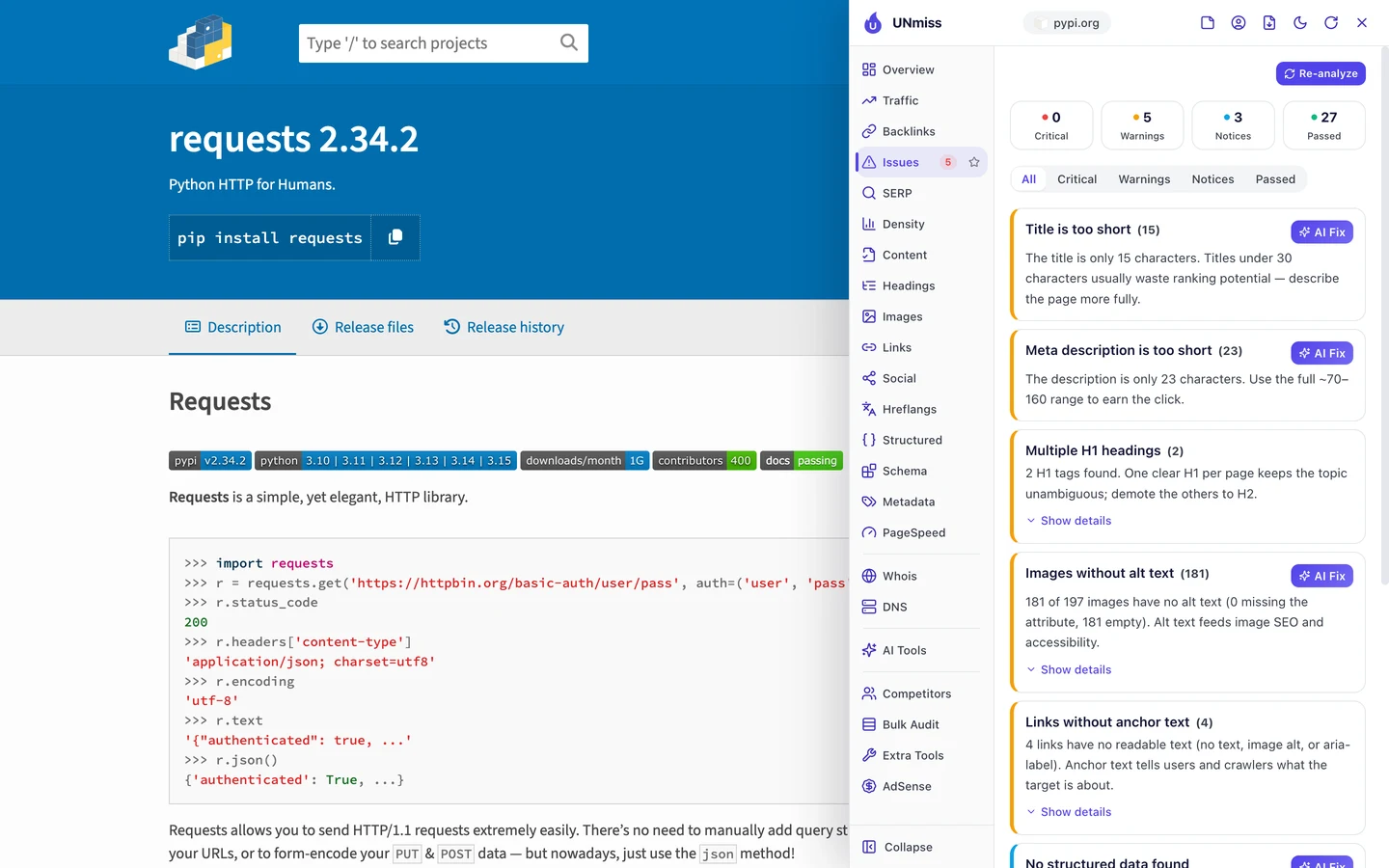
It also has 2 H1s. The H1 is the tag for a page's main heading, and a page should have one.
Here the package name is one H1, and the "Requests" heading at the top of the write-up looks like the second. The makers write that part, so the template can't fully control it.
That's the catch with summaries written by each maker. Some write a full sentence, and some write a motto.
So don't leave your titles and descriptions to chance. Add what the page does to the title, set a minimum length for the description, and preview both with our Meta Tag Generator.
Mark up each package in code
Structured data is code that tells Google what a page is, like a product, a guide or a piece of software. The extension's Structured tab looks for it.
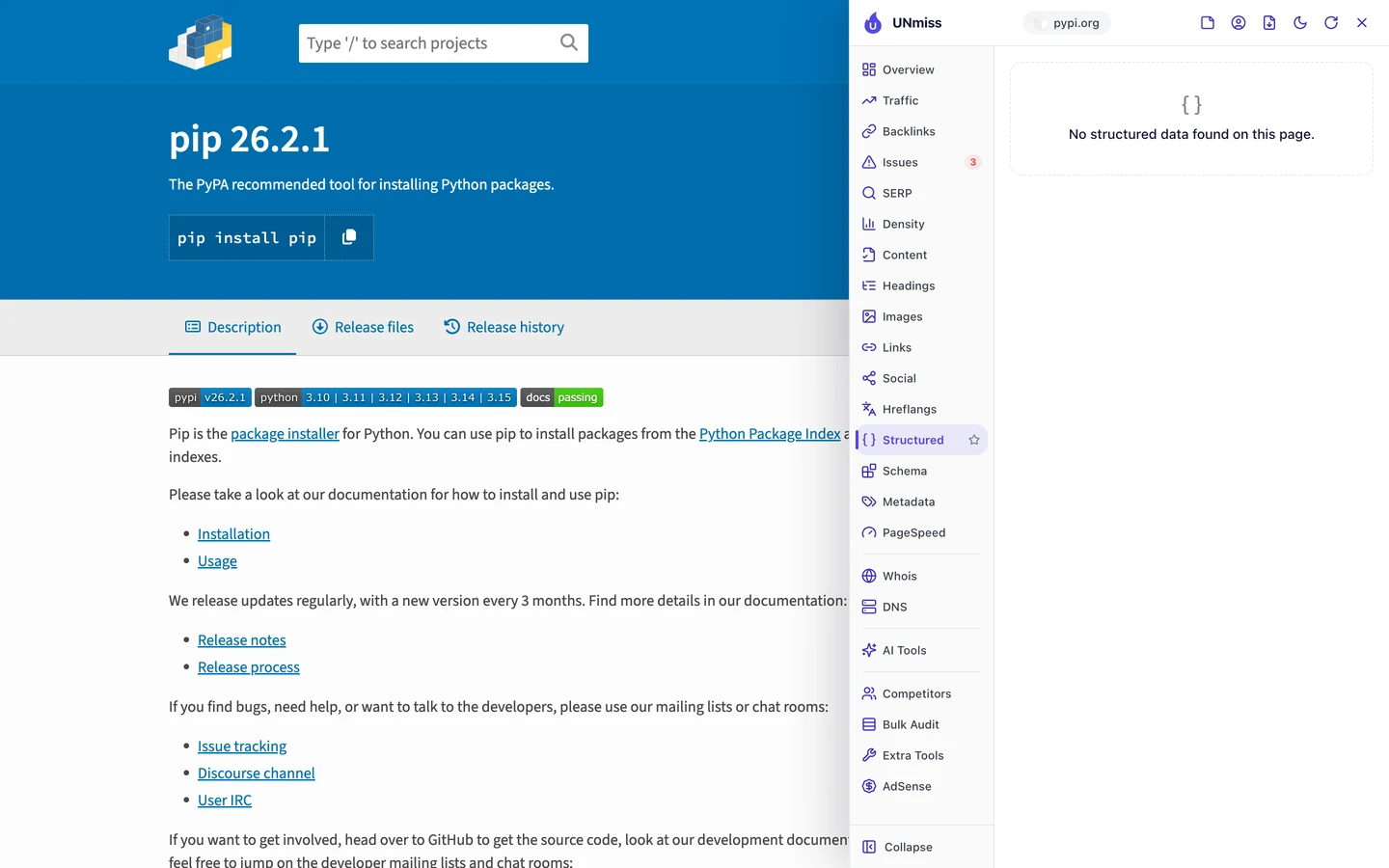
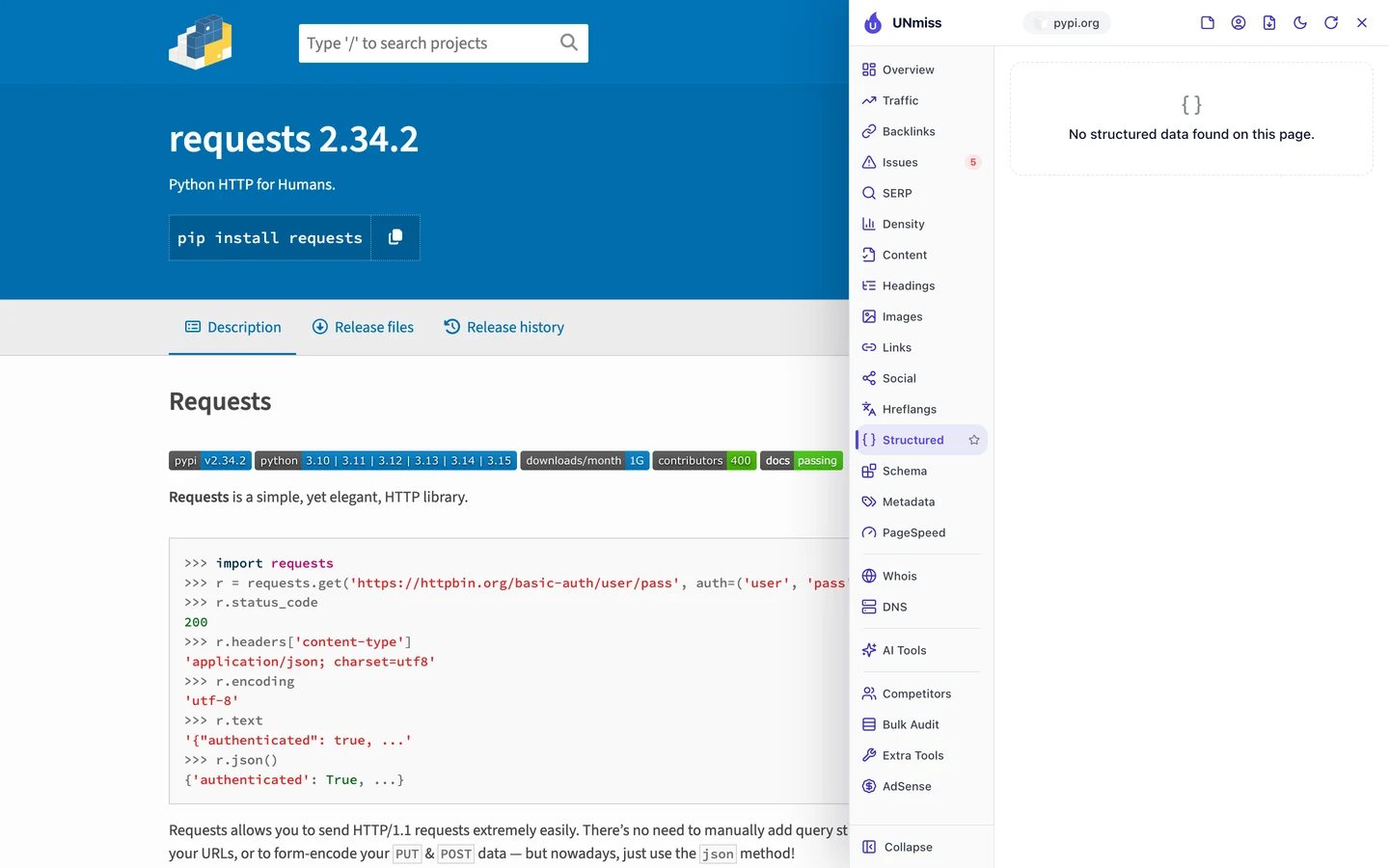
You won't find any on either page. Yet each one shows a version, a release date and the people who look after it.
All of that could go into code that Google reads directly. The Content tab shows what's missing.
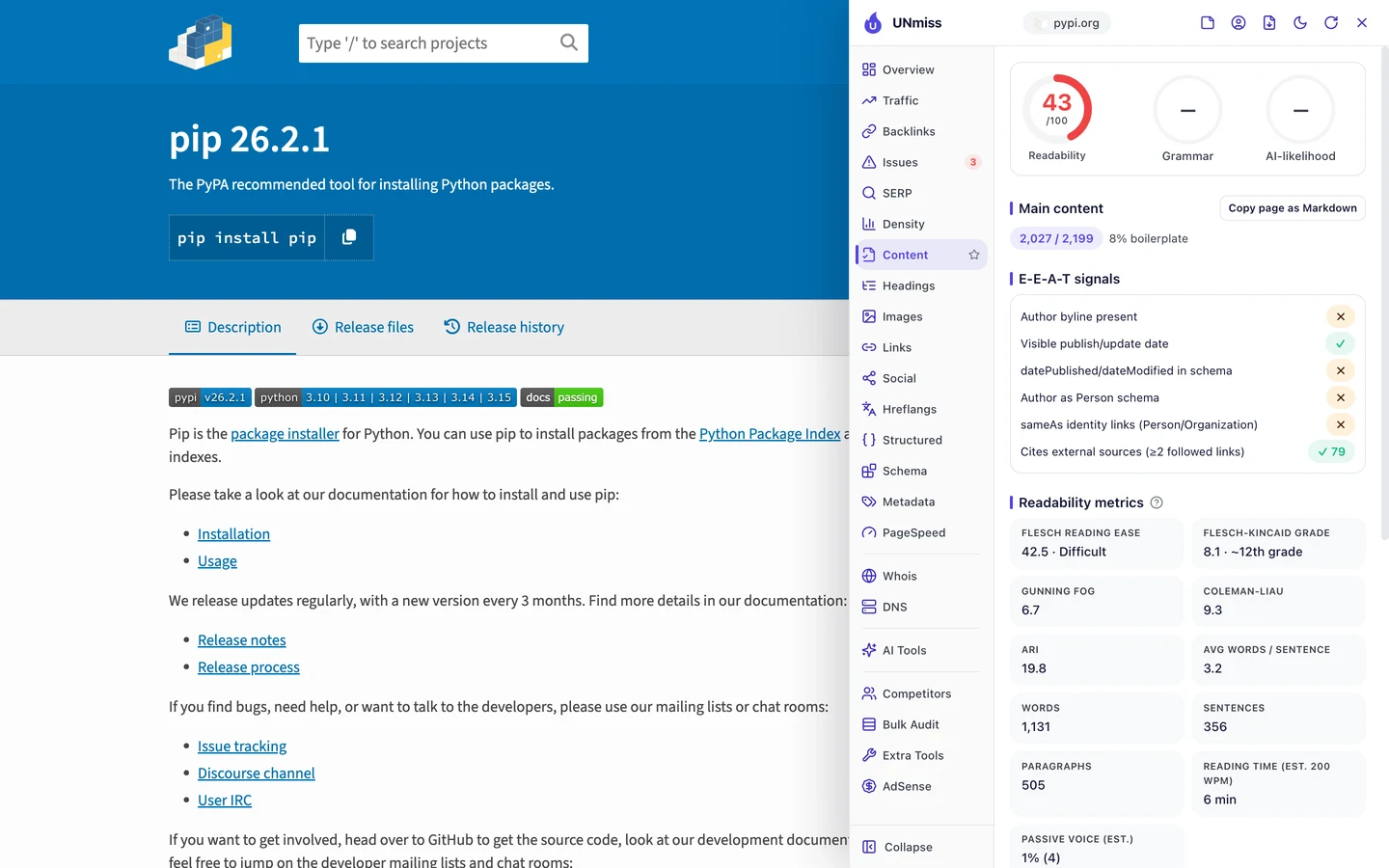
The pip page shows its release date, and it links to lots of outside sources. But the date isn't in the code, and there's no author in the code either.
Without that code, Google has to guess those facts from the page. It often gets them right, but you're leaving it to chance.
The same code helps AI tools. Lots of coders now ask ChatGPT or Claude which package to use, so we checked which AI crawlers may read PyPI.
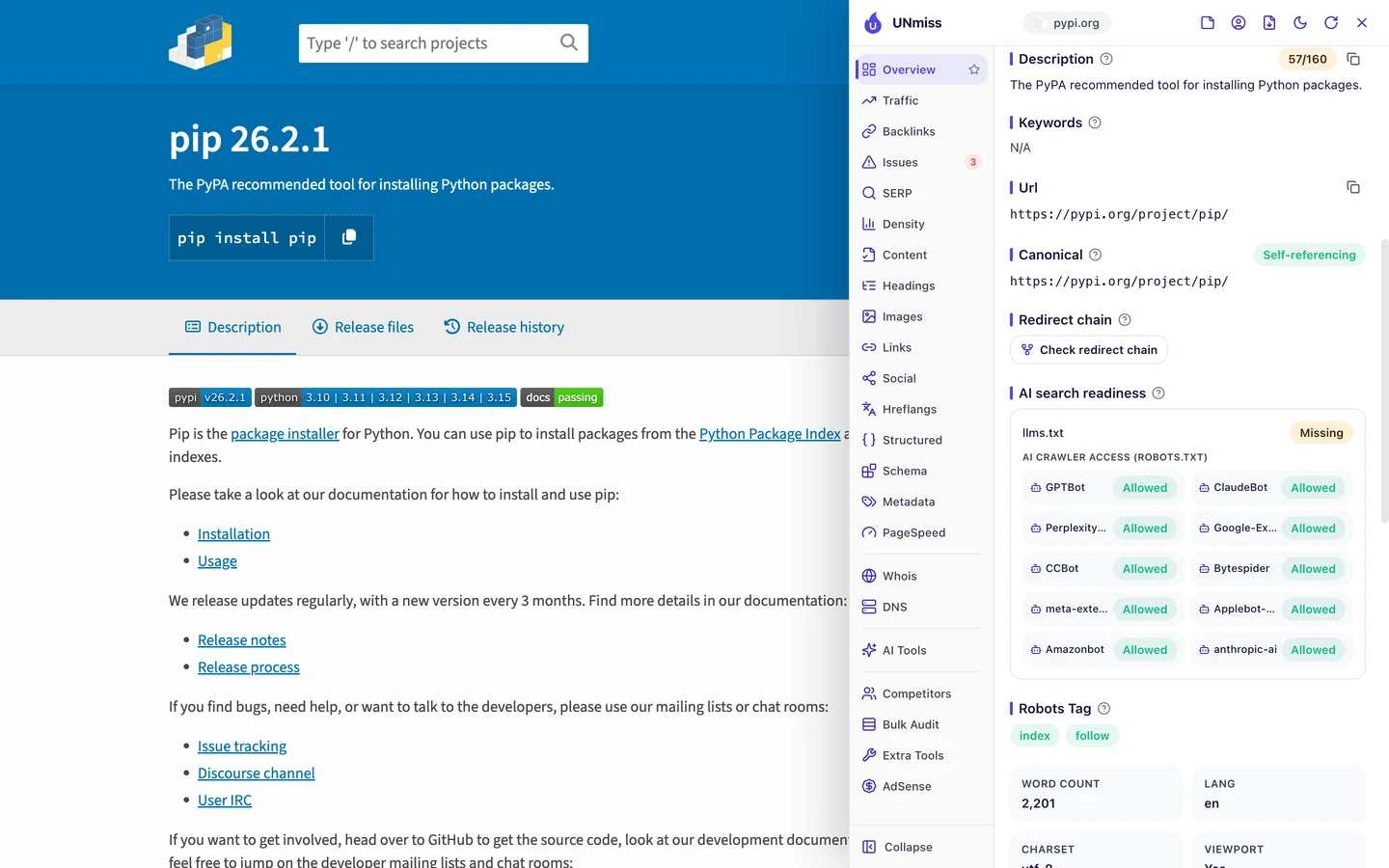
A crawler is a program that visits pages the way Google does. The rules for crawlers live in robots.txt, a file that tells crawlers what they may read.
PyPI lets in all 10 AI crawlers the extension checks. But it has no llms.txt, a short file that explains a site to AI tools.
MDN, the coding docs site we studied too, is worth a look if AI answers matter to you.
Set your own crawler rules with our robots.txt generator. Then check whether AI tools mention you with our AI Visibility Checker.
So add code that says what each page is, which version it covers and when it changed. Our Schema Markup Generator writes it for you.
Audit what crawlers really get
The extension checks one page at a time. Our Website Audit sends its own crawler through hundreds of pages at once, so you can see which problems repeat.
It checked 250 pages on PyPI. The site scored 79 out of 100, which the report rates as fair.
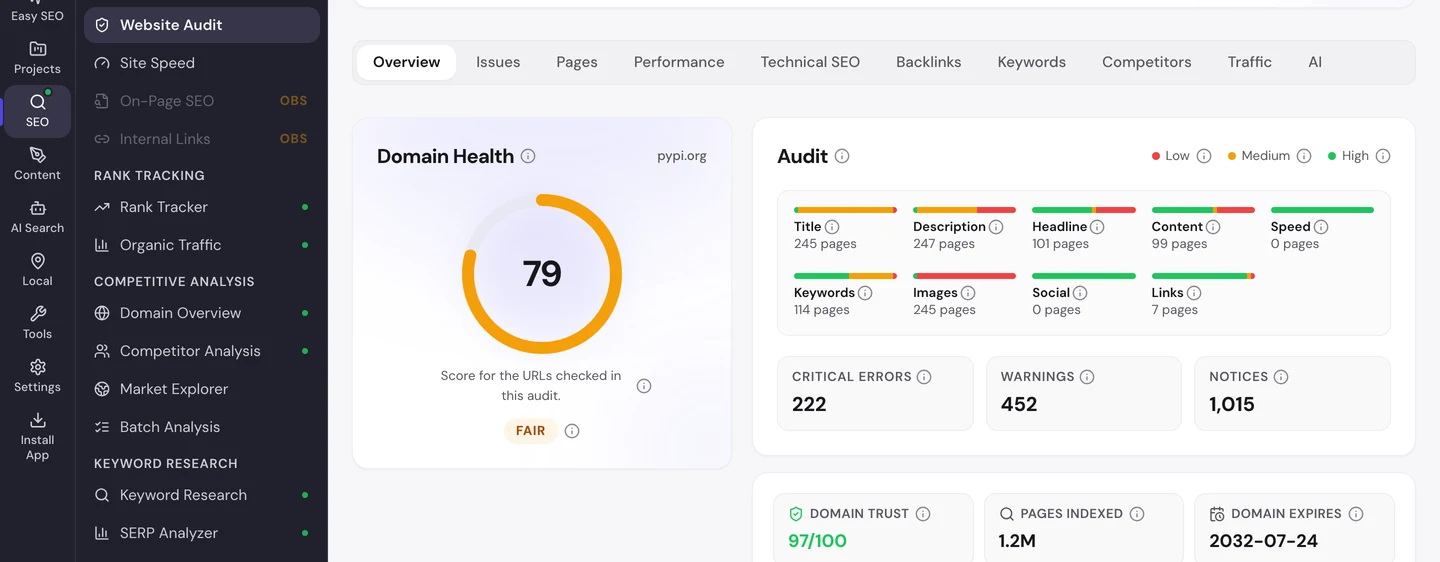
It also shows about 1.2M pages indexed, meaning listed by Google. The Issues tab sorts the problems by how much they matter.
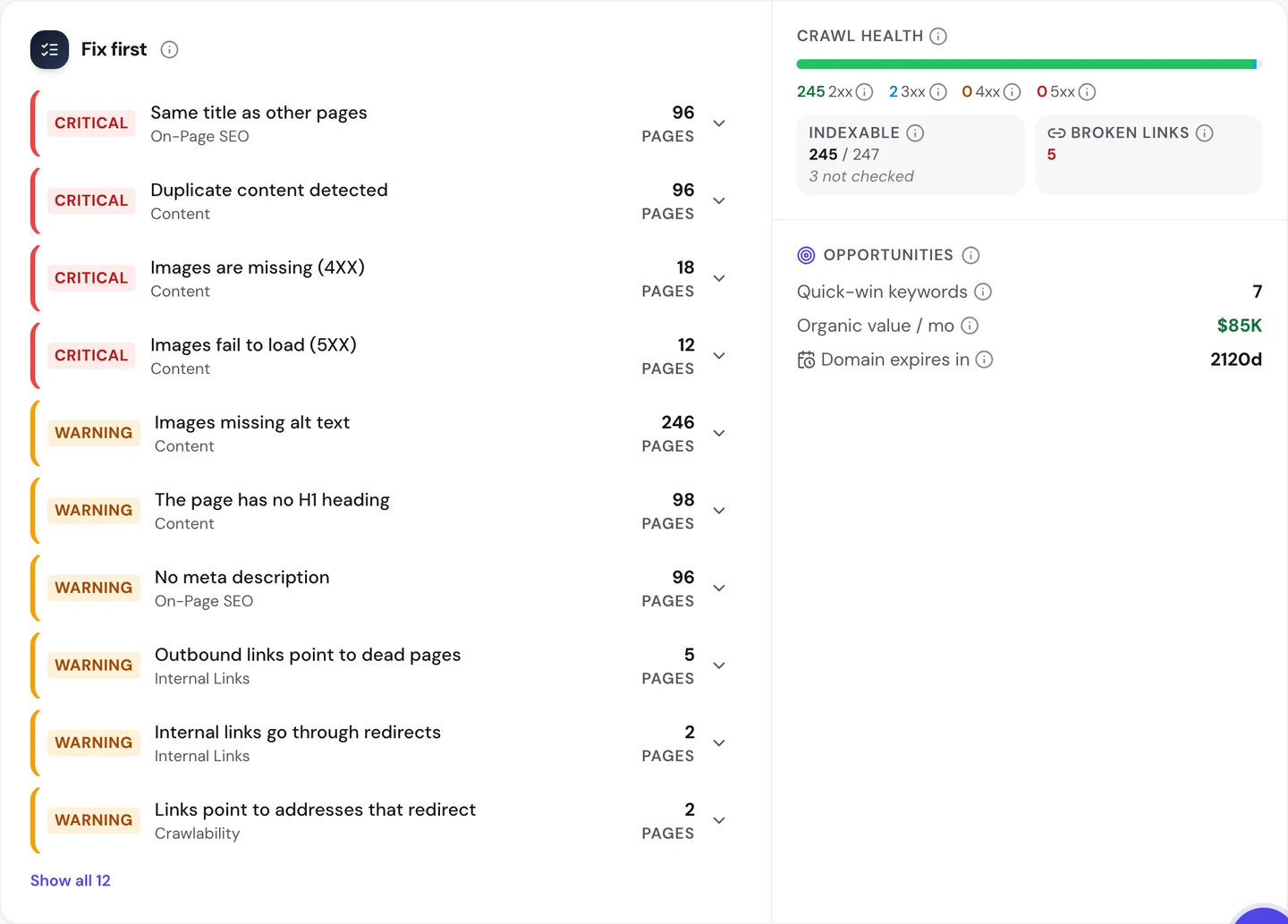
The top 2 errors are the same title and the same content on 96 pages. Lower down, 96 pages have no description and 98 have no H1.
That sounds bad, until you look at what those pages say. Every one of the 96 has the title "Client Challenge".
That's a bot check, a page that makes sure a visitor isn't a program copying the site. Our crawler got the check instead of the package page.
So most of those errors aren't PyPI's mistakes. They're the bot check, counted 96 times.
Bot checks protect a busy site from scrapers, programs that copy pages in bulk. The risk is that Google gets stopped too.
PyPI's pages rank first for their names, so Google clearly gets through. Open Library, which we studied too, also shows a bot check to unknown visitors.
The Technical SEO tab shows which pages Google may list.
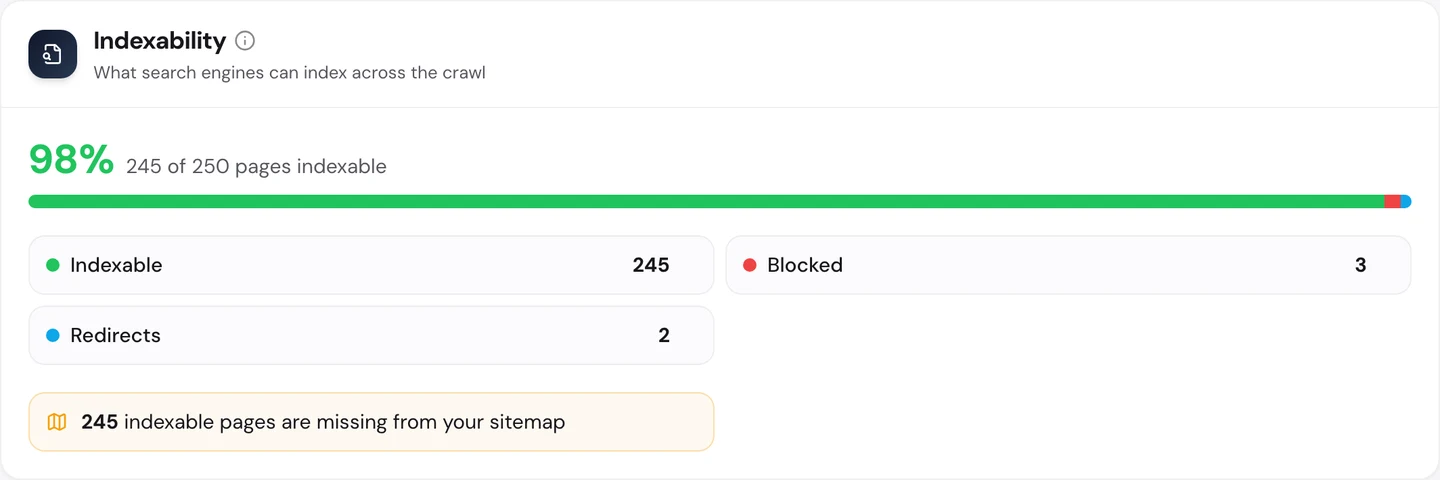
Almost every page can be listed, which is great. But 245 of them are missing from the sitemap, the file that lists a site's pages for Google.
Most of those are pages for old versions, which you may not want in a sitemap anyway. It's still worth checking that the main page for each package is in there.
You don't have to work out what to fix first. The audit's AI tab writes the plan: a short summary, each problem with how to fix it, and a to-do list for the next 3 months.
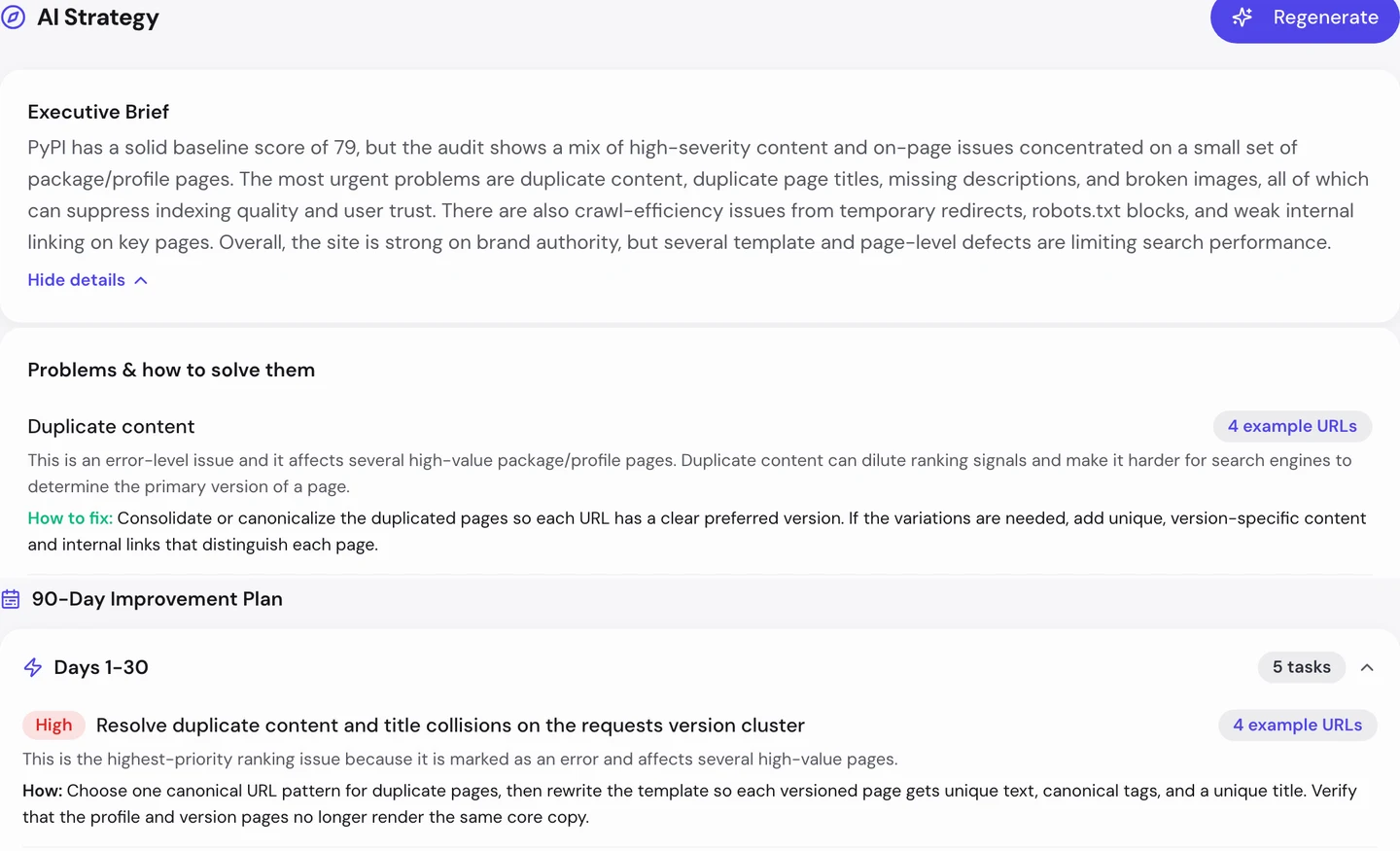
The plan reads the same numbers, so it counts the bot check pages too. But its first task holds up: the many pages for old versions of requests.
So run our Website Audit, then open the pages behind the biggest errors. If they all share a title like "Client Challenge", test them as Google before you fix anything.
Point old versions to the main page
Every time a package gets an update, PyPI keeps a page for the old version. The audit's Duplicates card shows what that looks like.
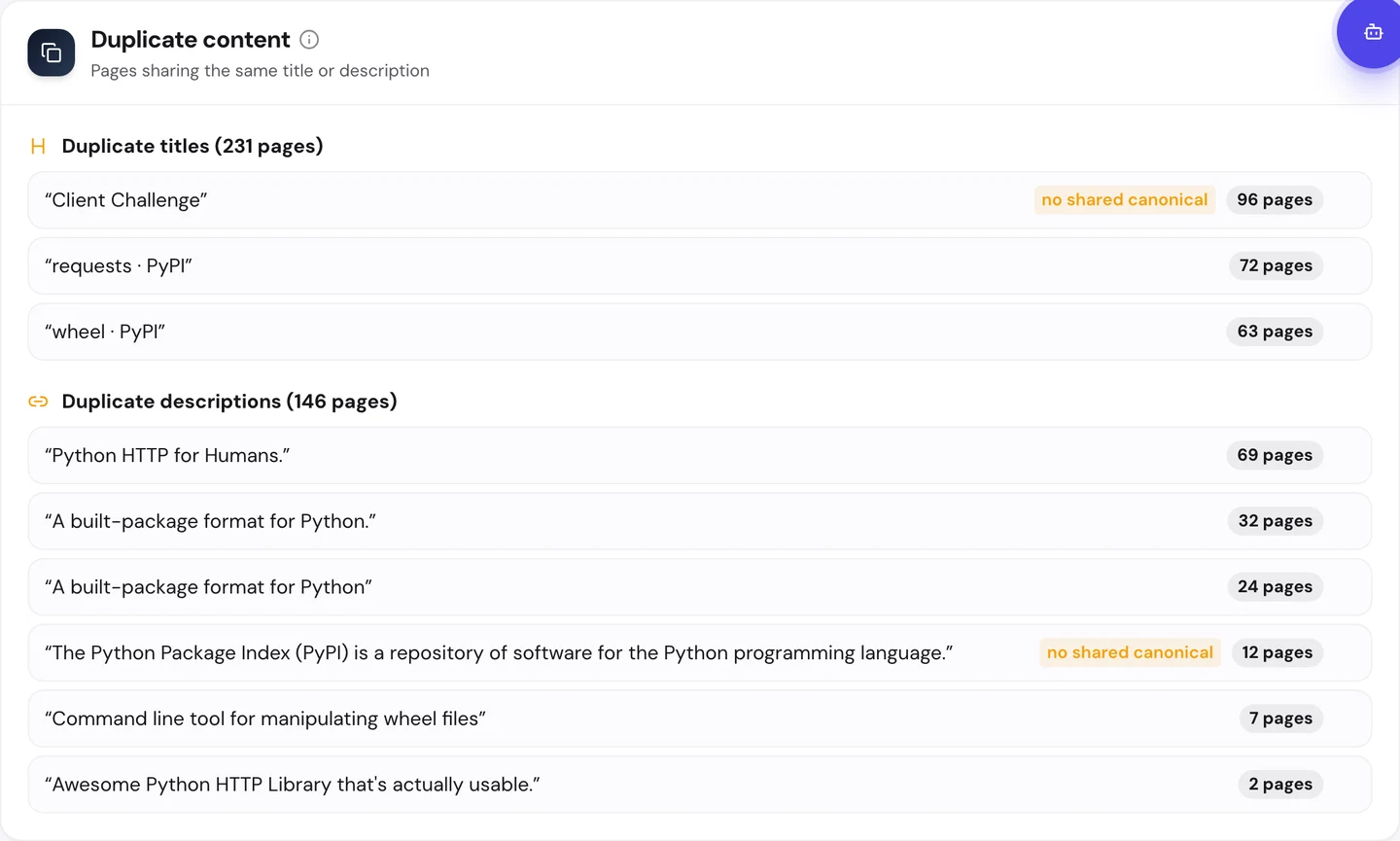
The title "requests · PyPI" shows up on 72 pages. "Python HTTP for Humans." is the description on 69.
Those are the requests page and its old versions, each with its own address. The wheel package, a format for sharing Python code, has the same story on 63 pages.
To Google, that's a lot of pages that look alike. If you were Google, which one would you rank?
PyPI answers that with a canonical tag, a tag that tells Google which address is the main copy. Our audit's page list shows every old requests and wheel page we reached pointing to the package's main page.
Look at the card again. "No shared canonical" shows up next to the bot check, but not next to requests or wheel.
That's why the main requests page still ranks first, even with dozens of look-alikes. The old pages stay open for anyone who needs them, and Google knows to send searchers to the main one.
The other choice is noindex, a tag that tells Google not to list a page. Use it if you'd never want an old version to show up at all.
So if you keep old versions, point each one at the main page with a canonical tag. Then run our Website Audit to check that every copy does.
PyPI keeps a page for every old version, and each one tells Google which page is the main one. We find the look-alike pages on your site, decide which one should rank, and set the tags so Google gets it right.
- We find pages that share a title or description
- We set canonical and noindex rules for old and near-copy pages
- We test your bot checks so Google gets the real page
- SEO and GEO, so AI answers can quote you too
Keep package pages plain and fast
Those old pages share one more thing with the main ones. They're light, so they load fast.
The Performance tab of the audit shows Core Web Vitals. These are Google's 3 checks of how fast a page loads, how fast it reacts and whether it stays still, measured on real visitors' devices.
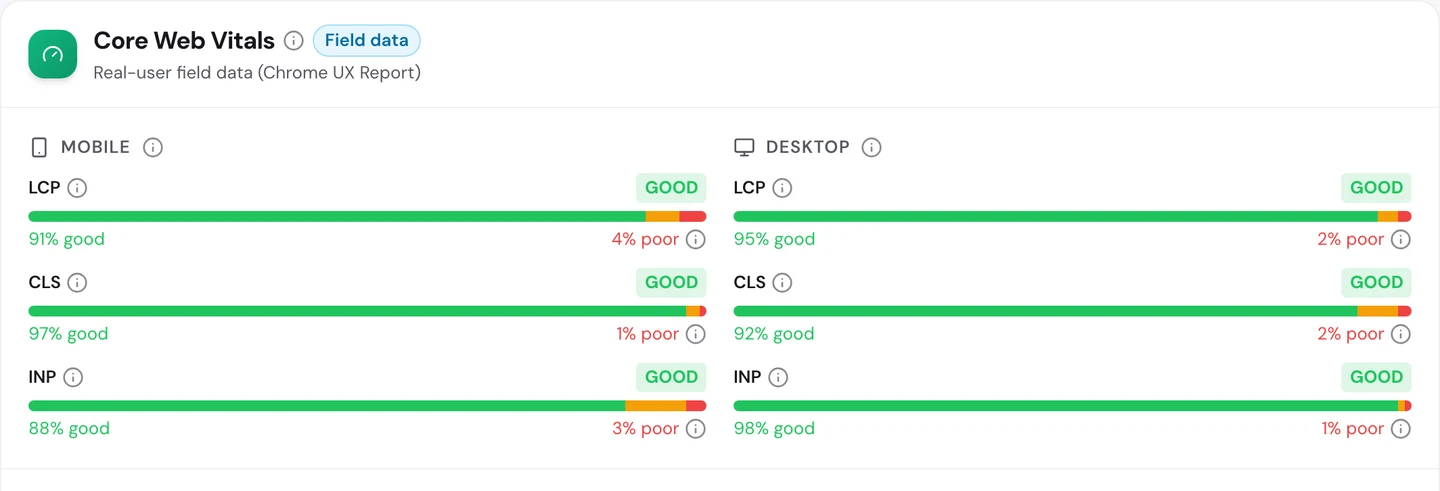
PyPI passes all 6 checks. On phones, the main content loads fast for about 9 in 10 visits.
Taps get a quick reaction, and pages stay still while they load.
The audit also found the text sits right in each page's code, so nothing waits for scripts to build it. Plain pages are easy for you to keep fast.
So keep your busiest page types simple, and test them on a phone. Our Site Speed tool shows what slows each page down.
Watch which pages get your links
Fast pages help, but links still carry a lot of weight. A backlink is a link from another website to yours, and Google treats each one a bit like a vote of trust.
The Backlinks tab of our audit shows the same data as our Backlink Analyzer.
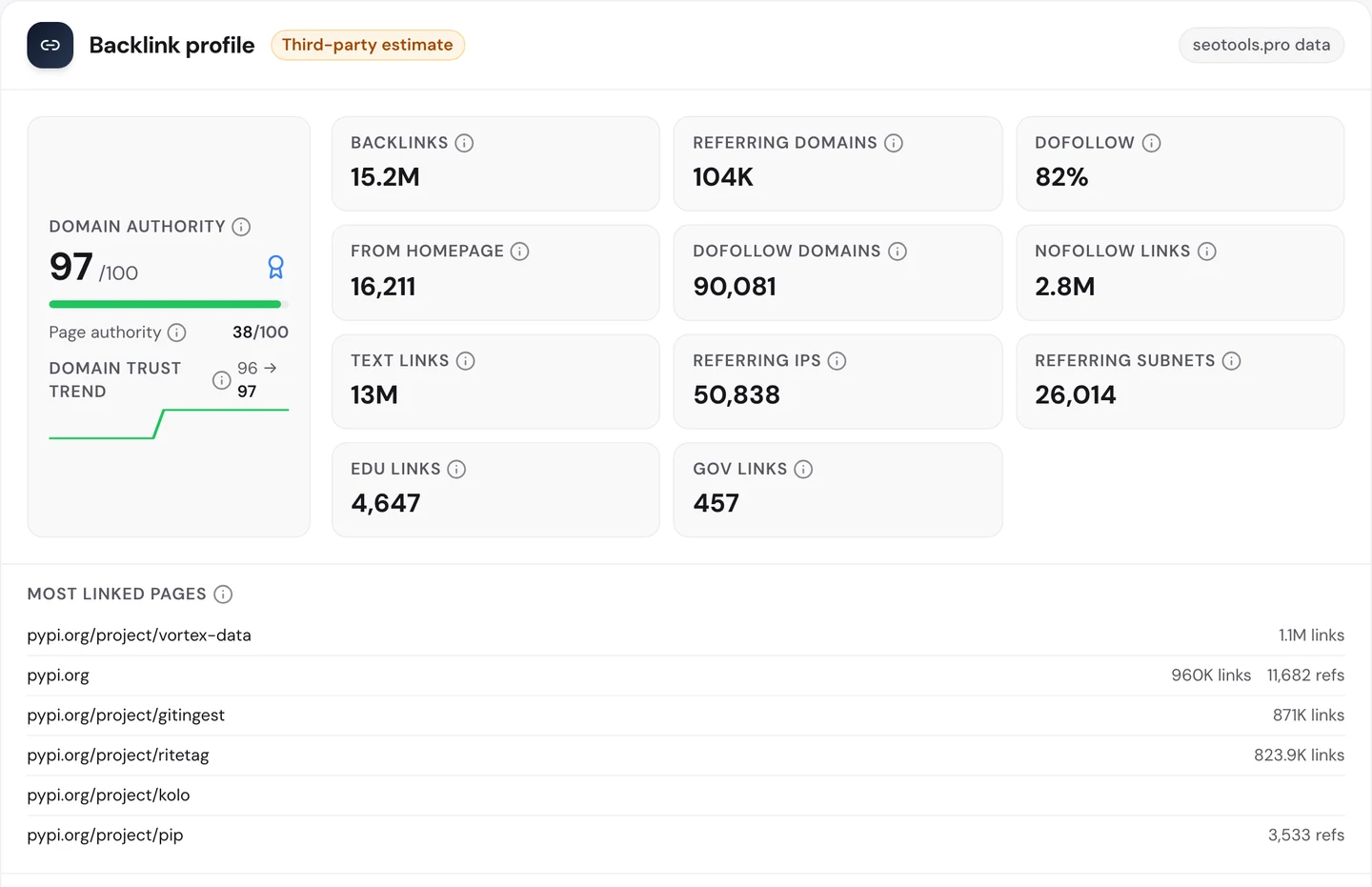
PyPI has about 15M links from about 104K referring domains, meaning websites that link to it. Its Domain Authority, our 0 to 100 score for a site's link strength, is 97.
Now look at the most linked pages. You'd expect pip or the homepage on top.
Instead, a small package called vortex-data leads with about 1.1M links. A handful of other small packages come close, each with far more links than pip.
Pip, the page that earns the most visits, sits at the bottom of that list. Its strength comes from about 3,500 different sites linking to it, not from sheer numbers.
Huge link counts like these often come from one site linking from every page it has. They're worth a look, but they don't always mean as much as you'd think.
So check your most linked pages in our Backlink Analyzer every month. Count the sites linking to a page, not just the links, and make sure your best pages are getting their share.
Find the searches you almost win
All those links should push PyPI high in Google. Our Domain Overview shows where it really stands.
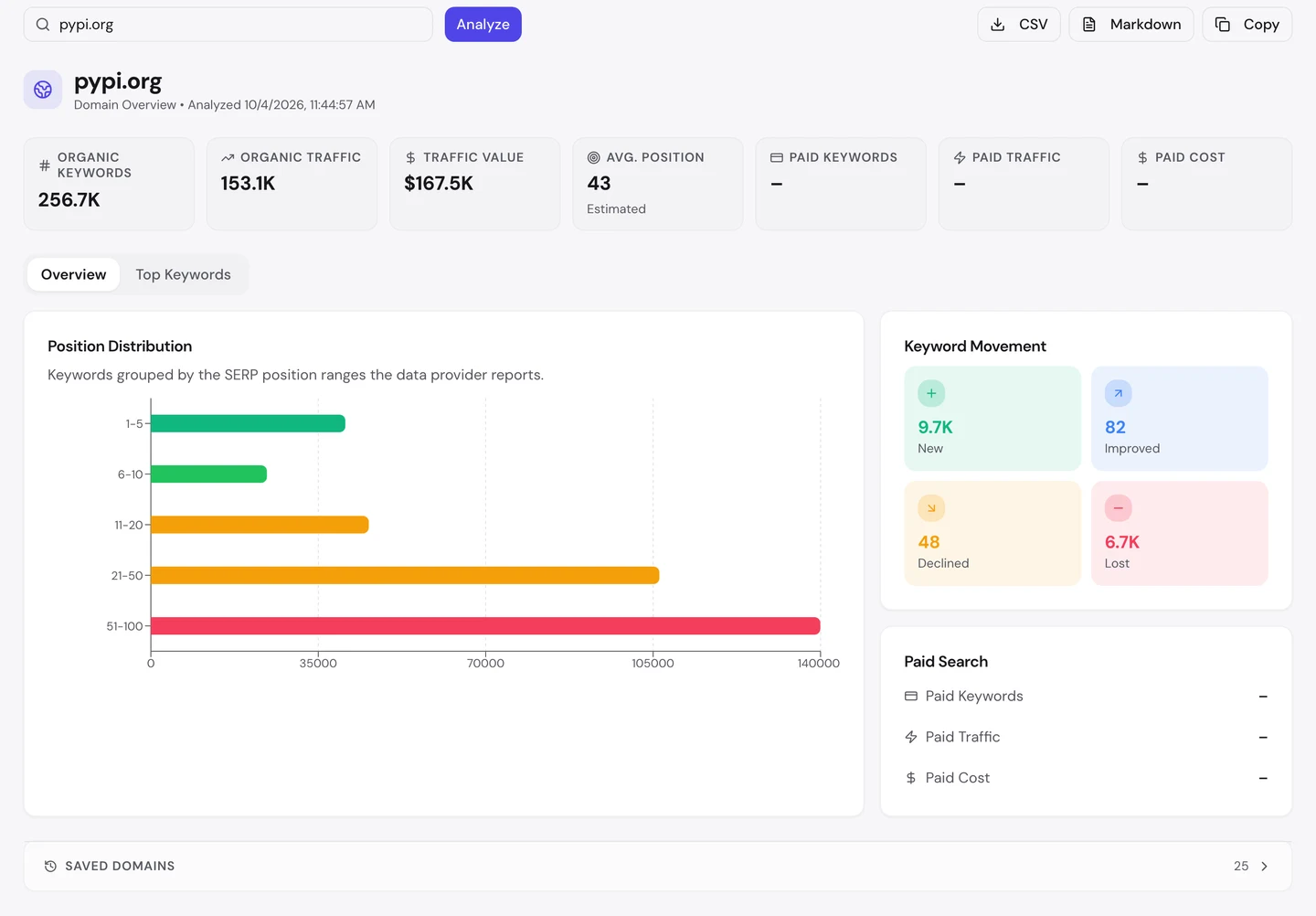
PyPI ranks for about 257K searches. Its traffic value, what those visits would cost as Google ads, is about $168K a month.
But its average position is 43, on page 5 of Google. The longest bar in the chart is spots 51 to 100, where hardly anyone clicks.
The Keywords tab you saw earlier has the good news. About 46K searches sit on page 2, just short of the top 10.
Those are your quickest wins if you're in the same spot. Then the Competitors tab shows who's winning the searches you don't.
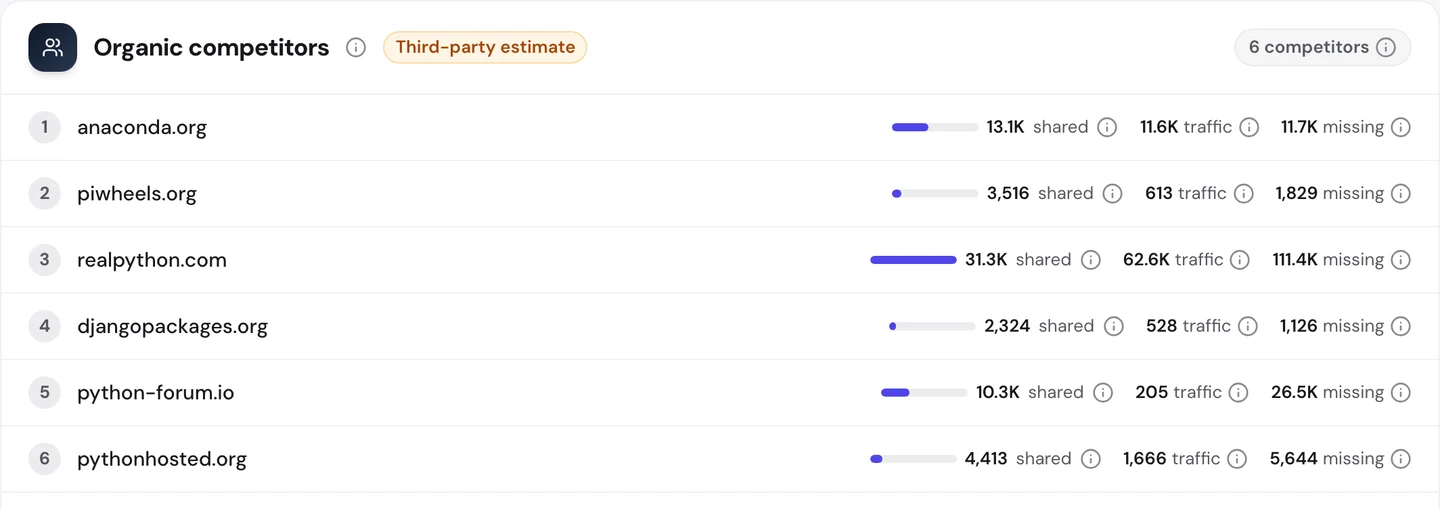
Anaconda, another place to get Python packages, comes first. Real Python, a site full of Python lessons, shares the most searches, about 31K.
Now look at the "missing" column. Those are searches the rival ranks for and PyPI doesn't, about 111K for Real Python alone.
Most of them are how-to searches that a list of packages can't answer for you. That column shows you which kind of page you'd need to win them.
If lessons are your thing, freeCodeCamp, the free coding school we studied too, is a good next read.
So find your searches on page 2 and improve those pages first, then watch them climb in our Rank Tracker. Check who shares your searches with our Competitor Analysis.
One page, pip, earns 29% of PyPI's US search visits. Our Organic Traffic Checker shows your monthly visits, your trend and the pages that earn them, so you know which ones to look after first.
- The same report that measured PyPI
- Each top page's traffic, share and top search
- Run it on any rival's domain too
What you cannot copy
First, the part you can't copy: PyPI is where pip gets its packages. The pip page says so itself, right in its first line.
Schools, government sites and about 104K other websites link to it. That's years of trust you can't buy.
Now a few honest notes you should know about the numbers.
We took our figures on 4 October 2026. The 153K figure counts US Google searches only.
The 580K figure comes from the audit's Traffic tab, and it counts the whole world. That's why the 2 numbers are so far apart.
All of these are estimates. Nobody outside PyPI can count its real visits, so tools work them out from rankings and search volume.
Our crawl checked 250 pages, a small sample of a very big site. It went deep into the old versions of requests and wheel, so it isn't a fair cross-section.
And 96 of those pages came back as the "Client Challenge" bot check. We didn't count the errors on them as PyPI's mistakes.
The audit also flagged images that wouldn't load. Many images on package pages are small badges hosted on other sites, and we couldn't check each one, so we left them out.
The one number to take away
4%.
That's the share of PyPI's US search visits that come from people typing its name. Everyone else typed the name of a package, like pip or requests.
They landed on a plain page named exactly that, with the install command at the top. No clever copy, no long guide.
That's the lesson for any site with lots of products. Name each page after the thing people want, and keep the old copies pointing to the main one.
Which of your pages do people find without knowing your name? Check them the way Google would.
You can run every one of these checks on your own site, and on your rivals', and see the same numbers for yourself.
Frequently asked questions
Should I keep pages for old versions of my product?
Keep them if people still need them, like old manuals or past releases. Point each one at the main page with a canonical tag, so Google knows which one to rank.
Is a canonical tag enough, or should I use noindex too?
A canonical tag is usually enough. Google treats it as a strong hint, not a rule, so check now and then that it still ranks the main page. Don't put both tags on one page, since they send mixed signals.
Can a bot check hurt my Google rankings?
Only if Google gets stopped by it. Most bot checks let known search crawlers through, but a wrong setting can block them. Test your key pages after any change to your bot rules.
How do I see what Google sees on my page?
Use the URL Inspection tool in Google Search Console. It shows the page Google fetched, so you can spot a bot check or a missing title before it costs you visits.
What should a software page's title say?
Start with the exact name people search. Then add what it does in a few words, and end with your site's name if there's room.
Which structured data fits a package or software page?
SoftwareApplication code can describe the name, the version and the type of software. Breadcrumb code fits too, and you can add the release date so Google doesn't have to guess it.
Do I need an llms.txt file?
It's not required, and AI tools don't all read it yet. It's quick to write, though, and it gives AI tools a short map of the pages that matter most on your site.
How long do new titles and descriptions take to show up in Google?
Usually days to a few weeks, depending on how often Google visits your pages. Busy pages get updated first. Google may still rewrite a description if it thinks another line fits the search better.