Open Library gets about 312K visits a month from Google in the US, and almost half land on a homepage that ranks first for plain searches like "read books online free".
Open Library is a free online library run by the Internet Archive. Its goal is a web page for every book ever published.
We ran it through our whole SEO toolkit. We found a bot check that lets Google in but stops other visitors, and a Spanish title on an English book page.
Here are 9 lessons you can copy, plus the part you can't.
Win searches that skip your name
We started with our Organic Traffic Checker. It estimates a site's organic traffic, meaning the people who find it on Google without ads.
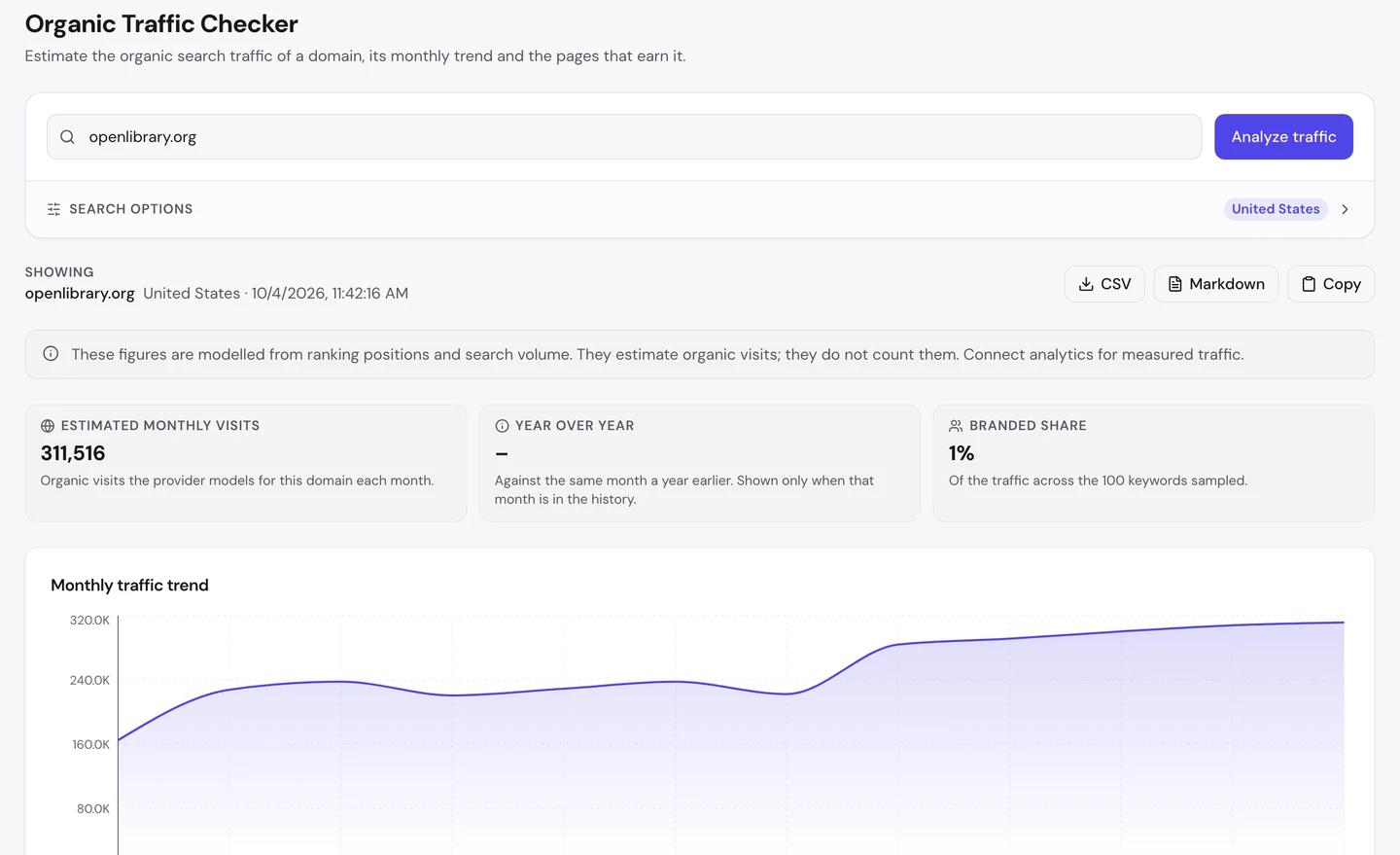
For openlibrary.org, that's about 312K visits a month in the US. The line has nearly doubled over the past year.
Almost half of those visits land on one page, the homepage. So we looked at what it ranks for.
The Keywords tab of our Website Audit lists the searches a site ranks for, where it ranks and how many visits each one sends.
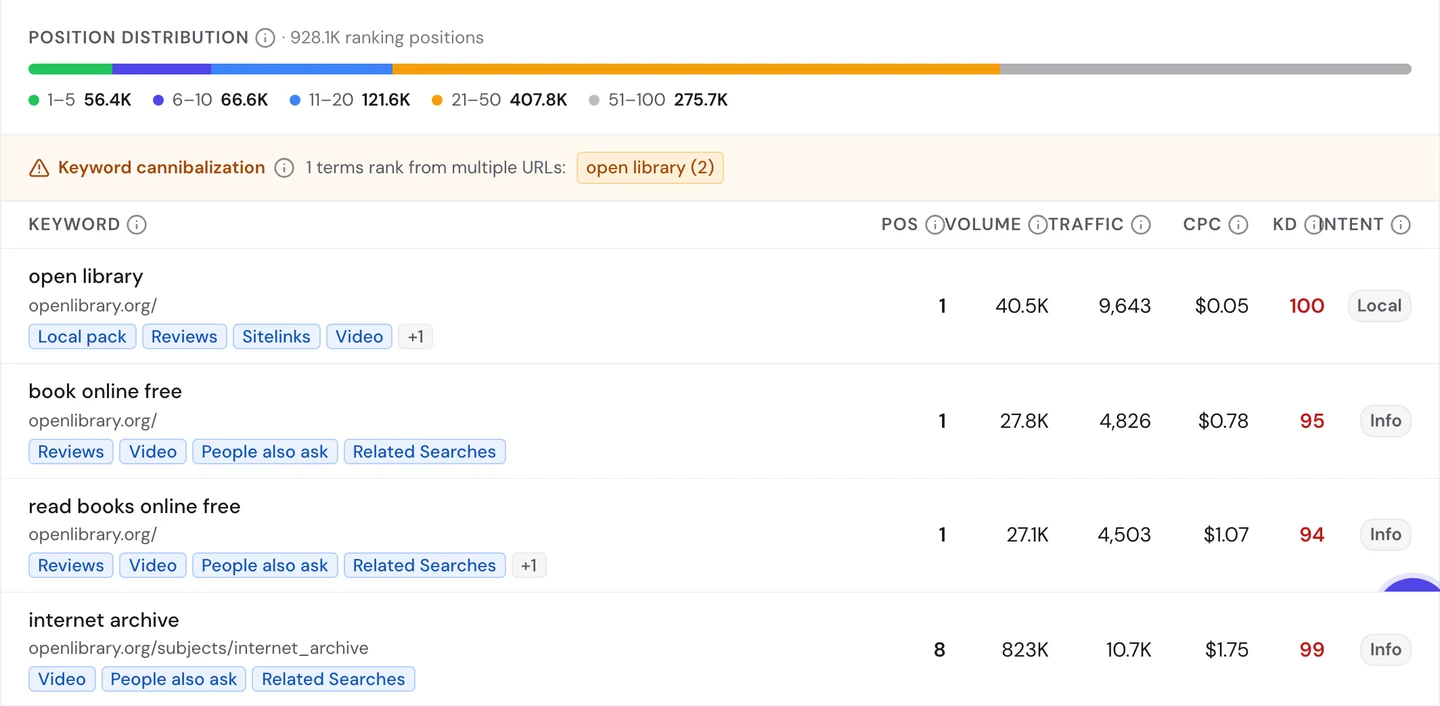
The homepage ranks first for "open library", which makes sense. Those people typed its name.
But it also ranks first for "book online free" and "read books online free". Each one gets about 27K searches a month, and neither says Open Library.
Those people just want a free book. If you've ever searched for one, you may have landed there too, without knowing the site.
There's a small catch, too. The tab warns about keyword cannibalization, when your own pages compete for the same search.
Here it's "open library" itself. The homepage and the search page both rank for it, and the homepage gets most of the visits.
The audit's Traffic tab shows the whole world, not just the US.
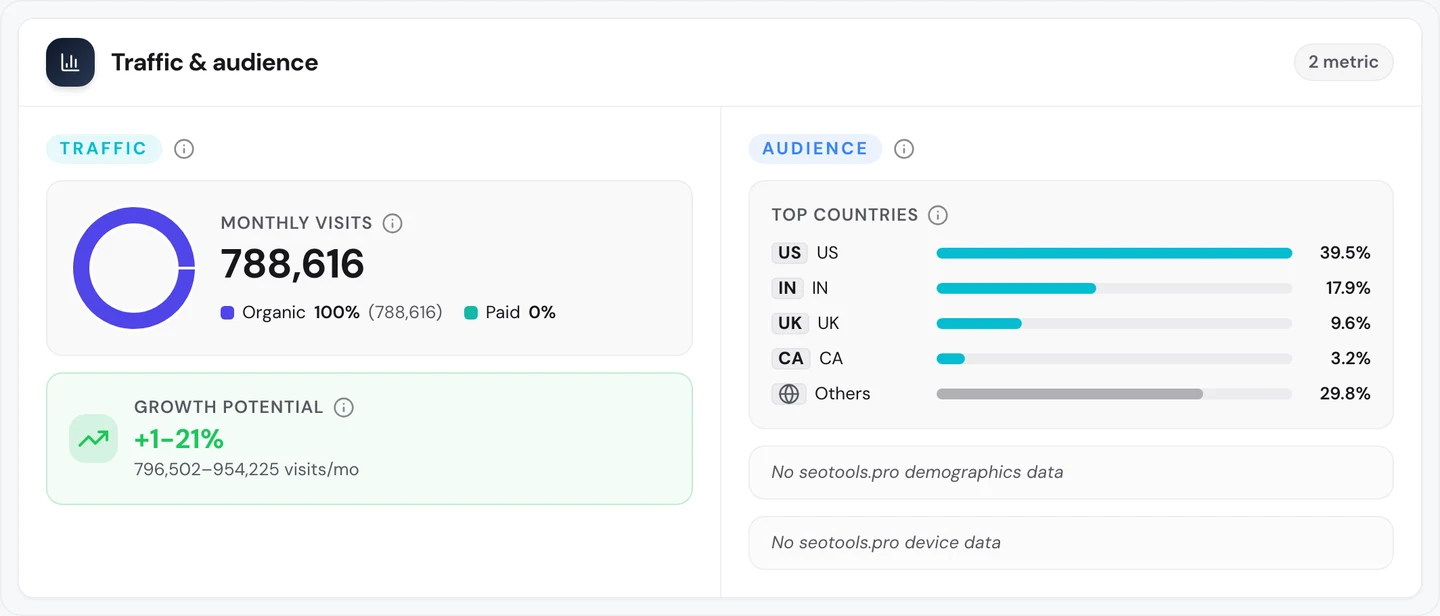
Worldwide, Open Library gets about 790K search visits a month, and it pays for none of them. The US sends about 2 in 5, and India comes next.
So build your main page around the words newcomers type, not just your name. Our Keyword Research tool shows those words, and our Organic Traffic Checker shows which pages win them.
Let the right bots through
Next, we wanted to see a single book page. We picked Roald Dahl's Fantastic Mr Fox.
We opened it in a browser run by a program, the way our tools test pages. Open Library didn't show us the book.
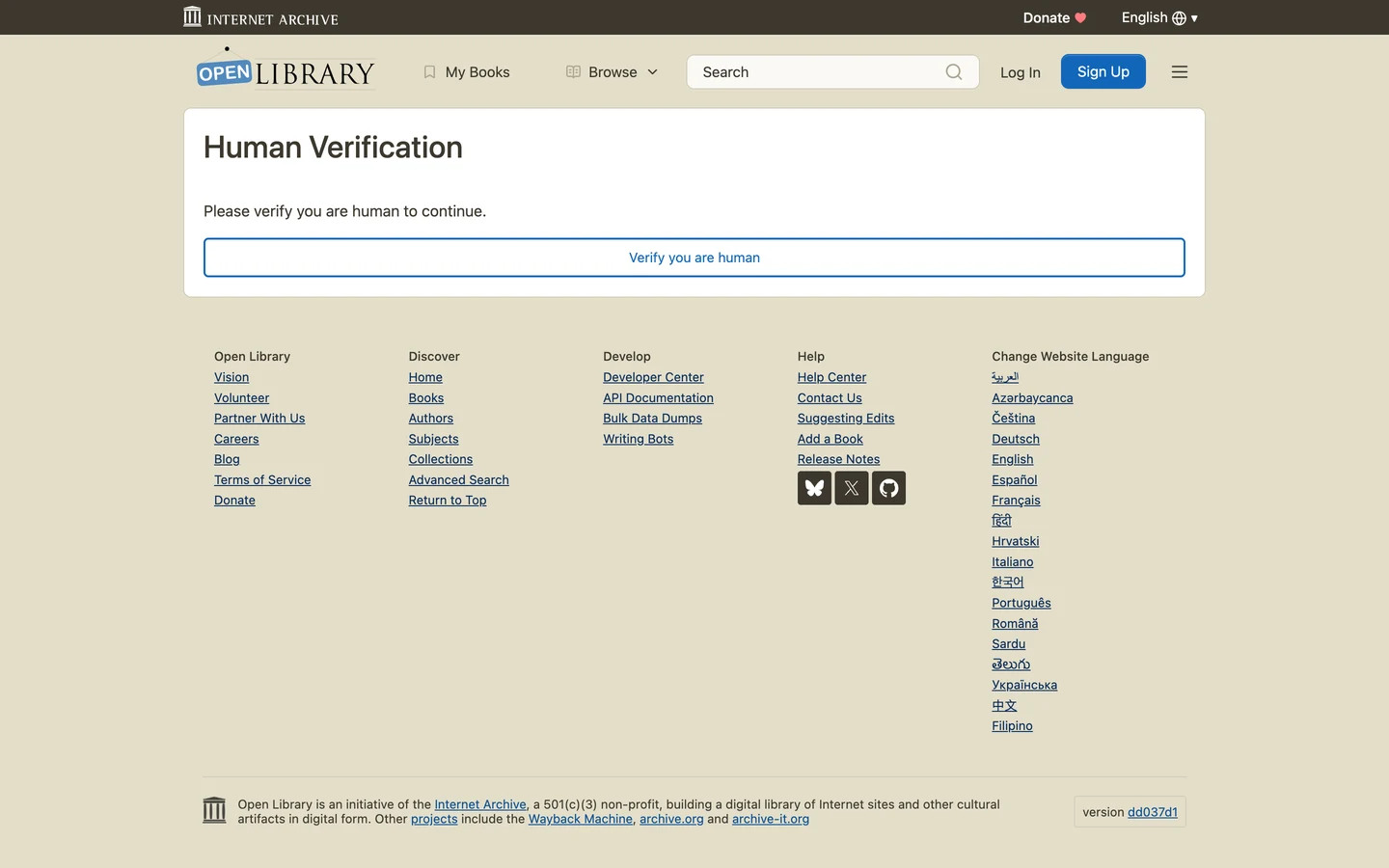
Instead, we got a Human Verification page. It asked us to prove we were human before we could go on.
Bot checks like this are common. They stop scrapers, programs that copy pages in bulk.
Our free browser extension then checked the page it was given. Open a page, Open a page, click the seotools.pro icon, and a panel opens beside it with its SEO checks., and a panel opens beside it with its SEO checks.
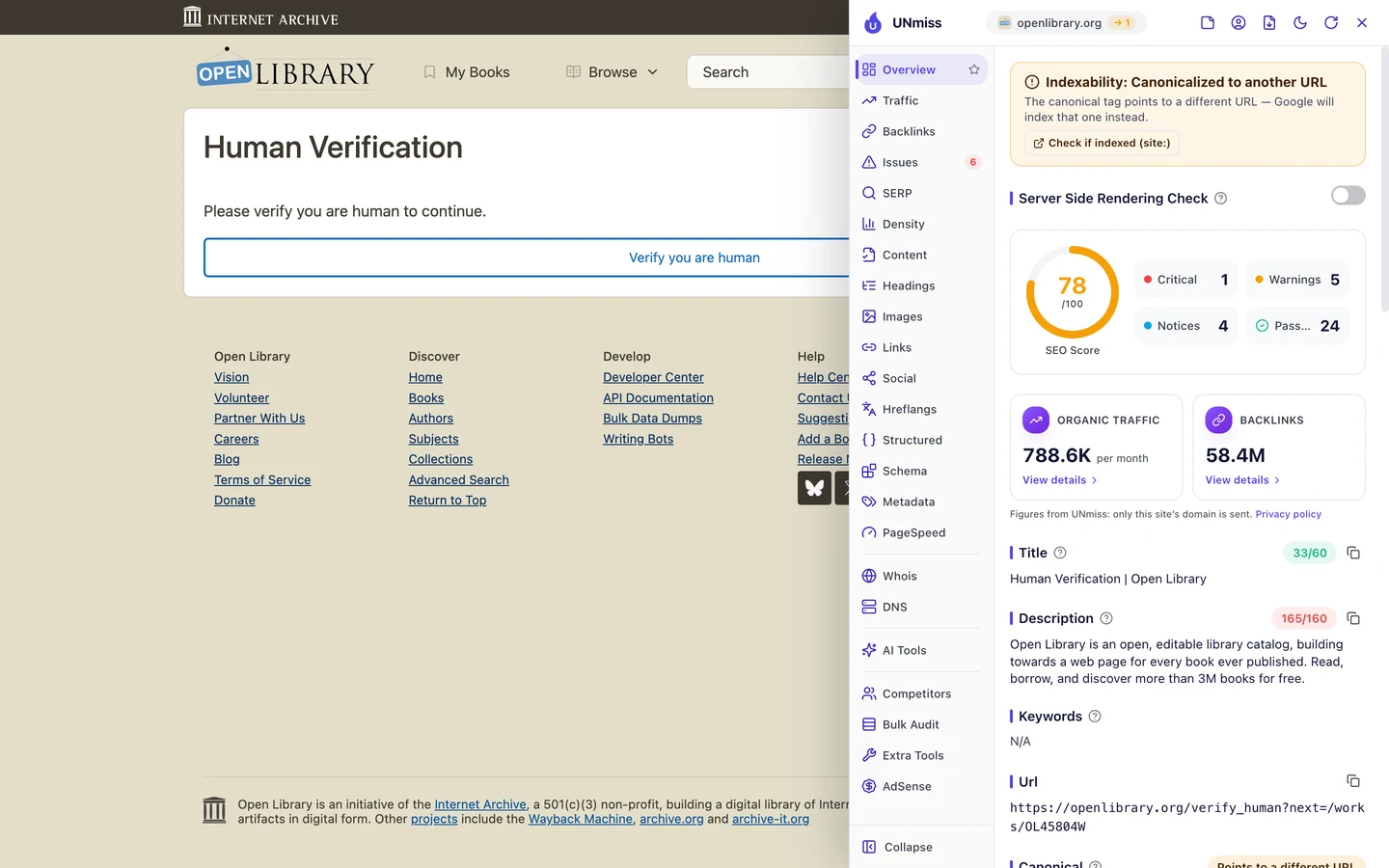
The title reads "Human Verification | Open Library". The address changed too, to a check page with the book's code on the end.
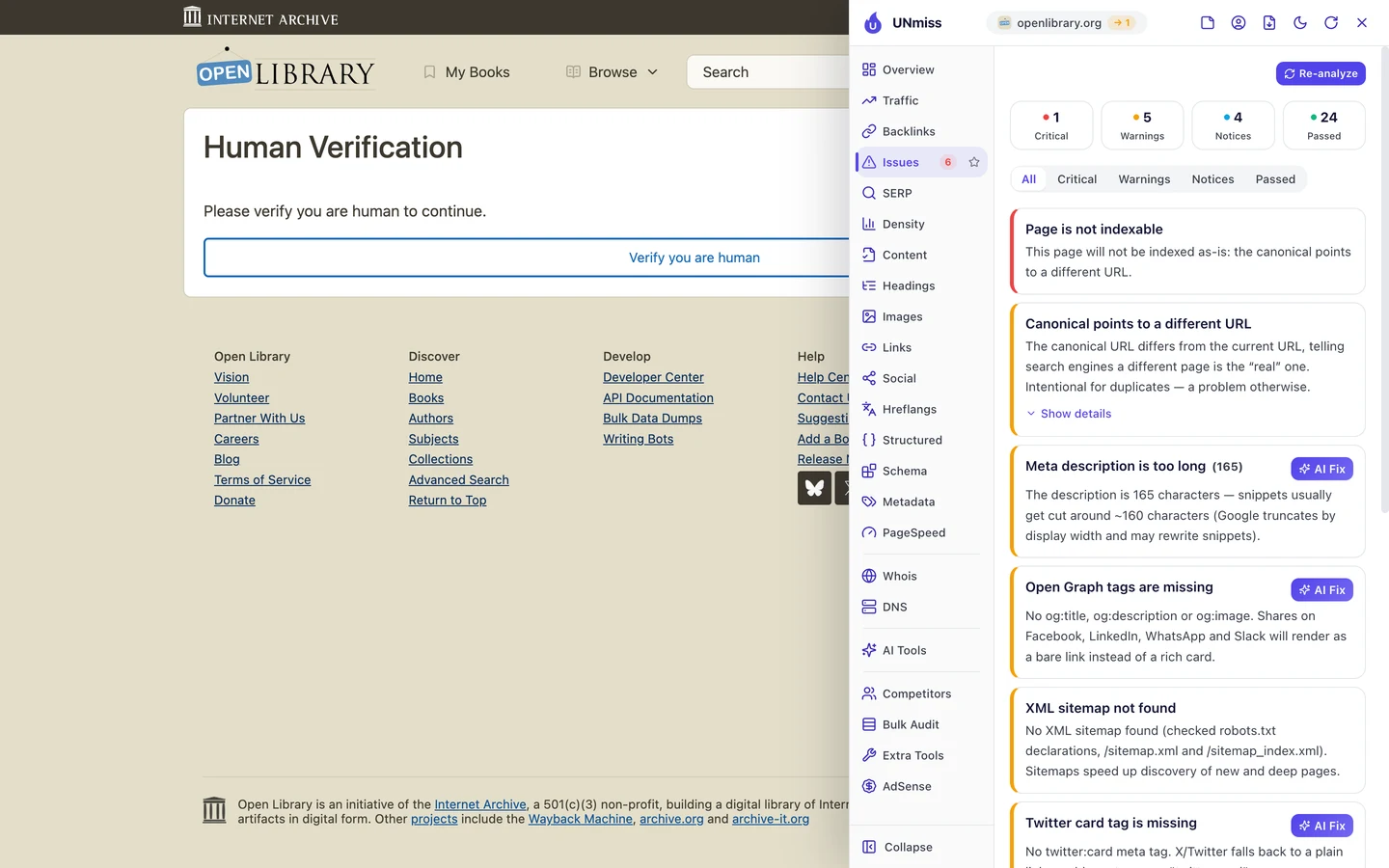
The top issue says the page won't be indexed, meaning listed by Google. Its canonical, a tag that tells Google which address is the main copy, points somewhere else.
That's fine for a check page. You'd never want Google to list it.
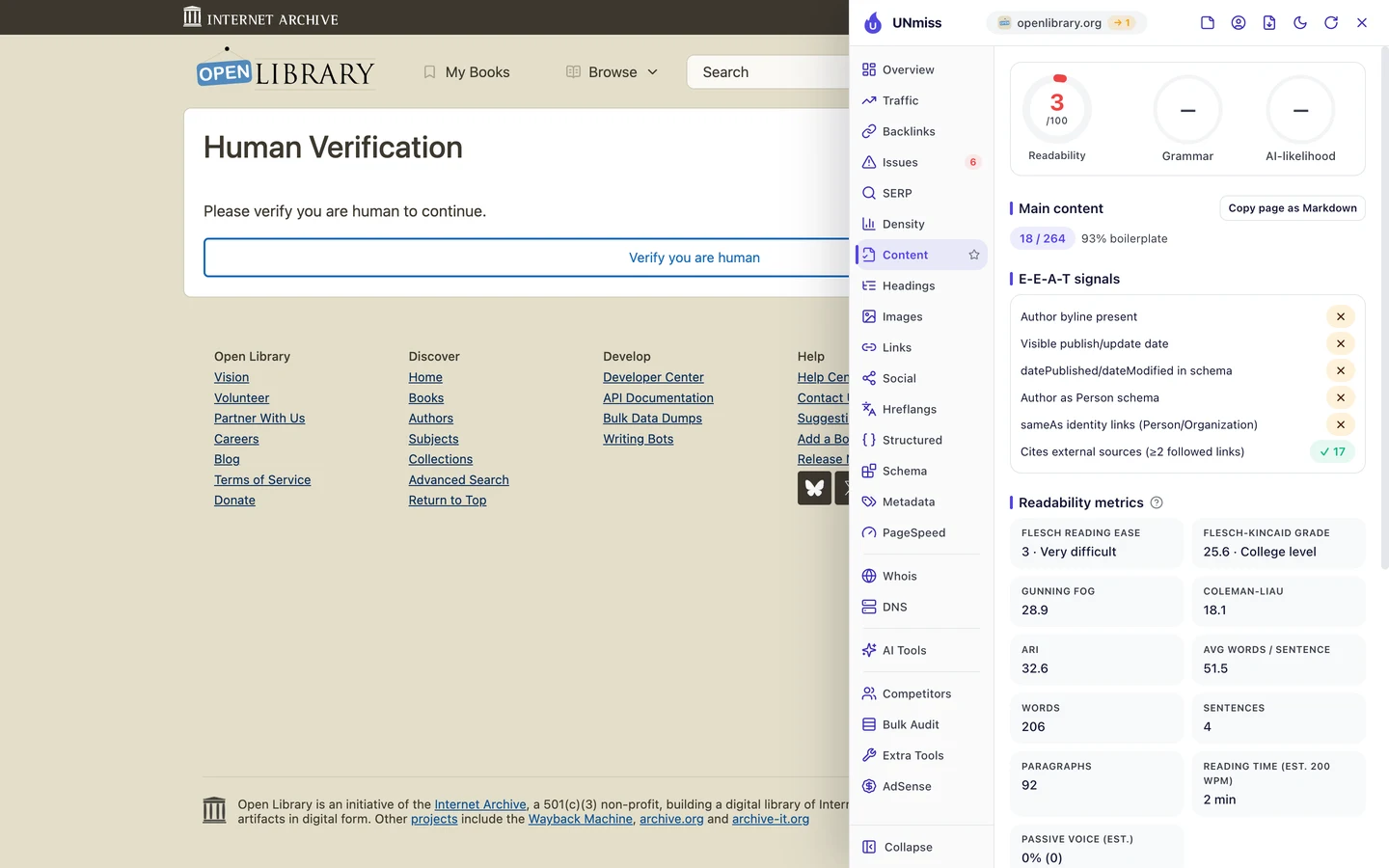
The Content tab shows how empty it is. Only 18 of its 264 words are real content, and the rest is menus and footer.
Fix either the publication date or the data-collection date so they are consistent.
Every browser and bot sends a user agent, the name it gives when it asks for a page. We asked for the book page under 3 names.
Googlebot is Google's crawler, a program that visits pages so Google can list them. GPTBot is the crawler from OpenAI, the company behind ChatGPT.
With a normal browser's name, Open Library sent us to the check page. With the names Googlebot and GPTBot, we got the real book page.
So Open Library lets search and AI crawlers in, and asks everyone else to prove they're human. That's a smart setup, as long as it keeps working.
Here's the risk. If a rule like this ever slips, Google could get the check page on every book at once.
The rules for crawlers also live in robots.txt, a file that tells crawlers what they may read. The extension reads it for you.
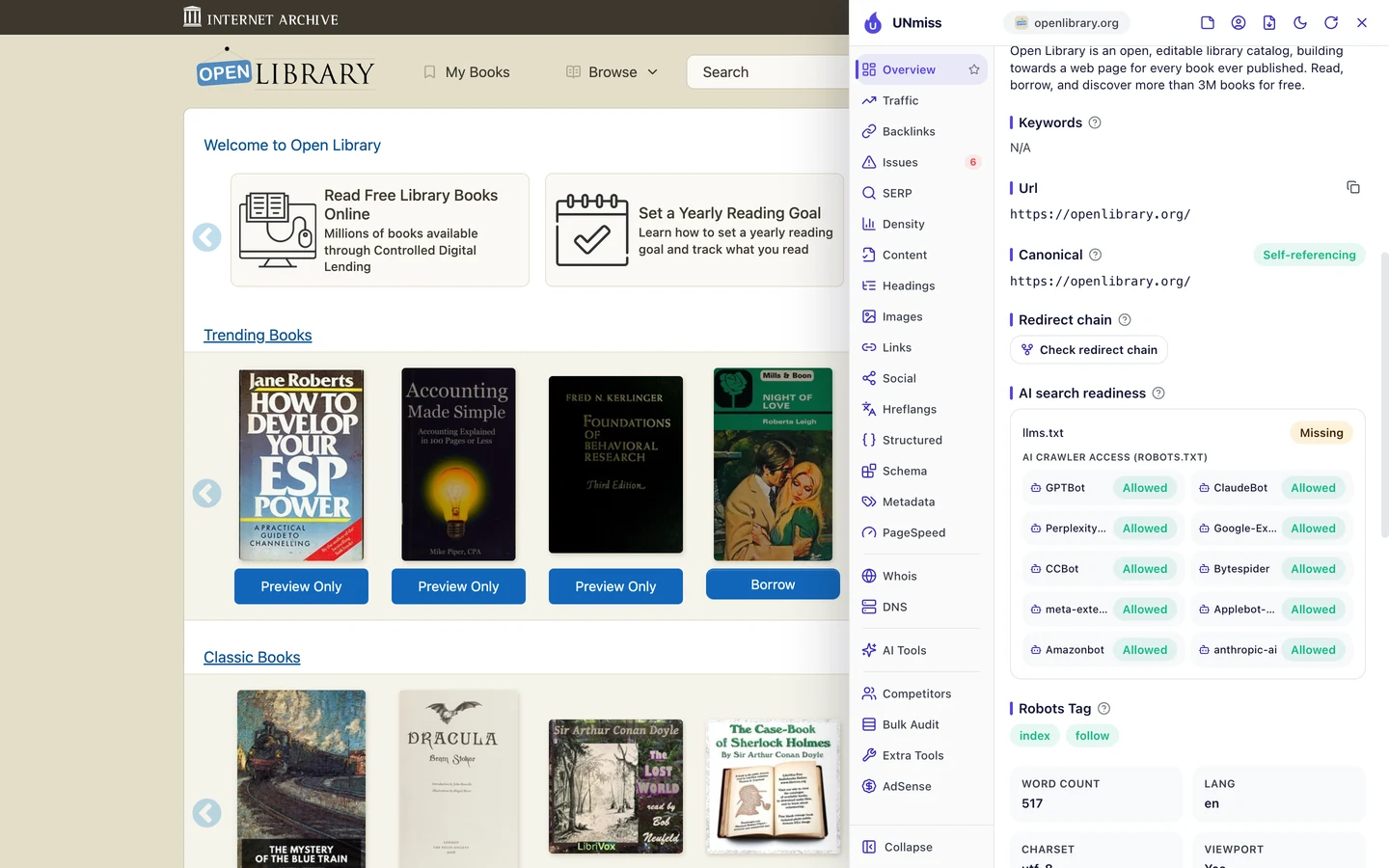
Open Library's robots.txt lets in all 10 AI crawlers the extension checks. But it has no llms.txt, a short file that explains a site to AI tools.
We looked at how big sites treat AI crawlers in our robots.txt case study. Our llms.txt case study looks at who uses that file.
So if you use a bot check, test your pages as Google, as AI crawlers and as a normal visitor. Set your crawler rules with our robots.txt generator, then see if AI tools mention you with our AI Visibility Checker.
Open Library shows a bot check to unknown visitors and lets search and AI crawlers through. We test your site the way Google, AI tools and real people see it, then fix what each one gets wrong.
- We test your key pages as Google, AI crawlers and real visitors
- We check your bot rules, robots.txt and llms.txt
- We fix pages that show crawlers a check page or the wrong title
- SEO and GEO, so AI answers can quote you too
Pick the title most people search
The real book page had one more surprise. Its title, the blue link Google shows for a page, wasn't the one you'd expect.
For Googlebot, the Fantastic Mr Fox page was titled "El Superzorro by Roald Dahl | Open Library". El Superzorro is the book's name in Spanish.
So the English page for a famous kids' book carried the title of a Spanish edition. Someone in the US would search for "Fantastic Mr Fox", not "El Superzorro".
Open Library keeps many editions of a book under one main page. It looks like that page took its title from the wrong one.
The homepage title has a smaller problem. The extension shows it on the Overview tab.
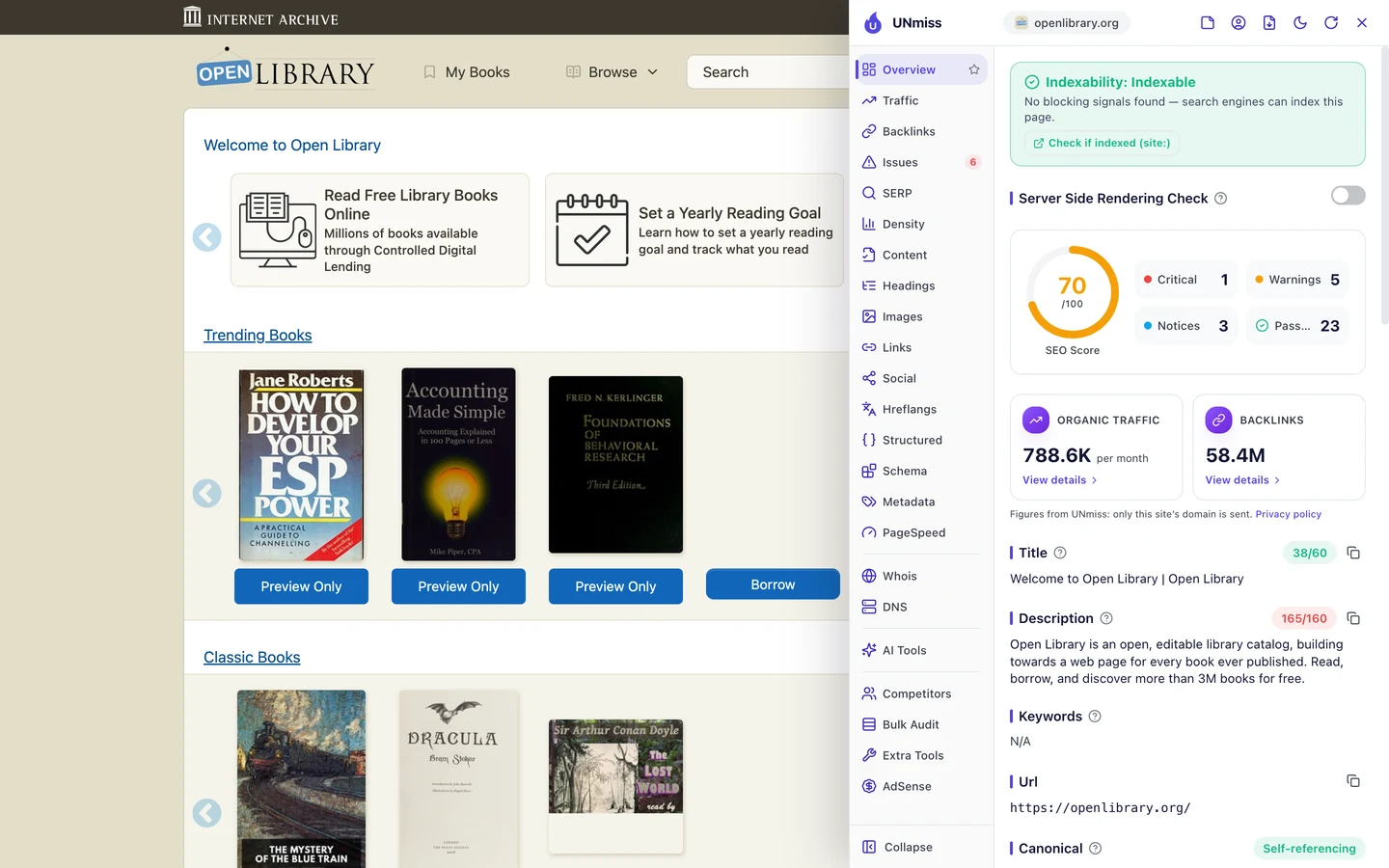
It reads "Welcome to Open Library | Open Library", so it says the name twice. Yet the page wins searches for free books online, and those words aren't in the title at all.
It ranks first anyway. A newer site with fewer links might not get away with that.
PHP.net, which we studied too, had titles with code names instead of the words people search. The fix is the same.
So give each page the title most searchers use, in their own language. See how yours looks on Google with our SERP Simulator.
Write a description for each page
The description is the short summary Google may show under your title. Open Library's homepage uses one that's 165 characters long.
Google tends to cut it off at about 160. So the end of the line may never show.
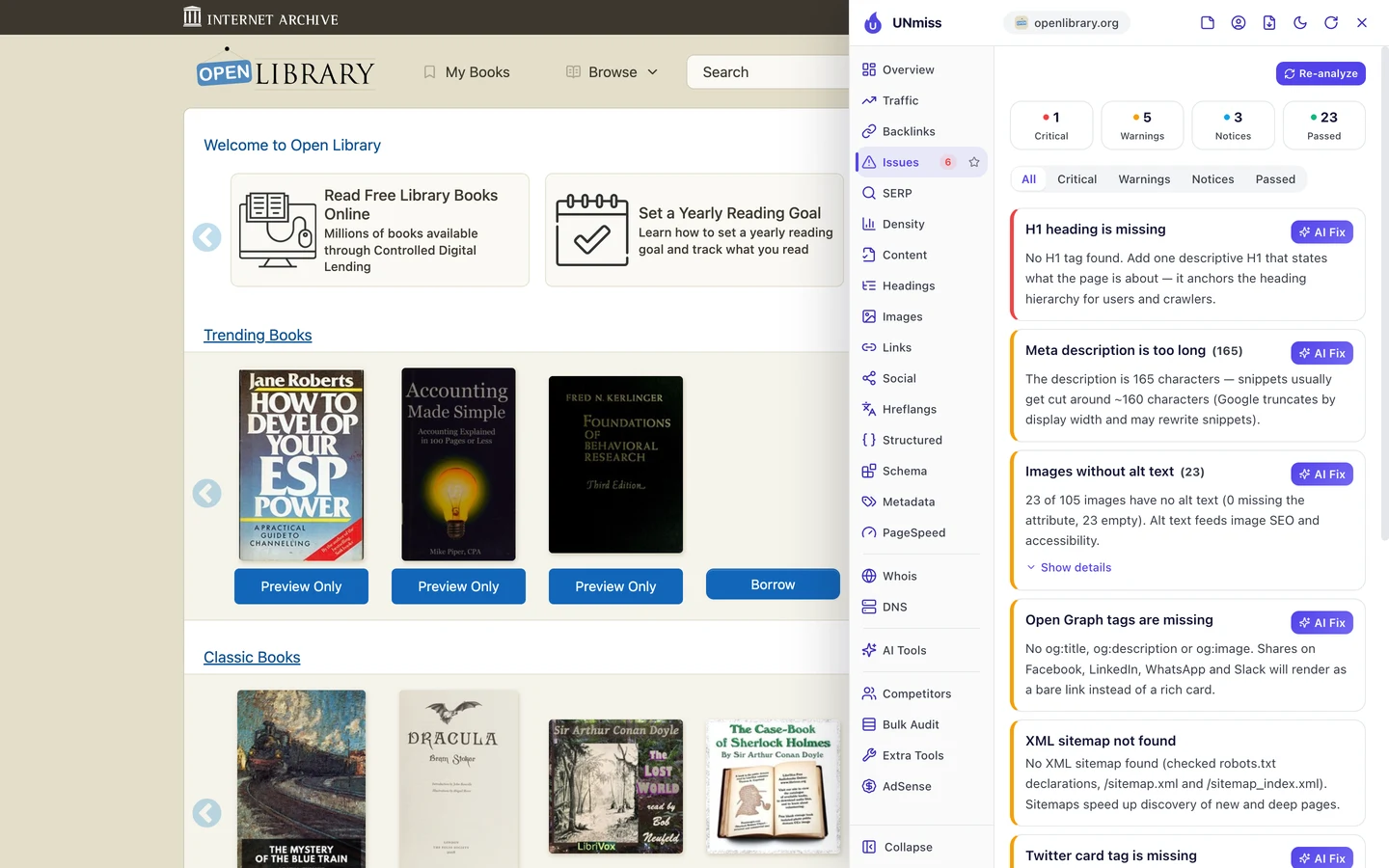
The Issues tab puts a missing H1 at the top. The H1 is the tag for a page's main heading, and the homepage has none.
It also flags 23 of 105 images with no alt text. Alt text is a short description that tells Google and screen readers what an image shows.
Then we found something bigger. That same long description shows up on page after page.

Our audit found the homepage blurb on 183 pages, word for word. To Google, all those pages sound the same, and you can't tell them apart in the results either.
When that happens, Google often writes its own summary. You lose your say in what people read before they click.
So write a short, fresh description for every page, or have your template build one from the page's own facts. Our Meta Tag Generator helps you write it and check the length.
Mark up every book in code
Structured data is code that tells Google what a page is, like a book, a person or a place. The extension's Structured tab looks for it.
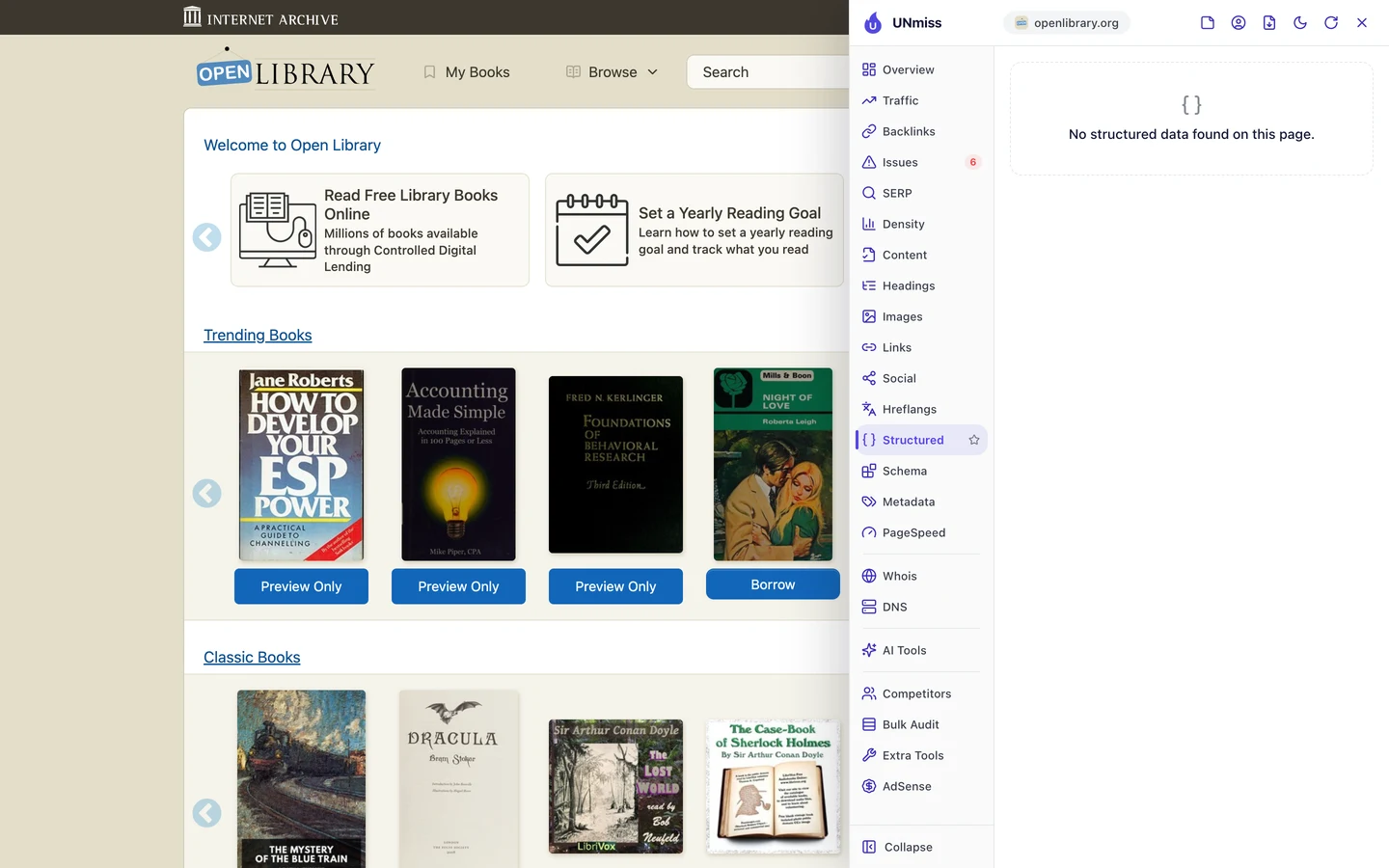
We found none on the homepage. We couldn't check a book page the same way, since our test browser hit the bot check.
That's a missed chance for a library. There's a Book type for this code, with spots for the author, the edition and the ISBN, the number printed on the back of a book.
It helps AI tools too. Code like this tells a chatbot which book and which author a page is about, with no guessing.
So add code that says each page is a book, who wrote it and which edition it is. Our Schema Markup Generator writes it for you.
Earn links from schools
A backlink is a link from another website to yours. Google treats each one a bit like a vote of trust.
The Backlinks tab of our audit shows the same data as our Backlink Analyzer.
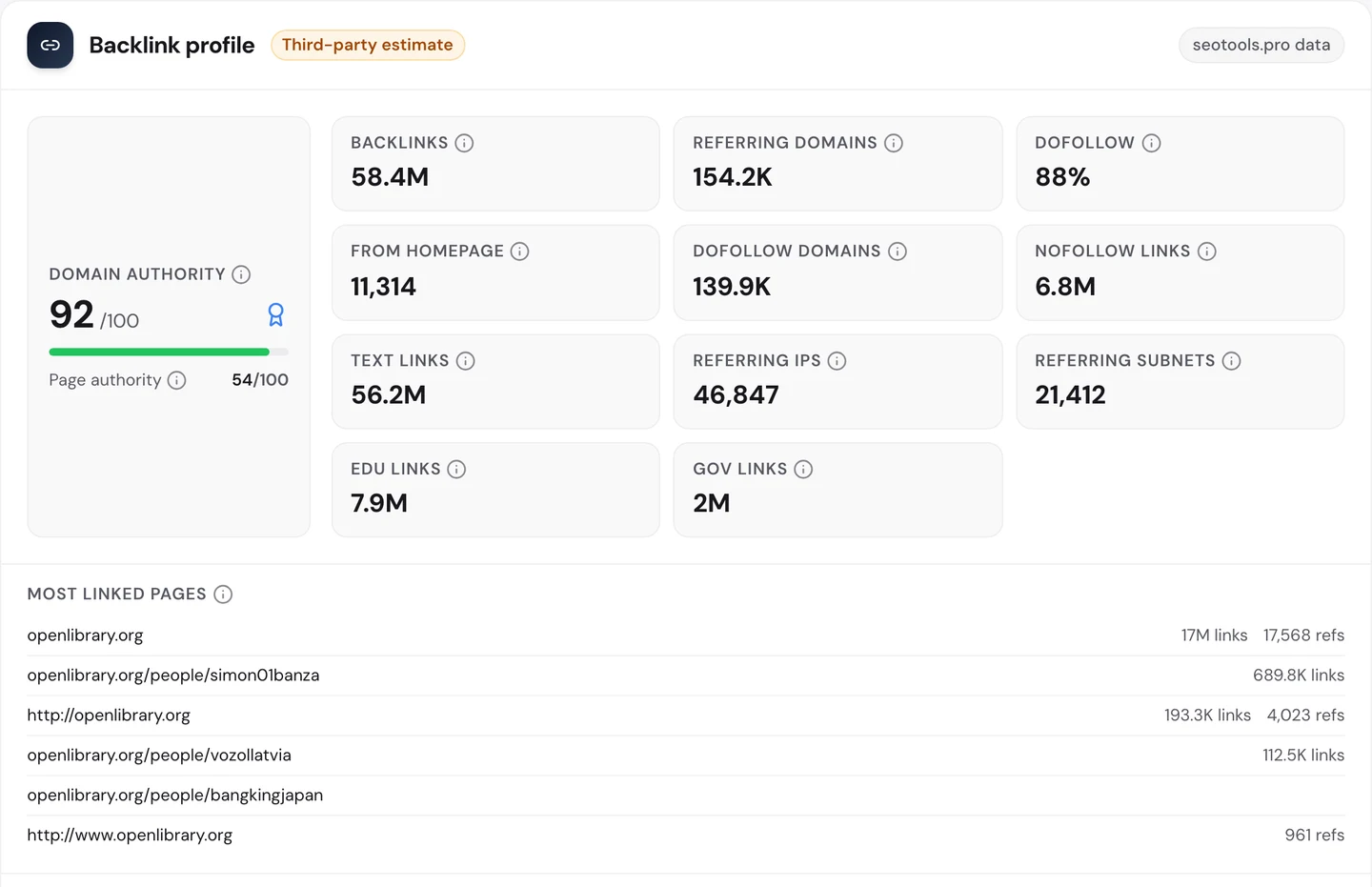
Open Library has about 58M links from about 154K referring domains, meaning websites that link to it. Its Domain Authority, our 0 to 100 score for a site's link strength, is 92.
Now look at the EDU links box. About 7.9M links come from .edu sites, the addresses US schools and colleges use.
Another 2M come from government sites, which fits a free library. Links like these are hard for you to get unless you're a trusted source too.
One thing to watch. After the homepage, the most linked pages include a few member profiles.
Docker Hub, which we studied too, had profiles that looked like spam at the top of its list. If a profile you don't know tops yours, go and look at it.
So find the people who'd send their readers to you, like teachers for a library. Then track every new link with our Backlink Analyzer.
Find the keywords near page 1
All those links should push Open Library high in Google. Our Domain Overview shows where it really stands.
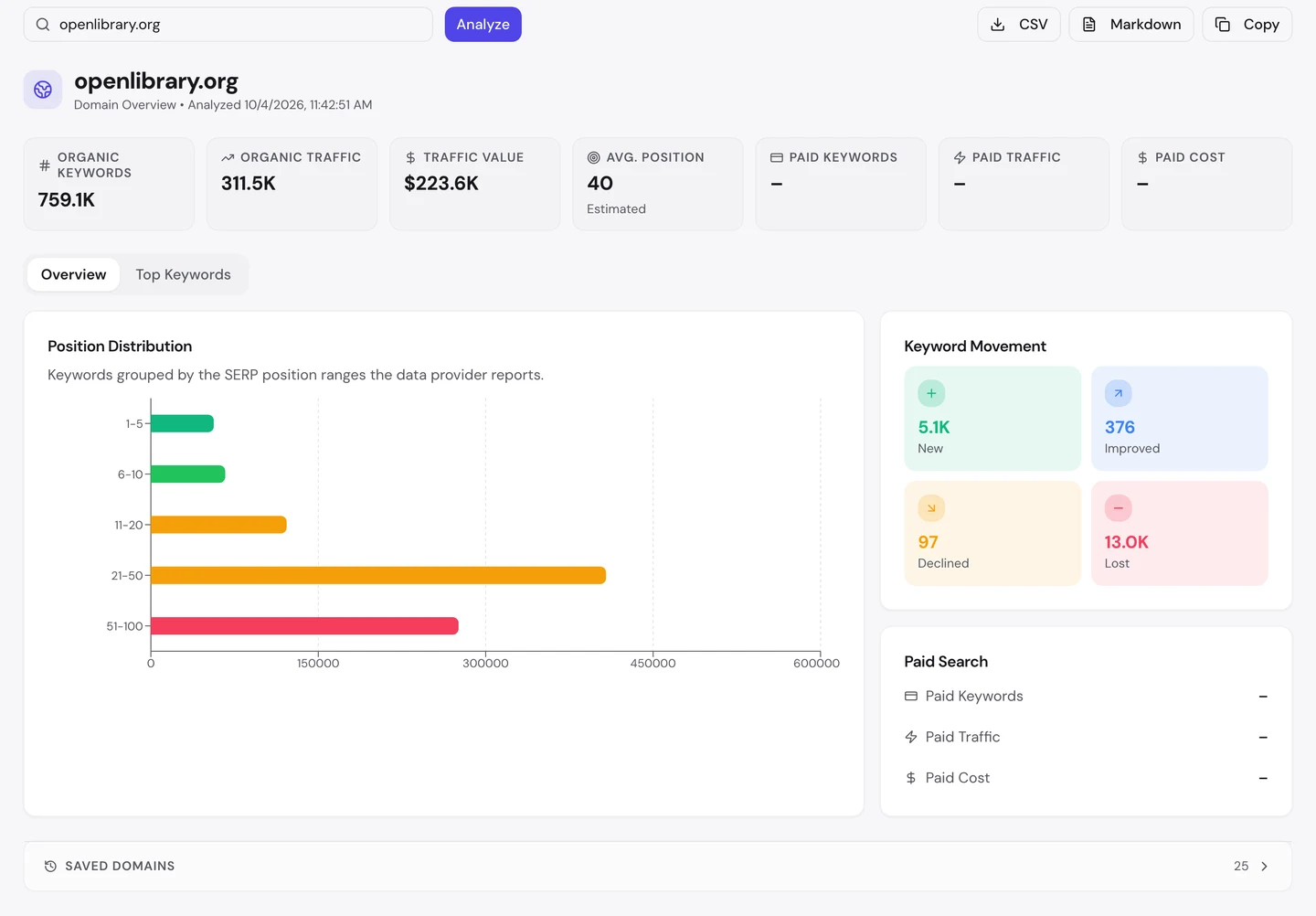
Open Library ranks for about 760K searches. Its traffic value, what those visits would cost as Google ads, is about $224K a month.
But its average position is 40, on page 4 of Google. The longest bar in the chart is spots 21 to 50.
The movement box is worth a look too. It picked up about 5K new keywords and lost about 13K.
If you want quick wins, look just short of page 1. The audit's Keywords tab counts about 122K rankings between 11th and 20th.
Some of those searches are won by rivals. The audit's Competitors tab shows who.
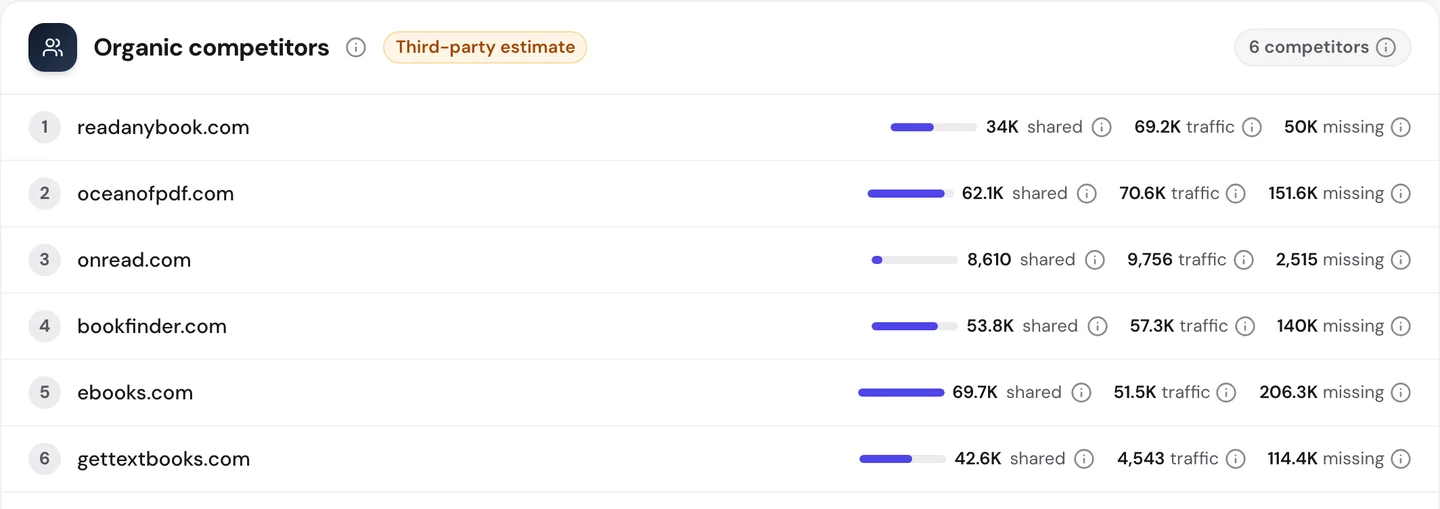
Most of the rivals are free ebook sites. Bookfinder.com shares about 54K searches with Open Library.
Ebooks.com shares about 70K. It also ranks for about 206K searches that Open Library doesn't.
That "missing" column is a ready-made to-do list. You can see each search a rival wins and decide if you need a page for it.
So find your keywords between 11th and 20th and improve those pages first. Check your rivals with our Competitor Analysis, then watch your pages climb in our Rank Tracker.
Audit what Google can reach
The extension checks one page at a time. Our Website Audit checks hundreds at once, so you can see which problems repeat.
It checked 332 pages, and Open Library scored 80 out of 100. The report rates that as good.
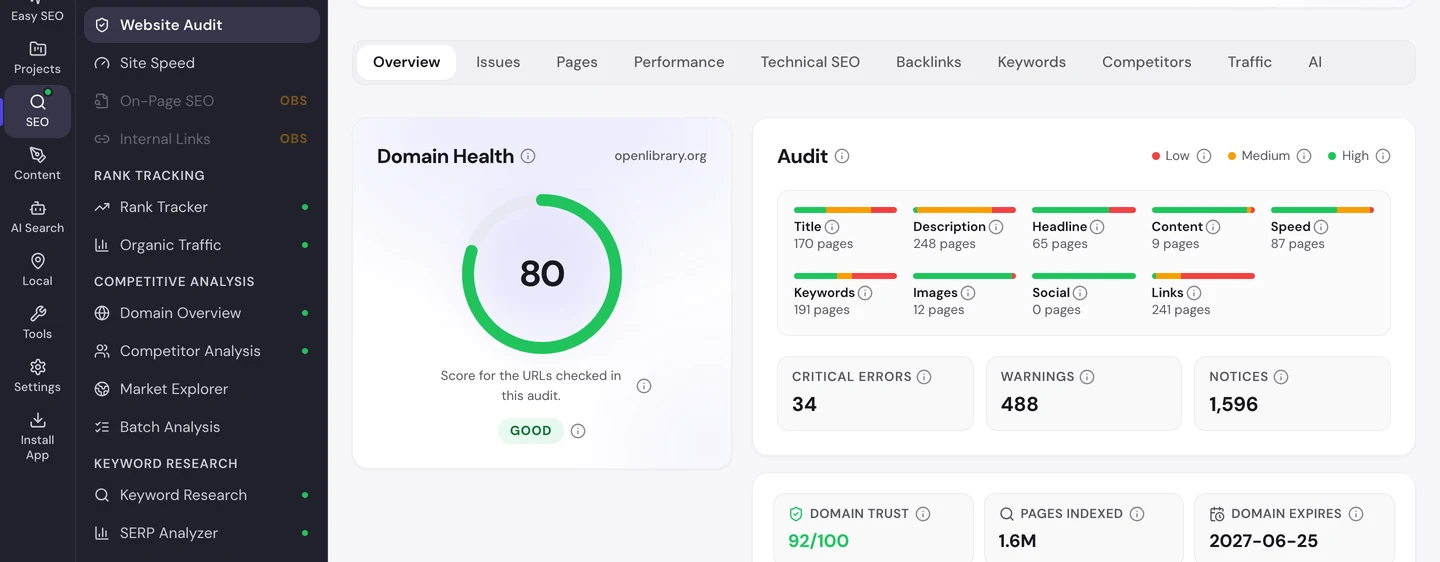
The Issues tab sorts the problems by how much they matter to you.
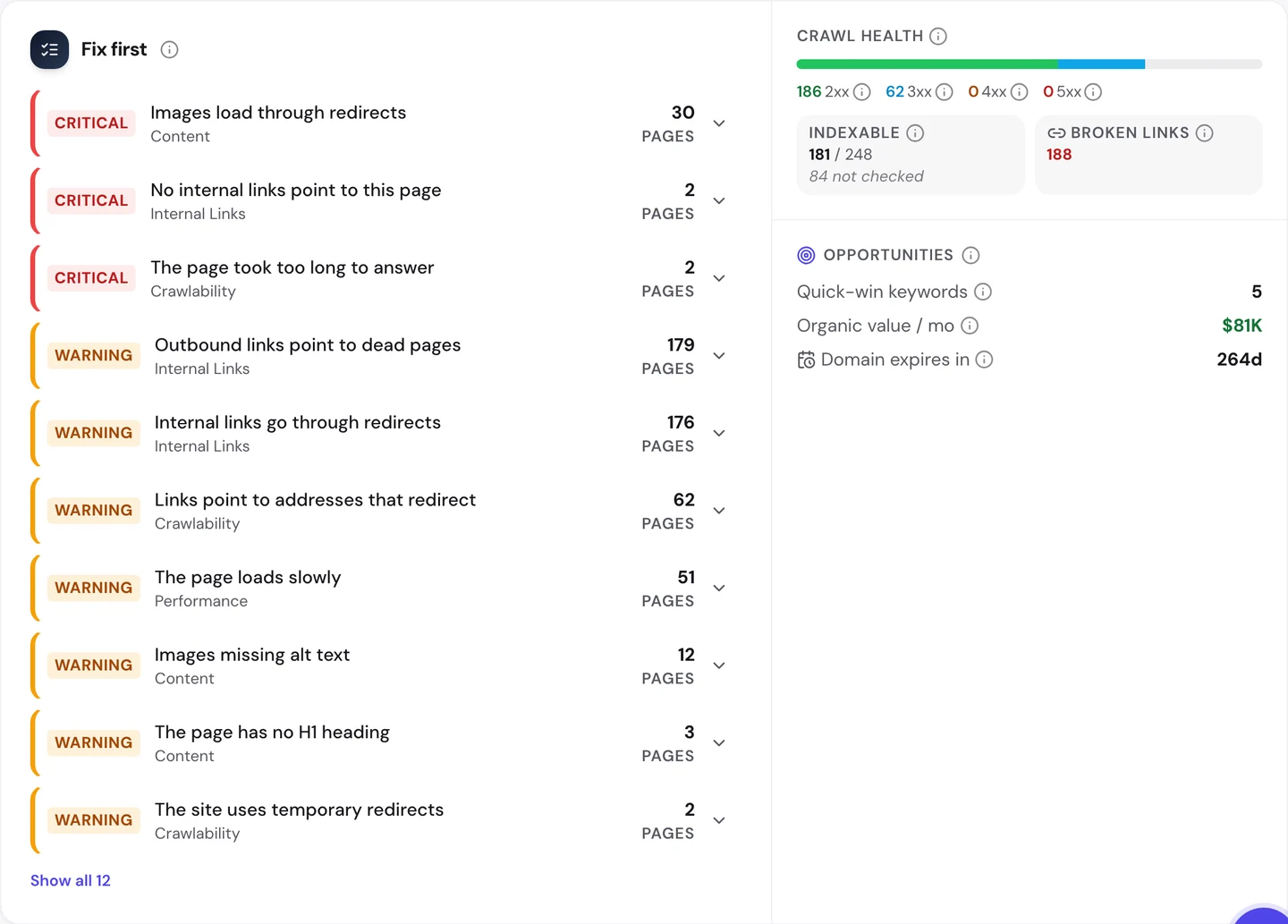
The top error is images that load through redirects. The image address points to an old spot and gets sent on, so each image takes an extra trip.
2 pages have no links pointing to them at all. And 2 more took too long to answer.
Most warnings are about links. About 180 pages link out to dead pages, and about 175 send their own links through redirects.
The Technical SEO tab shows which pages Google may list.
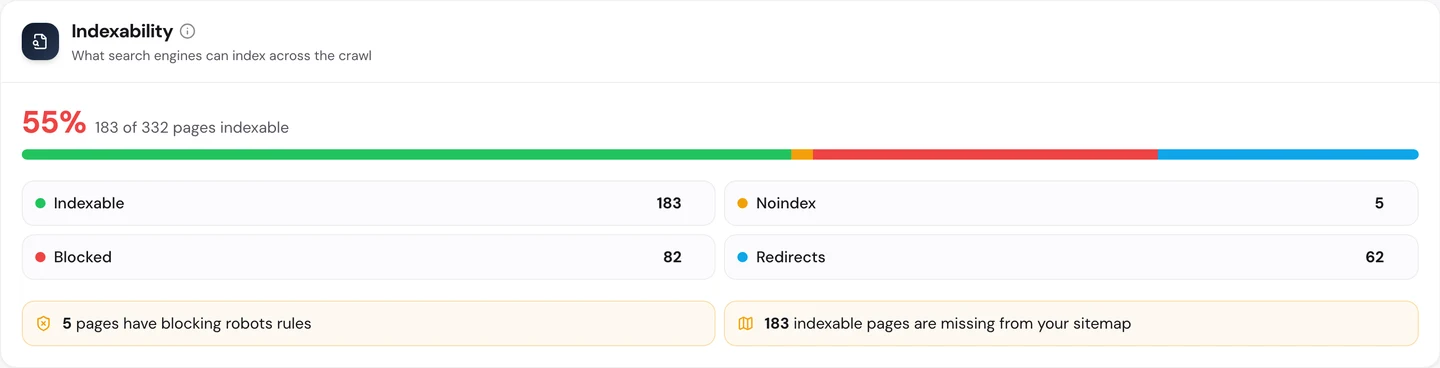
Only 55% of the pages we checked can be listed by Google. Robots rules block 82 of them, and 62 are redirects.
Some of that is on purpose. Still, it's worth checking that each rule blocks only what you mean it to.
Then there's the sitemap, the file that lists a site's pages for Google. All 183 pages Google may list are missing from one, and the extension couldn't find one at the usual addresses.
A site with millions of books needs a sitemap more than most. It helps Google find deep pages that few links reach.
You don't have to work out what to fix first. The audit's AI tab writes the plan: a short summary, each problem with how to fix it, and a 90-day to-do list.
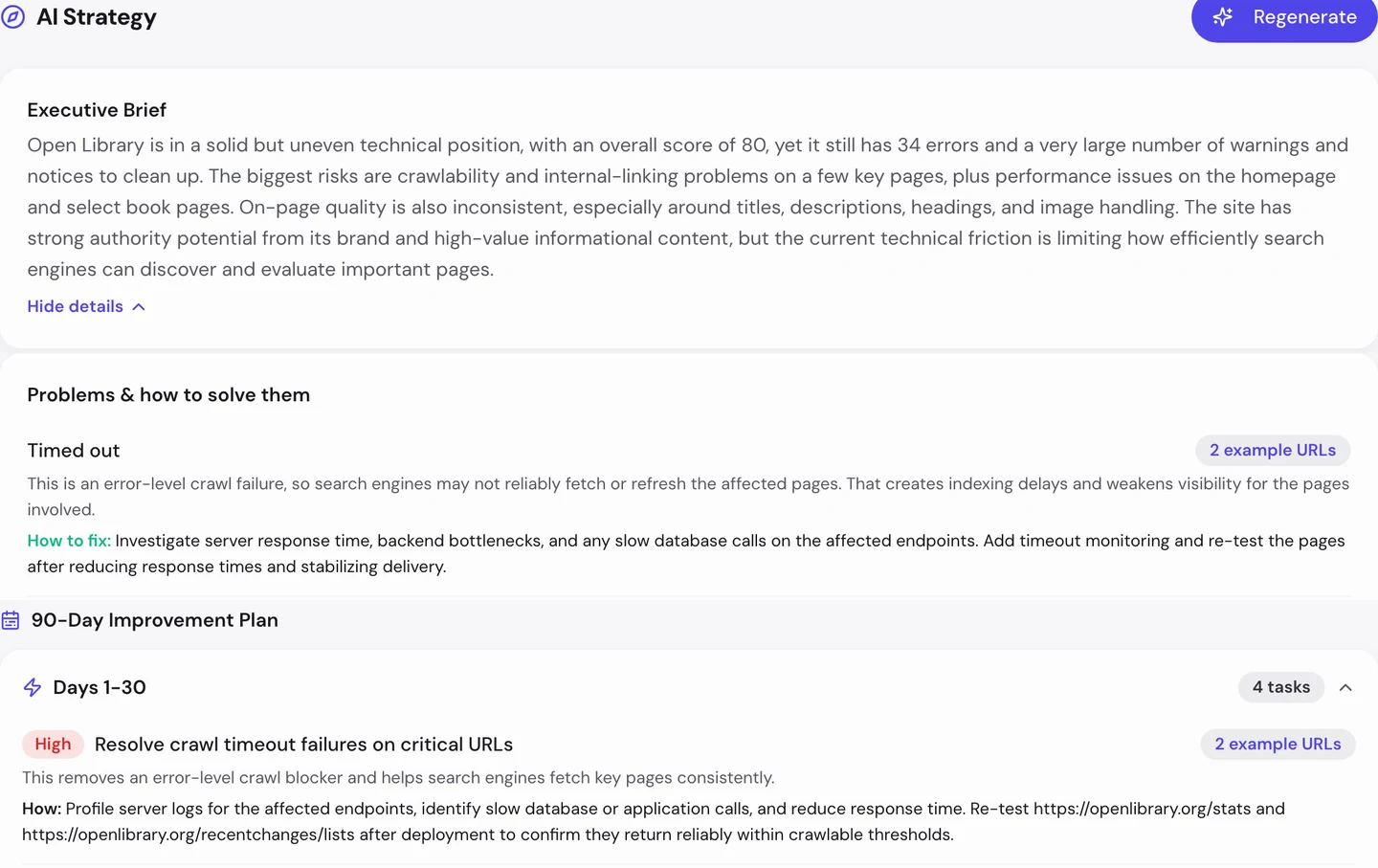
For Open Library, the first month starts with the 2 pages that time out. Then come the redirected images and the pages with no links.
So crawl your site the way Google would, and fix the problems that repeat across a template. Run our Website Audit, and you'll see which fixes help hundreds of pages at once.
Fix slow pages on phones
Last, speed. When we opened the homepage, its rows of books were still loading.
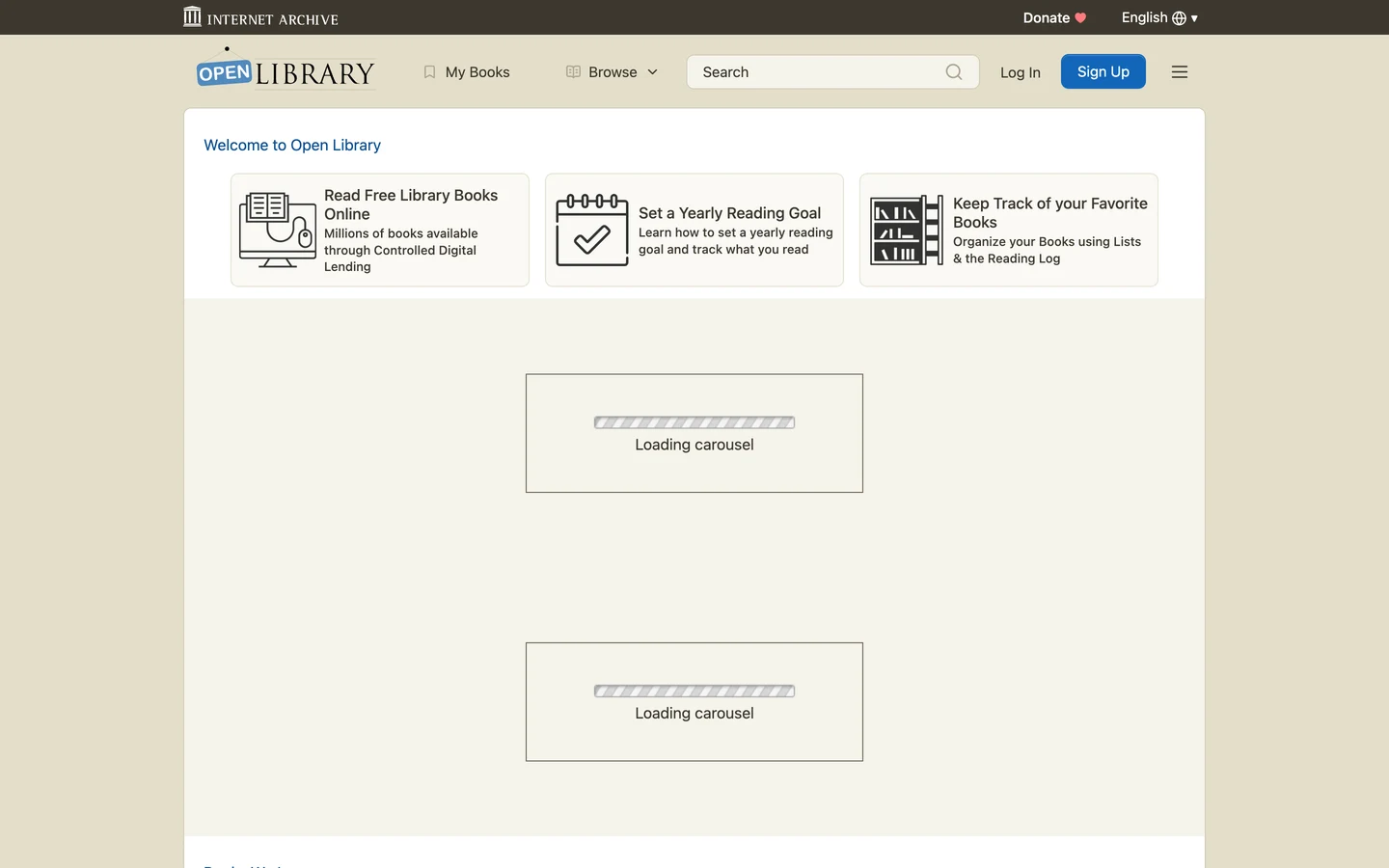
Each box said "Loading carousel". A carousel is a sliding row of book covers, and these filled in a moment later.
The Performance tab of the audit shows Core Web Vitals. These are Google's 3 checks of how fast a page loads, how fast it reacts and whether it stays still, measured on real visitors' devices.
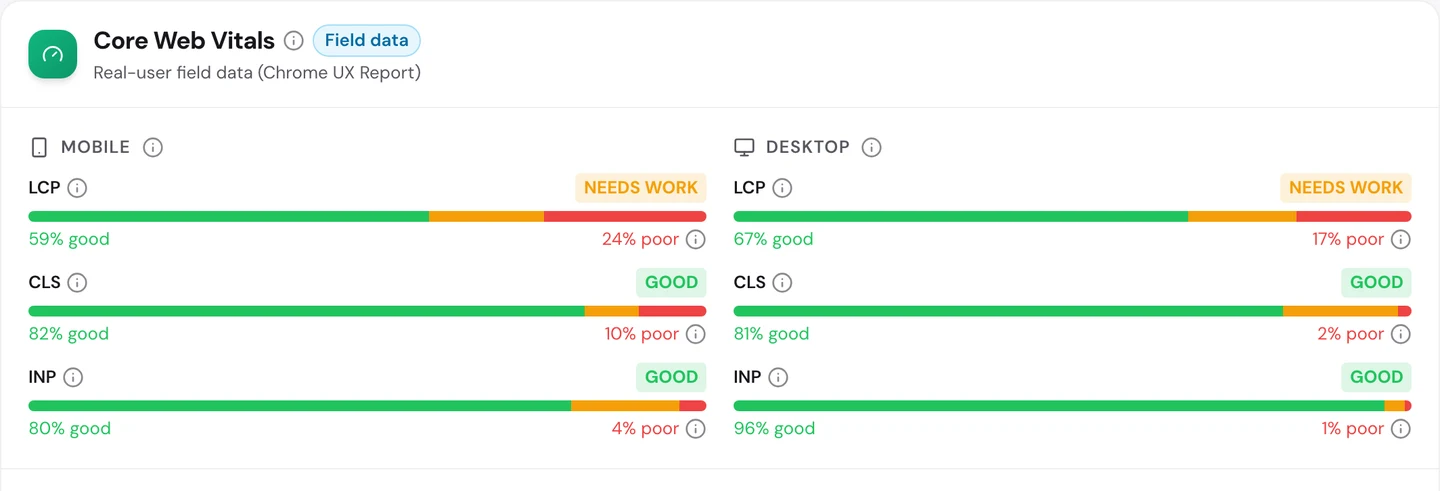
Open Library passes 4 of the 6 checks. Its pages react fast and stay still, on phones and on computers.
Loading is the weak spot, and it's the one you notice most. On phones, the main content shows up fast for only about 3 in 5 visits.
About 1 in 4 phone visits wait too long. On the homepage, the audit blames scripts that aren't packed small and a slow reply from the server.
So test your busiest pages on a phone, and load the main content before the extras. Our Site Speed tool shows what slows each page down.
Only 55% of the Open Library pages we crawled can be listed by Google. Our Website Audit shows which of your pages are blocked, redirected or missing from your sitemap, and what to fix first.
- The same audit we ran on Open Library
- Indexability, redirects and broken links in one place
- An AI plan that puts your fixes in order
What you cannot copy
First, the part you can't copy: Open Library is run by the Internet Archive, a nonprofit. Its domain dates back to 2001.
Millions of school and government links point to it. That's years of trust you can't buy.
Now a few honest notes on the numbers.
We took our figures on 4 October 2026. The 312K figure counts US searches for openlibrary.org only.
The 790K worldwide figure comes from the audit's Traffic tab. All of these are estimates, since nobody outside Open Library can count its real visits.
Tools work them out from rankings and search volume.
Our test browser hit the bot check on the book page. So the extension shots of that page show the check, not the book.
Our user agent test only changed the name we sent. We didn't test from Google's own servers, and those may be treated in their own way.
Our crawl checked 332 pages, a small sample of a very big site. So we used it to find problems that repeat, not to count every error.
The one number to take away
55%.
That's the share of the Open Library pages we crawled that Google may list. The rest are blocked, redirected or set to stay out.
Even so, Open Library wins about 312K US visits a month, and almost half come through one strong homepage.
That's the lesson for any big site. What Google can reach, and what it sees when it gets there, matter as much as what you publish.
What does Google see when it opens your pages? Check them the way Google would.
You can run every one of these checks on your own site, and on your rivals', and see the same numbers for yourself.
Frequently asked questions
Will a bot check hurt my rankings?
Not if Google gets through. Test your key pages as Googlebot and as a normal visitor, and make sure Google gets the real page.
How do I know a bot is really Googlebot?
Any program can borrow Googlebot's name. Google explains how to confirm its crawler from its address, so your bot check can let the real one in and stop fakes.
Is it cloaking to let Google skip a bot check?
Cloaking means showing Google something different from what people see. If people get the same page once they pass the check, you're showing everyone the same thing.
Should I block AI crawlers?
It depends on your goals. If you want AI tools to quote and link to you, let them in. If you sell content they could copy, you might block some.
Which title should a page with many editions use?
Use the name most people search for, in the language of the page. Mention the other names lower down, so those searches can still find it.
Do I need a sitemap if Google already finds my pages?
Big sites do. A sitemap helps Google find deep pages that few links reach, and it tells Google when pages change.
What's the quickest way to speed up a homepage?
Load the main text and the first images first, and hold back the rest. Pack your scripts small and drop any you don't use.
How often should a big catalog site run an audit?
Once a month is a good start. Run one after every big template change too, since a single change can touch thousands of pages.