GOV.UK gets about 135M visits a month from Google in the UK, and its top pages are named after the exact job you came to do, like "check MOT history".
GOV.UK is the UK government's one website for public services. It took the place of hundreds of separate department sites.
We ran it through our whole SEO toolkit to see what it does well, and where it trips over its own feet.
Here are 9 lessons you can copy, plus the part you can't.
Name each page after the task
We started with our Organic Traffic Checker. It estimates a site's organic traffic, meaning the people who find it on Google without ads.
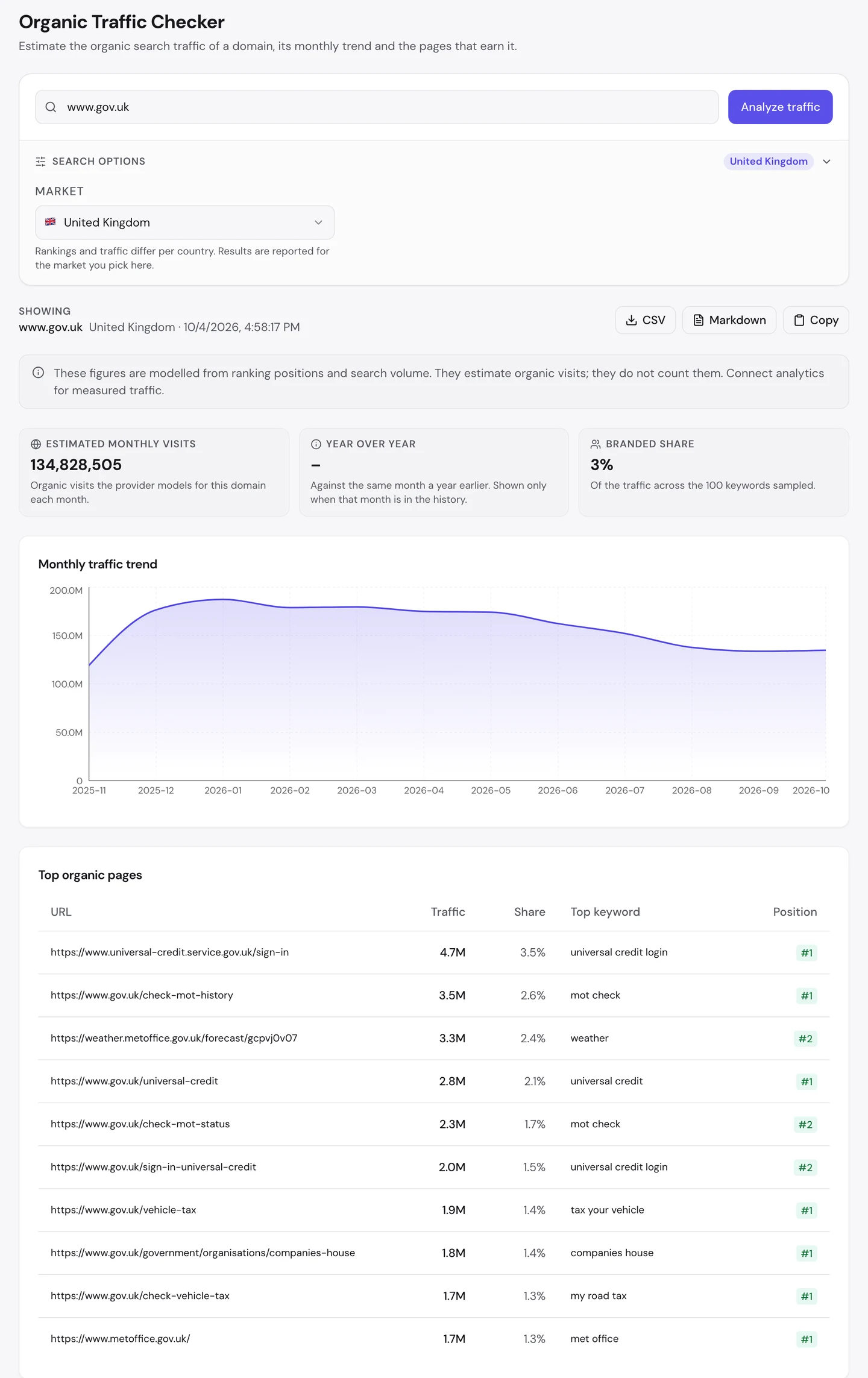
That's about 135M visits a month in the UK. It's more than 3 times what the NHS, which we studied too, gets there.
The tool reads the whole gov.uk family. So it counts service sites like Universal Credit and the Met Office too.
Now read the page addresses. They're the jobs themselves: /check-mot-history, /vehicle-tax and /check-vehicle-tax.
An MOT is the yearly safety test for cars in the UK. The page to check a car's MOT history ranks first for "mot check", with about 3.5M visits a month.
The page to tax your car ranks first for "tax your vehicle". And /check-vehicle-tax ranks first for "my road tax", even though "road" isn't in its address.
The top page of all is the Universal Credit sign-in, with about 4.7M visits. Universal Credit is a benefit, a payment that helps people with the cost of living.
Only 3% of the traffic in the searches we sampled came from people typing GOV.UK's name. Nearly everyone else searched for the job they had to get done.
The Traffic tab of our Website Audit shows the whole world.
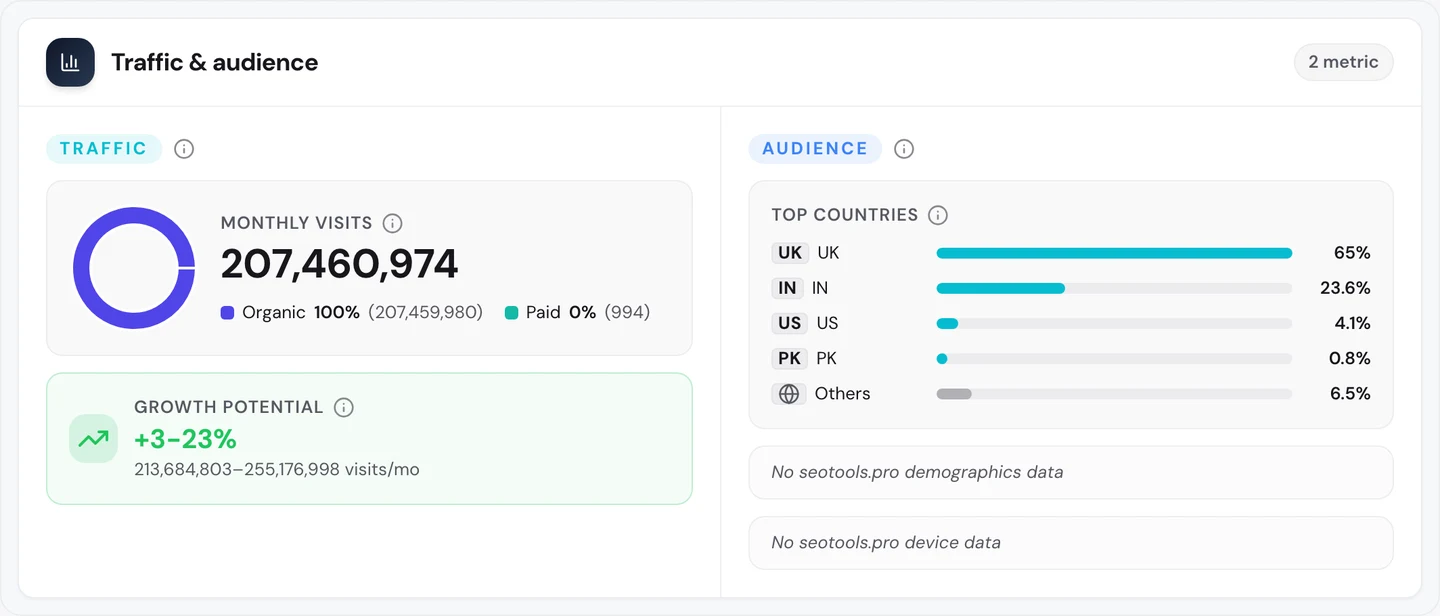
Worldwide it's about 207M search visits a month. Most come from the UK, and nearly a quarter come from India.
If you want to see this idea on a very different kind of site, look at Docker Hub, which we studied too.
So name each page after the exact job people type, and put that job in the address. Find the words they use with our Keyword Research tool.
Take 2 spots for your top searches
Look back at the top pages table. The search "mot check" sends visits to 2 GOV.UK pages, not one.
/check-mot-history ranks first, and /check-mot-status ranks second. The second page adds about 2.3M visits on its own.
The same thing happens with "universal credit login". The service's own sign-in page ranks first, and a GOV.UK page called /sign-in-universal-credit ranks second.
That's keyword cannibalization, when your own pages compete for the same search. It's often a problem, because Google can't tell which page to show.
But here, it helps. When you hold the top 2 spots, there's less room for anyone else.
The audit's Competitors tab shows who'd take those spots instead.
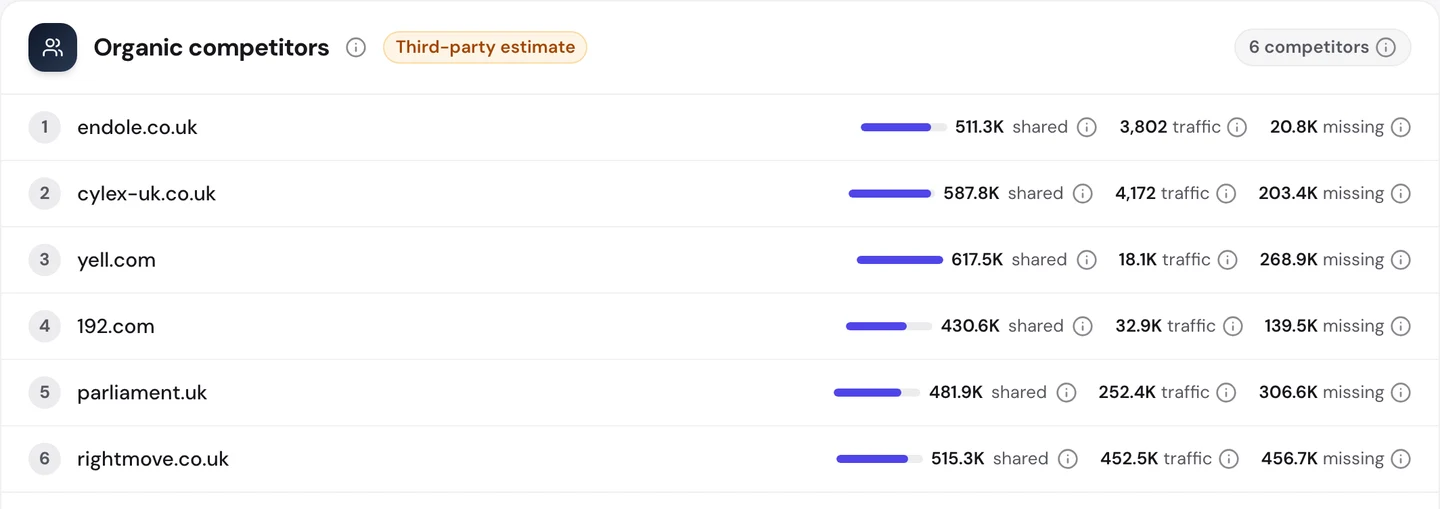
The top rivals are sites like endole.co.uk, yell.com and 192.com. They list details about firms, the same job GOV.UK's Companies House pages do.
Each one shares hundreds of thousands of searches with GOV.UK. Any spot GOV.UK leaves open, they're ready to fill.
So when one search needs 2 kinds of answer, give each its own clear page, and watch both spots. Our Rank Tracker shows which page holds each spot, and our Competitor Analysis shows who's next in line.
Keep pages plain and fast
Open any GOV.UK page and you'll see how plain it is. Here's the page to get a basic DBS check, a copy of your criminal record that some jobs ask for.
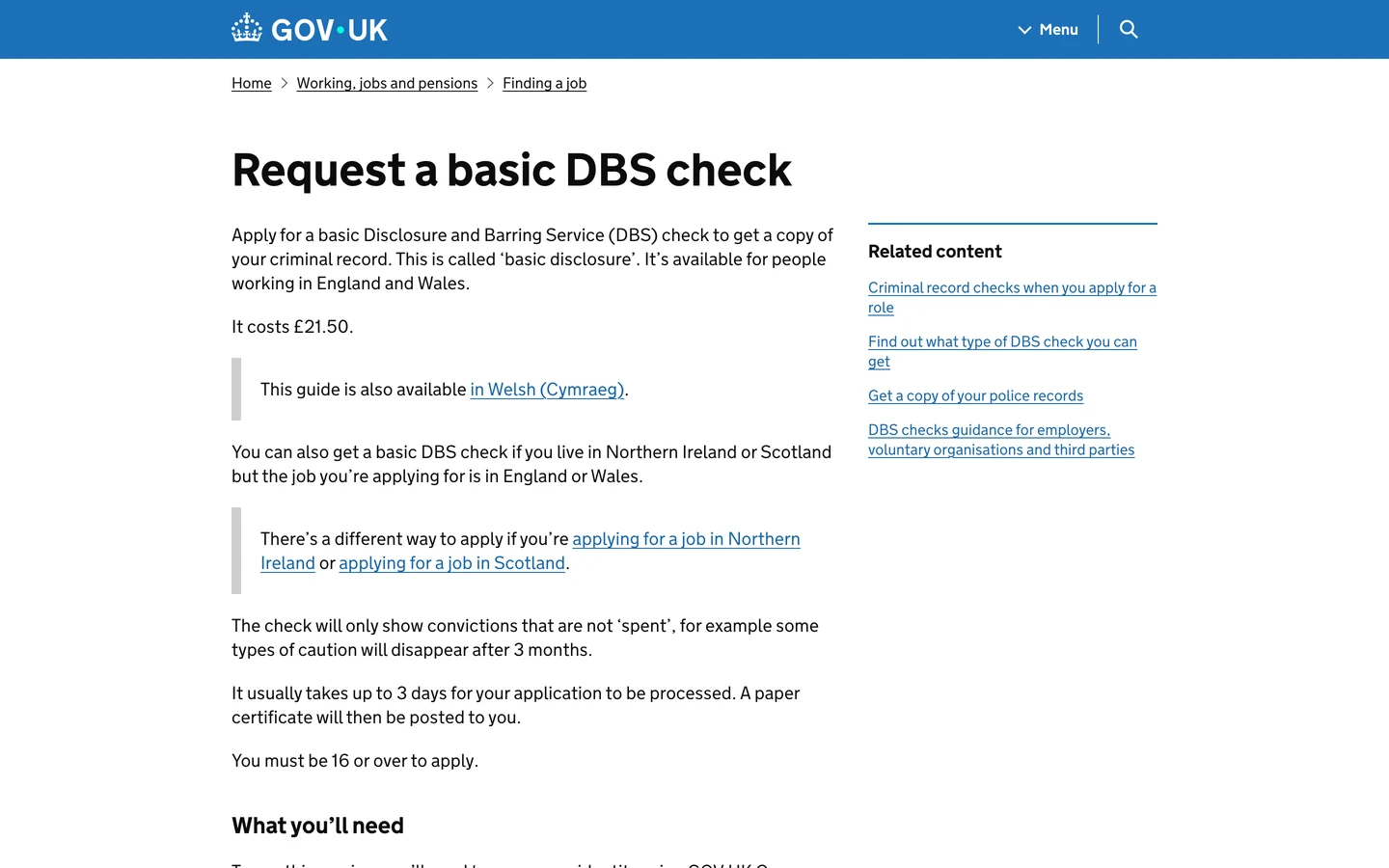
There are no images and no clutter. The heading is the task, and the first lines tell you the cost and how long it takes.
The Performance tab of our audit shows what that buys you. First come Core Web Vitals, Google's 3 checks of how fast a page loads, how fast it reacts and whether it stays still.
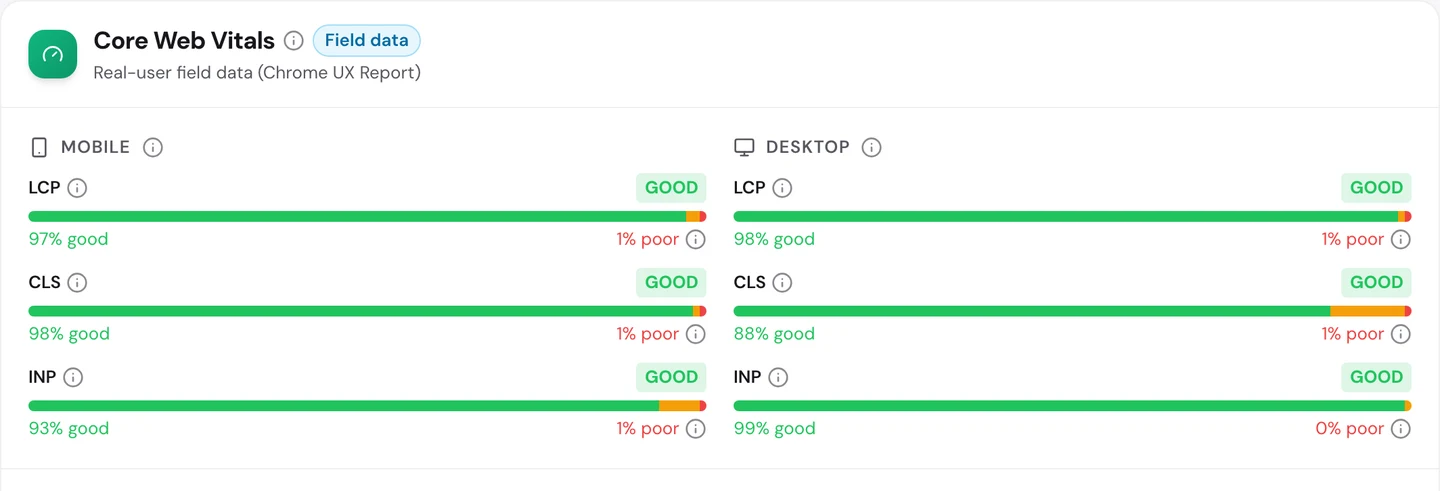
GOV.UK passes all 6 checks, on phones and on computers. On phones, about 97% of visits see the main part of the page load fast.
The audit's own speed test scores the homepage 98 out of 100 on phones and on computers. It loaded in about 205 milliseconds.
The audit did spot 2 small things. The homepage jumps around a bit in a lab test, and the CSS file, the code that styles each page, is very large on 249 pages.
Plain pages are fast pages, for you and for Google. And when you've come to renew a passport, fast and clear is all you want.
For more plain pages that rank, look at PHP.net and Calculator.net, which we studied too.
So cut anything that doesn't help people finish the task, and test your pages often. Our Site Speed tool shows what slows each page down.
Audit your page templates
We checked www.gov.uk with our Website Audit, and gave it the sitemap, the file that lists a site's pages for Google. The audit sends a crawler, a program that visits pages the way Google does.
It checked 262 pages. GOV.UK scored 88 out of 100, which the report rates as good.
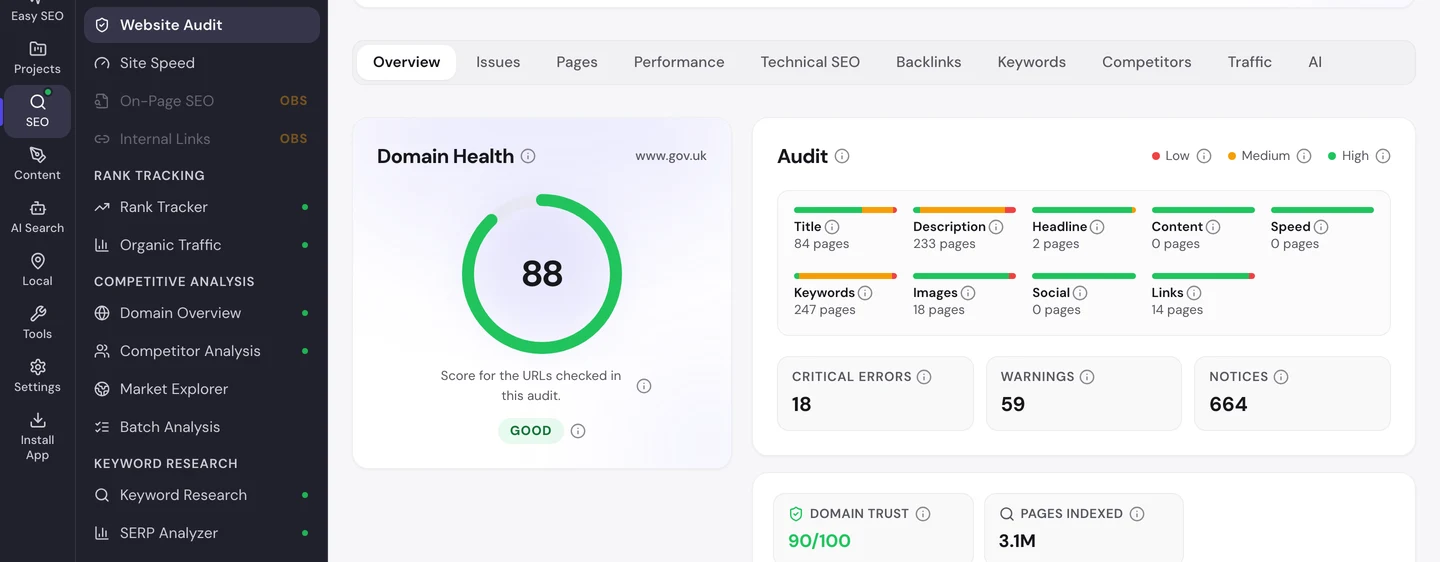
Google lists about 3.1M GOV.UK pages, so our crawl is a small sample. The Issues tab sorts what it found by how much it matters to you.
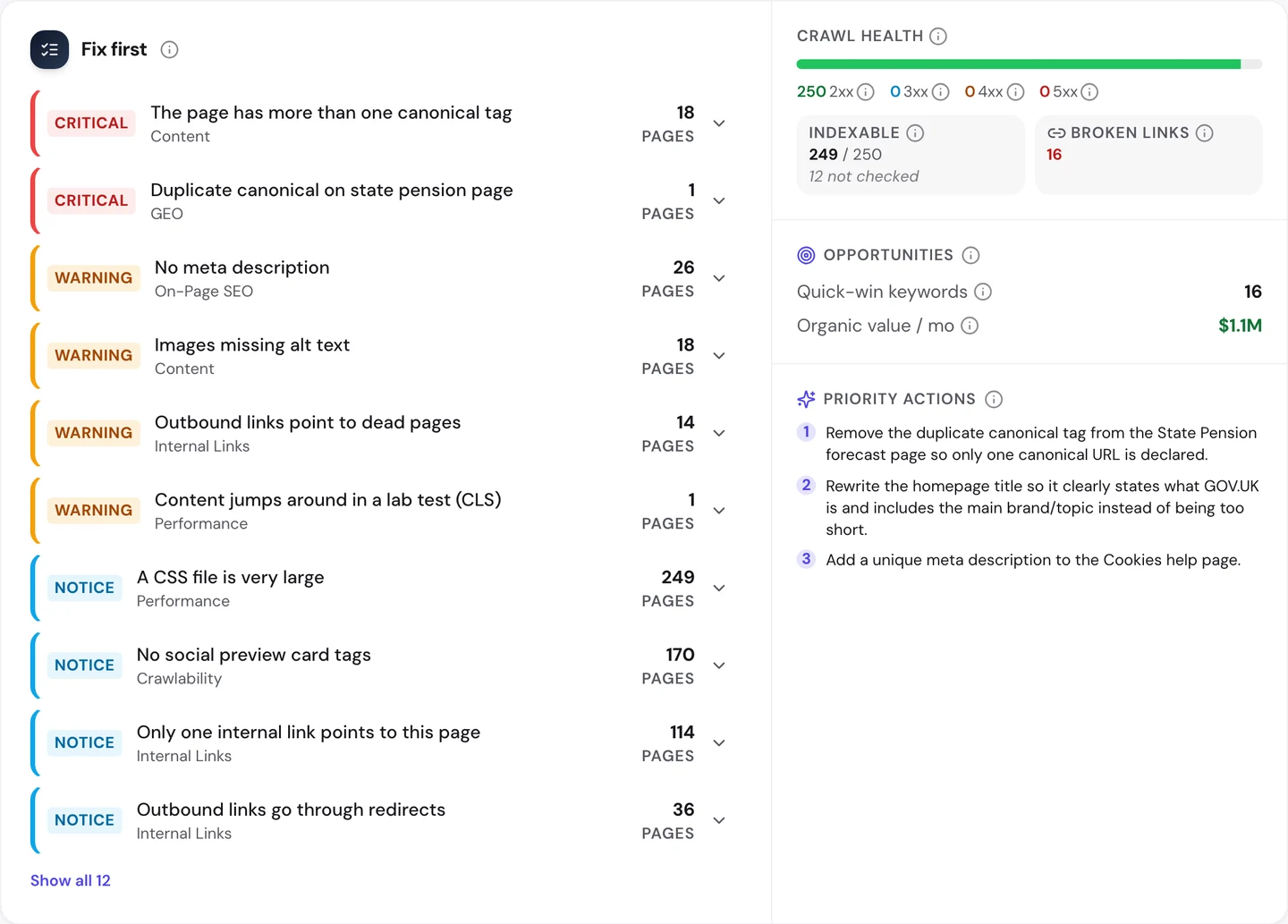
All 18 critical errors are the same problem. Each page has more than one canonical tag, a tag that tells Google which copy of a page is the main one.
Having 2 canonical tags is like giving Google 2 different answers. When they clash, Google may ignore both.
Look at which pages get it. The Pages tab shows the same 2 errors on service pages like /apply-renew-passport, /check-vehicle-tax and /check-mot-history.
Pages like these are built from shared templates. When a template prints the tag twice, every page made from it does too.
That's the good and bad of templates. One fix in the right place cleans up every page at once.
The Technical SEO tab shows you which pages Google may list.
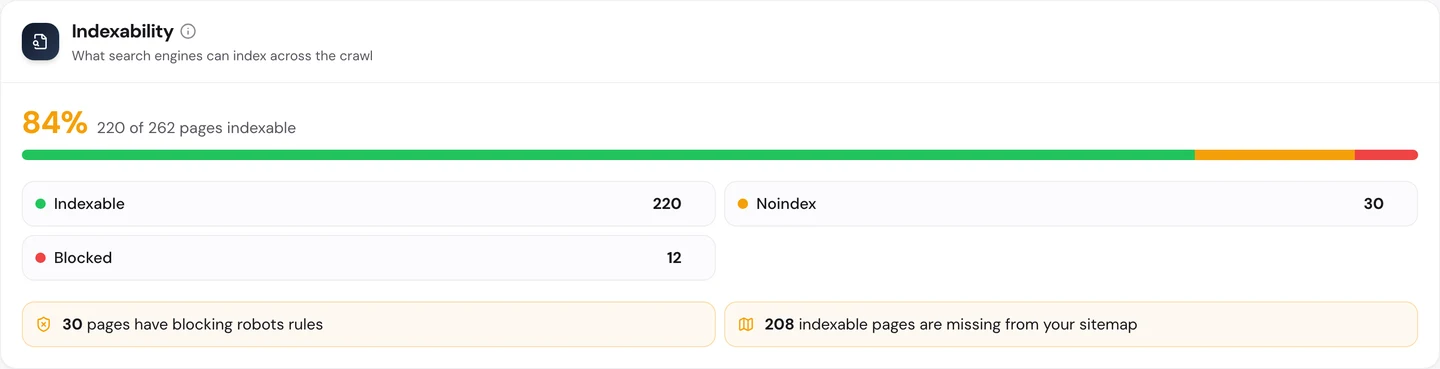
About 5 in 6 crawled pages can be listed. 30 are marked noindex, a tag that tells Google not to list a page, and 12 are blocked.
The bigger gap is the sitemap. 208 pages that Google may list are missing from it.
You don't have to work out what to fix first. The audit's AI tab writes the plan: a short summary, each problem with how to fix it, and a 90-day to-do list.
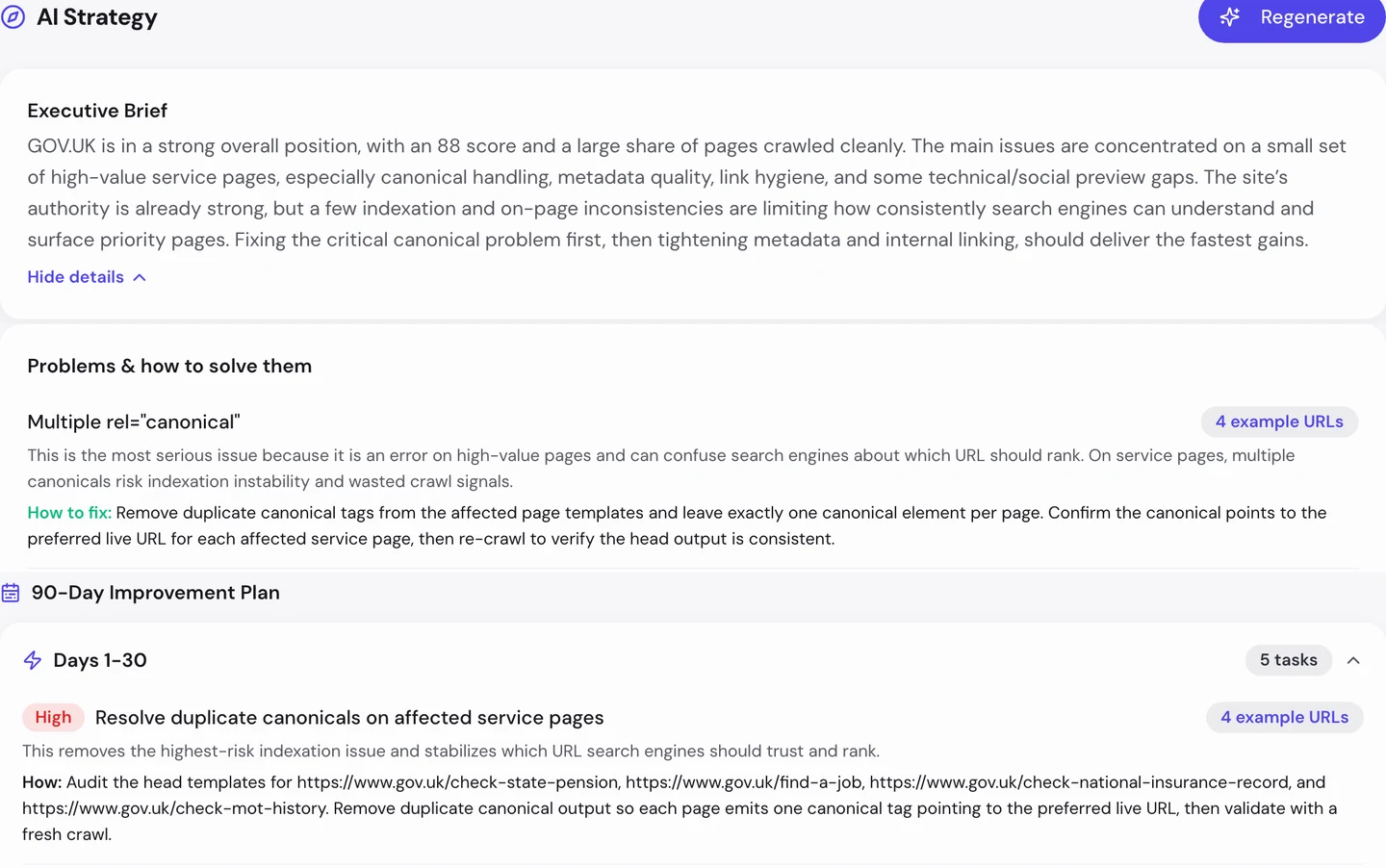
For GOV.UK, the first job is the canonical tags. The plan names pages like /find-a-job and /check-mot-history, and says to fix the tags in the page templates.
So when the same error shows up on many pages, find the template behind them and fix it once. Our Website Audit groups errors by type, so you can spot the pattern.
GOV.UK's critical errors all come from one fault: service pages that print 2 canonical tags. We find faults like this in your templates and fix them at the source, so every page built from them is right.
- We find the errors that repeat across your pages
- We fix canonical tags so Google knows your main page
- We add your missing pages to the sitemap
- SEO and GEO, so AI answers can quote you too
Write a description for every page
Our free browser extension checks one page at a time. Open a page, click the seotools.pro icon, and a panel opens beside it with its SEO checks.
We opened it on the DBS check page you saw earlier.
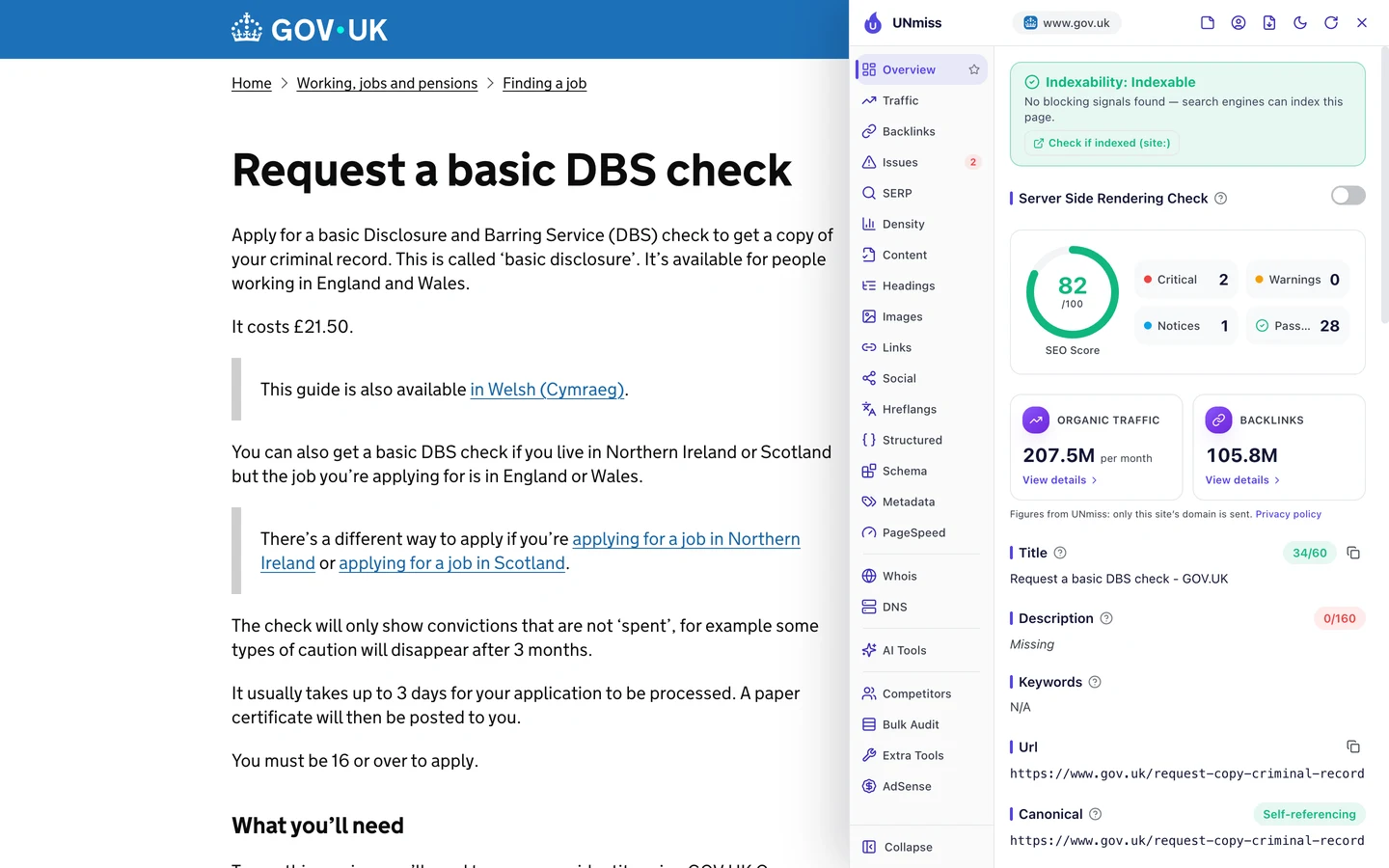
The page scores 82 out of 100. Its title is short and clear, at just 34 characters.
But it has no description, the short summary Google may show under your title. So Google has to pick some text from the page by itself.
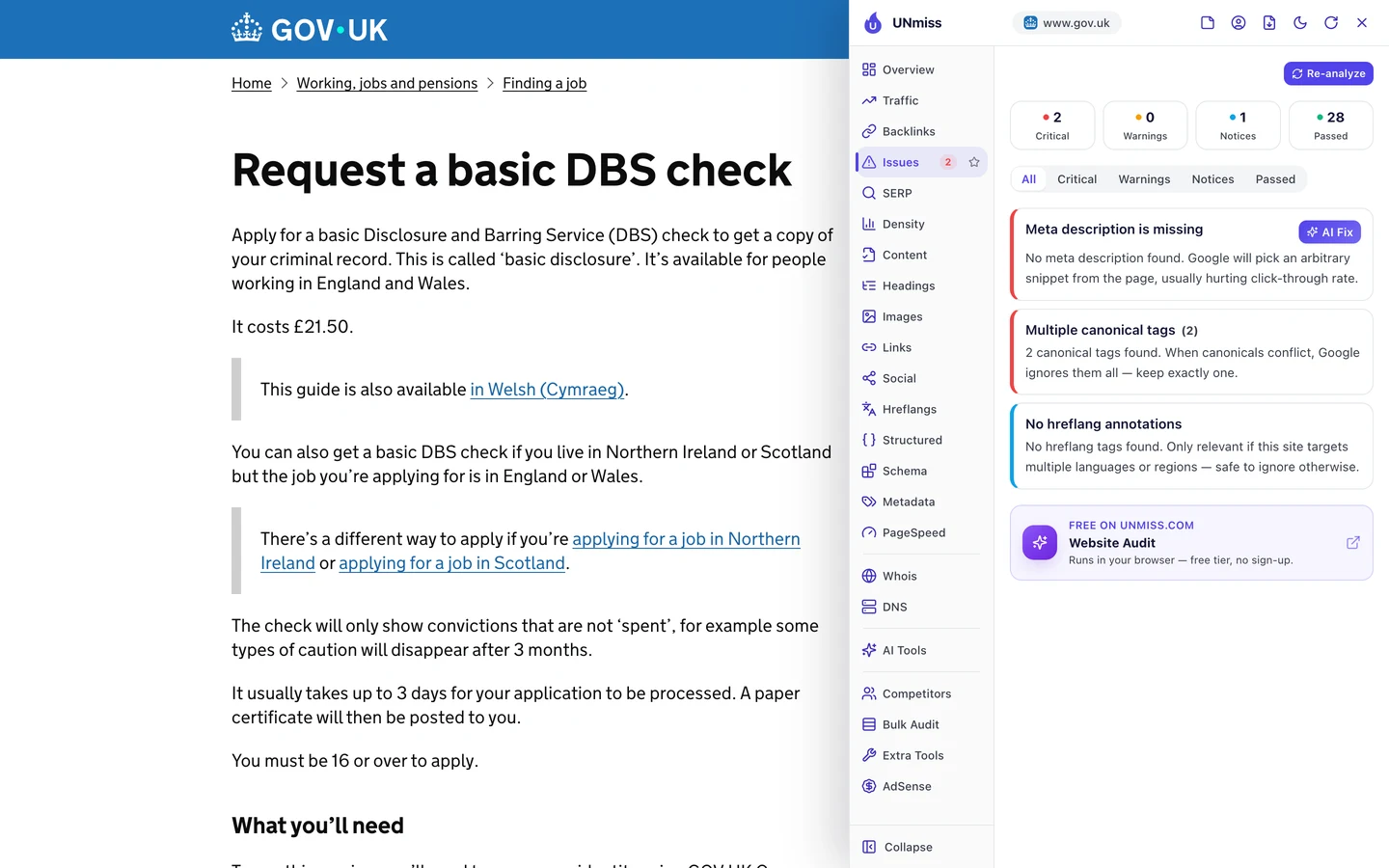
Both critical issues are ones the audit found across the site. The page has no description, and it has 2 canonical tags.
The audit found 26 pages with no description. When a page leads to a paid check, a clear summary helps the right people click.
So write a short, unique description for every page that says what it does and who it's for. Our Meta Tag Generator helps you write one at the right length.
Cut titles to about 60 characters
The ETA page has the opposite problem. An ETA is a permit that lets some visitors travel to the UK.
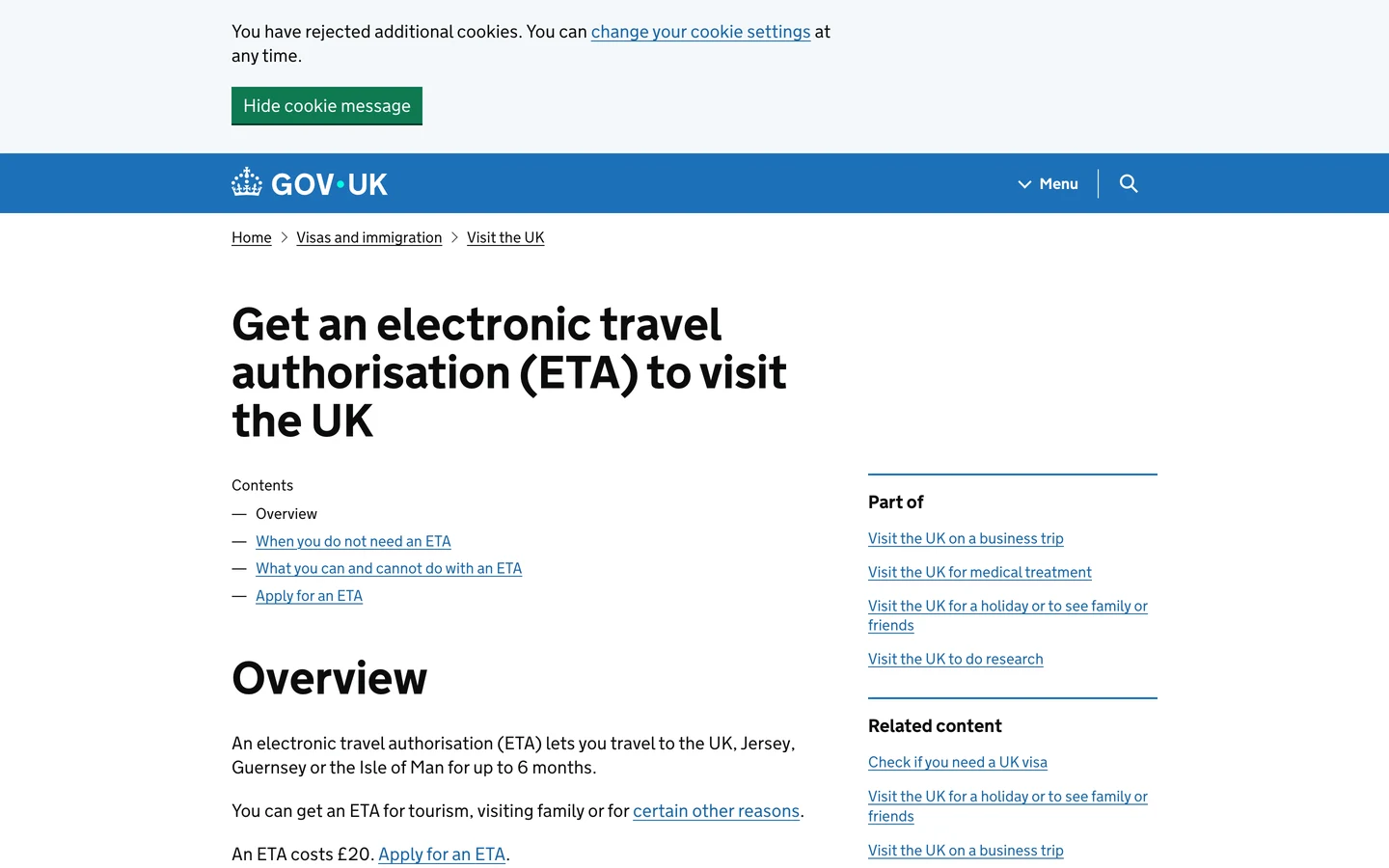
The heading spells out the full name, and it's long. The title Google shows is even longer.
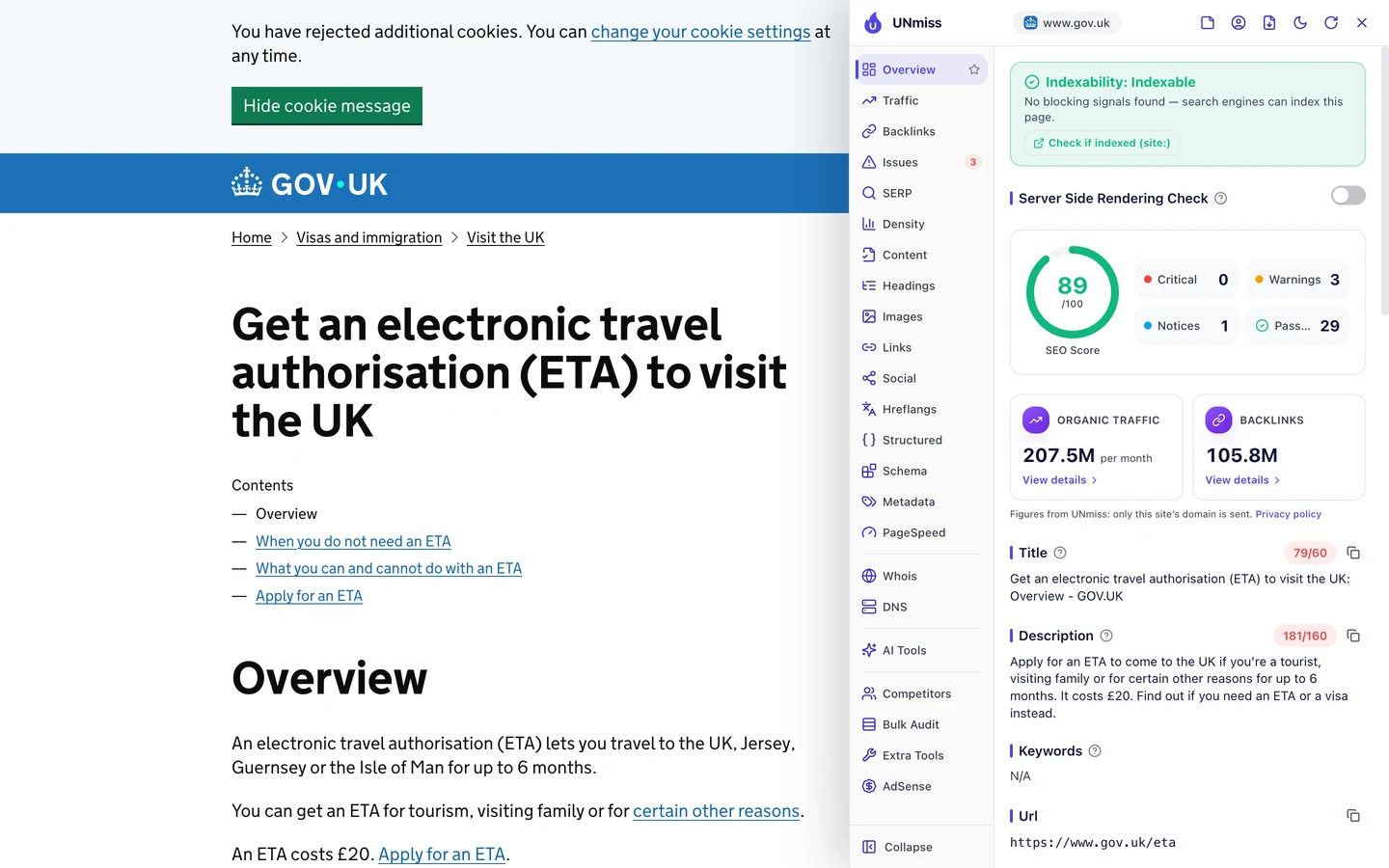
The page scores 89 out of 100, but its title runs to 79 characters. Google usually cuts titles after about 60.
So the end of the title, "Overview - GOV.UK", may never show. The description is too long as well, at 181 characters.
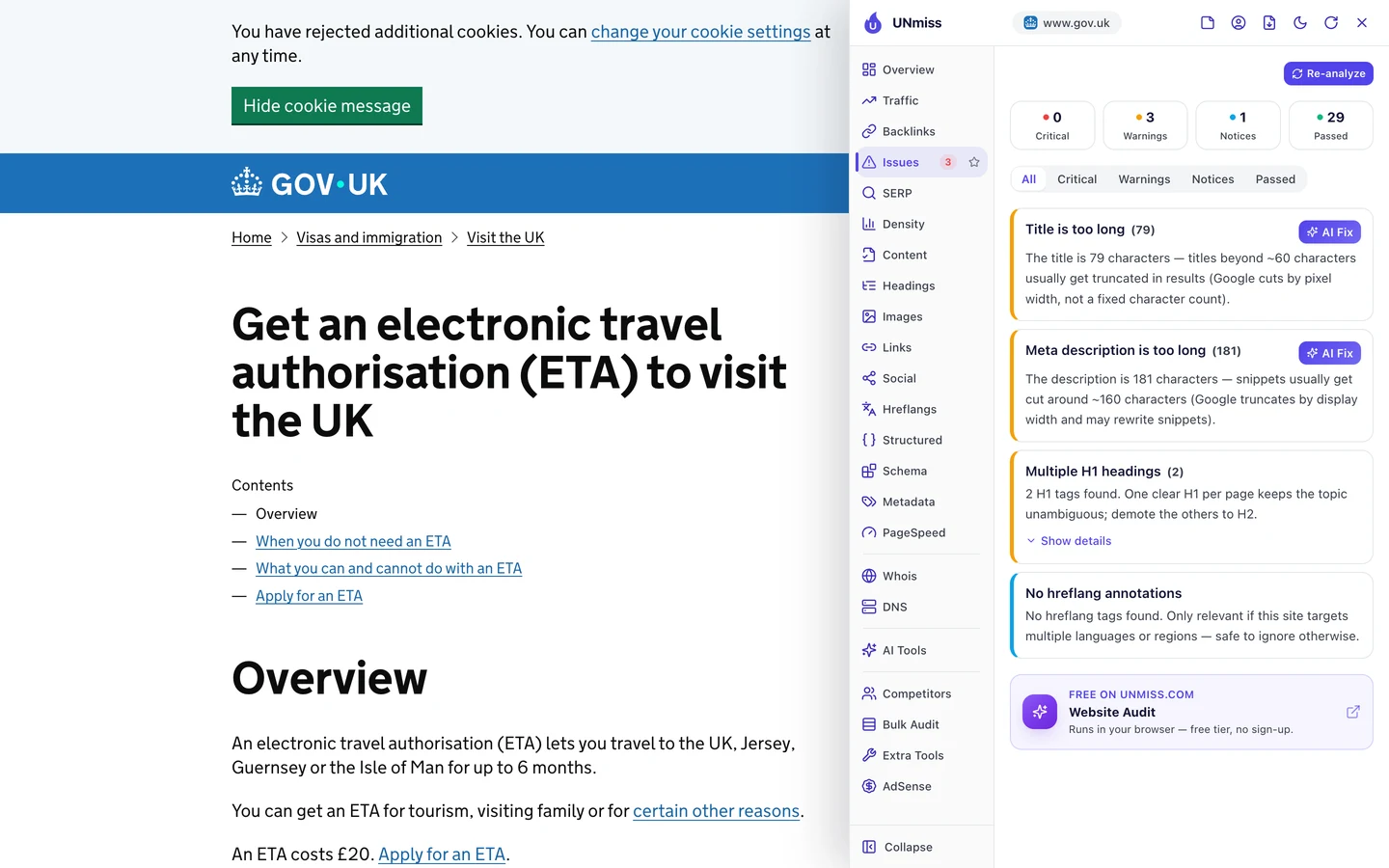
There's a third warning too. The page has 2 main headings, and one is enough.
The audit's AI plan lists long titles as a problem across the site. A title like "Get an ETA to visit the UK" would say it all in fewer words.
So keep titles under about 60 characters and descriptions under about 160, with the task first. See how yours look in Google with our SERP Simulator.
Tell Google what each page is
Structured data is code that tells Google what a page is. The extension's Structured tab looks for it.
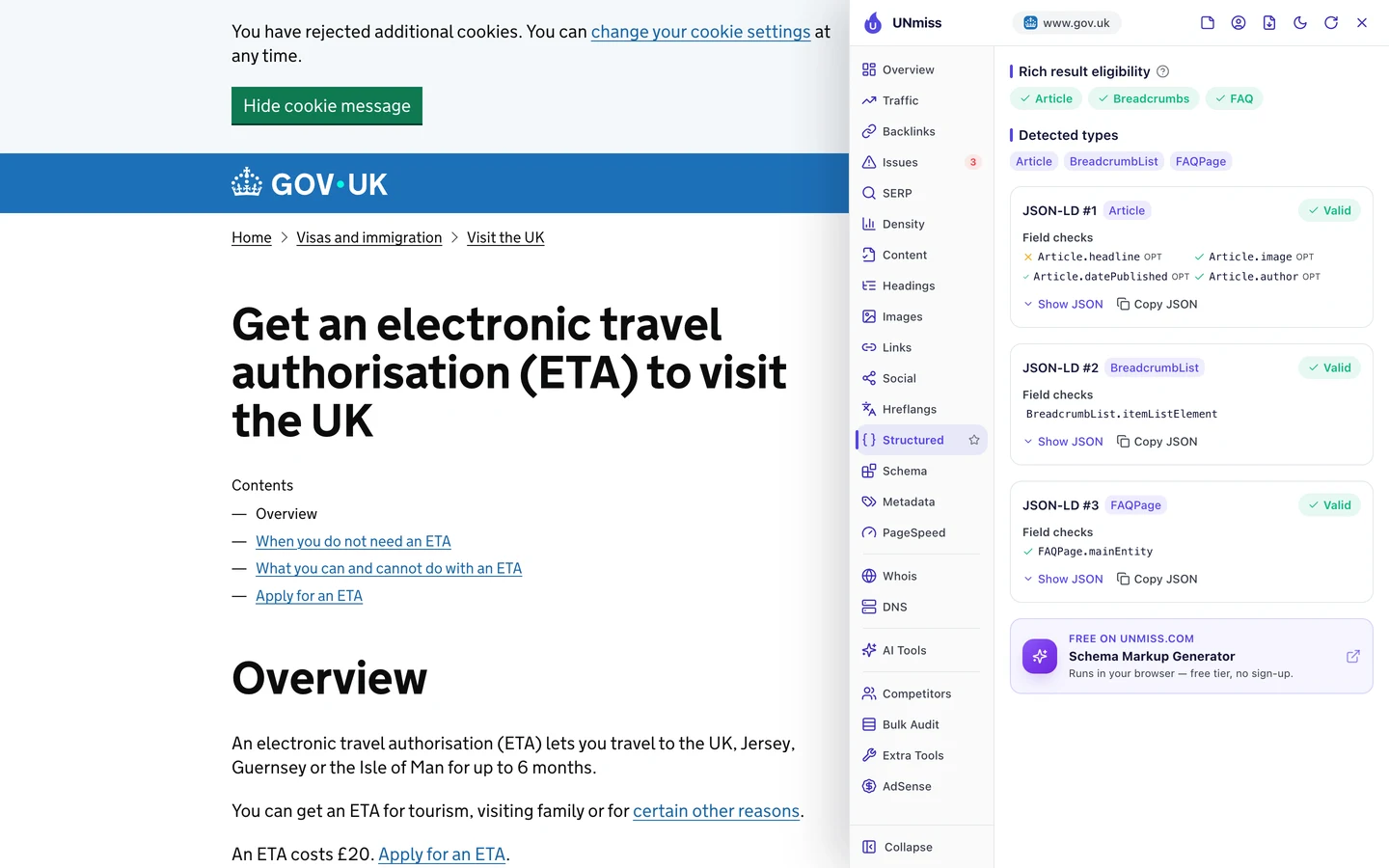
The ETA page has 3 blocks of it. One says it's an article, one shows where it sits on the site, and one marks up its questions and answers.
All 3 are valid, so Google can read them.
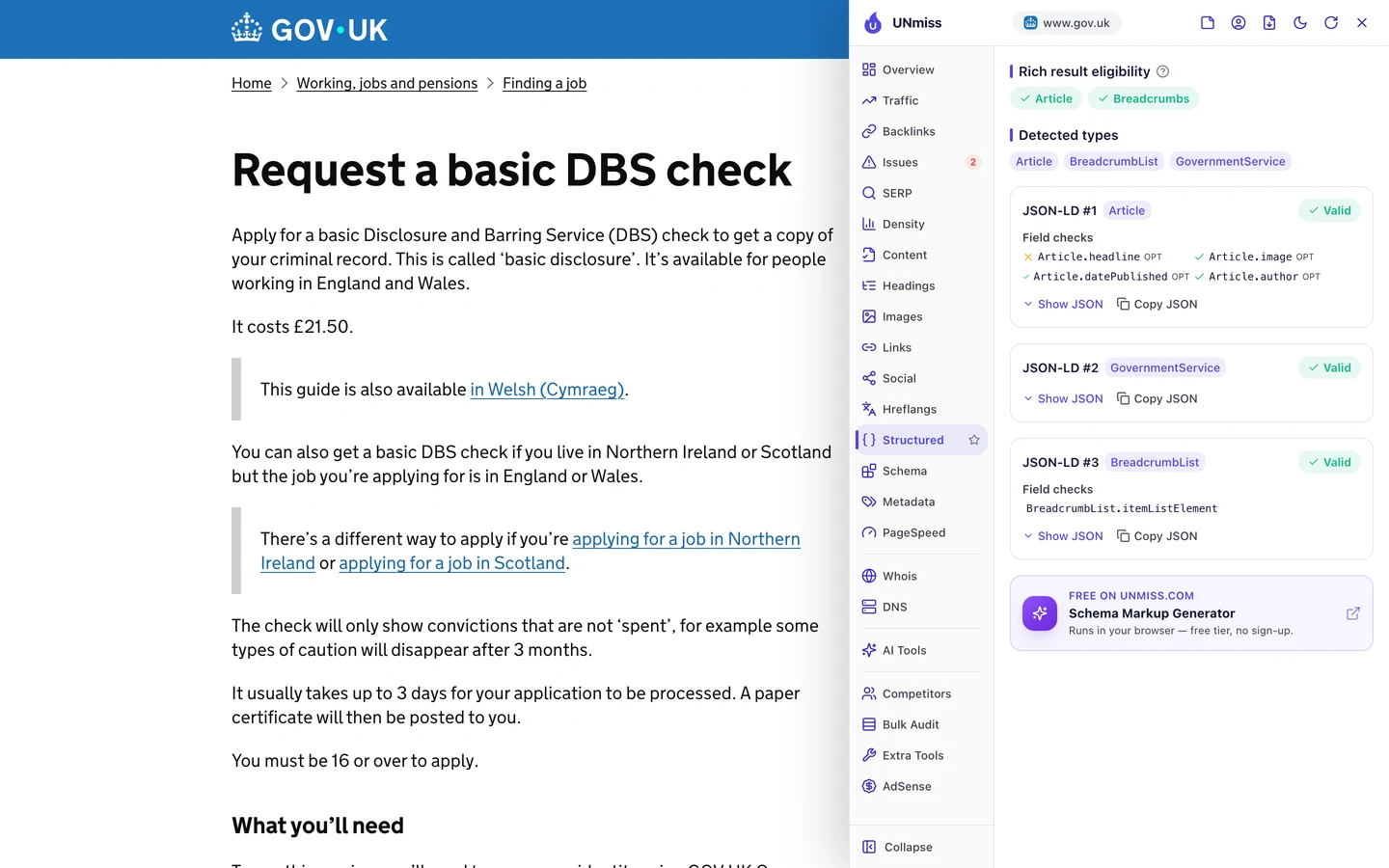
The DBS page goes one step further. It uses a type called GovernmentService, made for just this kind of page.
The audit found the same care across the site. Of the 50 pages it checked for this code, 49 have it.
The Content tab shows who wrote a page and when.
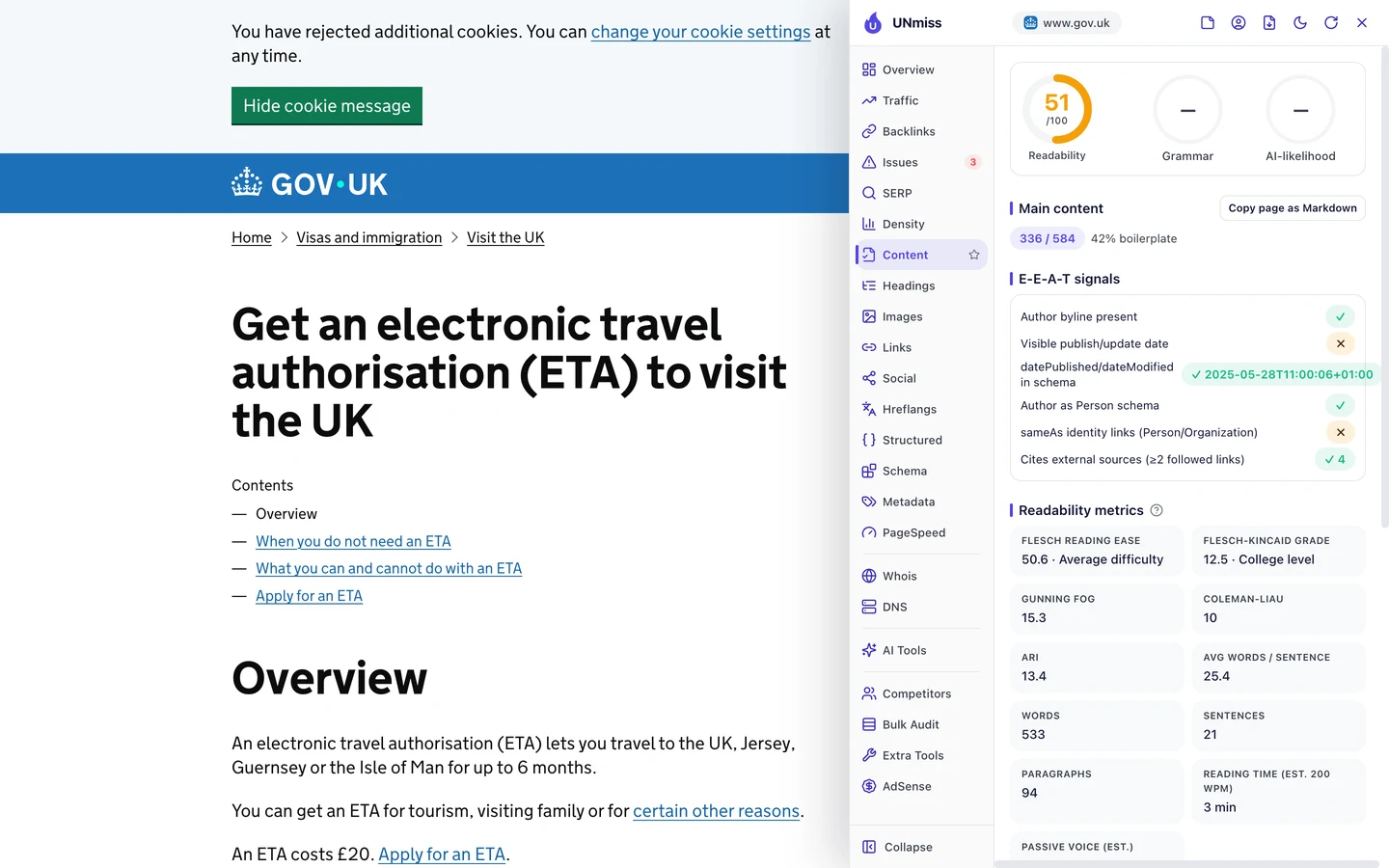
The page names an author in its code and puts a date there too. But you won't see a date on the page itself.
The tool also rates the text fairly hard to read, at 51 out of 100. That's partly because it counts the menus and footer links as long sentences.
So add code that says what each page is, who wrote it and when. Our Schema Markup Generator writes it for you.
Earn links by being the source
A backlink is a link from another website to yours. Google treats each one a bit like a vote of trust in you.
The Backlinks tab of our audit shows the same data as our Backlink Analyzer.
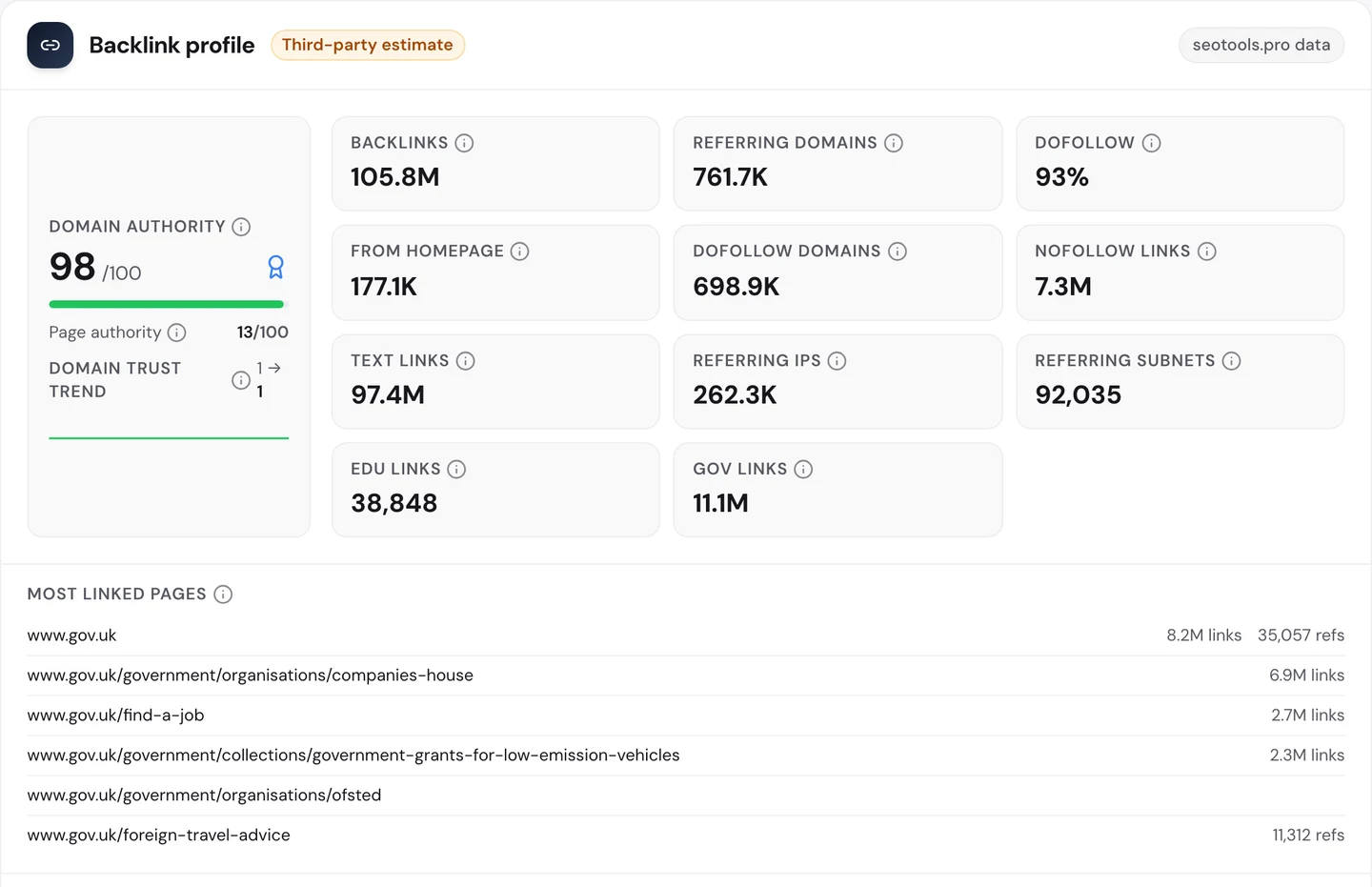
GOV.UK has about 106M links from about 762K websites. Its Domain Authority, our 0 to 100 score for a site's link strength, is 98.
About 11M of those links come from other government sites. On the day we checked, new links came in from a parish council and a school.
After the homepage, the most linked page is Companies House, with about 6.9M links. Find a job comes next.
When you're the official source, people link to you without being asked. They want to show their readers where the facts come from.
Our Domain Overview shows the US view of gov.uk.
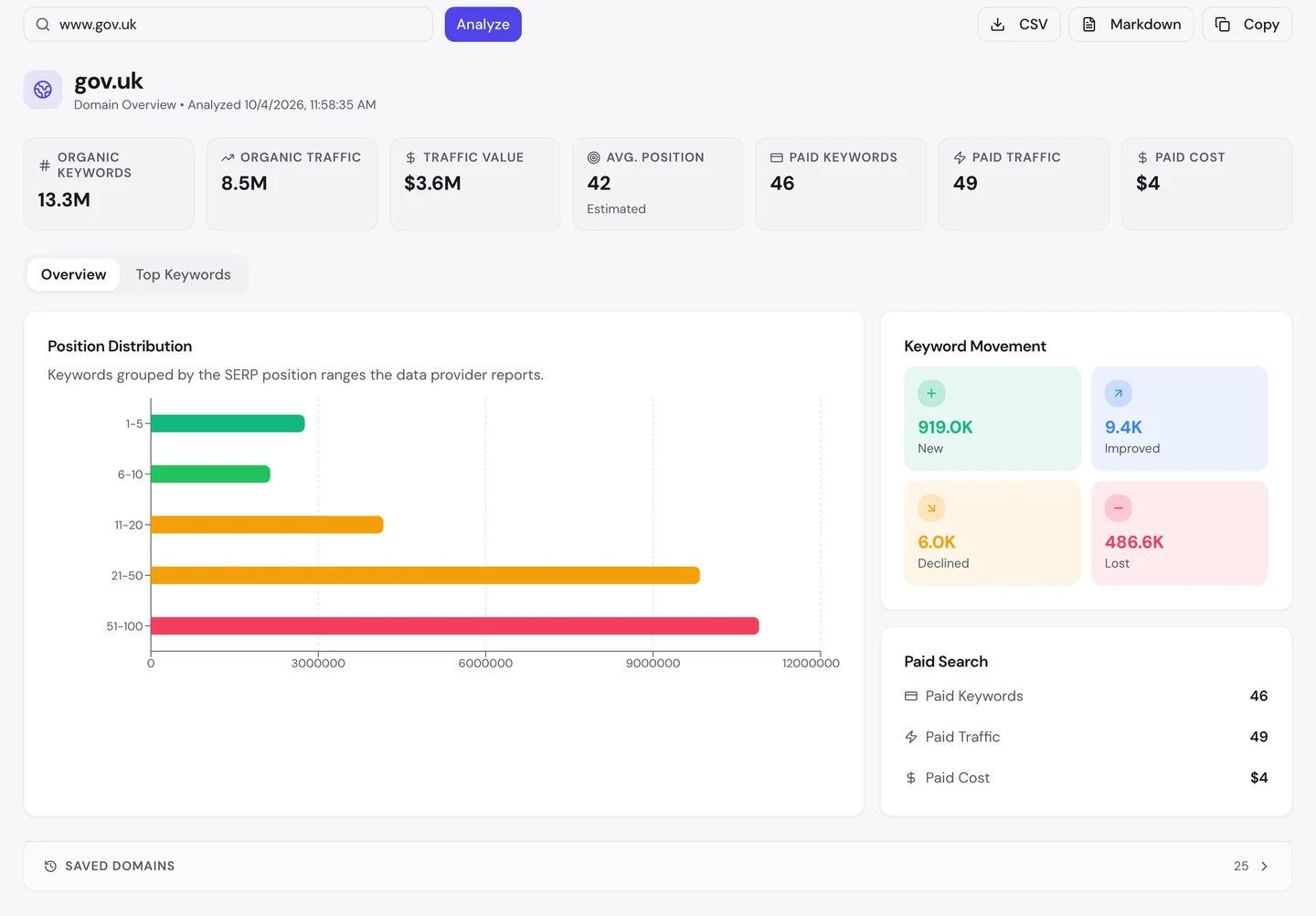
The US isn't the country GOV.UK serves. There, a lot of its visits go to Met Office weather pages, so we kept our story on the UK.
So write the page others in your field will want to point to, like the official form or the clearest guide. Then see who links to it with our Backlink Analyzer.
Let AI tools read your pages
More and more people ask ChatGPT or Claude how to get things done, instead of searching Google. So we checked which AI tools may read gov.uk.
The rules for crawlers live in robots.txt, a file that tells crawlers what they may read. Our extension reads it for you.
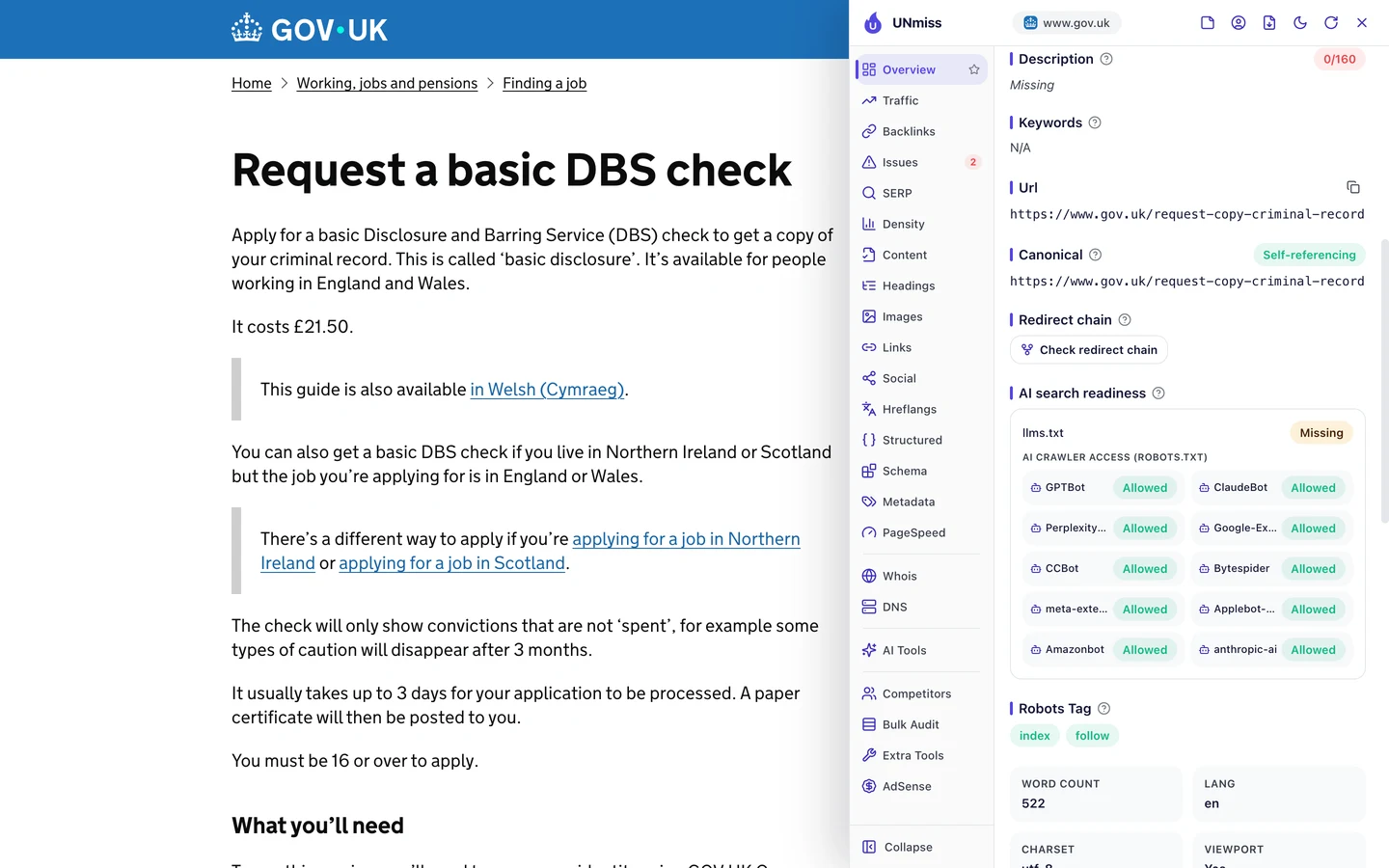
GOV.UK lets in all 10 AI crawlers the extension checks. But it has no llms.txt, a short file that explains a site to AI tools.
The audit's AI Search check looks at 12 crawlers, and they're all allowed too. It scores GOV.UK 90 out of 100, and takes points off for the missing llms.txt.
The audit also found that the words sit in the plain page code, not behind JavaScript. So any crawler can read them on its first visit.
That open door suits a public service. Its help can reach you wherever you ask.
So decide on purpose who may read your pages, and add an llms.txt file if you want AI tools to find your best ones. Write your rules with our robots.txt generator, then check whether AI tools mention you with our AI Visibility Checker.
GOV.UK's top pages are named after the jobs people search for, like "mot check". Our Organic Traffic Checker shows your top pages and the search behind each one, so you can see which names work.
- The same report that measured GOV.UK
- Pick the country you want to check
- Run it on any rival's domain too
What you cannot copy
First, the part you can't copy: GOV.UK is the one official home for these jobs. If you want to tax your car or check your MOT, the real service lives here.
Sites everywhere link to it because they need to point somewhere official. That kind of trust takes a whole government to build.
Now a few honest notes on the numbers you've seen.
We took our figures on [actual data date before Aug 29, 2026]. The 135M figure is for the UK, and it counts the whole gov.uk family, not just www.gov.uk.
That family takes in service sites like Universal Credit and Companies House, and the Met Office weather site. The tool reads the root domain, so they all count.
The 207M worldwide figure comes from the audit's Traffic tab. The Domain Overview looks at the US, where weather pages take a big share, so we didn't build a lesson on it.
The Competitors tab may mix countries, so treat it as a rough guide.
All of these are estimates. Nobody outside GOV.UK can count its real visits, so tools work them out from rankings and search volume.
The UK trend also rose last winter and has eased since. Estimates like this can swing when rankings move, so treat the trend as a rough guide.
Our crawl checked 262 pages of a site with millions. So we used it to find problems that repeat, not to count every error.
The one number to take away
3%.
That's the share of GOV.UK's sampled search traffic that comes from people typing its name.
Everyone else searched for a job, like "mot check" or "tax your vehicle". They found GOV.UK because its pages are named after those jobs.
That's the lesson for any site. Name your pages after what people need, not after who you are.
What job does your reader come to do? Check that you have a page named after it.
You can run every one of these checks on your own site, and on your rivals', and see the same numbers for yourself.
Frequently asked questions
Should my page address match the search word for word?
Close is good enough. Google reads meaning, so a clear address that names the task works even if the words differ a little.
Is it bad if my pages compete for the same search?
Not always. If each page does a different job, showing both can push rivals down. If they say the same thing, merge them into one.
How do I check if a page has more than one canonical tag?
Run a crawl and look for duplicate canonical errors. You can also open the page source and search for the word canonical.
Does a missing meta description hurt my rankings?
Not directly. But Google then picks its own snippet, and it may not be the one that makes people click.
Should a business site look as plain as GOV.UK?
You don't have to copy the look. Just cut anything that slows people down on their way to the task.
Which schema type should a service business use?
Pick the most specific type that fits, like LocalBusiness or Service. Add breadcrumbs too, so Google sees where each page sits.
How can a small site earn links from government sites?
Publish data, guides or tools that councils and schools can point their readers to. Then tell the people who'd find it useful.
Is an llms.txt file worth adding?
It's quick to write and does no harm. It won't replace good pages, but it can point AI tools to your best ones.