GeeksforGeeks gets 14.6M visits a month from Google worldwide, and its biggest pages in the US aren't about coding at all.
They explain Google Scholar, email and how to turn centimetres into inches. Only 1% of US visitors search for the name GeeksforGeeks.
If you run a site built on one topic, that's a risky mix. We ran GeeksforGeeks through our whole SEO toolkit to see what's working and what isn't.
Here are 9 lessons you can copy, plus the part you can't.
Know where your readers live
We started with the Traffic tab of our Website Audit. It estimates a site's organic traffic, meaning the people who find it on Google without ads, and where they live.
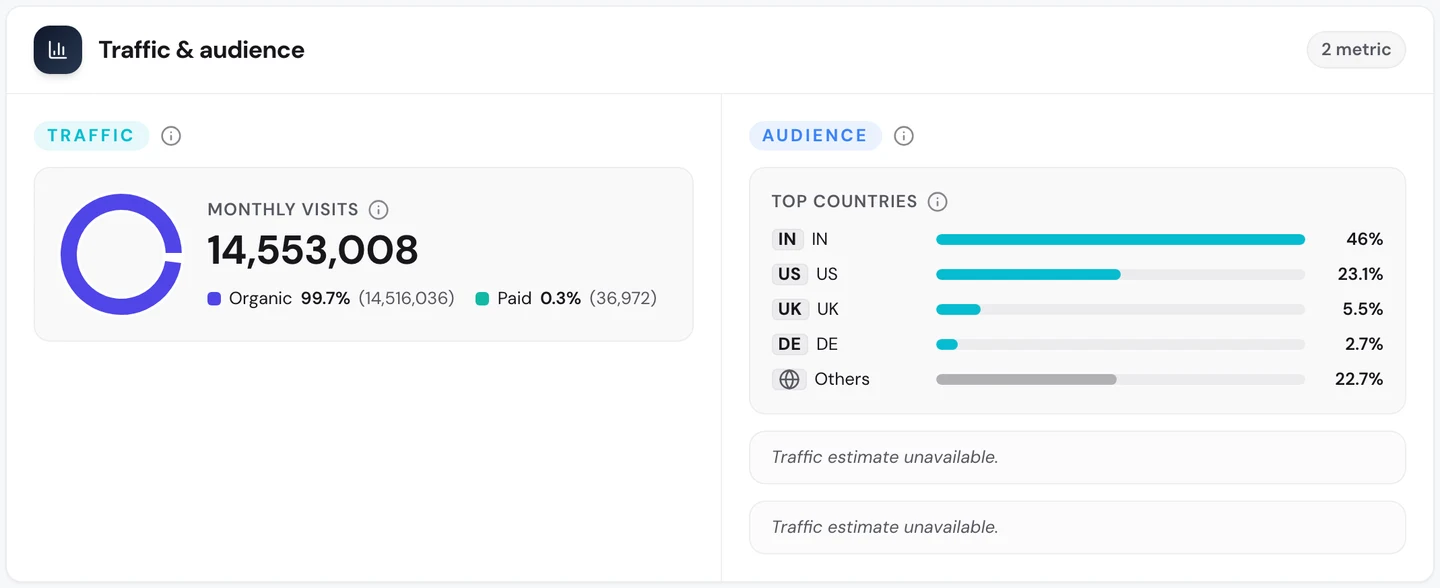
That's about 14.6M search visits a month. India sends almost half of them, and the US sends about 1 in 4.
Many sites we've studied, like NerdWallet, get most of their visits from the US. GeeksforGeeks is built for students in India first.
Our Organic Traffic Checker shows the US side on its own.
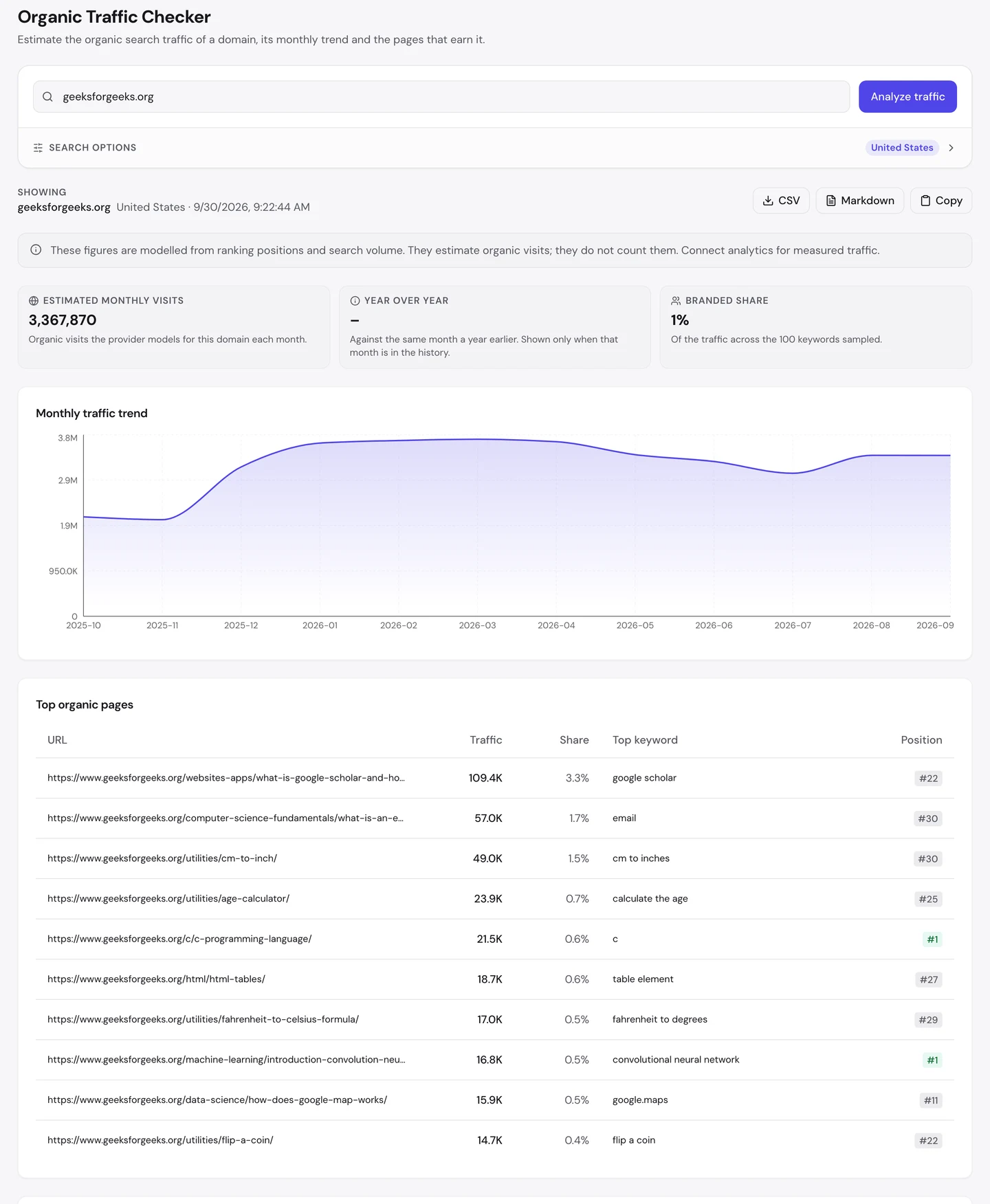
That's about 3.4M US visits a month. So if you only check one country, you can miss most of your audience.
Check where your own visitors come from before you decide what to write, and which spelling to use.
Stay close to your main topic
Look at that list of top pages again. The biggest one is a guide to Google Scholar, and it was last updated in 2024.
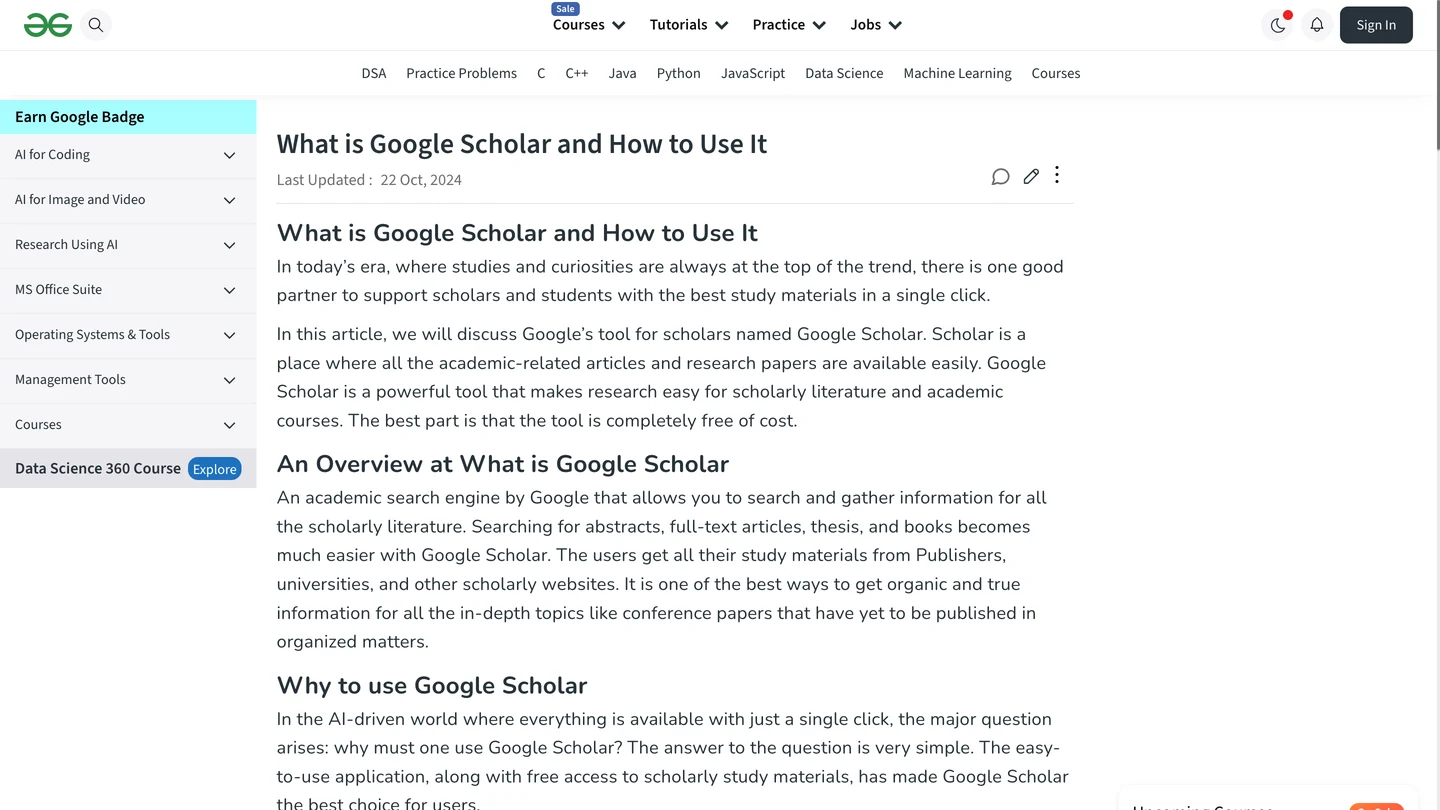
Pages like this bring you quick visits, but they drift away from what your site is known for. That drift is risky.
Public reports say GeeksforGeeks lost a big share of its Google rankings in the March 2025 core update, a large change to how Google ranks sites. Many blamed pages far from its coding topics.
Its core pages still hold strong. The Keywords tab of our audit lists every search a site ranks for, where it ranks and how many visits each one sends.
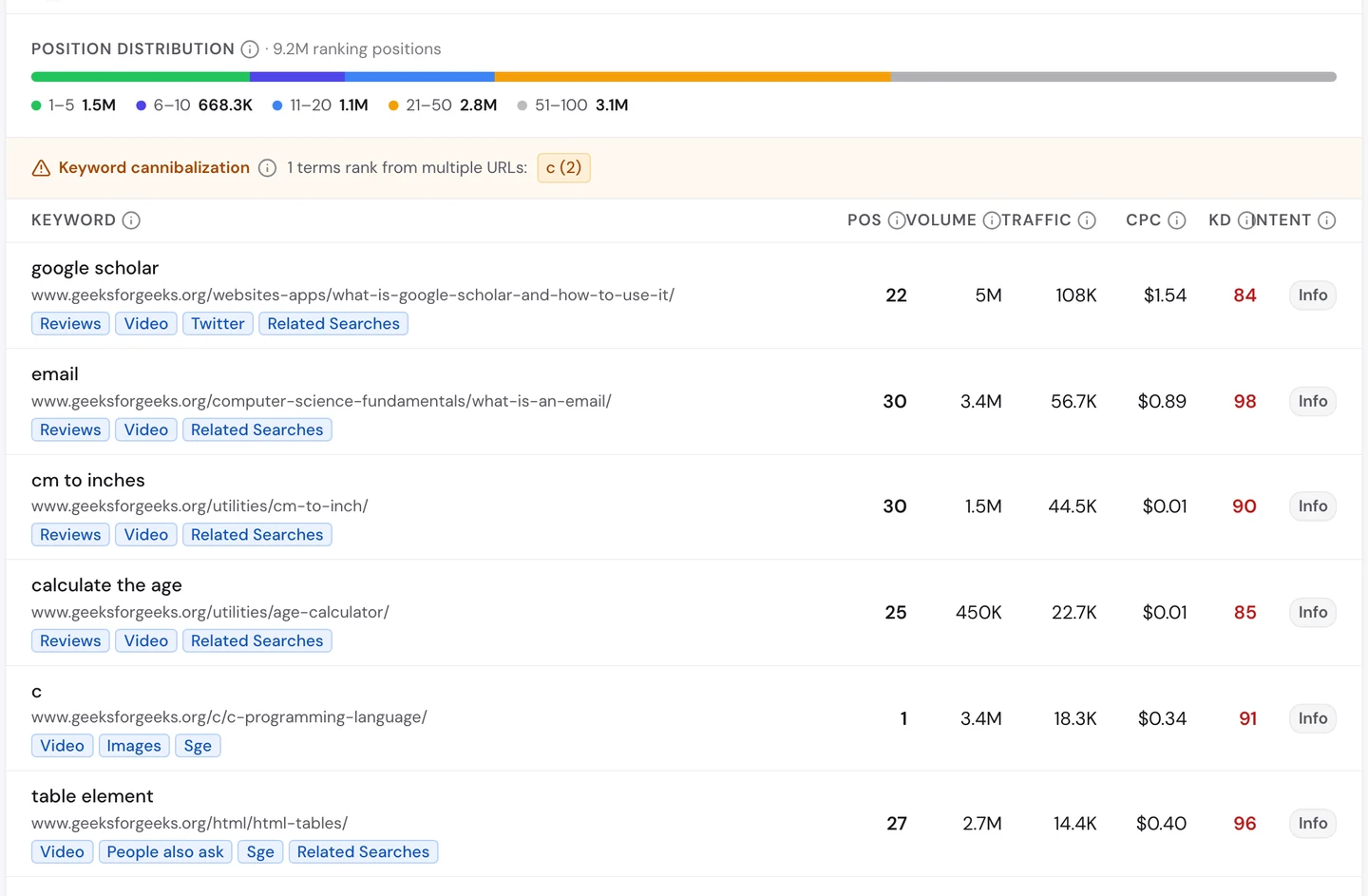
For "c", the programming language, GeeksforGeeks ranks first. It also ranks first for a well-known machine learning topic.
The Competitors tab shows which sites Google sees as its real rivals.
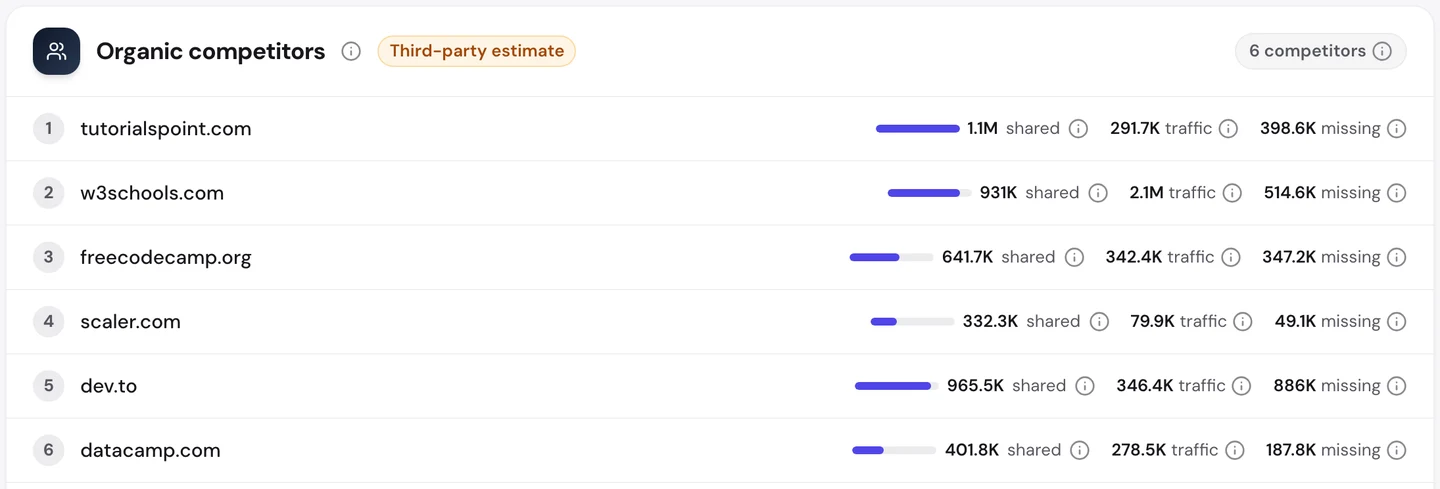
Every one is a coding site: TutorialsPoint, W3Schools, dev.to and freeCodeCamp, which we studied on its own. Google clearly still sees GeeksforGeeks as a coding site.
Our Domain Overview shows the recovery.
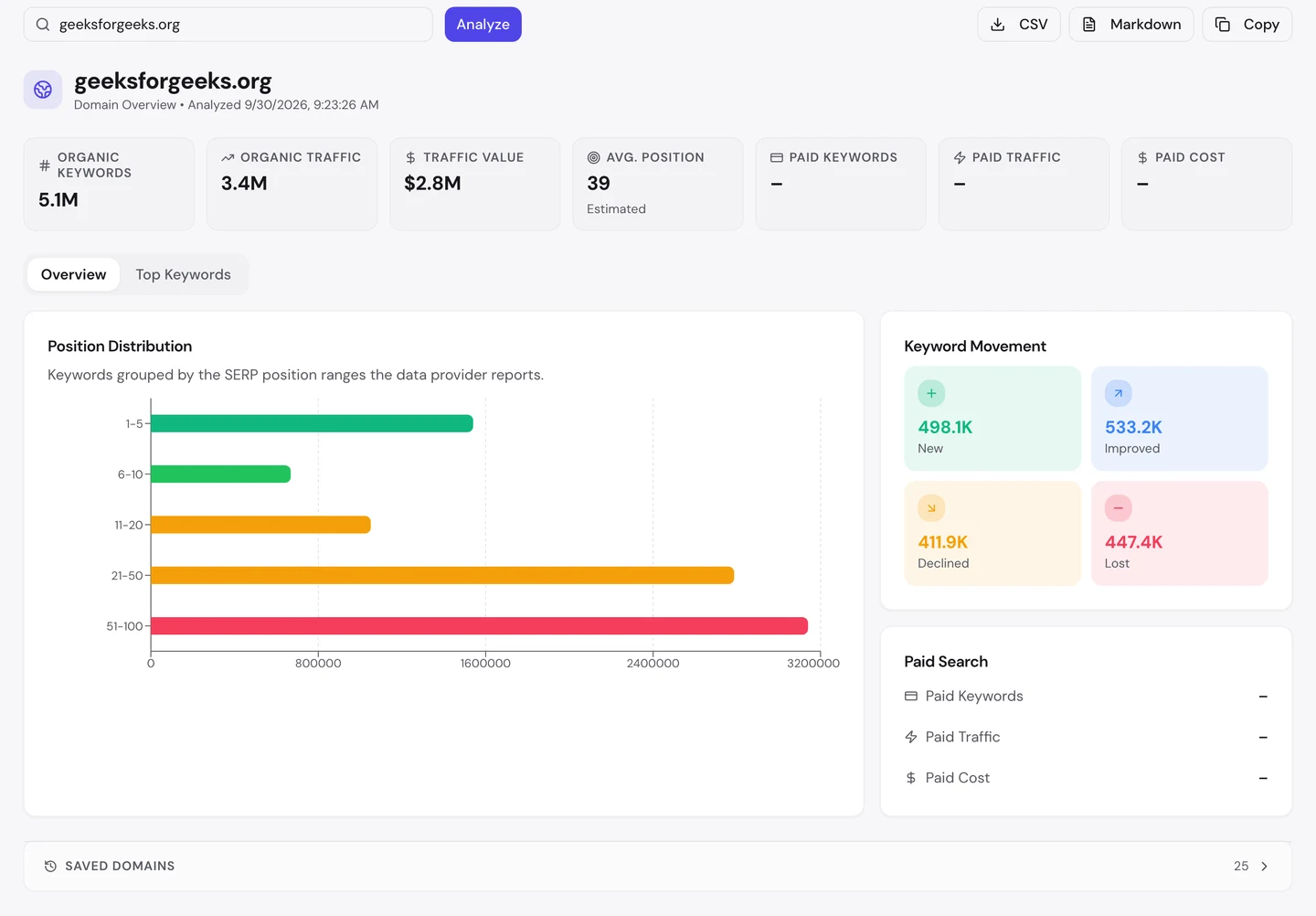
More keywords arrived or moved up than dropped. The traffic chart above also climbs from about 2M to 3.4M US visits over the past year.
So add new topics only if they fit what you're known for. Your core pages are the ones Google trusts you on.
Build small tools for quick wins
4 of the top 10 US pages are tiny tools: a centimetre-to-inch converter, an age calculator, a temperature converter and a coin flip.
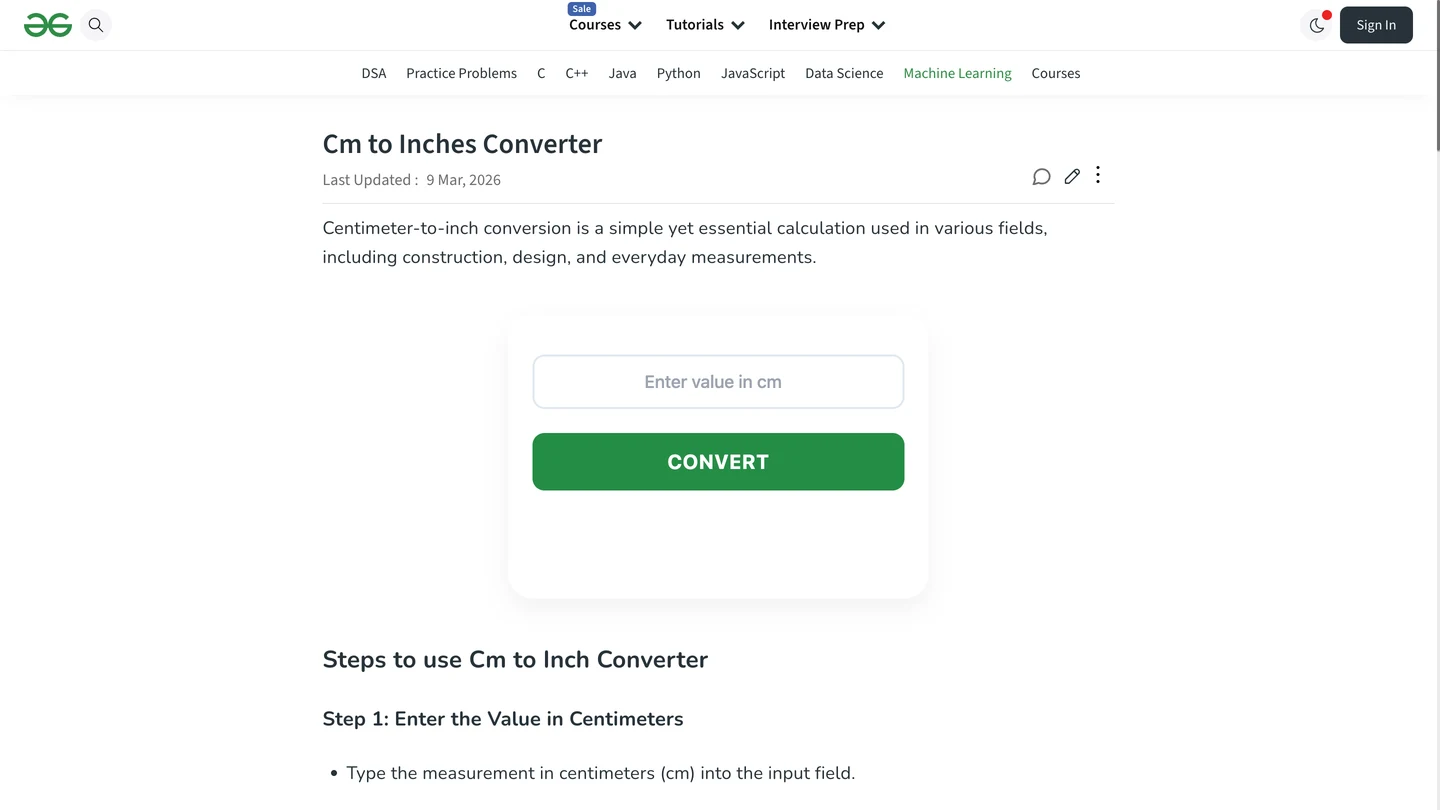
You type a number and get your answer. You don't have to read a tutorial first.
Calculator.net, the free calculator site we studied on its own, gets 11M visits a month from tools like this.
Our free browser extension shows one thing GeeksforGeeks could improve. Open the page, click the seotools.pro icon, and its Structured tab shows the page's structured data, code that tells Google what a page is.
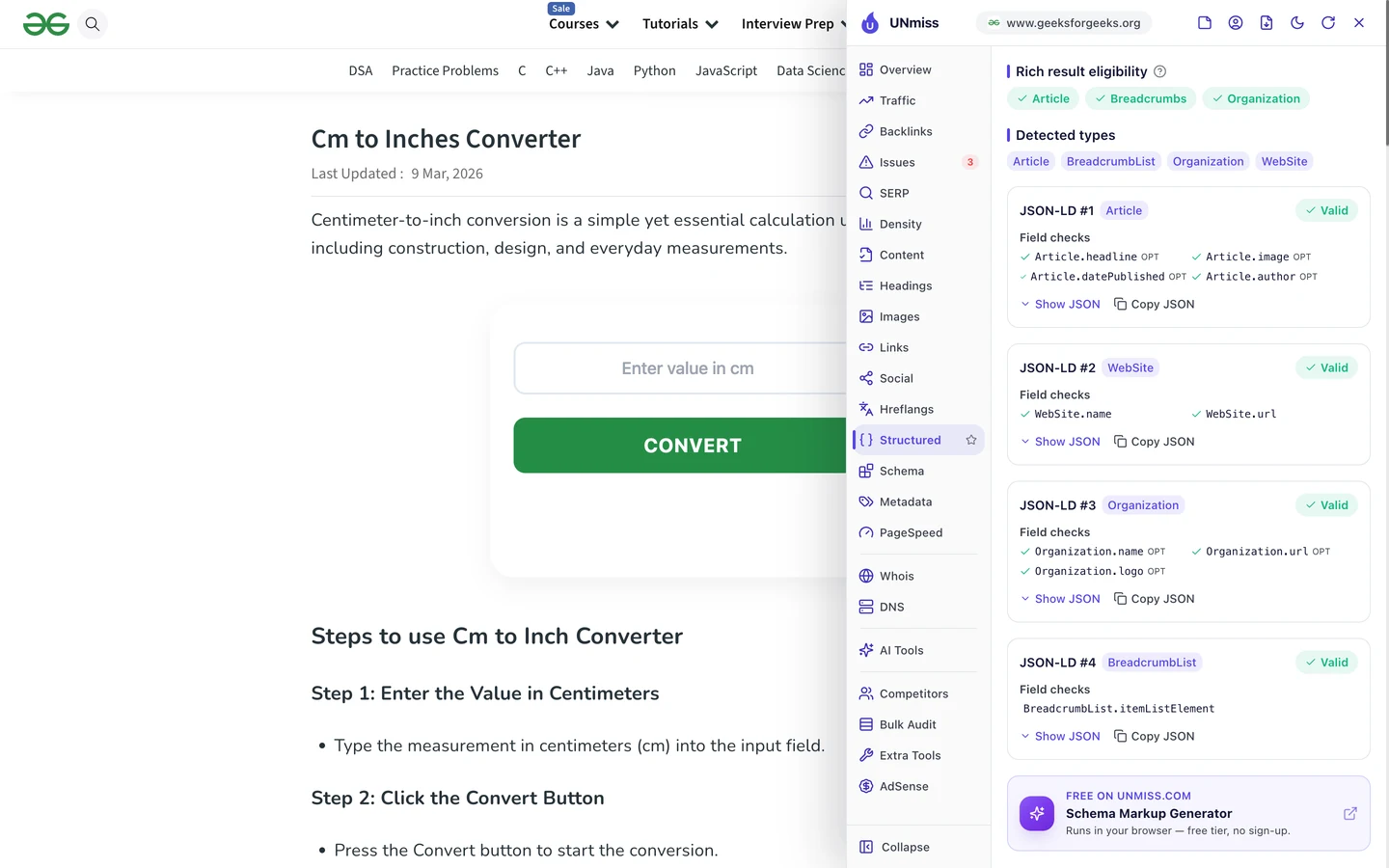
The converter is labelled as an article, not as a tool. You can write code that says "this is a tool" with our Schema Markup Generator.
So if your readers do the same sum again and again, build them a small tool. It's often the quickest page to rank.
4 of GeeksforGeeks' top 10 US pages are tiny tools. We build free tools like these for your site, so people who need a quick answer find you first and come back.
- We find the sums your readers search for
- We design a tool that answers them in seconds
- We add clear help text so the page can rank
- SEO and GEO, so AI answers can quote it too
Give every page its own description
A meta description is the short summary Google may show under your title in search results. Every page should have its own.
Our extension scores the Google Scholar guide 89 out of 100. But look at its description.
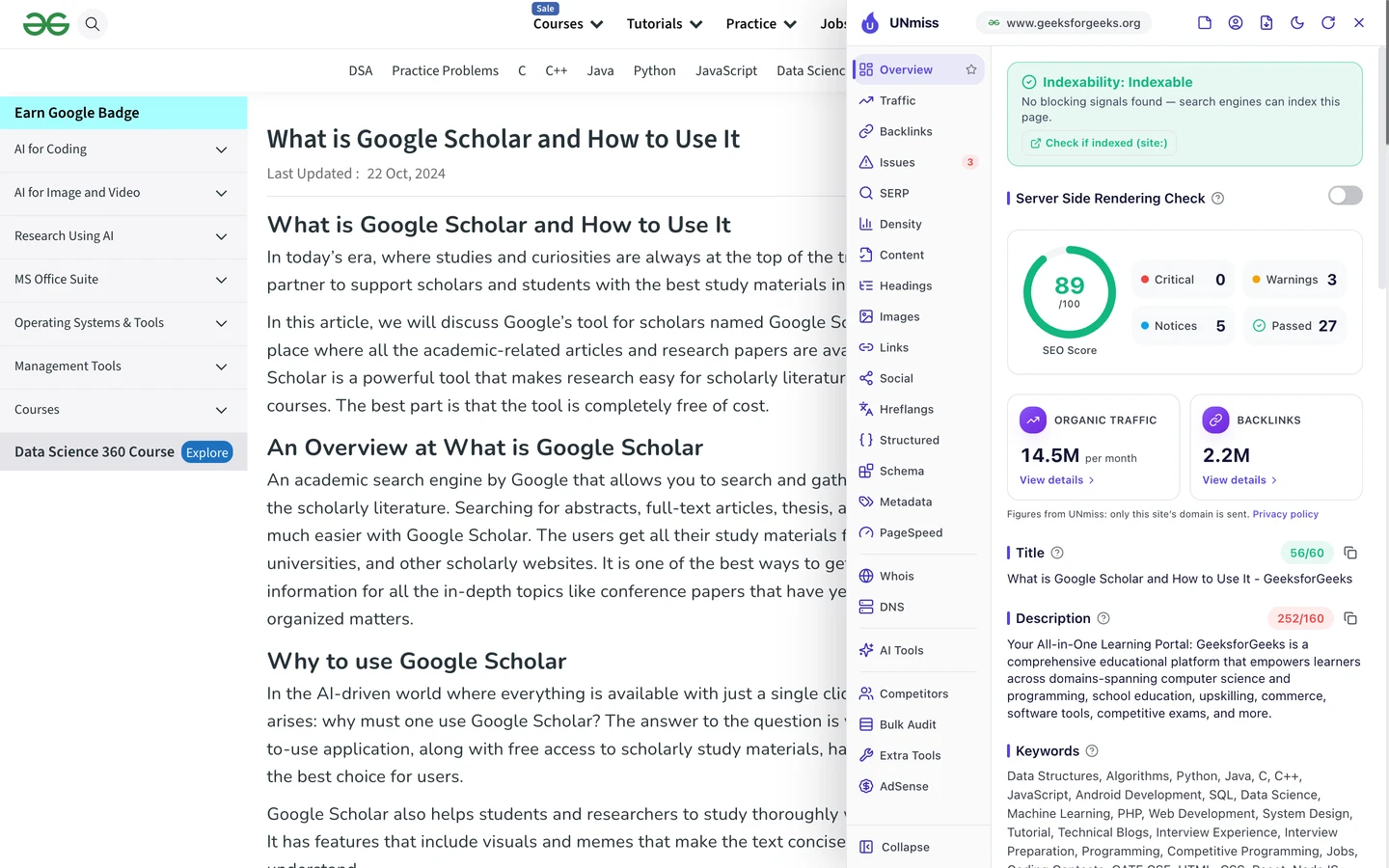
It doesn't describe the page at all. It says "Your All-in-One Learning Portal" and describes the whole site in 252 characters.
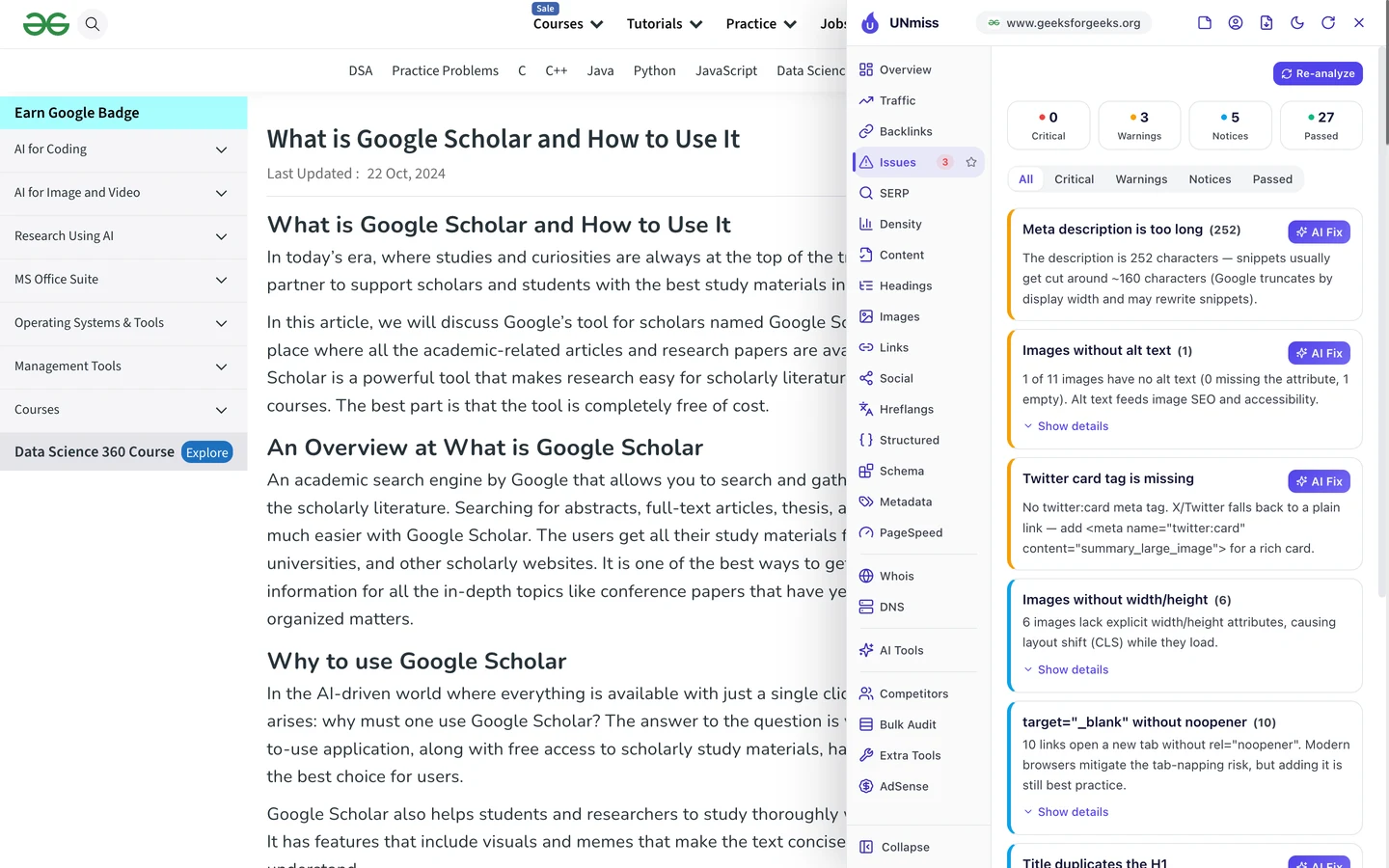
We checked the page code ourselves, and it gets worse. Every page we looked at has 2 description tags, and both are about the site, not the page.
The Technical SEO tab of our audit shows how far it spreads.

One description is shared by 200 pages. Google usually ignores a description like that and writes its own, which may not sell your page as well as you could.
So write one short, specific description for each page. Our Meta Tag Generator helps you keep it under about 160 characters.
Keep one page per search
Go back to the Keywords tab. Above the table is a warning: "c" ranks from 2 different GeeksforGeeks pages.
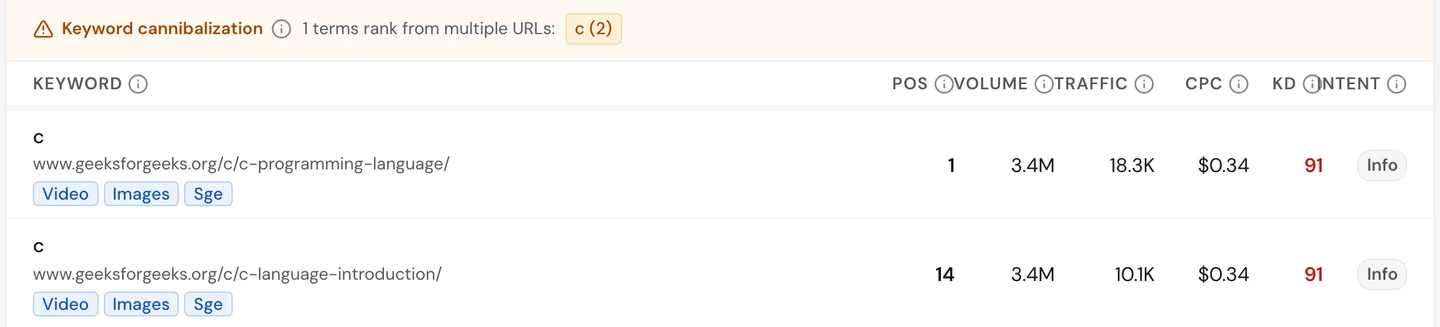
That's called keyword cannibalization, when your own pages compete for the same search. One ranks first, and the other sits on page 2.
Here it barely hurts, because the first page wins. But it often splits links and clicks between 2 pages, so neither ranks as well as one strong page would.
So pick one main page for each important search, and find the searches your pages share with our Keyword Research tool. Point the others to the main page with a link, and track the result in our Rank Tracker.
Earn links from schools
A backlink is a link from another website to yours. Google treats each one a bit like a vote of trust.
The Backlinks tab of our audit shows the same data as our Backlink Analyzer.
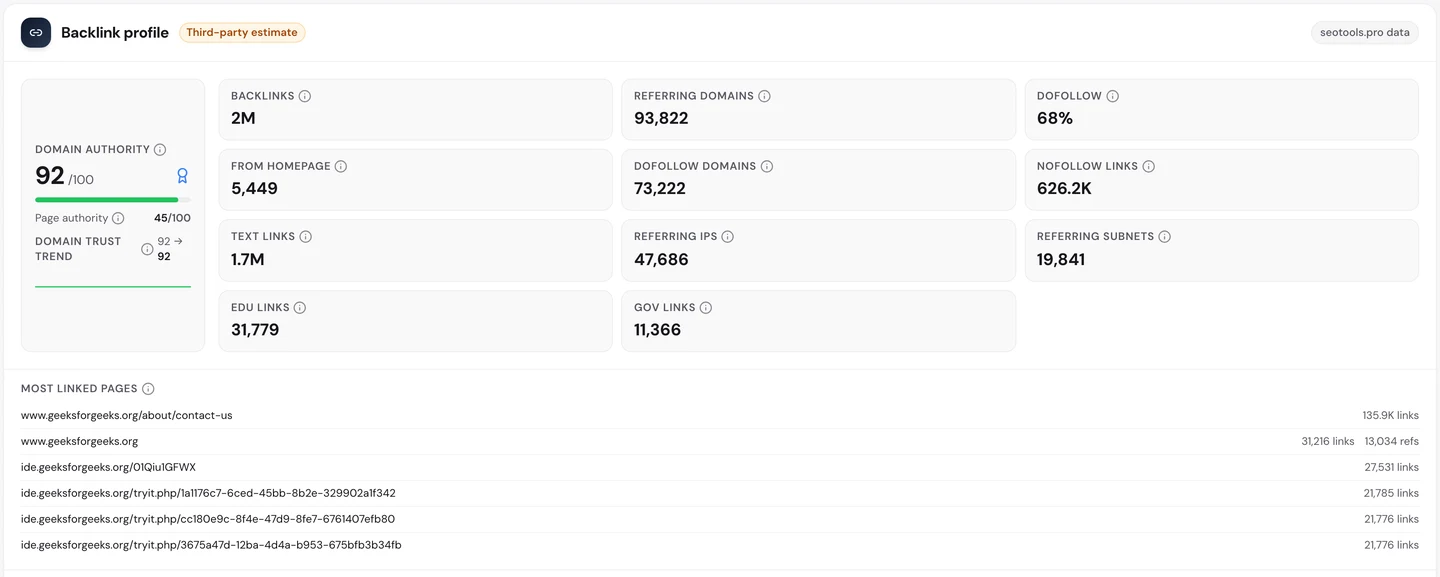
GeeksforGeeks has about 2M links from more than 90K websites. About 32K of them come from .edu sites, the addresses of schools and universities.
Links from schools are hard to buy and easy to trust. You earn them by being the page teachers and students already use.
So write the clearest explanation of a topic students struggle with. Then show it to the people who teach it.
Audit the templates, not pages
When you build thousands of pages from a few templates, one mistake spreads fast. So we checked GeeksforGeeks with our Website Audit.
It crawls a site the way Google does. It opens each page, follows the links to the next ones, and tests every page against a long list of checks.
We had it crawl 250 pages. GeeksforGeeks scored 86 out of 100, which the report rates as good.
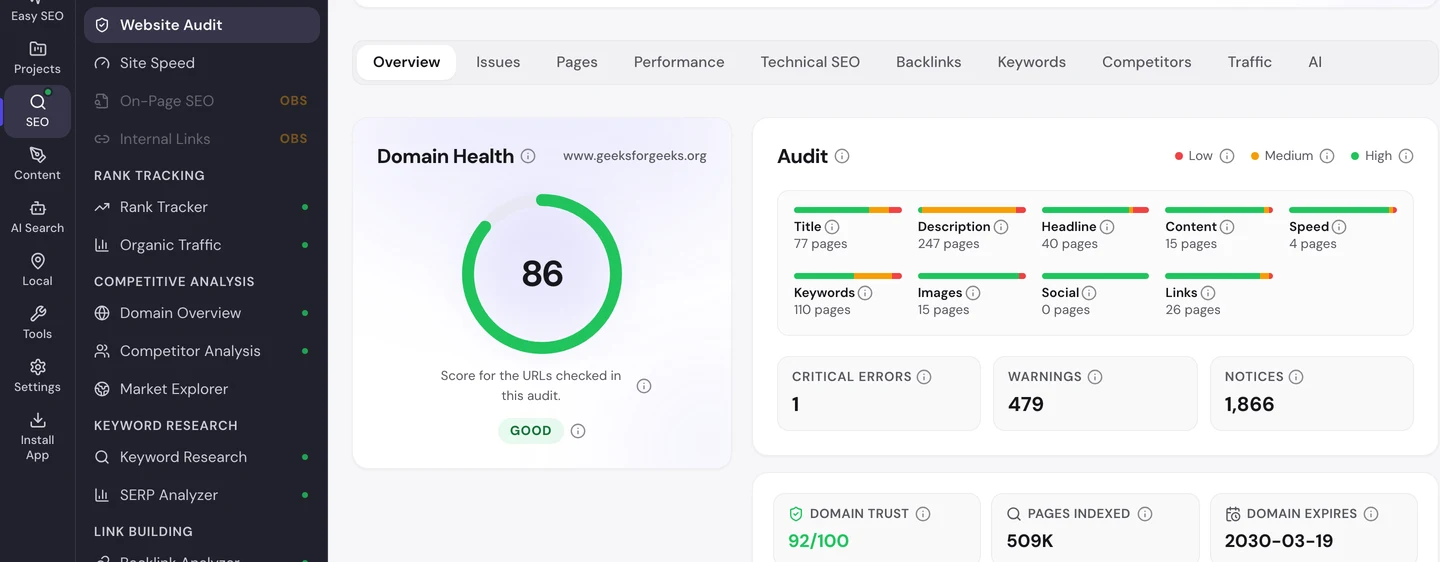
The Issues tab sorts the problems by how much they matter.
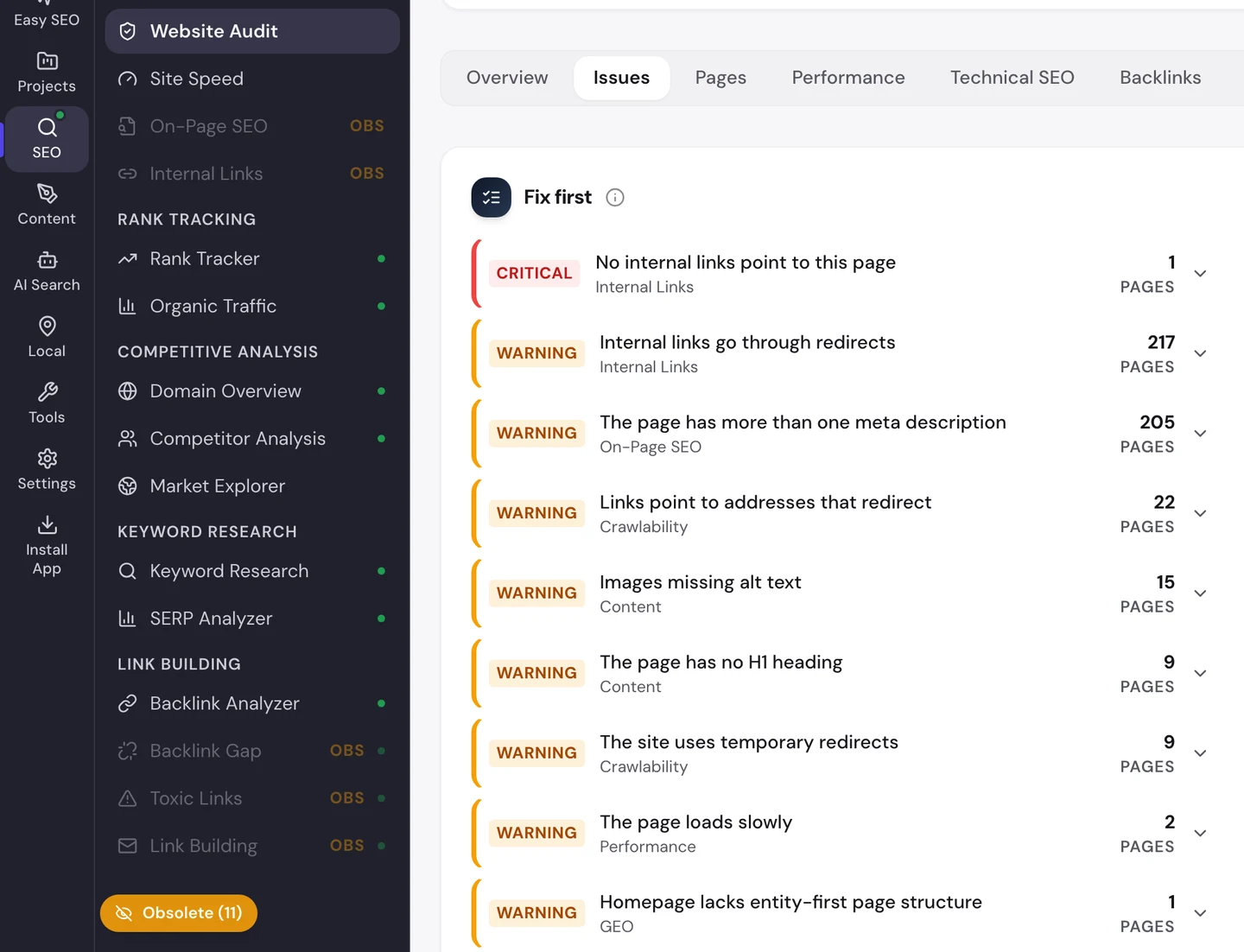
There's only 1 critical error, a page no other page links to. The biggest warnings are links that go through redirects and the doubled descriptions from the last lesson.
The Pages tab shows the good news page by page.
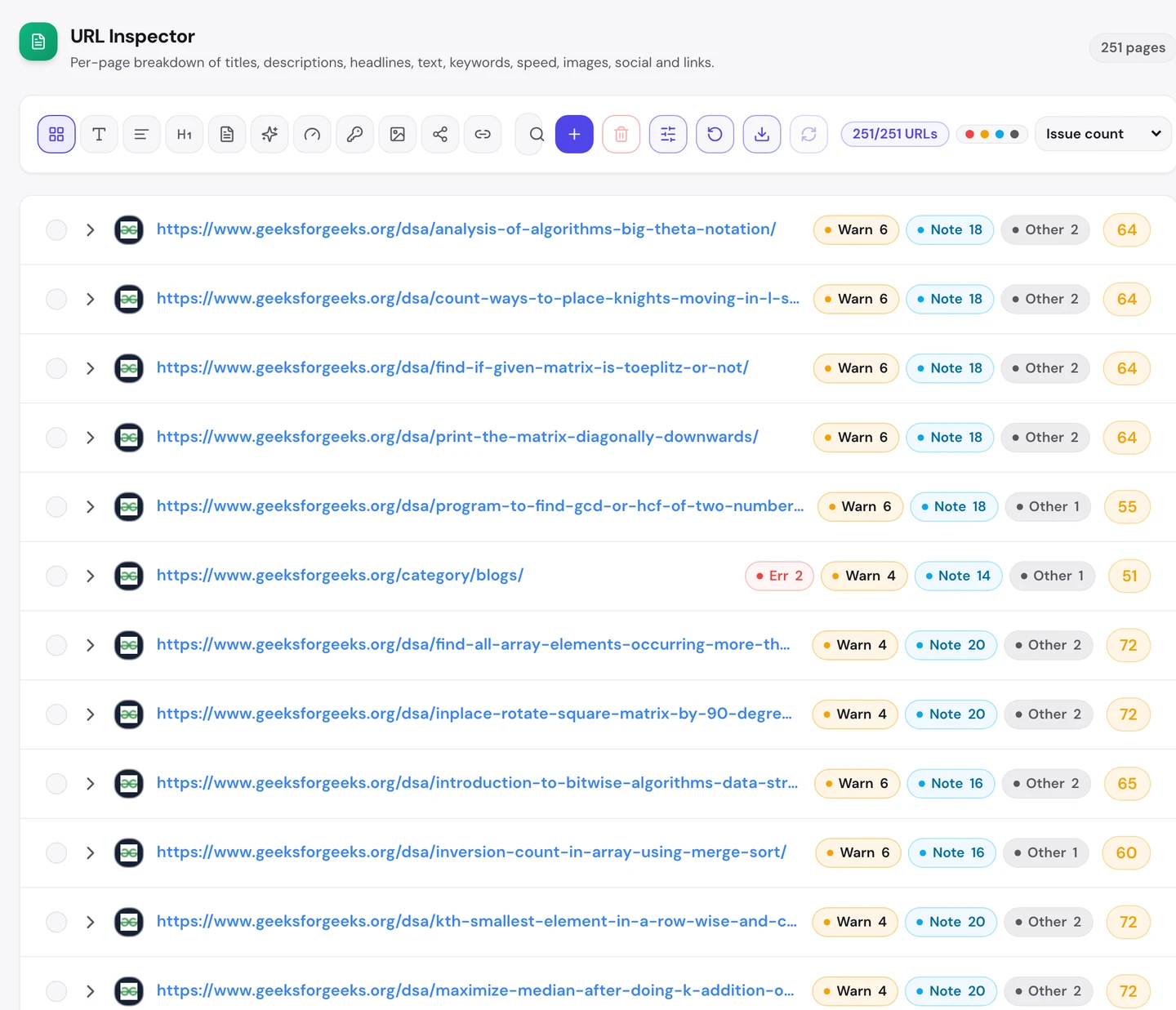
The coding tutorials, the core of the site, have no errors at all. The problems sit in the shared parts of the template.
The Technical SEO tab adds one more find.
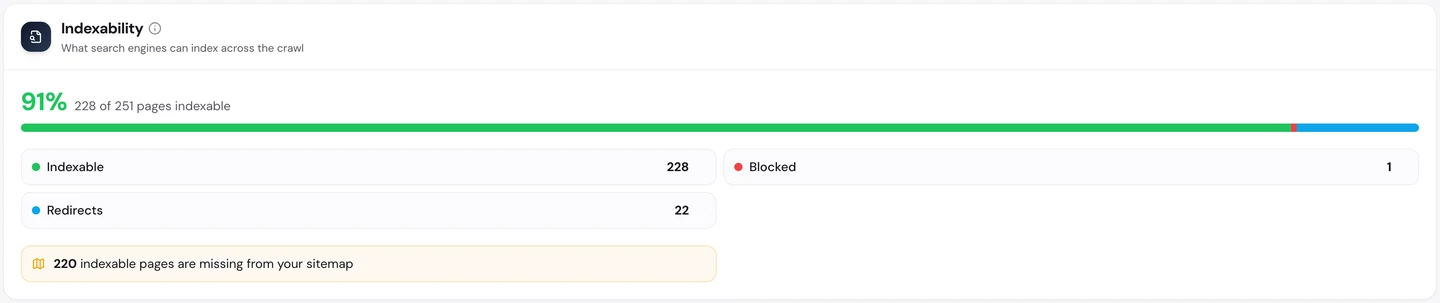
220 pages that Google may list are missing from the sitemap, the file that lists a site's pages for Google.
You don't have to work out what to fix first. The audit's AI tab writes a short brief with the top fixes, each with how to do it.
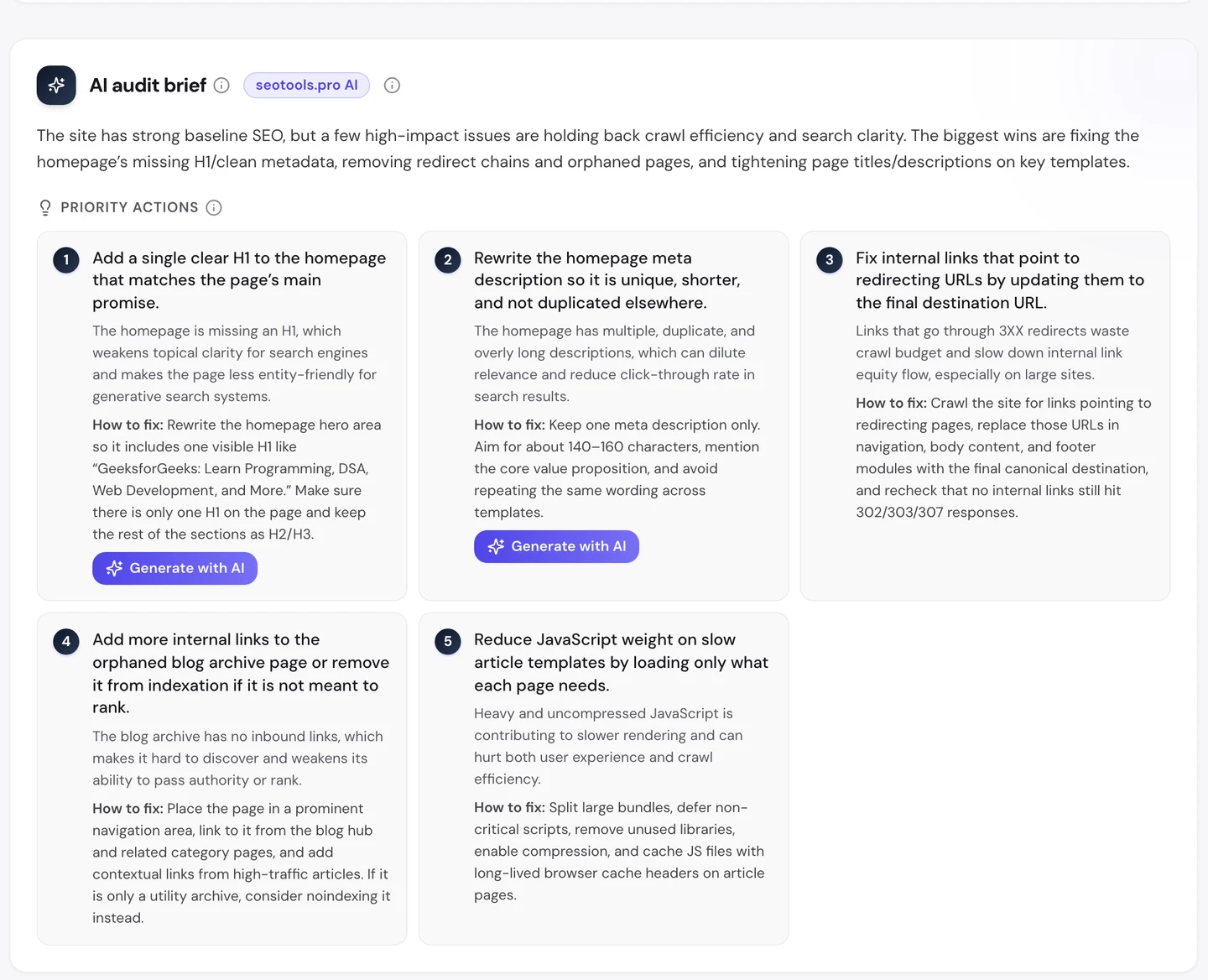
For GeeksforGeeks, fixing the duplicate description is priority number 2. One template change would fix it on every page.
Speed up the pages phones load
The Performance tab of the audit shows Core Web Vitals. These are Google's 3 checks of how fast a page loads, how fast it reacts and whether it stays still, measured on real visitors' devices.
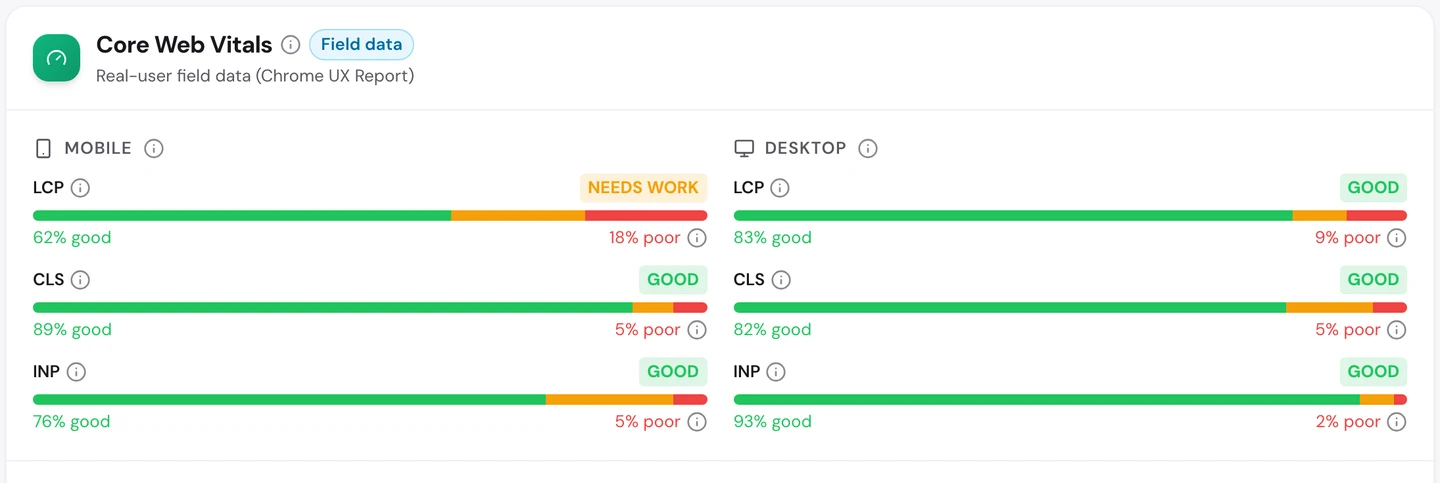
On desktops, GeeksforGeeks passes all 3. On phones, it needs work on loading: only about 6 in 10 page loads are fast enough.
That matters for a site where most readers are students on their phones, maybe like you.
So test your key pages on a phone, not just a laptop. Our Site Speed tool shows what slows each page down.
Decide which AI tools may read you
Students now ask ChatGPT or Claude to explain code, not just Google. So we checked which AI tools may read GeeksforGeeks.
Each of those tools sends a crawler, a program that visits pages and reads them. The rules for crawlers live in robots.txt, a file that tells crawlers what they may read, and our extension reads it for you.
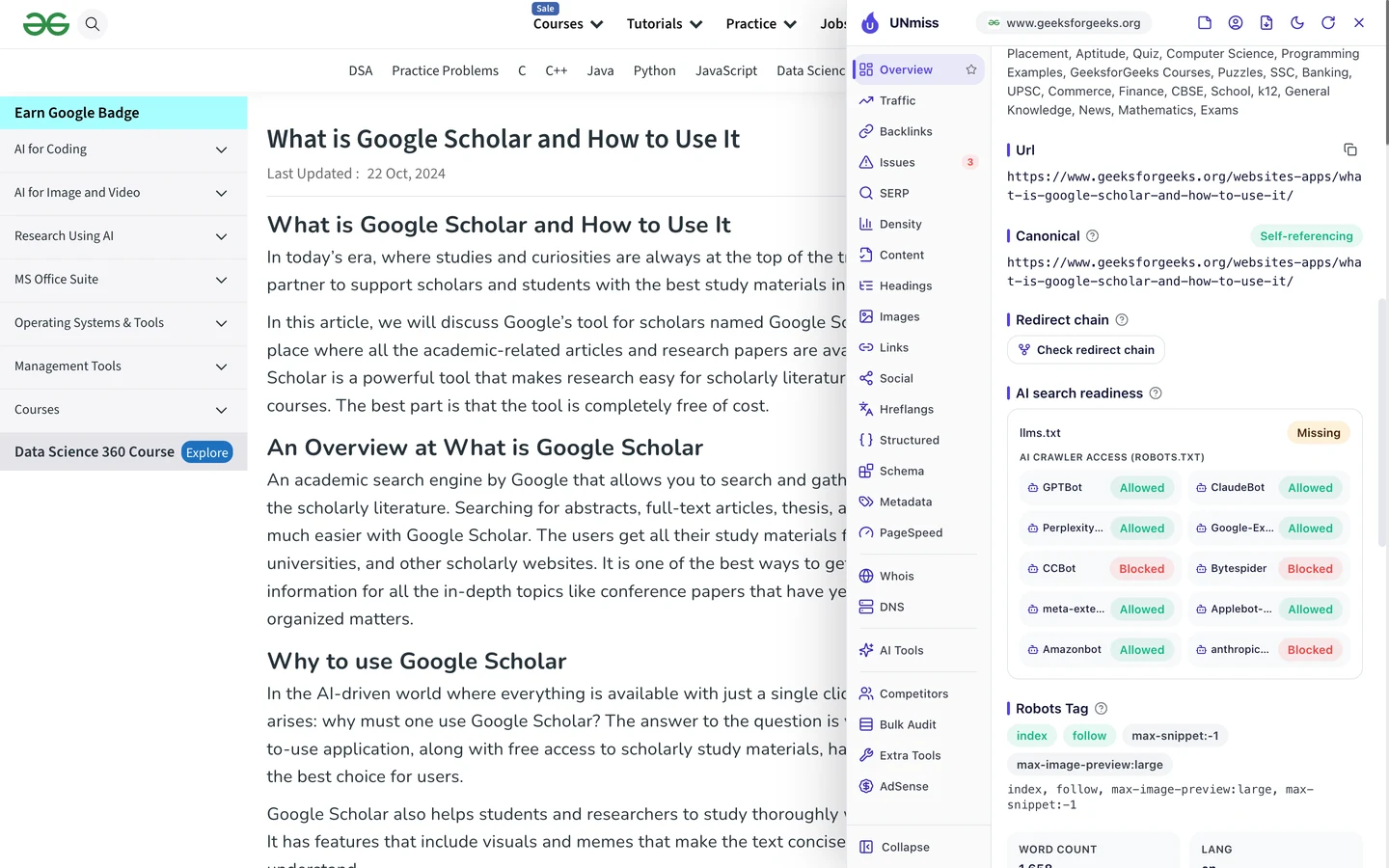
GeeksforGeeks lets in the crawlers behind ChatGPT, Claude and Perplexity. It blocks a few others.
Its robots.txt tells a small story. The lines that blocked ChatGPT's and Claude's crawlers are still there, but switched off with a # at the start.
So the site once blocked them, then changed its mind. You can change yours too, any time.
wikiHow, the how-to site we studied, made the opposite choice and blocks them.
Make your choice on purpose. Write your rules with our robots.txt generator, then check whether AI tools mention you with our AI Visibility Checker.
GeeksforGeeks shares one description across 200 pages. Our Website Audit crawls your site, finds problems that repeat across your templates, and writes a plan to fix them.
- The same audit that checked GeeksforGeeks
- Every page scored, with the fix for each problem
- An AI brief with your top priorities
What you cannot copy
First, the part you can't copy: thousands of coding tutorials, built up over more than 15 years.
That library is why Google still sees GeeksforGeeks as a coding site. A new site can start with one topic it knows deeply.
Now a few honest notes on the numbers.
We took our figures on [actual data date before Aug 23, 2026]. The 14.6M figure is worldwide and comes from the audit's Traffic tab, and the 3.4M figure counts US searches only.
Both are estimates. Nobody outside GeeksforGeeks can count its real visits, so tools work them out from rankings and search volume.
The 2025 ranking drop comes from public reports, not from our tools. Our traffic chart starts after it.
We set the crawl to 250 pages, a sample of a very big site. So we used it to find problems that repeat, not to count every error.
The one number to take away
200.
That's how many pages share the same description in our crawl alone. It's one line in one template, and it's hiding every page's real summary from Google.
That's the lesson for any big site. The fixes that matter most are often the small ones that repeat everywhere.
Know a line that appears on every page of your site? Check it first.
You can run every one of these checks on your own site, and on your rivals', and see the same numbers for yourself.
Frequently asked questions
What is a Google core update?
A big change to how Google ranks pages, released a few times a year. Sites can rise or fall across many pages at once. Google says the fix is to make pages more helpful, not to chase quick tricks.
How long does it take to recover from a core update?
Often months, and usually only after the next core update. Improve your weakest pages, remove or merge thin ones, and keep publishing well on your main topic.
Can two description tags on one page hurt me?
Not directly, but Google may pick the wrong one or ignore both and write its own summary. Keep exactly one description per page, written for that page.
What should a good meta description say?
What the page answers and why it's worth the click, in plain words. Aim for about 150 characters, use the words people search, and don't repeat it on other pages.
How do I find pages that compete with each other?
Look for searches where 2 of your pages rank at once. The Keywords tab of an audit flags them, and so can a quick site search on Google for your main phrase.
Is it bad to write about topics outside my niche?
Not always. A close neighbour topic can work well. The risk comes when many pages drift far away, because Google may stop seeing you as an expert on anything.
Should a tool page have text on it too?
Yes, a little. Put the tool first, then a short explanation, a worked example and the formula. That helps Google understand the page and helps readers trust the answer.
Do links from .edu sites count more?
Google says it doesn't give them special weight. But schools rarely link to weak pages, so these links tend to be trusted, relevant and hard for rivals to copy.