ClinicalTrials.gov gets about 166K visits a month from Google in the US, even though the raw code of its study pages holds none of the study text.
ClinicalTrials.gov is a US government list of medical research studies. Each study gets its own page, and code in your browser builds it.
We ran the site through our SEO tools. Our Website Audit couldn't read a single page, and the reason is a lesson for any site built the same way.
Here are 9 lessons you can copy, plus the part you can't.
Give every study its own page
We started with our Organic Traffic Checker. It estimates a site's organic traffic, meaning the people who find it on Google without ads.
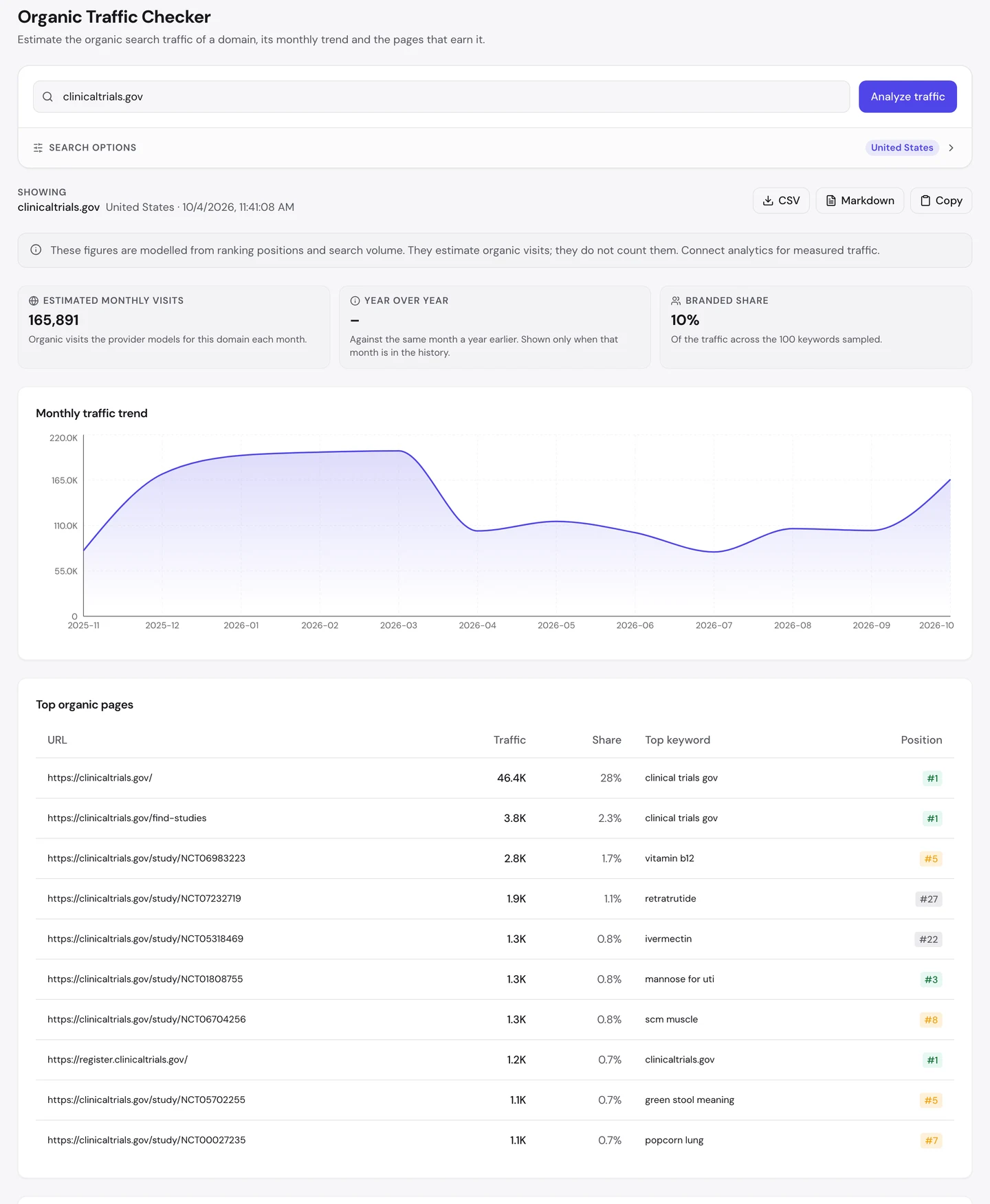
That's about 166K visits a month in the US. Only 10% of it comes from people typing the site's name.
The homepage earns more than 1 in 4 of those visits. Now look at the rest of the top 10 pages.
7 of them are single study pages. Each one pulls in its own stream of visitors.
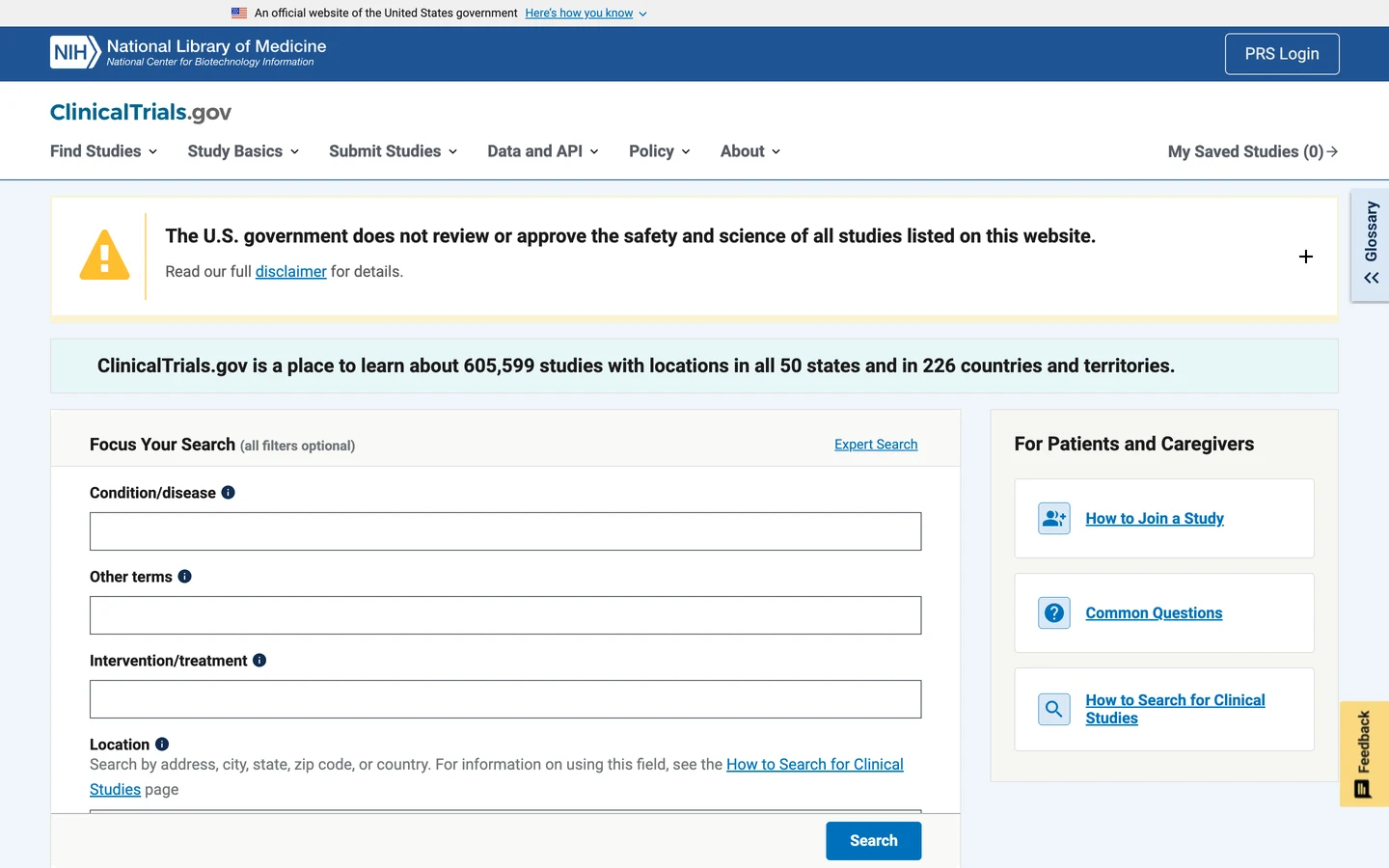
The homepage says the site lists about 606K studies. Every study has its own address, so every study can show up in Google.
That's the base of it all. One page for one thing gives Google an exact place to send you.
Docker Hub, which we studied too, gives every piece of software its own page. PHP.net, which we also studied, does the same for every function.
So give each thing you offer its own page and its own address. Then see which of your pages earn the visits with our Organic Traffic Checker.
Match the words patients type
Now look at the searches those study pages win. They're not codes or long science names.
One study page ranks 7th for "popcorn lung", a lung disease. Another ranks 5th for "green stool meaning".
A third ranks 3rd for "mannose for uti", a supplement people look up for bladder infections. You'd never guess a research study would answer that.
These are everyday questions. Most people typing them probably aren't looking for a clinical trial at all.
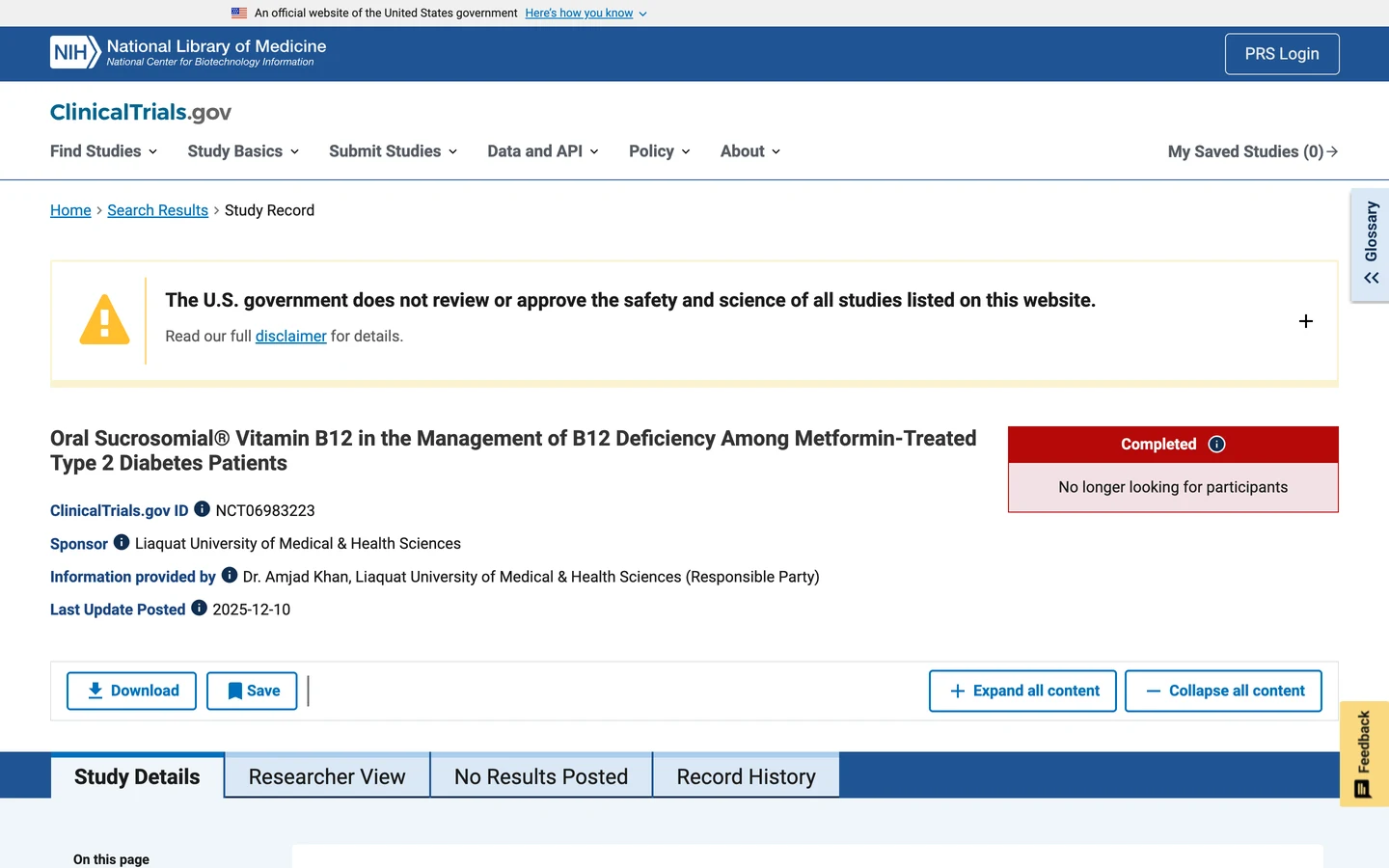
This page is a study of a vitamin B12 supplement for people with diabetes. It ranks 5th for the plain search "vitamin b12".
That one page earns about 2.8K visits a month. Google found the words you'd type in its title and text, and matched them.
Healthline, a health site we studied too, is built around searches like these.
You can do this on purpose. Find the plain words people use, then put them in your title, your headings and your first lines.
So look up how people really search for your topic with our Keyword Research tool. Then use their words, not your own in-house names.
Audit what a crawler really sees
Next, we ran our Website Audit. It sends a crawler, a program that visits pages the way Google does, to check hundreds of pages at once.
We asked for 250 pages. We also gave it the sitemap, the file that lists a site's pages for Google.
It came back empty. The report said, "We couldn't read any pages for this site."
So we checked why. We asked for the vitamin B12 study page the plain way, just like a crawler does.
We even posed as Googlebot and GPTBot, the crawlers from Google and OpenAI. We got the same page each time.
Here's what came back, cut down to the key lines. The file is about 94 KB, but this is what matters.
<title>ClinicalTrials.gov</title>
<meta name="description" content>
…
<app-root></app-root>
…
The title is just the site's name, and the description is empty. There's no study title, no study text and no main heading.
The only words a reader would see are some glossary buttons and a note for "study record managers". That's it.
See that empty "app-root" tag? It's the box the study gets poured into.
JavaScript, the code that runs inside your browser, fills that box after the page loads. Until then, the raw HTML, the code the server first sends, is a shell.
Your browser runs that code, so you see the full study. Our free browser extension reads the page the same way.
Open the page, click the seotools.pro icon, and a panel opens beside it. The Content tab counts the words on the page.
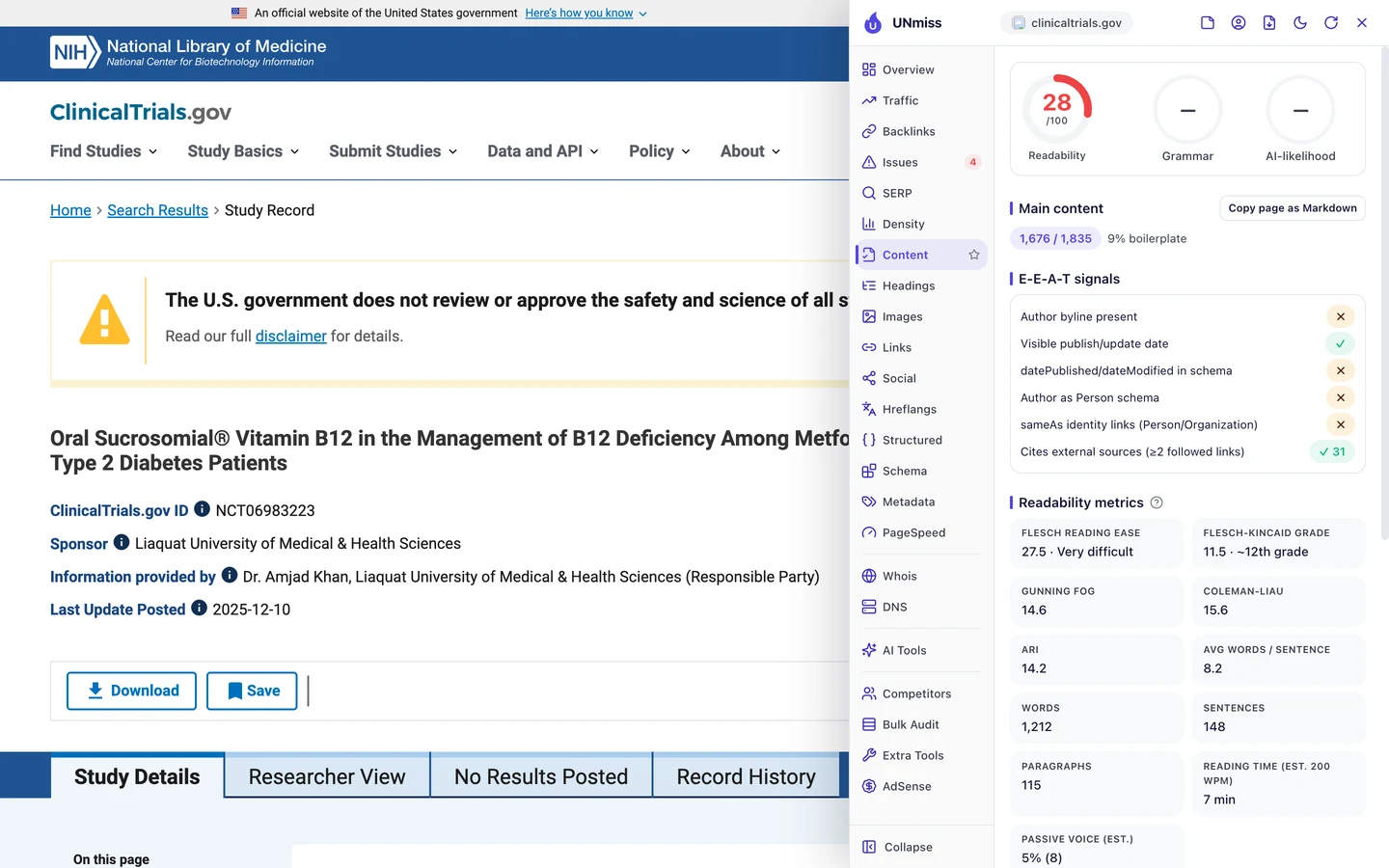
In a browser, the extension finds about 1,700 words of main content. In the raw HTML, we found none of them.
That's why our audit got nothing. It reads the raw HTML, like many crawlers do, so every page looked empty.
Here's the useful part for you. If our audit can't read your pages, a simple crawler can't either.
So run our Website Audit on your own site. If it comes back empty, or your pages show no title or text, check what your raw HTML really holds.
ClinicalTrials.gov's study pages reach crawlers with none of the study text in them. We check what your raw HTML really holds, then put your words there so Google and AI tools can read them.
- We test your pages the way crawlers fetch them
- We set up prerendering or server-side rendering for key pages
- We fix the titles, descriptions and headings in your templates
- SEO and GEO, so AI answers can quote you too
Put your main text in the HTML
So why do the study pages still rank? Google runs JavaScript.
It loads the page like a browser would, often a bit later, and then reads the study. That's how single studies reach the top 10.
Many other crawlers don't wait. Most AI crawlers don't run JavaScript, so they read the raw HTML and move on.
For them, every study page looks like the empty shell above. And the site does let them in.
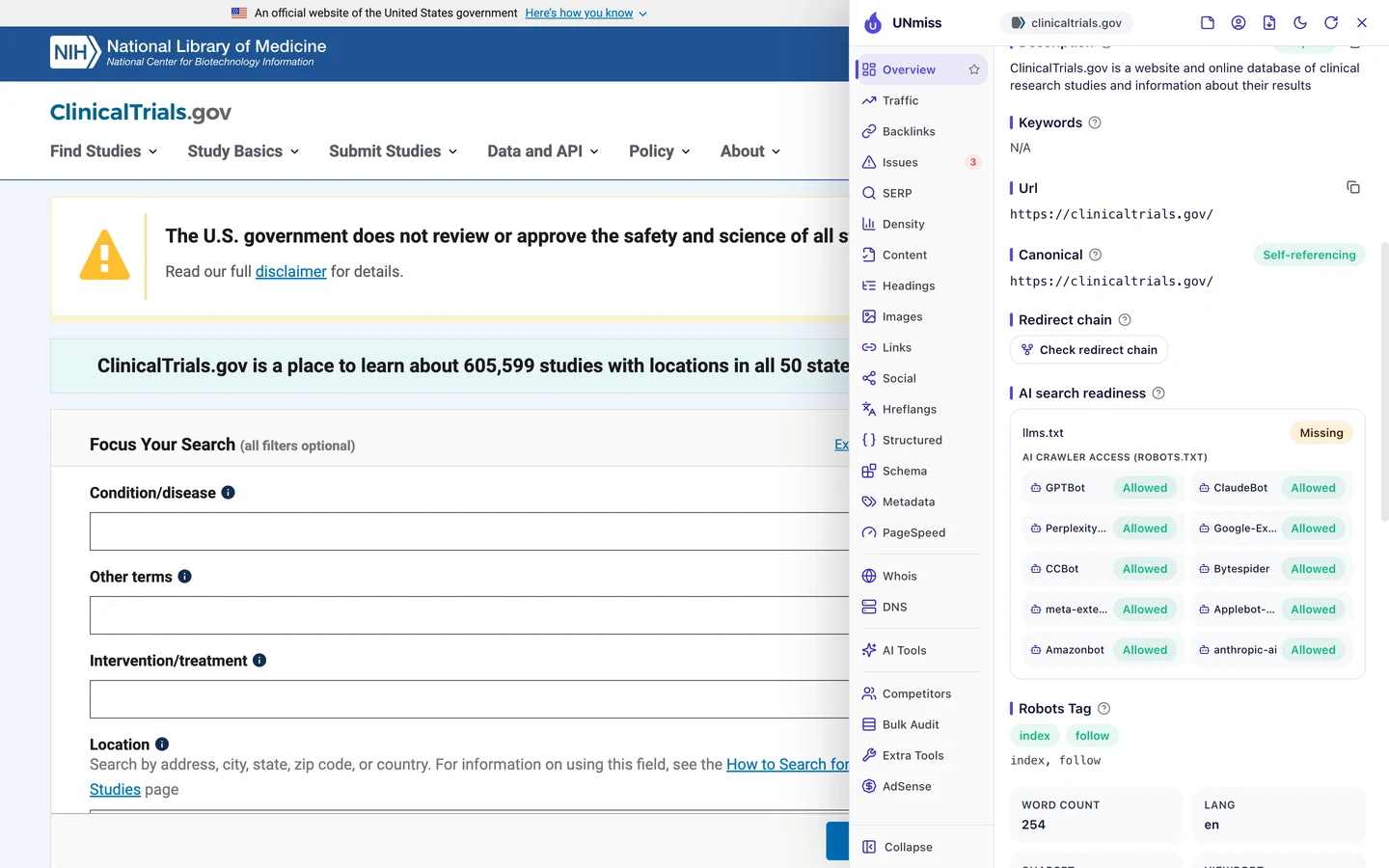
The rules live in robots.txt, a file that tells crawlers what they may read. Here, all 10 AI crawlers the extension checks are allowed.
But being let in isn't the same as being able to read. An AI crawler that skips JavaScript walks in and finds an empty room.
The site also has no llms.txt, a short file that explains a site to AI tools. We looked at how big sites use these files in our llms.txt study.
We also looked at which AI crawlers big sites let in, in our robots.txt study.
Its robots.txt does get one thing right. It blocks search result pages, which can go on forever, so crawlers spend their time on real studies.
The fix for the empty shell is to send the text with the page. Server-side rendering builds the full page on the server before it's sent.
Prerendering saves a ready-made copy of each page ahead of time. Either way, the study's title and text are in the raw HTML for every crawler, not just Google.
So make sure your main text ships in the HTML. Then check your crawler rules with our robots.txt Generator, and see if AI tools mention you with our AI Visibility Checker.
Cut titles to what people search
Once your text is in the HTML, the next job is the title. That's the blue link you see in Google.
The extension's Overview tab shows the title of the page you're on, plus a score out of 100.
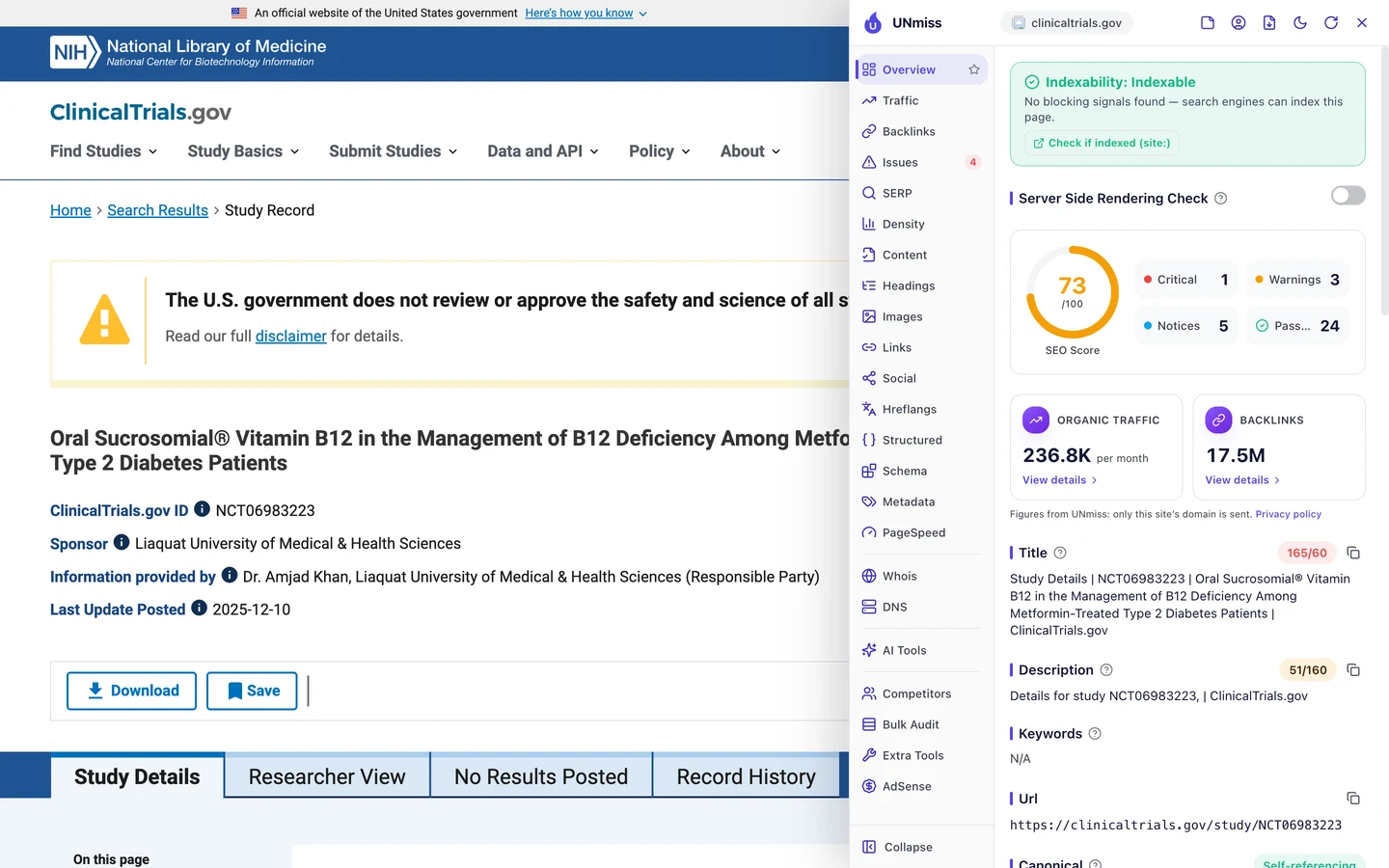
The vitamin B12 page scores 73. Its title is 165 characters long.
It opens with "Study Details" and a study code. The words you'd search for come after that.
Google usually cuts titles off at about 60 characters. So searchers see a code and the start of a long science name, and the rest gets chopped.
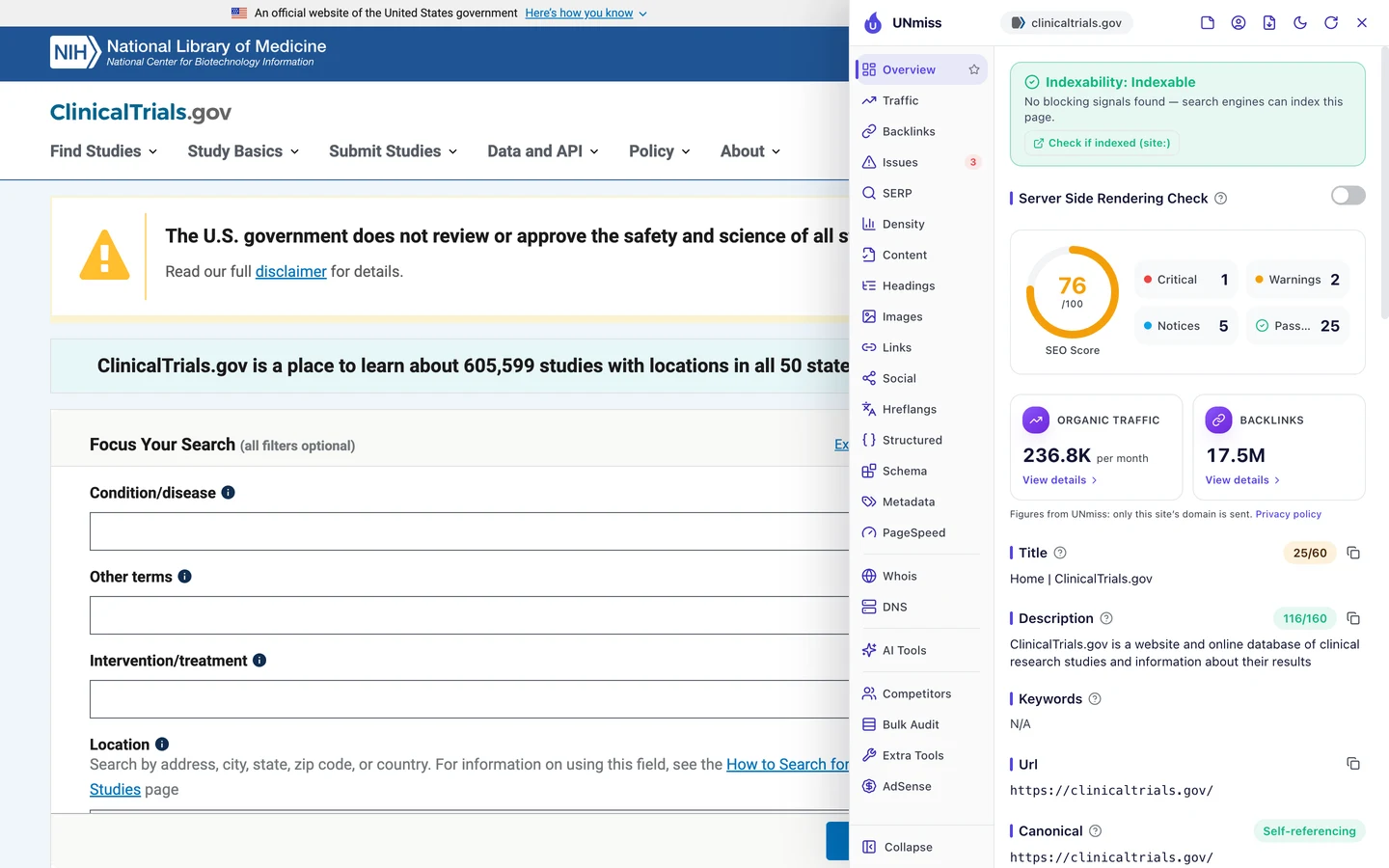
The homepage has the opposite problem. Its title, "Home | ClinicalTrials.gov", is only 25 characters.
It still wins searches for the site's name. But it says nothing about finding a study, which is what new visitors want.
A better study title would lead with the topic, like "Vitamin B12 for Diabetes Patients on Metformin", then the site's name. You'd see what the page is about at a glance.
So put the words people search first, and keep your titles near 60 characters. Preview how yours look in Google with our SERP Simulator.
Write descriptions that make sense
The description is the short summary Google may show under your title. On the vitamin B12 page, it reads "Details for study NCT06983223, | ClinicalTrials.gov".
That's 51 characters, with a stray comma before the bar. It looks like a template that expected another word there and got nothing.
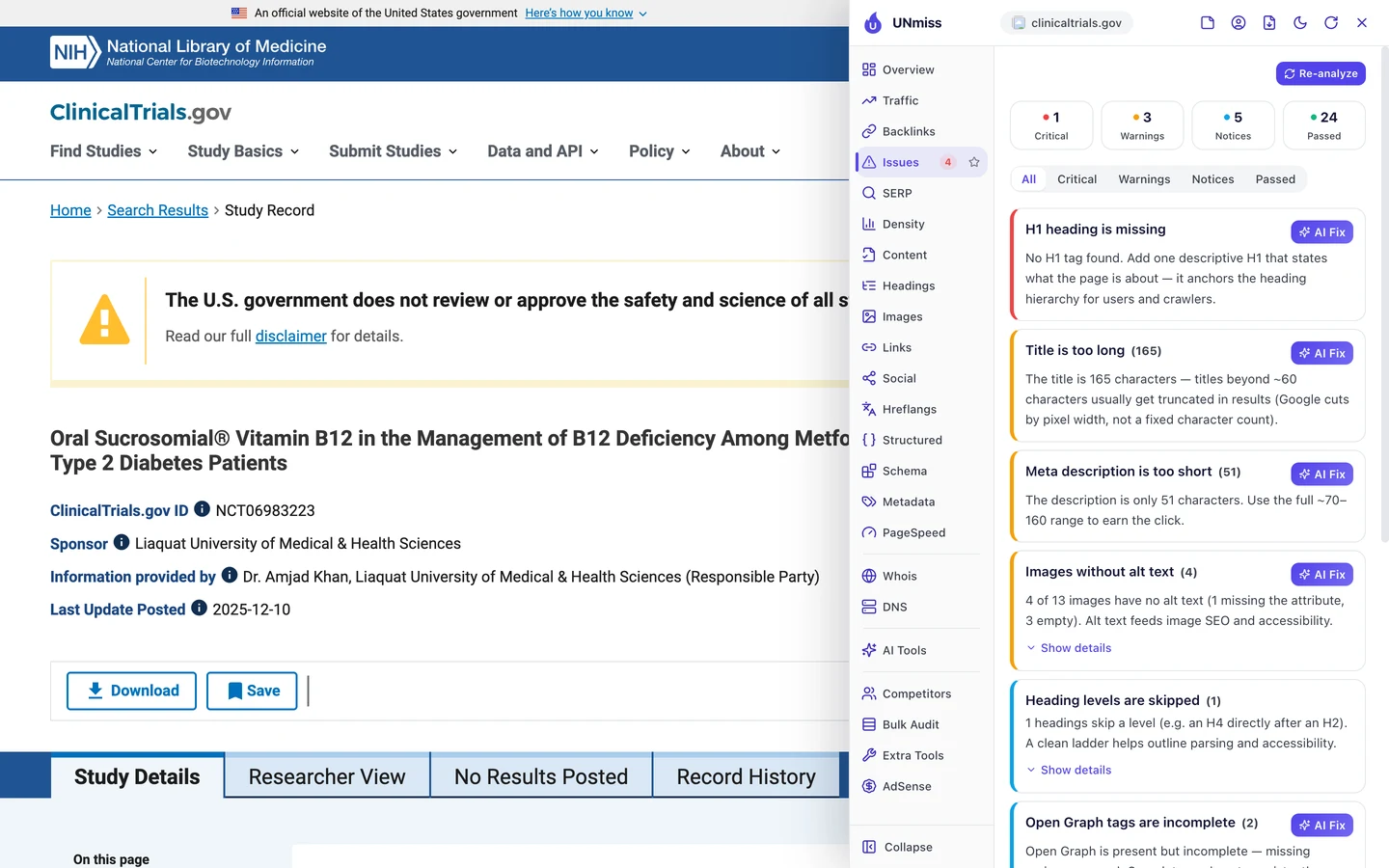
The Issues tab flags it as too short. Google can show up to about 160 characters, and this page uses a third of that.
A template like this likely sits behind every study page. So one fix to it could improve them all at once.
A good template pulls in real details. Think the condition, the treatment and whether the study still wants people to join.
So build your description template from the facts on each page, not a fixed phrase. Test yours with our Meta Tag Generator.
Add one H1 to every page
Look at the top of that Issues list again. The one critical issue is a missing H1, the tag for a page's main heading.
The study page shows a big bold title. But in the code, it isn't marked as the H1.
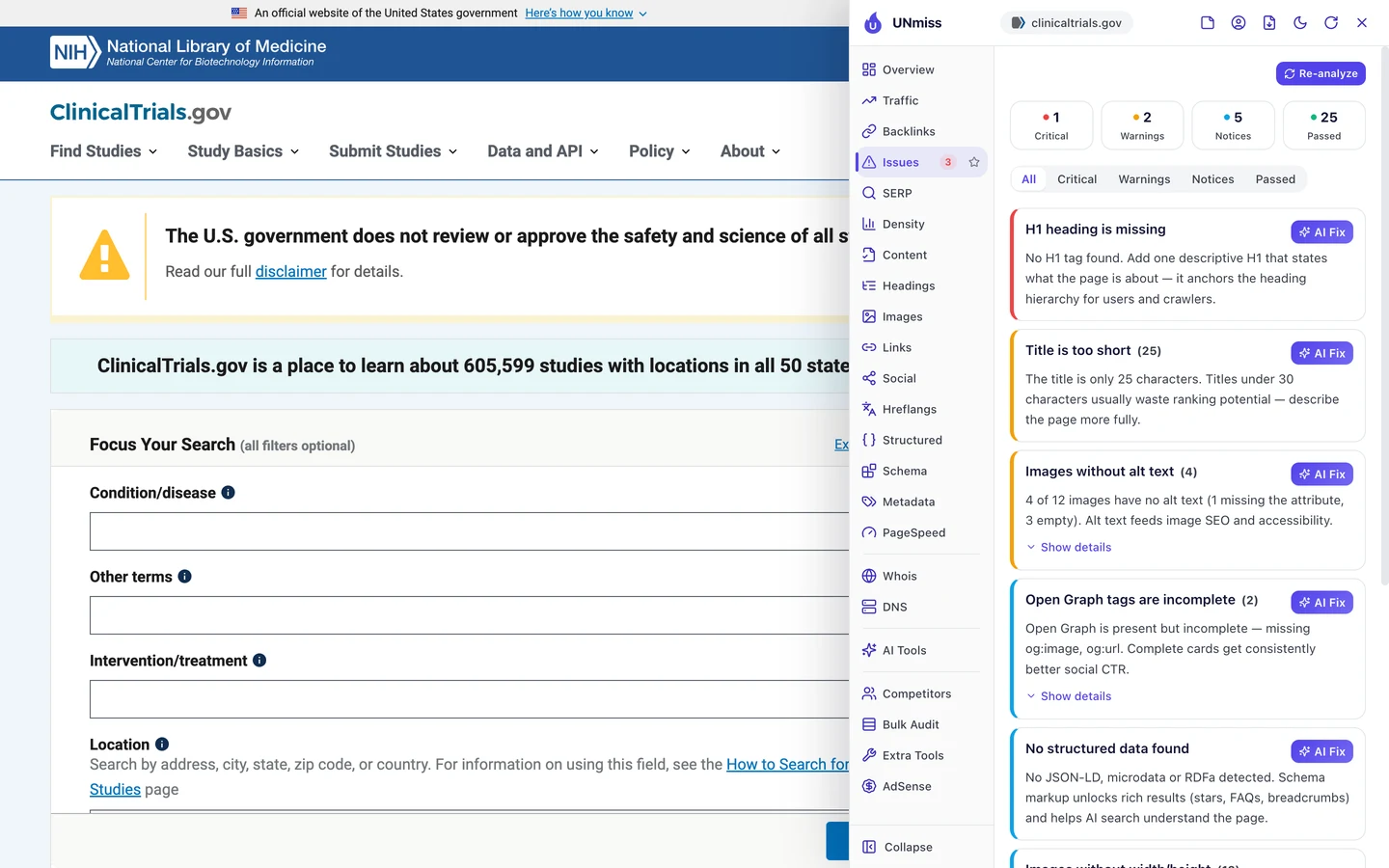
The homepage has the same gap. On both pages, a missing H1 is the only critical issue.
The H1 tells Google and screen readers what a page is about. The study page has 13 smaller headings, but nothing above them.
It's a small fix in one template. Turn each study's title into its H1, and every study page gets one.
While you're in there, fix the 4 images with no alt text. Alt text is a short description that tells Google and screen readers what an image shows.
So check your key templates for one clear H1 with our free browser extension. It takes a few seconds per page.
Mark up each study in code
Structured data is code that tells Google what a page is, like a recipe, a product or a medical study. The extension's Structured tab looks for it.
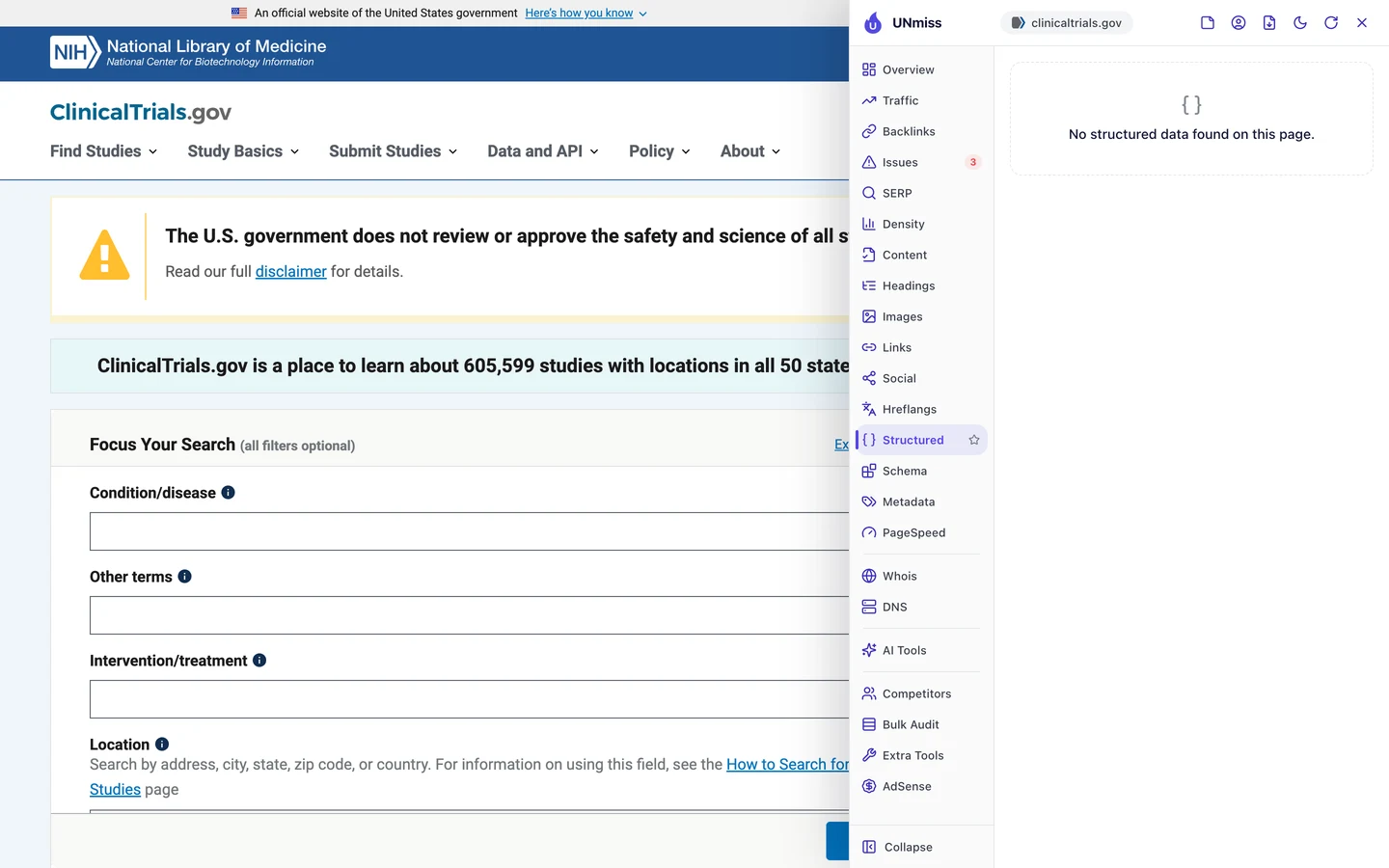
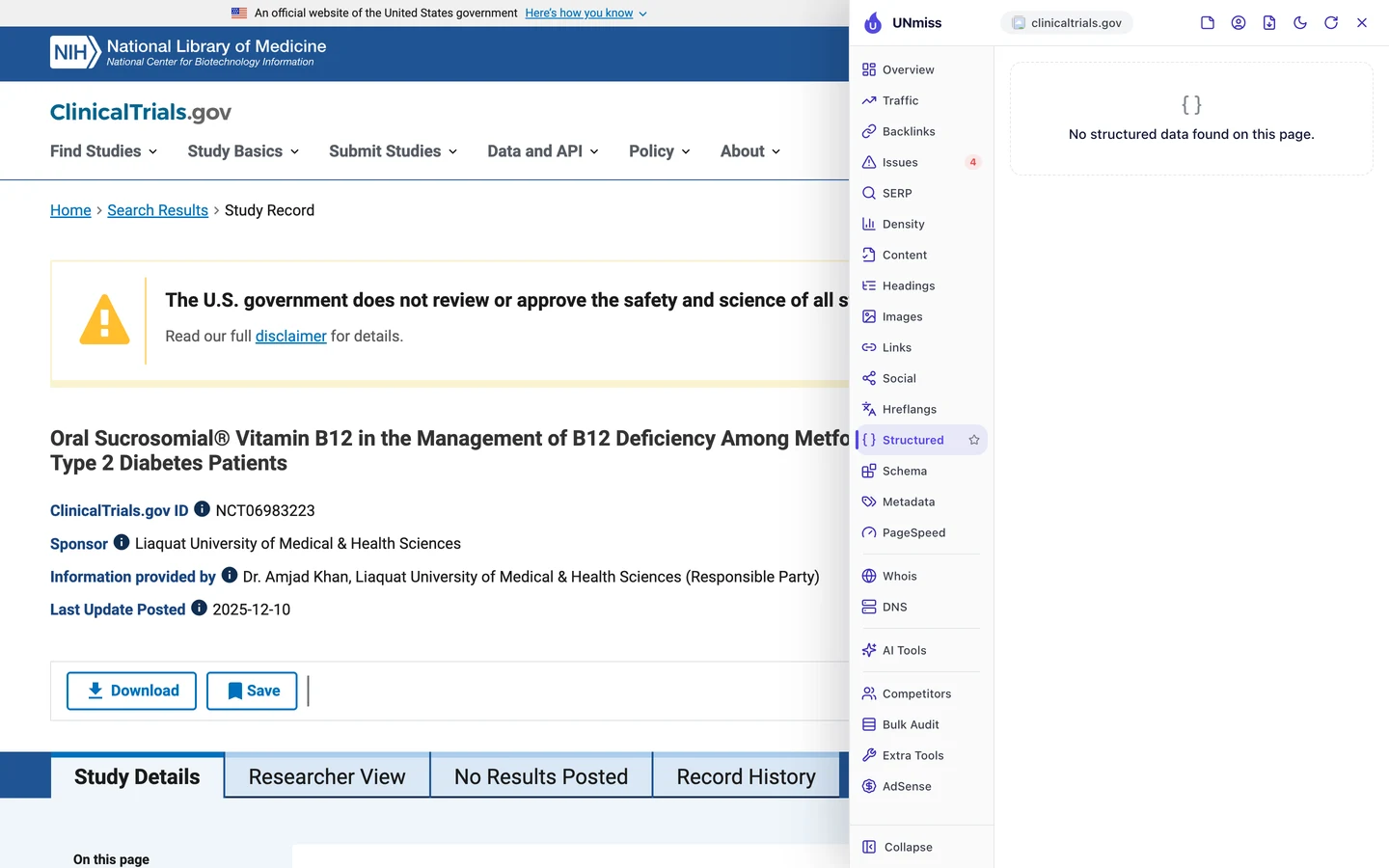
Neither page has any. That's a missed chance for a site that's packed with facts.
Each study page already shows a sponsor, a status and the date of its last update. The Content tab found no date in the code, though.
Code could spell all of that out for Google and AI tools. There's even a ready-made type for this, called MedicalStudy.
And here's the bonus. If you add it to the raw HTML, even crawlers that skip JavaScript can read the key facts.
So add code that says what each page is, who runs it and when it changed. Our Schema Markup Generator writes it for you.
Find your keywords on page 2
Last, our Domain Overview shows where the whole site stands in Google.
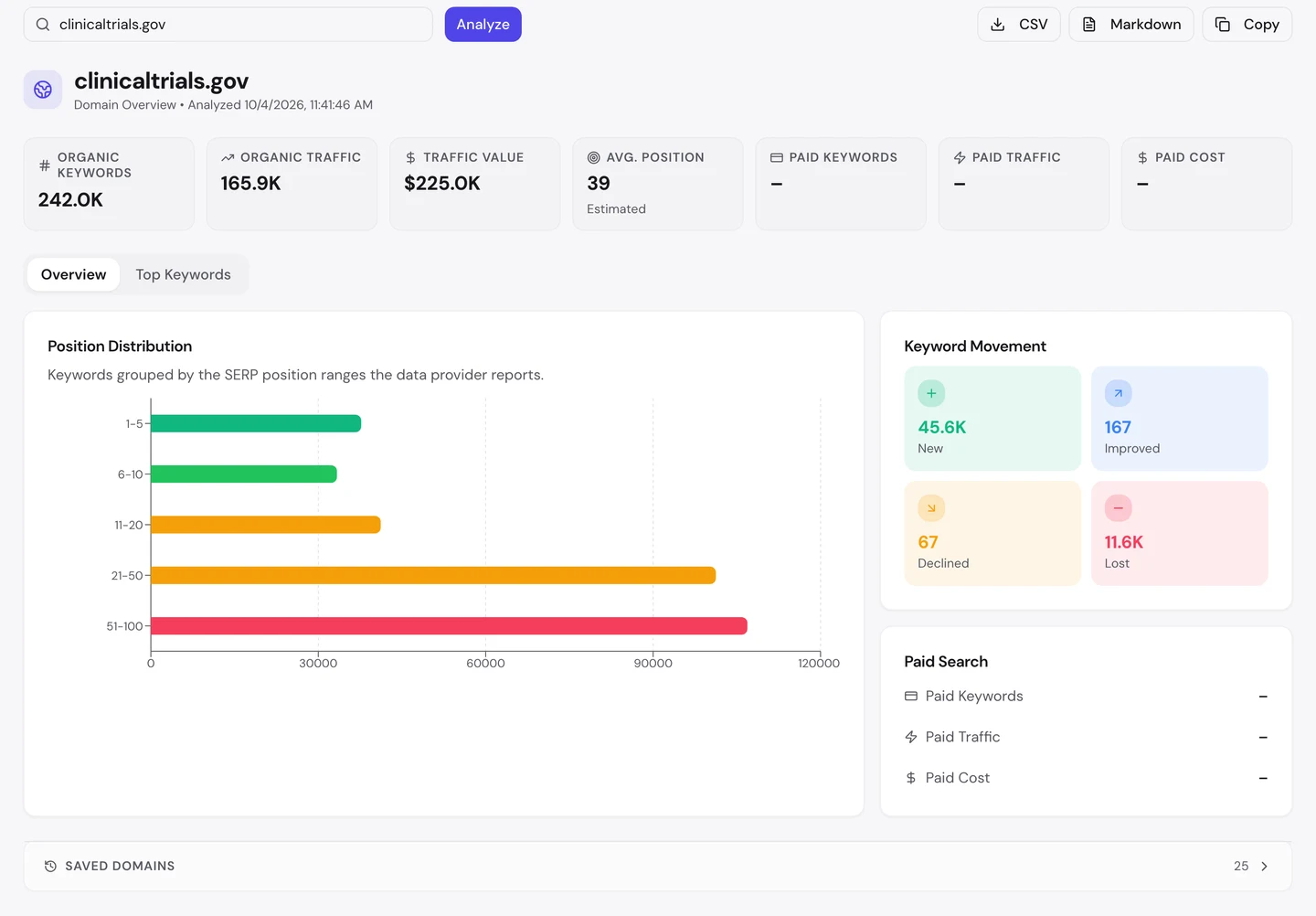
The site ranks for about 242K searches. Its traffic value, what those visits would cost as Google ads, is about $225K a month.
But its average spot is 39, on page 4 of Google. Most of its keywords sit below 20th place, where few people click.
The movement box is good news. It gained about 46K new keywords and lost about 12K.
Pages that need JavaScript can take Google longer to read. So the fix from earlier may help here too.
The quickest wins sit on page 2, in spots 11 to 20. A better title or a clearer page can push those onto page 1.
So find your keywords between 11th and 20th place, and improve those pages first. Then watch them climb in our Rank Tracker.
Our Website Audit couldn't read a single ClinicalTrials.gov page, because the study text isn't in the raw HTML. Run it on your site to see what crawlers really get from each page.
- The same audit we ran on ClinicalTrials.gov
- Titles, descriptions and headings for every page it reads
- An AI plan for what to fix first
What you cannot copy
First, the part you can't copy: ClinicalTrials.gov is an official US government site, run by the National Library of Medicine. Its domain dates back to 2000.
The extension counts about 17.5M backlinks to it. A backlink is a link from another website to yours, and that many takes years of trust you can't buy.
You can still see who links to you, and to your rivals, with our Backlink Analyzer.
Now a few honest notes on the numbers.
We took our figures on [actual data date before Aug 29, 2026]. The 166K figure counts US searches only.
The extension shows its own, different estimate of about 237K a month. Both are estimates, worked out from rankings and search volume, since nobody outside the site can count its real visits.
Our Website Audit read 0 pages, so there's no audit report and no crawl sample here. We checked the raw HTML by hand instead, on the same day.
We didn't test each AI crawler one by one. We only know that most AI crawlers don't run JavaScript, and that the raw HTML has no study text.
Google clearly does run it, since single studies reach its top 10. So the empty HTML likely costs the site more with AI tools than with Google.
The one number to take away
0 words.
That's how much study text a crawler gets from a ClinicalTrials.gov study page before any code runs. In a browser, the same page holds about 1,700 words.
Google does the extra work and still sends about 166K visits a month. Most AI crawlers won't.
That's the lesson for any site built as a JavaScript app. If your words aren't in the HTML, some readers will never see them.
What does your raw HTML say? Check it the way a crawler would.
You can run every one of these checks on your own site, and on your rivals', and see the same numbers for yourself.
Frequently asked questions
How do I see my page's raw HTML?
In Chrome, right-click the page and pick View Page Source. That's the raw HTML, and if your main text isn't in there, crawlers that skip JavaScript won't see it.
Is server-side rendering hard to add?
It depends on how your site is built. Many modern web tools can do it with a setting, and on older apps, prerendering your key pages is often the quicker fix.
Does Google punish sites built with JavaScript?
No. Google can read them, but it has to run the code first, and that extra step can slow down how fast new pages get read.
What's the difference between prerendering and server-side rendering?
Server-side rendering builds each page fresh when someone asks for it. Prerendering builds pages ahead of time and hands out saved copies, and both put the text in the HTML.
Will an llms.txt file fix an empty page?
No. It can point AI tools to your key pages, but those pages still need their text in the HTML.
Which structured data fits a research or data page?
MedicalStudy fits clinical studies, and Dataset fits pages that share data. Fill in the name, status, sponsor and dates you already show on the page.
Should I block my search result pages from crawlers?
Usually, yes. They can go on forever and repeat the same content, so blocking them lets crawlers spend their time on your real pages.
How do I know if AI tools can read my site?
Check that your text is in the raw HTML and that your robots.txt lets AI crawlers in. Then ask AI tools about your topic and see if they name you.