Booking.com gets about 10M visits a month from Google in the US, and its biggest pages are plain city pages built from one template.
Its New York page alone brings in about 1 in 8 of those visits. It ranks first for "hotels near me".
We ran the site through our SEO tools. Our Website Audit got turned away, so we checked the city pages one by one instead.
Here are 9 lessons you can copy, plus the part you can't.
Build one page for every city
We started with our Organic Traffic Checker. It estimates a site's organic traffic, meaning the people who find it on Google without ads.
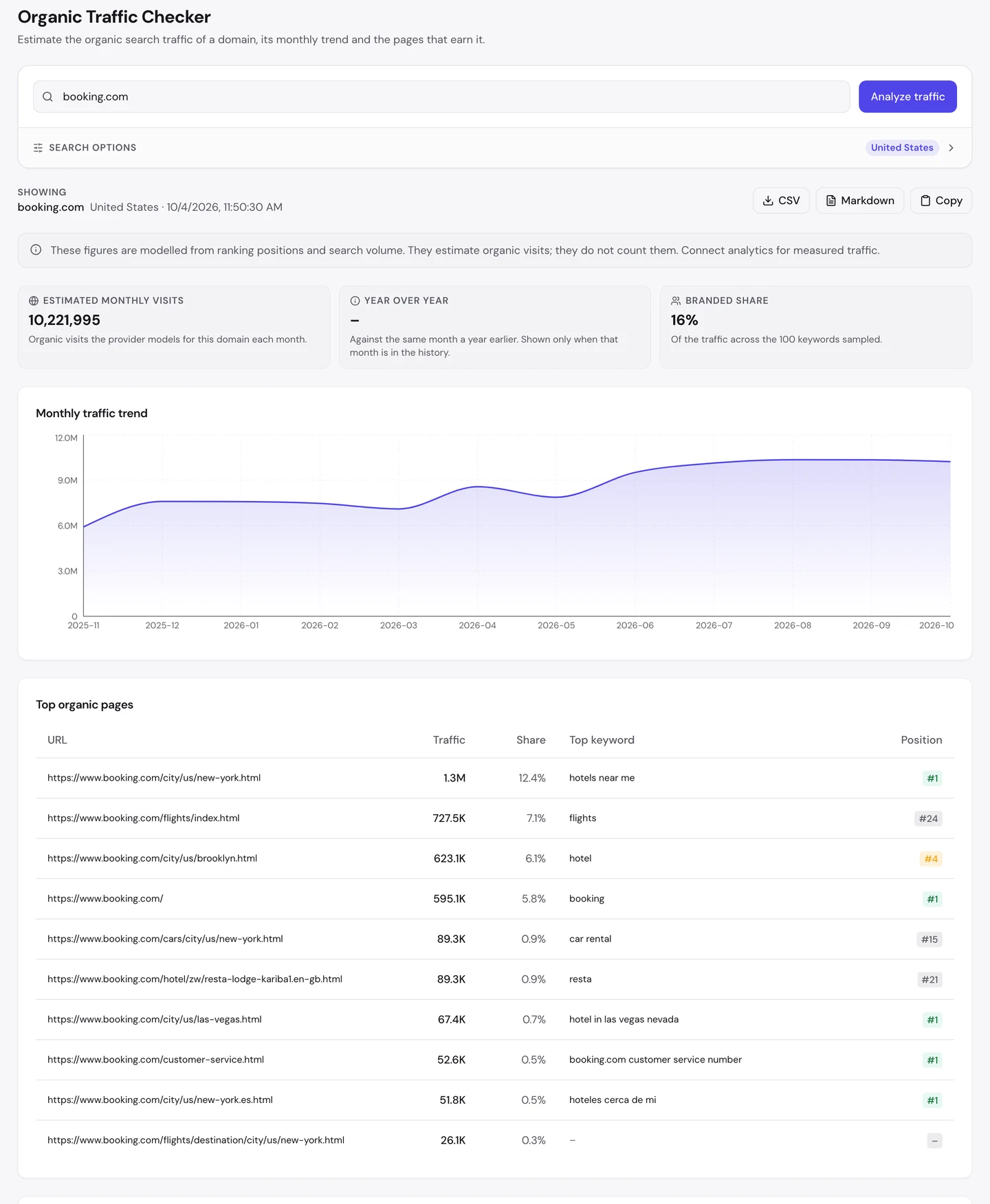
That's about 10.2M visits a month, from the US alone. And the top page isn't the homepage.
It's the hotels page for New York. 4 of the top 10 pages are hotel pages for a single city, like Brooklyn or Las Vegas.
This is programmatic SEO. It means building many pages from one template and a list of data, like a list of cities.
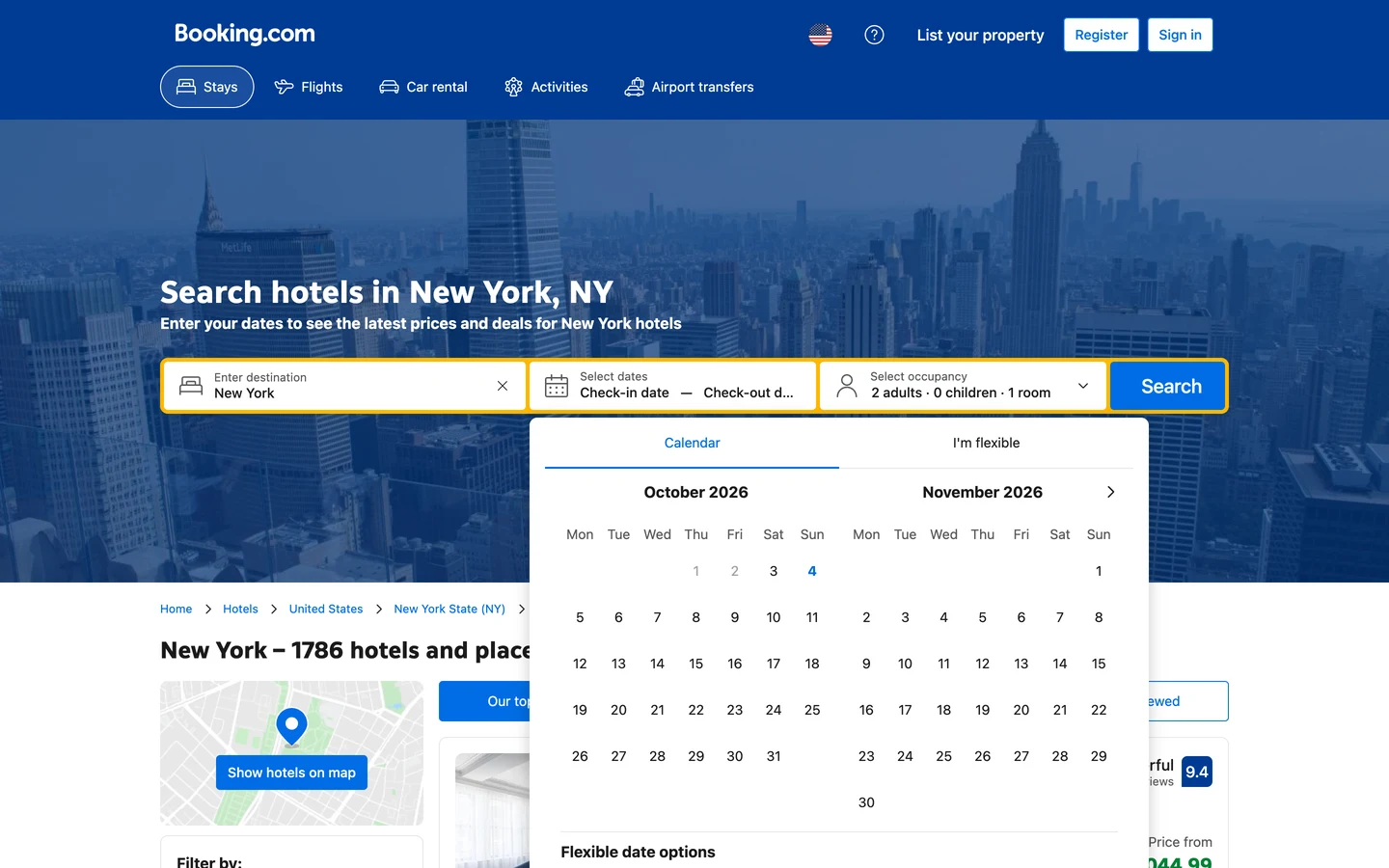
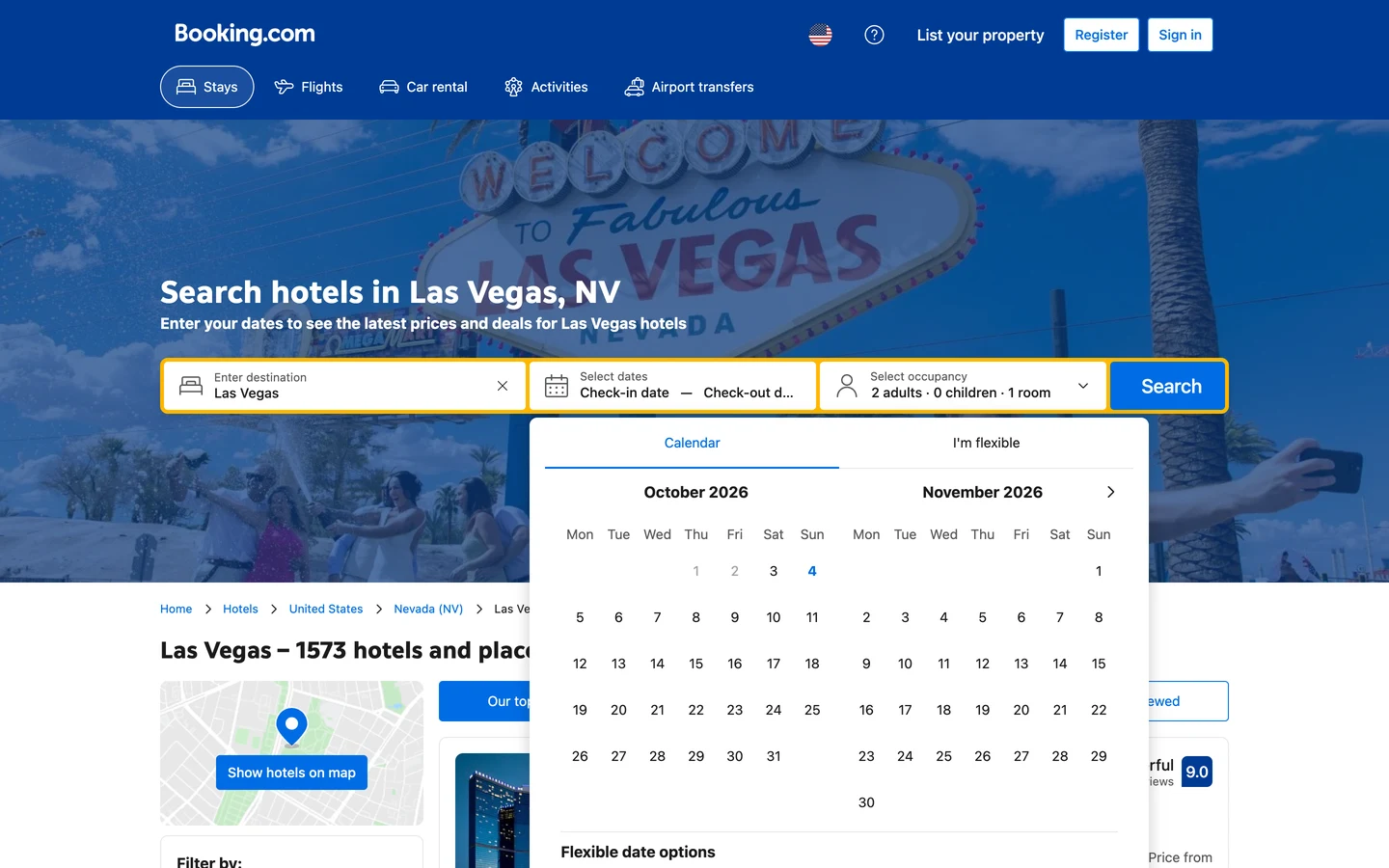
Put the 2 pages side by side. They're the same page, with a new city name, a new photo and a new list of hotels.
The heading even names the search you'd type, "hotels in Las Vegas". That page ranks #1 for "hotel in las vegas nevada".
Eventbrite, which we studied too, builds a page for every city as well. Wise, another site we studied, does it with a page for every currency pair.
So list the things your customers search for, like places, products or pairs, and give each one its own page. Then see which of those pages earn visits with our Organic Traffic Checker.
Win the "near me" searches
Look at what the New York page wins, and you'll see something odd. Its top search isn't "hotels in New York".
It's "hotels near me", and the page ranks #1. That one page brings in about 1.3M visits a month.
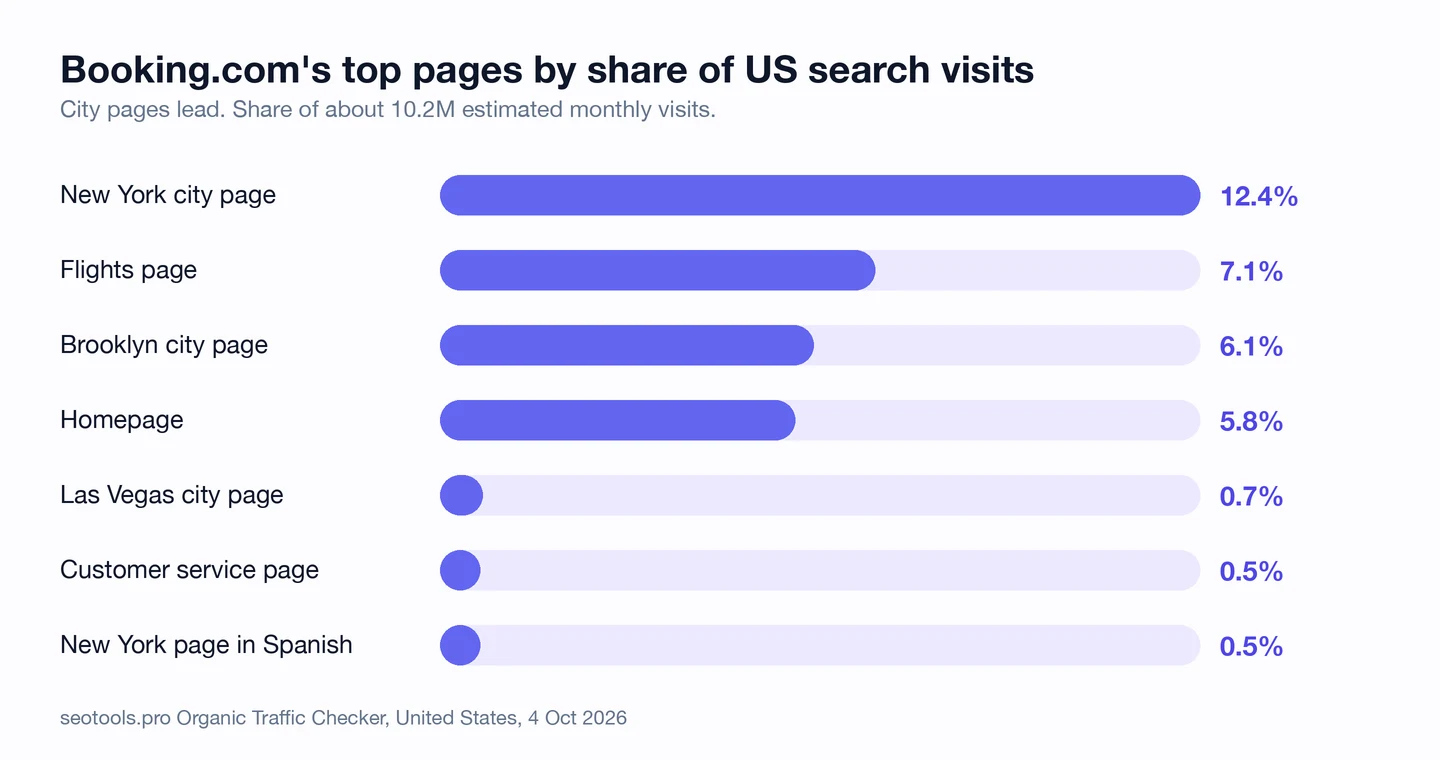
That's about 12% of all of Booking.com's US search visits. It's more than the flights page, and more than the homepage.
Why does a New York page win "near me"? Google answers those searches based on where you are, so it picks the city page that fits your area.
The Brooklyn page shows the same thing. It ranks #4 for the plain word "hotel" and brings in about 623K visits.
You can't rank for "near me" without a page for the place. A page for each city gives Google a match for each searcher.
So build a page for every place your customers are in, with the place name in the title and heading. Then track how each one ranks with our Rank Tracker.
Write the description once
Next, we opened the Las Vegas page with our free browser extension. Click the seotools.pro icon, and a panel opens beside the page.
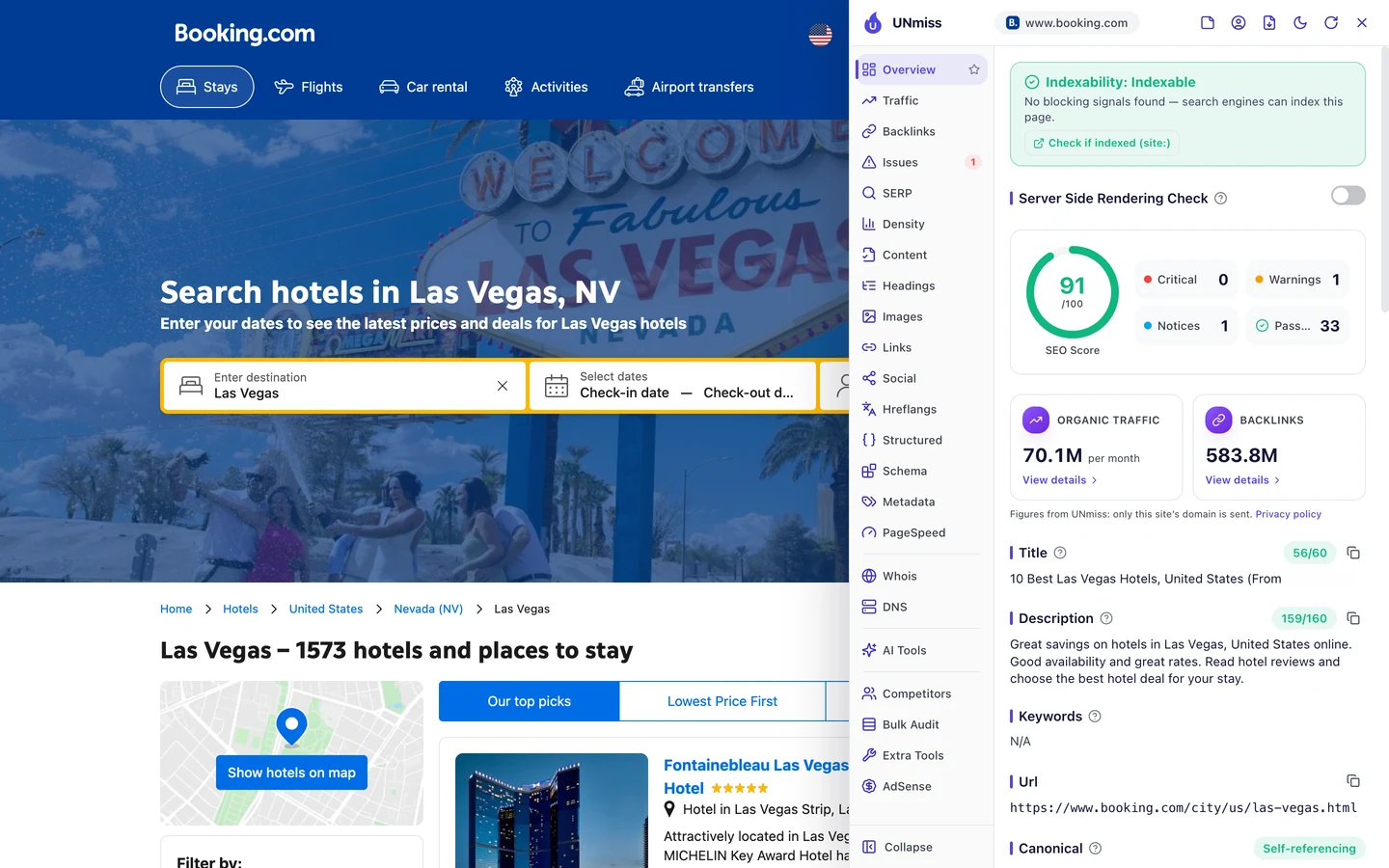
The description is the short summary Google may show under your title. Here it's 159 characters, right at the edge of what Google shows.
It starts, "Great savings on hotels in Las Vegas, United States online." Then it talks about good rates and hotel reviews.
Now look at the New York page. It's the very same sentence, with "New York" in place of "Las Vegas".
That's one template with a slot for the city. Write it once, and every city gets a full, on-topic description.
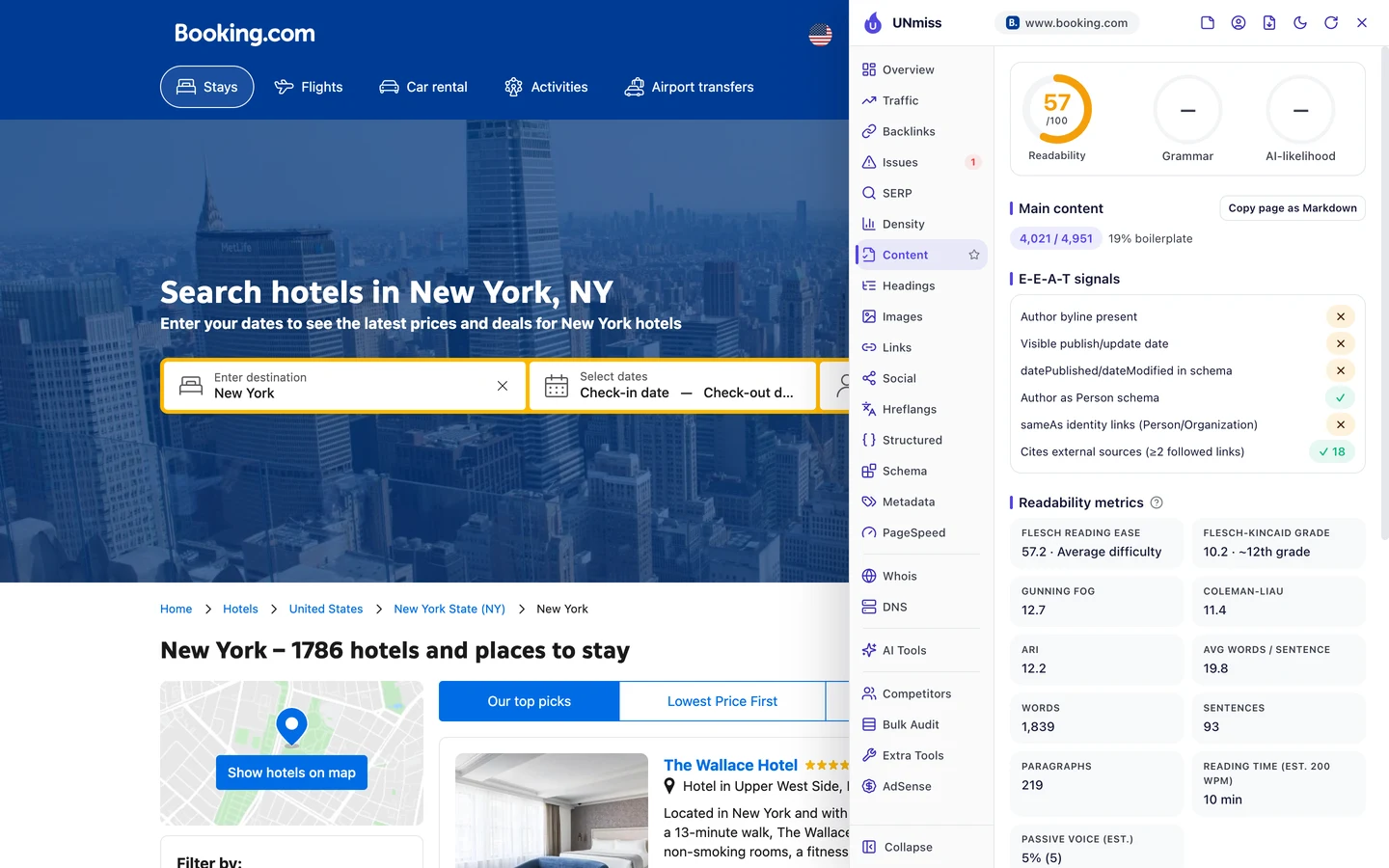
The page body works the other way. The Content tab says only 19% of the New York page is boilerplate, the parts every page repeats.
The rest is hotel lists, guest reviews and tips for that one city. So the shell is shared, but what's inside it is unique.
That's the balance you want. Template the small stuff, and fill the page with real data you can't copy from anyone else.
So write one description template with a slot for the place name, and keep it under 160 characters. Build and test it with our Meta Tag Generator.
Put a price in your title
The title is the blue link you see in Google. The extension's Overview tab shows it for the page you're on.
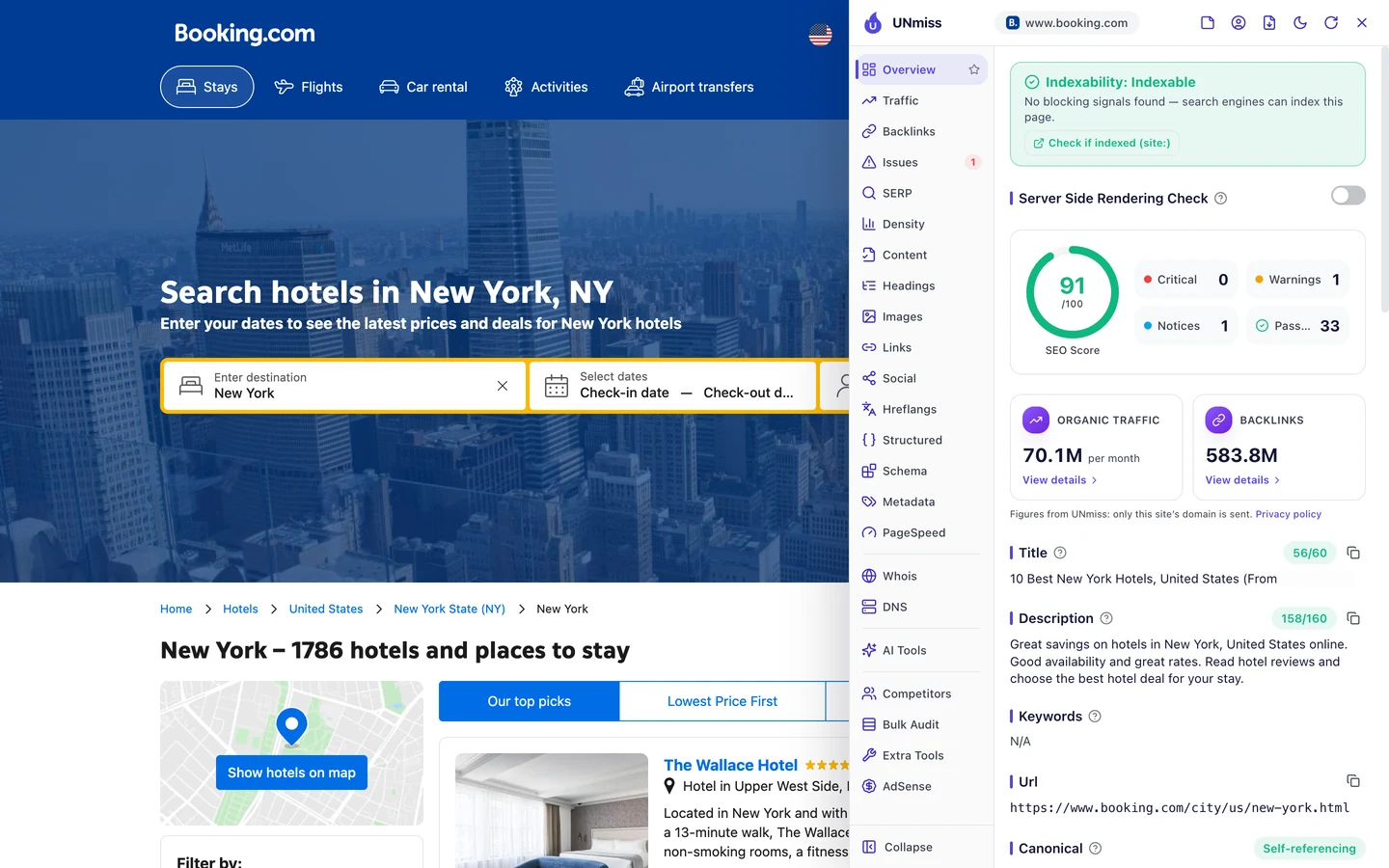
On the New York page, it reads "10 Best New York Hotels, United States". Then it adds a starting price in brackets.
That price is in the visitor's own currency, so it changes with who's looking. You see a real number for your trip before you even click.
A price tells you this page can book a room, not just talk about one. And "10 Best" promises a short list, which people like to click.
Both city titles are 56 characters long. That's just under the 60 or so Google usually shows before it cuts a title off.
So add one fresh, useful fact to your titles, like a price, a count or a year, and keep them near 60 characters. Preview how yours look in Google with our SERP Simulator.
Mark up every city page in code
Structured data is code that tells Google what a page is, like a place, a product or a list. The extension's Structured tab finds it.
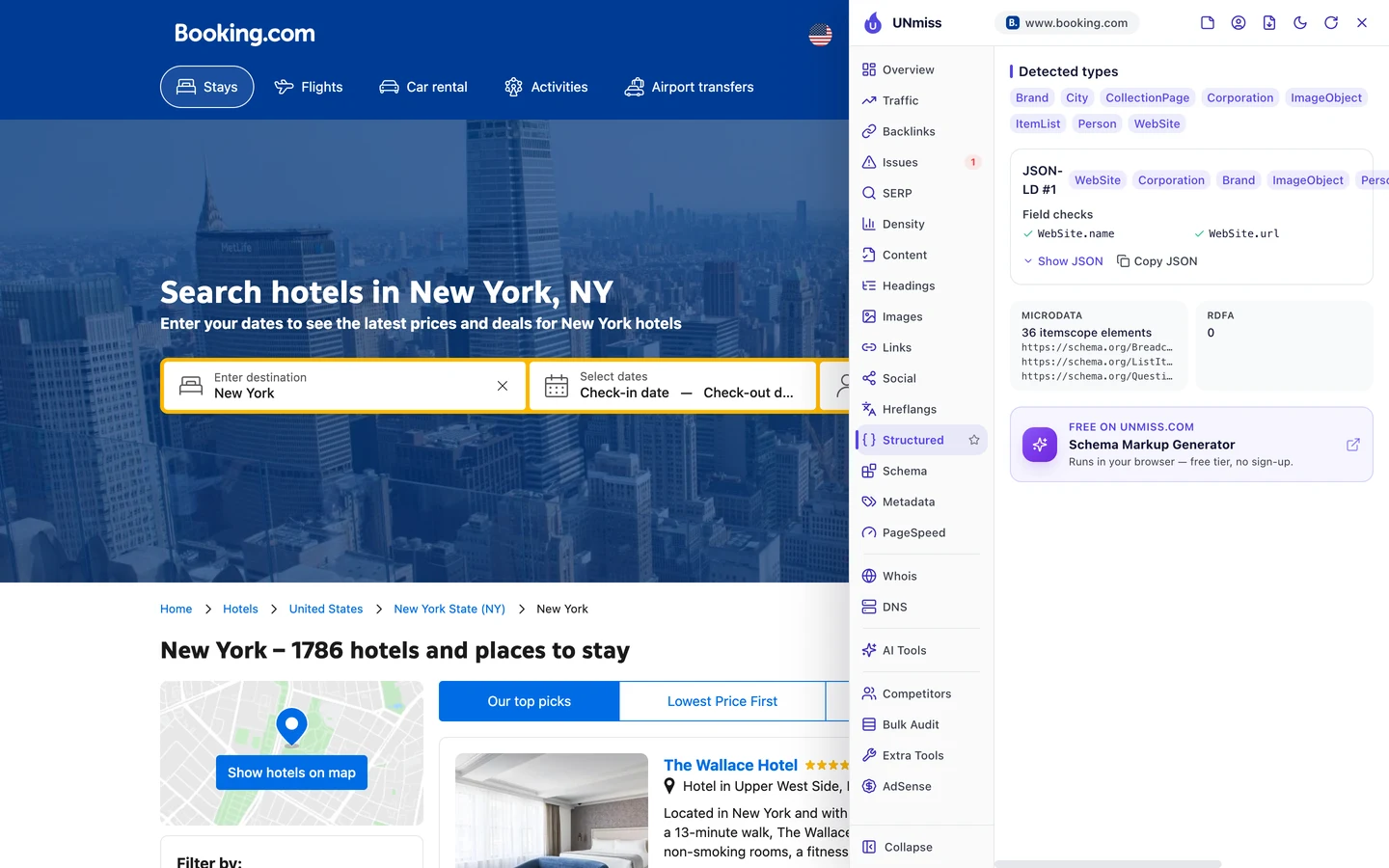
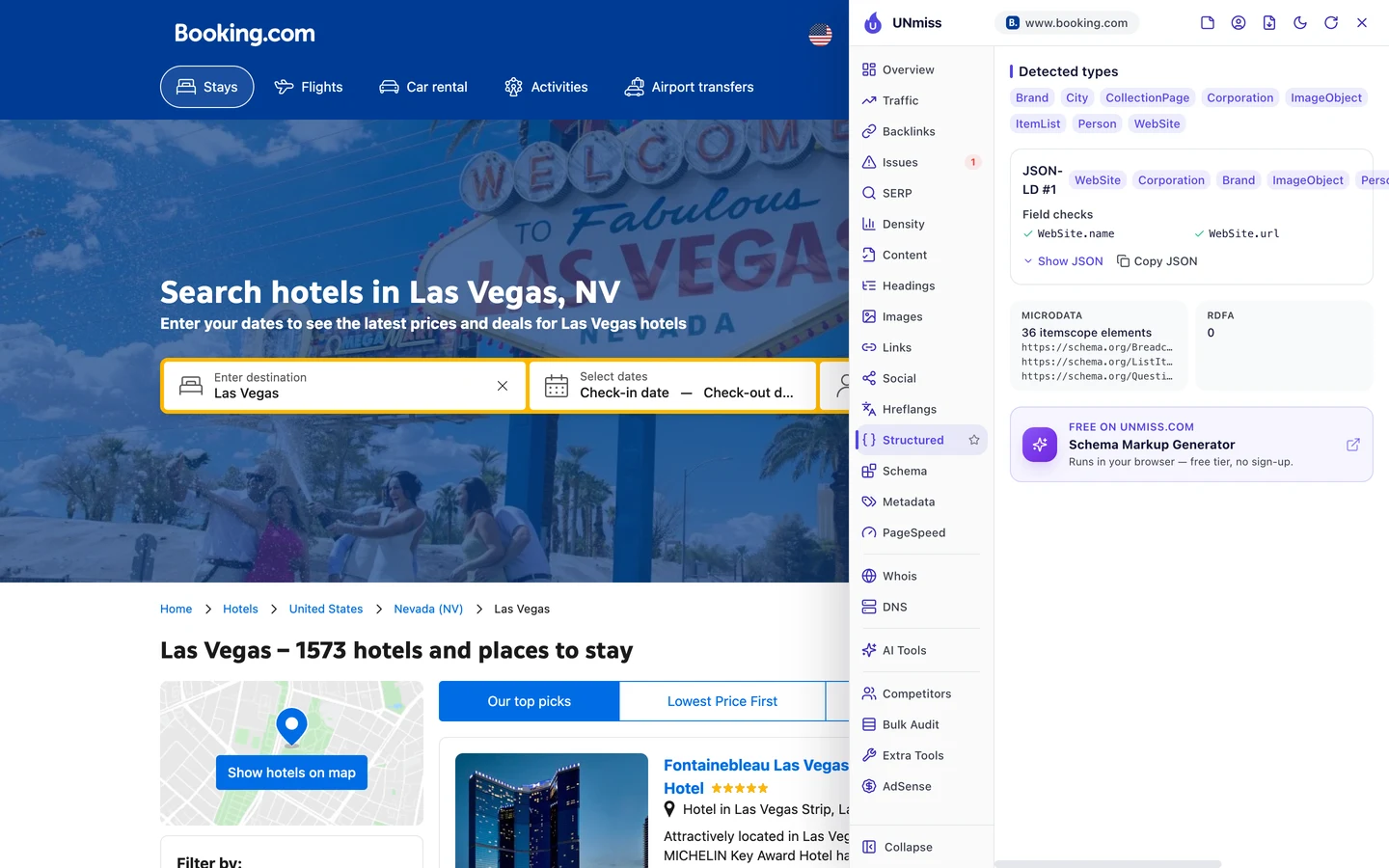
Both pages carry the same 8 types. City tells Google the page is about a place, and ItemList says it holds a list, here a list of hotels.
Both also have 36 bits of microdata, an older way to mark things up. They cover the breadcrumb trail, the list items and the questions near the bottom.
Nobody typed this by hand for each city. It lives in the template, so every new city page gets it for free.
So add structured data to your template once, and every page built from it will say what it is. Our Schema Markup Generator writes the code for you.
Translate every city page
Hreflang is a tag that tells Google which language version of a page to show. The extension's Hreflangs tab lists every version.
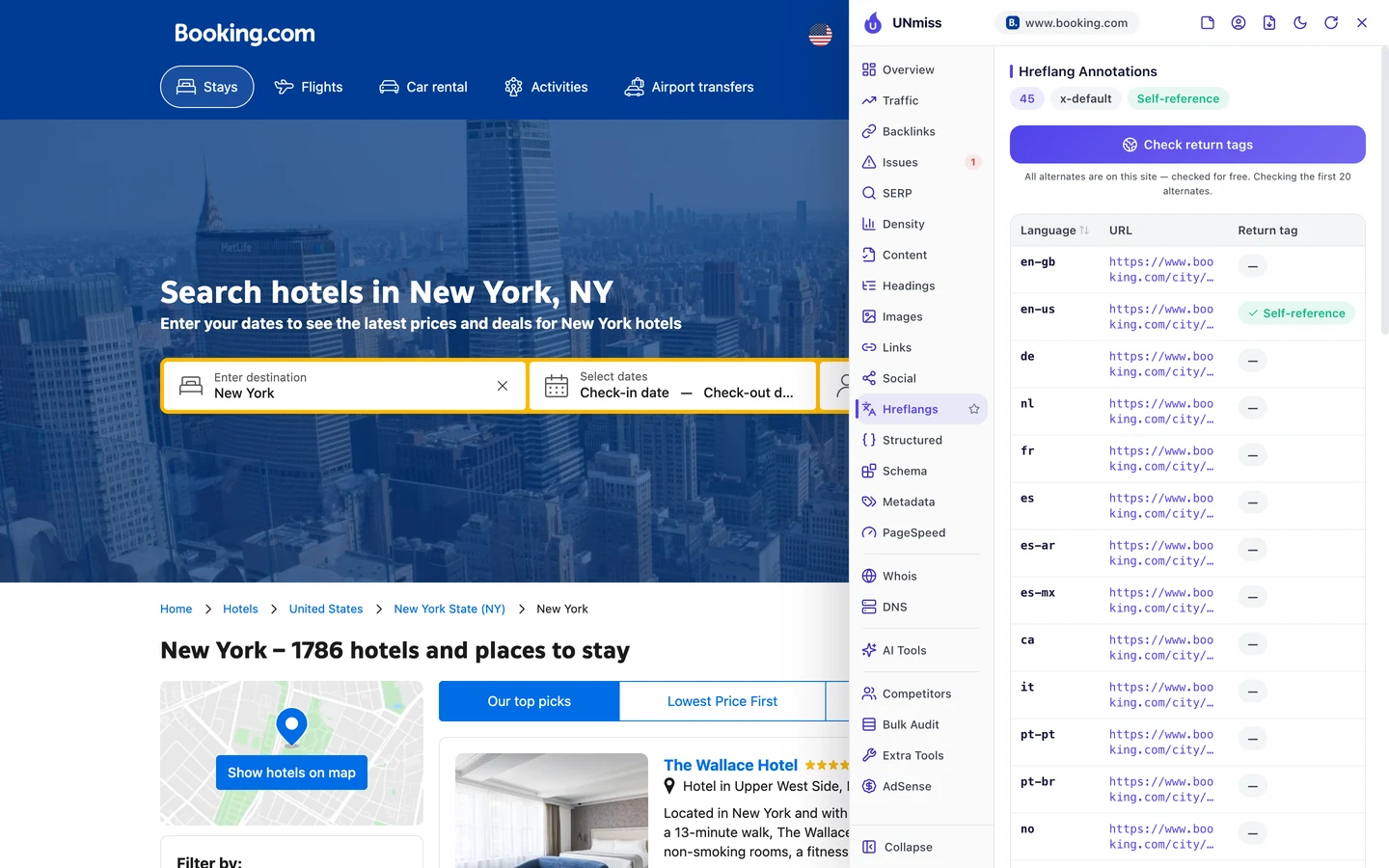
The New York page has 45 language versions. There's English for the US and the UK, plus Spanish, German, Japanese, Arabic and many more.
It also has an x-default, the page Google shows when no language fits. And it points to itself, which Google expects.
Here's the payoff. The Spanish New York page ranks #1 for "hoteles cerca de mi", which is Spanish for "hotels near me".
It brings in about 52K visits a month, and that's from the US alone. Lots of people in the US search in Spanish, and Booking.com is ready for them.
Each language page reuses the same template, too. Translate the template once, and every city gets that language.
So translate your best pages for the languages your visitors speak, and link the versions with hreflang. Then check the tags on any page with our free browser extension.
Audit one template, fix thousands
Next, we ran our Website Audit. It sends a crawler, a program that visits pages the way Google does, to check many pages at once.
It came back empty. The report said it couldn't read any pages, and that the site "may block automated crawlers".
It's not the site's rules that stopped us. Robots.txt, a file that tells crawlers what they may read, lets every AI crawler the extension checks in.
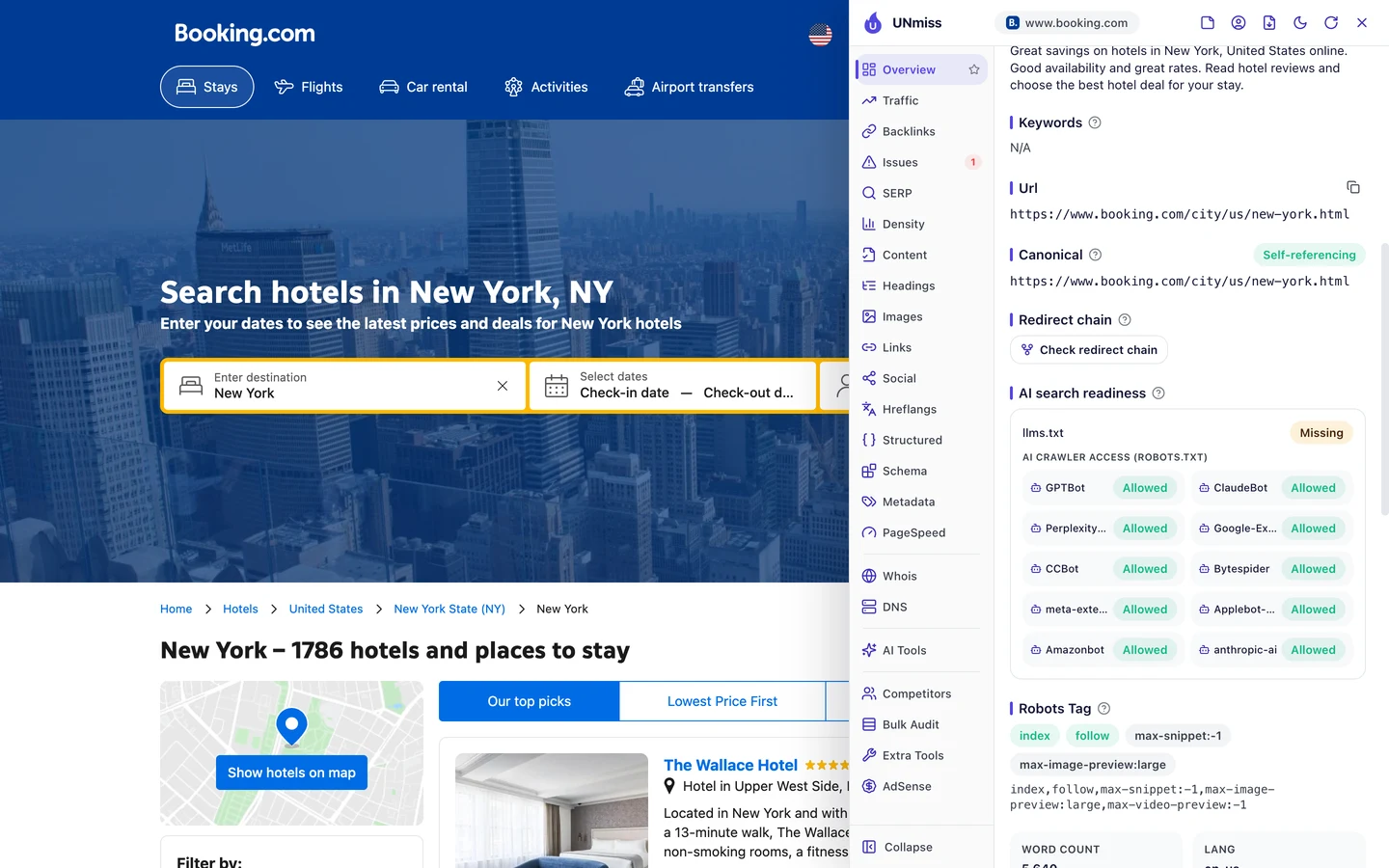
All 10 are allowed. So something else, like bot protection, likely turns away tools like ours.
Our audit couldn't read ClinicalTrials.gov either, a site we studied too, but for a different reason. Big sites often guard their pages hard, so you may hit the same wall.
Here's the good news. On a template site, you don't need to crawl every page.
Check one page per template, and you've checked them all. So we checked 2 city pages with the extension's Issues tab.
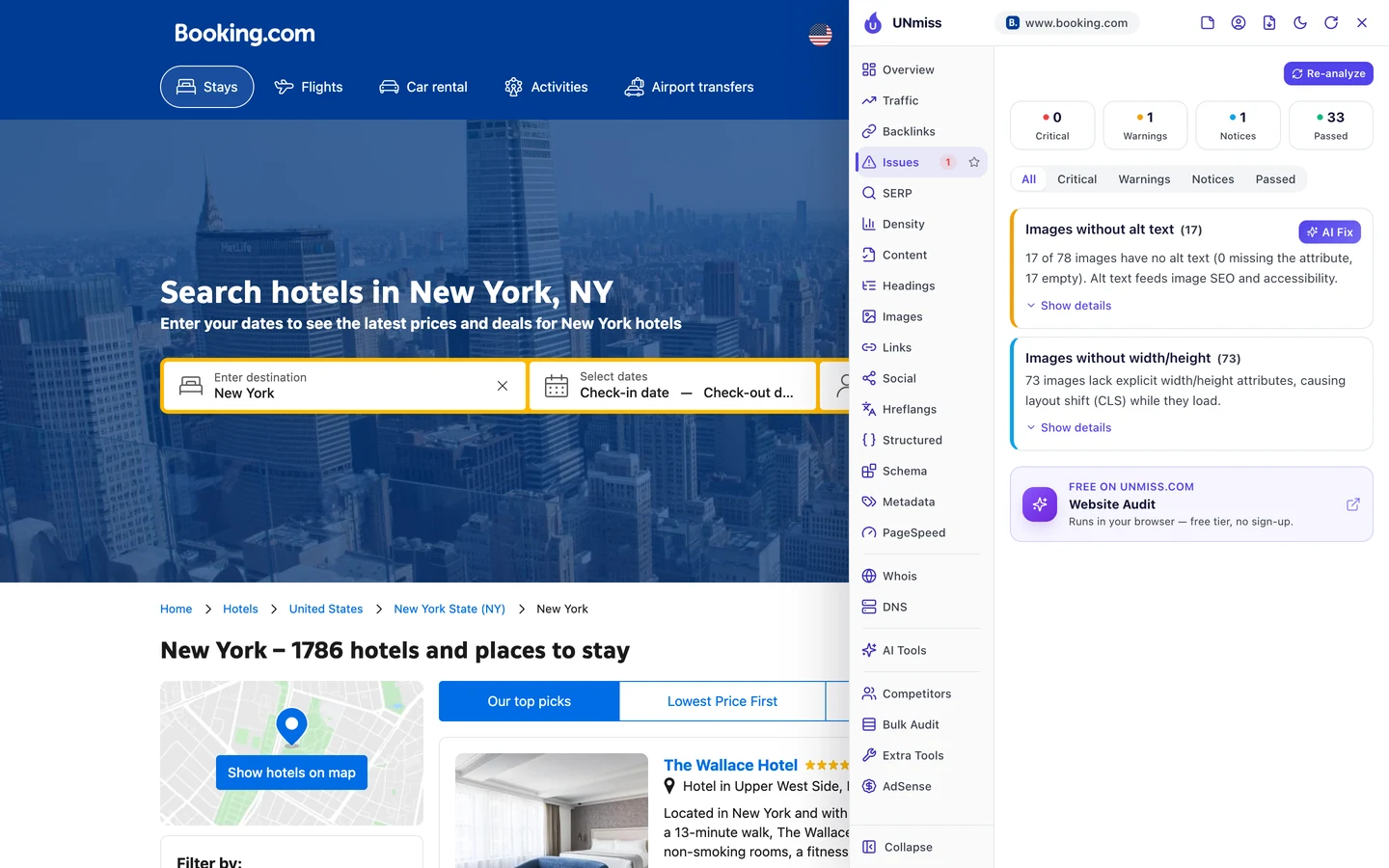
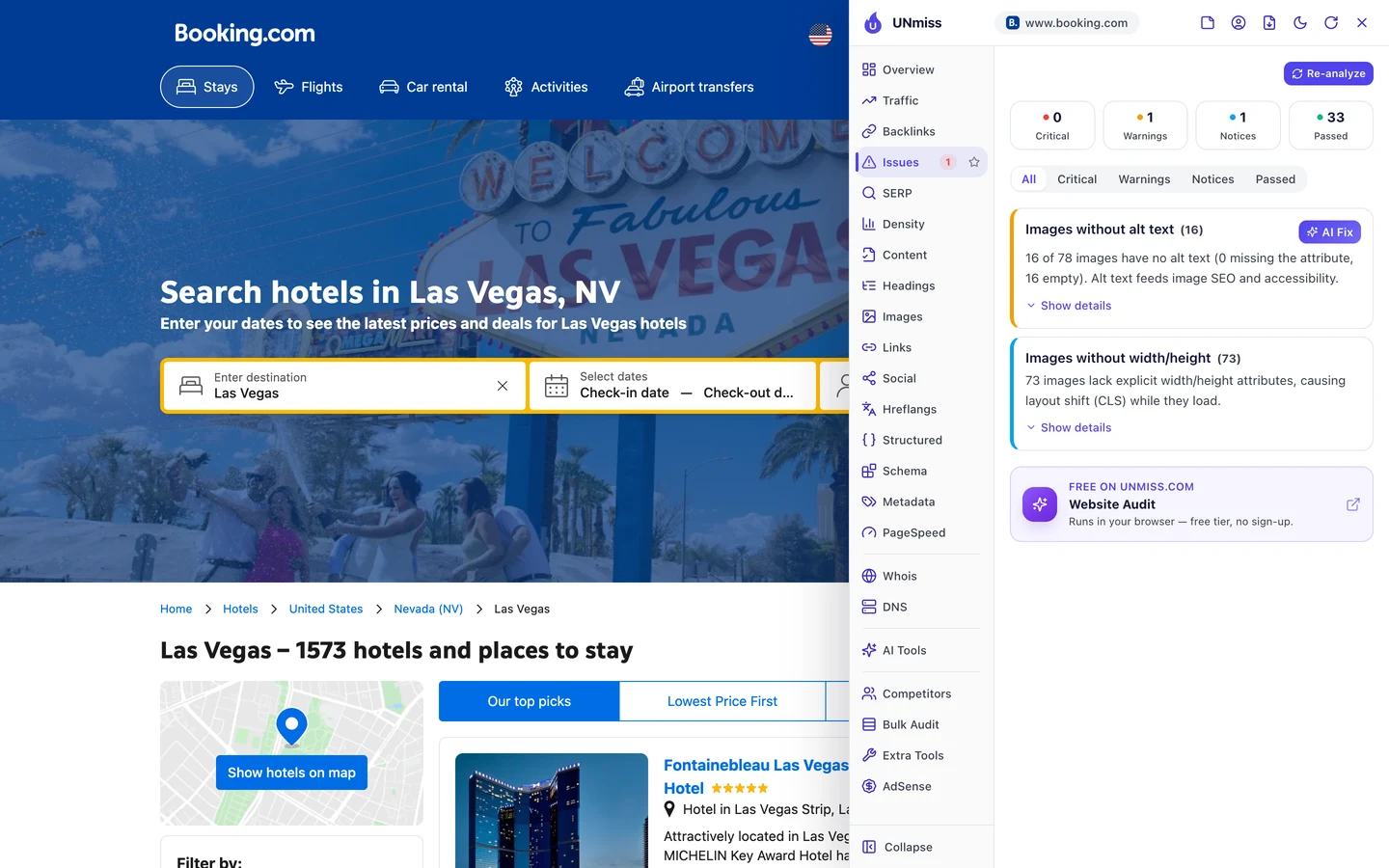
Both pages score 91 out of 100. Both have 0 critical issues, 1 warning and 1 notice.
On both, 73 images have no width or height set. So the page jumps around as the images load.
That hurts Core Web Vitals, Google's 3 checks of how fast a page loads, how fast it reacts and whether it stays still. The jumping fails the last one.
About 1 in 5 images also have no alt text. Alt text is a short description that tells Google and screen readers what an image shows.
Same template, same problems. Fix the template once, and thousands of city pages get better at the same time.
Zapier, which we studied too, taught the same lesson. Audit the template, not just the page.
So run our Website Audit on your site, group the issues by template and fix each template once. Then check how fast your pages load with our Site Speed test.
Booking.com's city pages share one template, and they share its problems too. We find the issues in each of your templates, then fix them at the source so every page built from them gets better.
- We audit one page per template, not thousands by hand
- We fix titles, descriptions and image sizes in your templates
- We add structured data and hreflang that scale to every page
- SEO and GEO, so AI answers can quote you too
Answer searches for your own name
Most of Booking.com's search visits don't use its name. People search for places and hotels, and its city pages answer them.
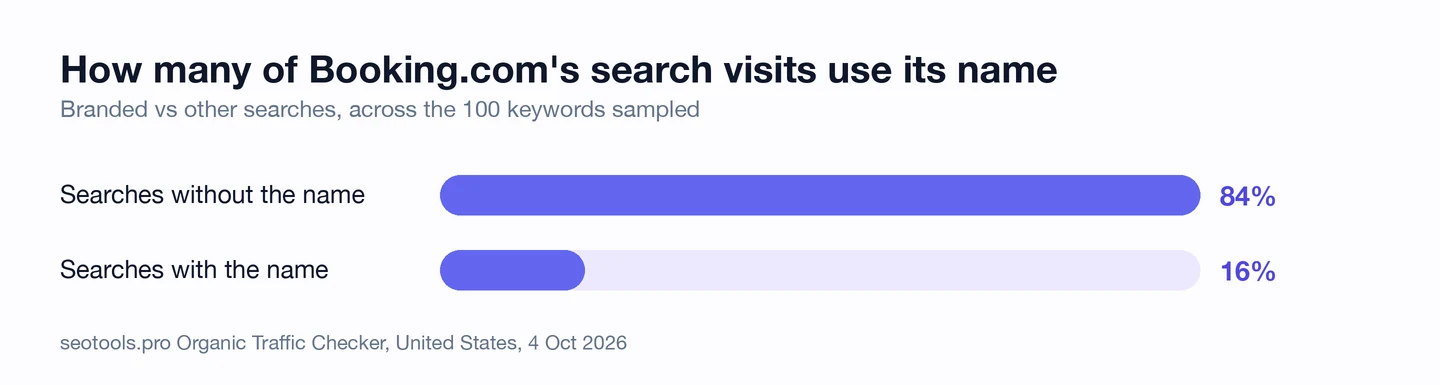
Only 16% of its visits come from people typing "Booking.com". Canva, which we studied too, is the opposite, since most of its visits come from its name.
But the brand searches Booking.com does get, it wins. The homepage ranks #1 for "booking" and brings in about 595K visits.
Now look at the customer service page. It ranks #1 for "booking.com customer service number", with about 53K visits a month.
Those people already have a trip, or a problem with one. If you don't give them a clear page, some other site will rank for your name instead.
So build a page for every question people ask about your brand, like support, refunds or how to reach you. Find those searches with our Keyword Research tool.
Watch the keywords you lose
Last, our Domain Overview shows where the whole site stands in Google.
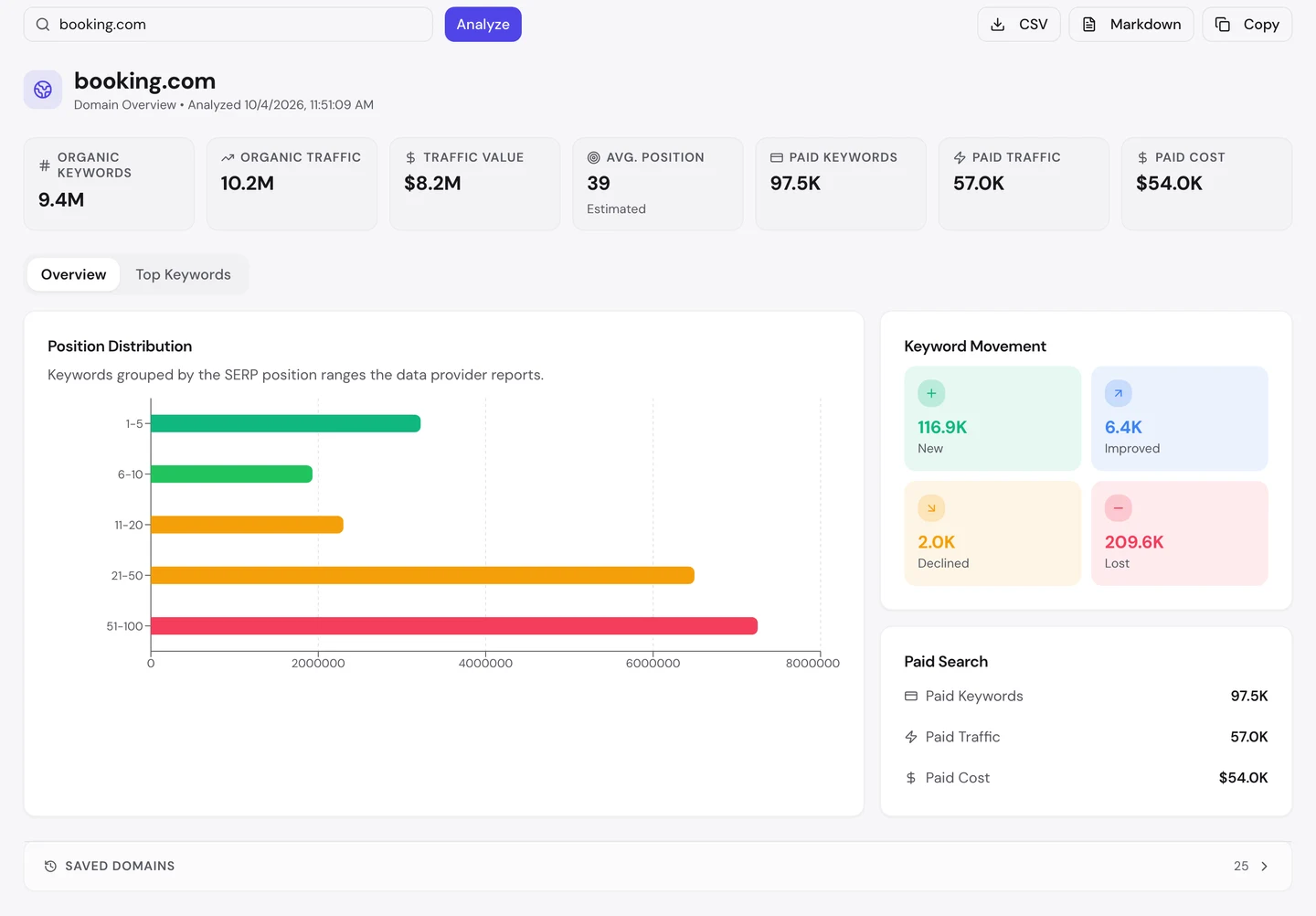
You can see that Booking.com ranks for about 9.4M searches. Its traffic value, what those visits would cost as Google ads, is about $8.2M a month.
Its average spot is 39, on page 4 of Google. With millions of pages, most of them sit low, and that's normal.
Now look at the movement box. It gained about 117K new keywords but lost about 210K.
On a template site, losses often come in groups. If a set of city pages slips, the cause is usually something those pages share.
So check your lost keywords each month, and look for the template behind them. Our Domain Overview shows the losses, and our Rank Tracker follows your key pages day by day.
Booking.com's city pages share a title pattern, a description and the same image problems. Run our Website Audit on your site to see what your templates repeat, good and bad.
- The same checks we ran on Booking.com's city pages
- Titles, descriptions and images for every page it reads
- An AI plan for what to fix first
What you cannot copy
First, the part you can't copy: Booking.com has been around a long time. Its domain dates back to 1998.
A backlink is a link from another website to yours. The extension counts about 584M of them pointing at Booking.com, and that takes decades to earn.
You can still see who links to you, and to your rivals, with our Backlink Analyzer.
Then there's the data. Hotels list themselves on Booking.com, so each city page is full of real rooms, prices and reviews.
A template is only as good as what you pour into it. Booking.com's real edge is that list, not the layout.
Now a few honest notes on the numbers.
We took our figures on <correct date>. The 10.2M figure counts US searches only.
The extension shows its own, different estimate of about 70M a month, for the whole world. Both are estimates, worked out from rankings and search volume, since nobody outside the site can count its real visits.
The 16% branded share comes from a sample of 100 keywords, not every search. Take it as a rough guide.
Our Website Audit read 0 pages, so there's no audit report and no crawl sample here. We checked 2 city pages by hand with the extension instead, on the same day.
The issues we found are for those 2 pages. Other templates on the site, like hotel or flight pages, may look different.
We also haven't quoted any title price. It's shown in each visitor's own currency, so yours won't match ours.
The one number to take away
12%.
That's how much of Booking.com's US search traffic lands on one city page, New York. It's about 1.3M visits a month from a single page.
And that page is no special project. It's the same template as every other city, with New York's name and New York's hotels poured in.
That's the lesson for you. Build one great template, fill it with real data, and let every page in the list earn its own visits.
Which list could your site turn into pages? Start with the one your customers already search for.
You can run every one of these checks on your own site, and on your rivals', and see the same numbers for yourself.
Frequently asked questions
How many pages do I need before programmatic SEO pays off?
There's no set number. Start with the items people search for most, make those pages great, and add more once they rank.
Will Google see template pages as duplicate content?
Not if each page holds its own useful data, like real listings, prices or reviews. Pages that only swap a name and nothing else can look thin to Google.
How do I make a page rank for "near me" searches?
Build a page for each place you serve, with the place name in the title and main heading. Then add real local details, like addresses, maps and reviews.
Is it safe to show a price in my title if it changes?
Yes, as long as the price on the page matches. Google can rewrite titles that don't match the page, so keep the two in sync.
Do I need hreflang if my site is only in English?
Only if you have versions for different countries, like the US and the UK. With one language for one country, you can skip it.
Which structured data fits a listing page?
ItemList fits a page that lists things, and BreadcrumbList fits the trail of links at the top. Add the type of the thing itself too, like City, Product or Event.
Why would a big site block SEO tools?
Big sites guard against scrapers and fake traffic. Those filters can catch harmless tools too, so check a few pages by hand with a browser extension instead.
How can I tell which pages share a template?
Look at the addresses. Pages that follow the same pattern, like a folder name followed by a city, almost always share a template.