Google stopped showing FAQ rich results on 7 May 2026. It deleted the documentation on 15 June 2026. Every schema markup generator we tested still offers you an FAQPage builder, and not one of them mentions that the thing it generates no longer appears in Google.
So we ran the obvious test. One fixed set of inputs — one article, three questions, one product — through three free schema generators, then every output through Google's own Schema.org validator. Nine samples, one validator, no opinions. A generator either emits markup that validates or it does not.
Eight of the nine passed. That sounds like a clean sweep until you look at what "passing" actually measures, and then at what the outputs contain: one generator emits an empty @type that throws two severe errors, another writes five empty strings into a single Article and ships a product with no price in it, and the validator waves most of it through regardless.
One disclosure before anything else, because it changes how you should read the rest: seotools.pro makes one of the three tools, and we ranked it first. Worse, we tested our own generator before the others, found it wanting, and fixed it before running this comparison. You are reading post-fix results. The section called "What we fixed before we tested anyone" tells you exactly what our output looked like before, and the whole point of using a third-party validator is that you do not have to take our word for any of it. Discount our opinion accordingly.
Use the seotools.pro Schema Markup Generator if you want output that validates with no errors and no empty properties: it was the only tool in the test to score 0 errors and 0 empty strings across all three types, with full coverage of Google's recommended properties. TechnicalSEO.com (the tool most people know as Merkle's) is excellent everywhere except one bug: its Article output carries an empty @type that produces 2 severe validator errors. RankRanger has the widest type coverage and the loosest output — valid, but padded with empty values and missing an offers block on Product.
@typeThat last number is the one worth sitting with. FAQ markup is the single most generated schema type on the internet, it is the default example in half the tutorials, and as of May 2026 it earns you nothing in Google Search. The generators have not caught up, and neither have most of the guides telling you to use them.
What "valid" actually means, and what it does not
There are two completely different questions people conflate when they talk about validating structured data, and almost every argument about schema tools comes from mixing them up.
Is this valid vocabulary? That is what the Schema.org validator answers. It checks that your types exist, that your properties belong to those types, and that the values are the right shape. It is a grammar checker for a controlled vocabulary. It has no opinion about whether your markup is useful.
Will this earn a rich result? That is a Google question, and it is governed by Google's own per-feature documentation: which properties are required, which are recommended, and whether the feature still exists at all. Markup can be flawlessly valid and completely pointless.
Our FAQ samples are the perfect illustration. All three validated cleanly — zero errors, zero warnings, every property correct. And all three describe a rich result Google turned off four months ago. The validator has no way to tell you that, because it is not what the validator is for.
This article uses both measures, kept separate throughout: the validator's verdict, which is objective and reproducible, and Google's current published requirements, which we quote so you can check them yourself.
How we tested
One fixture, used byte for byte in every tool. An article about improving website loading speed, with a headline, description, image URL, author name and URL, publisher name and logo, a published date and a canonical page URL. Three question-and-answer pairs. One product with a name, description, image, brand, SKU, offer URL, price, currency, price validity date, availability and an aggregate rating of 4.7 from 128 ratings.
That input is deliberately complete. We wanted to see what each generator does when it is given everything, not how it copes with gaps. A tool that drops a field you supplied is making a choice, and that choice is the thing under test.
1. Every tool received identical input, and every form was driven to completion — where our automation initially failed to fill a field, we fixed our automation rather than scoring the tool down for it. 2. Every output was validated through Google's own Schema.org validator, one request at a time, and the raw error objects were kept. 3. Google's requirements are quoted from Google's current documentation, not from memory or from what the requirements used to be.
One thing we could not do: run these through Google's Rich Results Test. Testing pasted code there now requires signing into a Google account, and we do not create accounts or sign in to run comparisons. So where this article talks about rich-result eligibility, it is checking your markup against Google's published property lists — which is the same rulebook the Rich Results Test applies — and it says so rather than implying a verdict we did not obtain.
The results
| Tool | Type | Validator errors | Empty values emitted | Google's recommended properties |
|---|---|---|---|---|
| seotools.pro | Article | 0 | 0 | 7 of 7 |
| TechnicalSEO | Article | 2 | 1 | 7 of 7 |
| RankRanger | Article | 0 | 5 | 4 of 7 |
| seotools.pro | Product | 0 | 0 | 4 of 4 |
| TechnicalSEO | Product | 0 | 0 | 3 of 4 |
| RankRanger | Product | 0 | 2 | 0 of 4 |
| seotools.pro | FAQPage | 0 | 0 | Feature retired by Google |
| TechnicalSEO | FAQPage | 0 | 0 | Feature retired by Google |
| RankRanger | FAQPage | 0 | 0 | Feature retired by Google |
Read that table with the two-questions distinction in mind. The errors column is the validator's objective verdict. The other two columns are about quality: empty values are properties emitted with nothing in them, and the recommended-properties column counts how much of Google's own suggested set survived the trip through the form.
1. seotools.pro Schema Markup Generator — the only clean sweep
Our own tool, ranked first by us, immediately after we fixed it. Read the next section before you weigh this one.
It was the only generator in the test to produce zero validator errors and zero empty values across all three types, with complete coverage of Google's recommended properties for both Article and Product.
The Article output carries all seven of Google's recommended properties — headline, image, datePublished, dateModified, author, author.name and author.url — with image emitted as an ImageObject rather than a bare URL string, and the publisher's logo as a nested ImageObject. The Product output carries the required name plus offers, and inside that offer all four recommended properties: price, priceCurrency, availability and priceValidUntil. It also emits sku and an aggregateRating.
The behaviour that produced the zeros is unglamorous: if you leave a field blank, the property does not appear. Not an empty string, not a placeholder — absent. Structured data is judged on what is present, and an empty value is worse than a missing one because it asserts that you have a headline and that the headline is nothing.
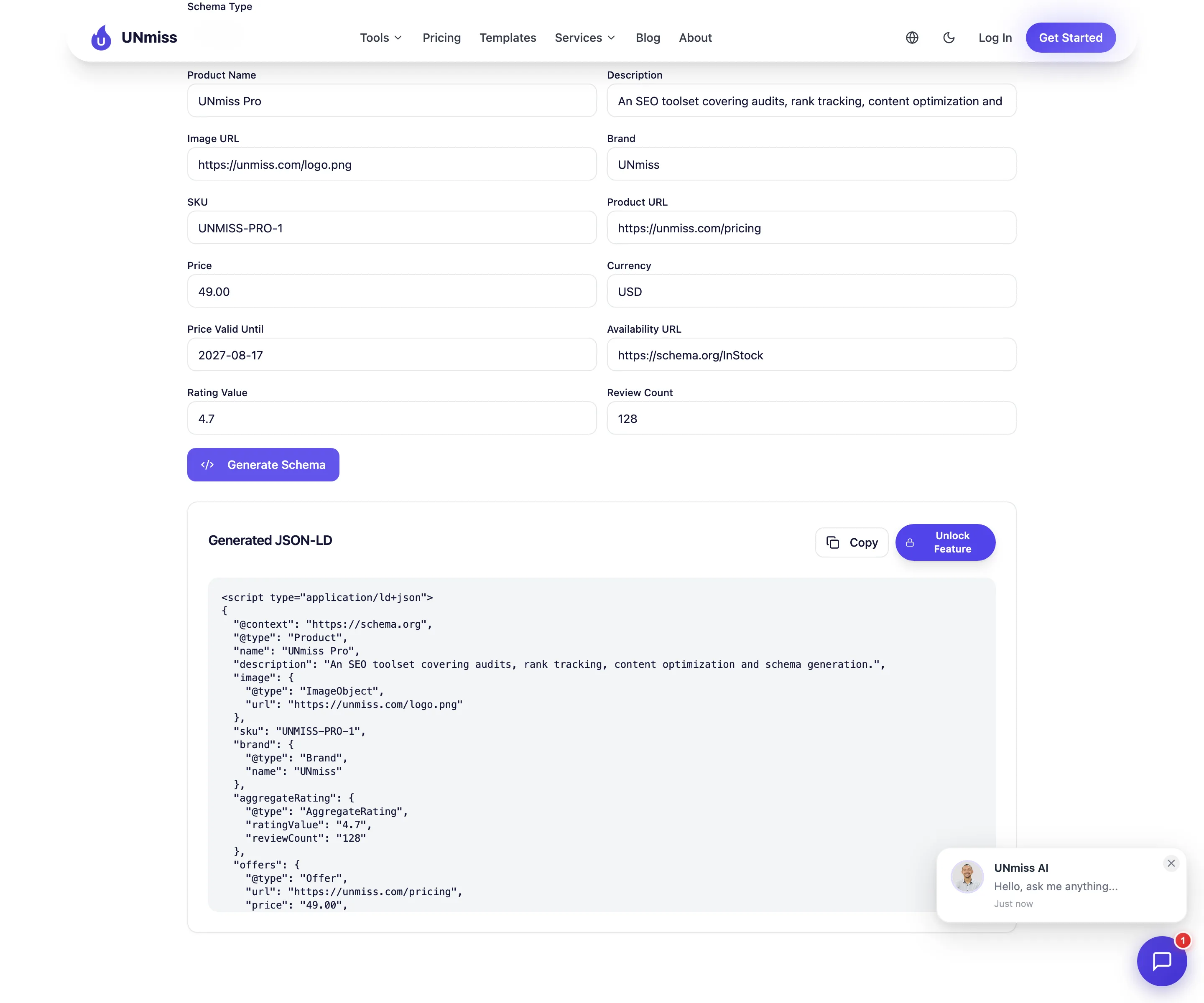
The free tier covers Article, FAQ and Product at 5 generations a day with no account. The other five types — Local Business, How-To, Breadcrumb, Organization and Person — need a plan.
- 0 validator errors on all three types
- 0 empty values emitted, anywhere
- 7 of 7 recommended Article properties
- 4 of 4 recommended offer properties
- ImageObject rather than bare URL strings
- Free for Article, FAQ and Product with no account
- 5 of 8 types need a paid plan
- 5 generations a day on the free tier
- Download is paid; copy to clipboard is free
- Offers an FAQ builder for a retired Google feature, like everyone else
- No live validation built into the tool
Article, FAQ and Product free with no account. Empty fields are omitted rather than emitted, so the output validates without padding.
Open the free generator →What we fixed before we tested anyone
This section exists because leaving it out would make everything above dishonest.
We built this test intending to run our generator alongside the others as they stood. We validated ours first, found three real defects, fixed them, shipped the fix, and only then ran the comparison. The results you are reading are post-fix. Here is precisely what was wrong.
The type buttons were broken. The quick-select chips on the tool page passed lowercase values — article, faq, product — into a generator that switched on capitalised ones. Clicking any chip rendered no form fields at all, generated nothing, and, because the unrecognised value failed the plan check, opened an upgrade prompt for Article, which is a free type. That was live. Anyone who used the chips instead of the dropdown hit it.
Article and Product were thin. Article emitted image as a bare string and had no publisher logo or canonical page reference. Product had no SKU, no offer URL, no price validity date, no ratings fields in the interface at all, and a hardcoded availability.
Every builder emitted empty strings. Leave a field blank and you got "headline": "" back — exactly the flaw we score RankRanger on below. That is the honest context for our zero in the empty-values column: it is a number we earned last week, not one we always had.
We also corrected the marketing copy, which claimed "100% free" and "8 Schema Types" while five of the eight sat behind a plan.
You should factor all of that in. A tool that had to be fixed the week of the test is not a tool with a long track record, and if you would rather use one of the others on that basis, that is a reasonable call.
2. TechnicalSEO.com — the best-built tool, with one real bug
TechnicalSEO.com's Schema Markup Generator — the tool most of the industry still calls Merkle's, now under dentsu — is the most polished of the three by a distance. Live JSON-LD preview beside the form, sensible field grouping, links to both Schema.org's reference and Google's documentation under every type, and one-click buttons to send your markup to the testing tools.
It also produced the only genuinely failing output in the test.
Its Article markup emits the author object with an empty @type:
"author": { "@type": "", "name": "RH Fardin", "url": "..." }
The Schema.org validator returns two severe errors for that single mistake. The first is INVALID_OBJECT on the author property, reporting that the expected types are Organization, Person, Role or Thing and that it received an empty one. The second is INVALID_ITEMTYPE for the empty type itself. Both are flagged severe, not warnings.
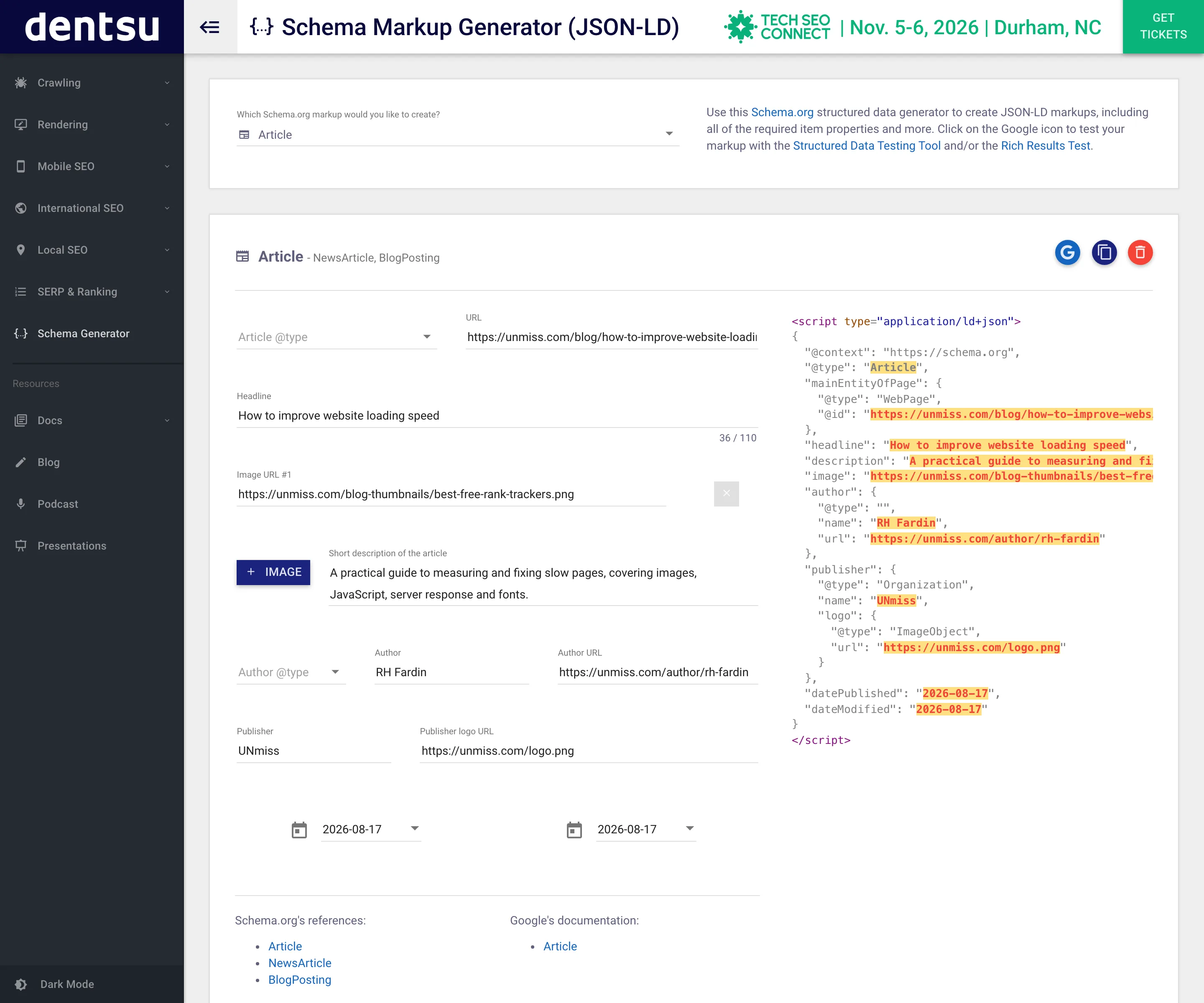
It is a small bug with a disproportionate effect, because author is one of the properties Google explicitly recommends for Article, and an invalid author object is worse than no author object. The fix on their side is one line. Until it lands, if you generate Article markup here, delete the empty @type or set it to Person before you ship it.
Everything else it did was strong. Its Product output was the second-best in the test: correct offers block, correct aggregate rating, three of four recommended offer properties, no empty values. Its FAQ output was clean and matched ours exactly. Its Article carried all seven recommended properties — the two errors come from the shape of one of them, not from anything missing.
- Live JSON-LD preview as you type
- 13 schema types, all free, no account
- Links to Schema.org and Google docs per type
- Clean Product and FAQ output
- 7 of 7 recommended Article properties present
- Empty
@typeon author — 2 severe errors - Missing priceValidUntil on Product
- One empty value in the Article output
- Offers an FAQ builder for a retired feature
3. RankRanger — the widest coverage, the loosest output
RankRanger's Schema Markup Generator offers twelve types including several the others skip, and its forms are the most granular here — separate width and height fields for images, best and worst rating bounds, offer counts. Everything is free and needs no account.
The granularity is also the problem. Fields you leave alone are emitted anyway, as empty strings.
Its Article output contained five empty values in a single object: "width": "" and "height": "" inside the image, the same pair again inside the publisher logo, and an empty datePublished. Its Product output added two more, with empty bestRating and worstRating inside the aggregate rating.
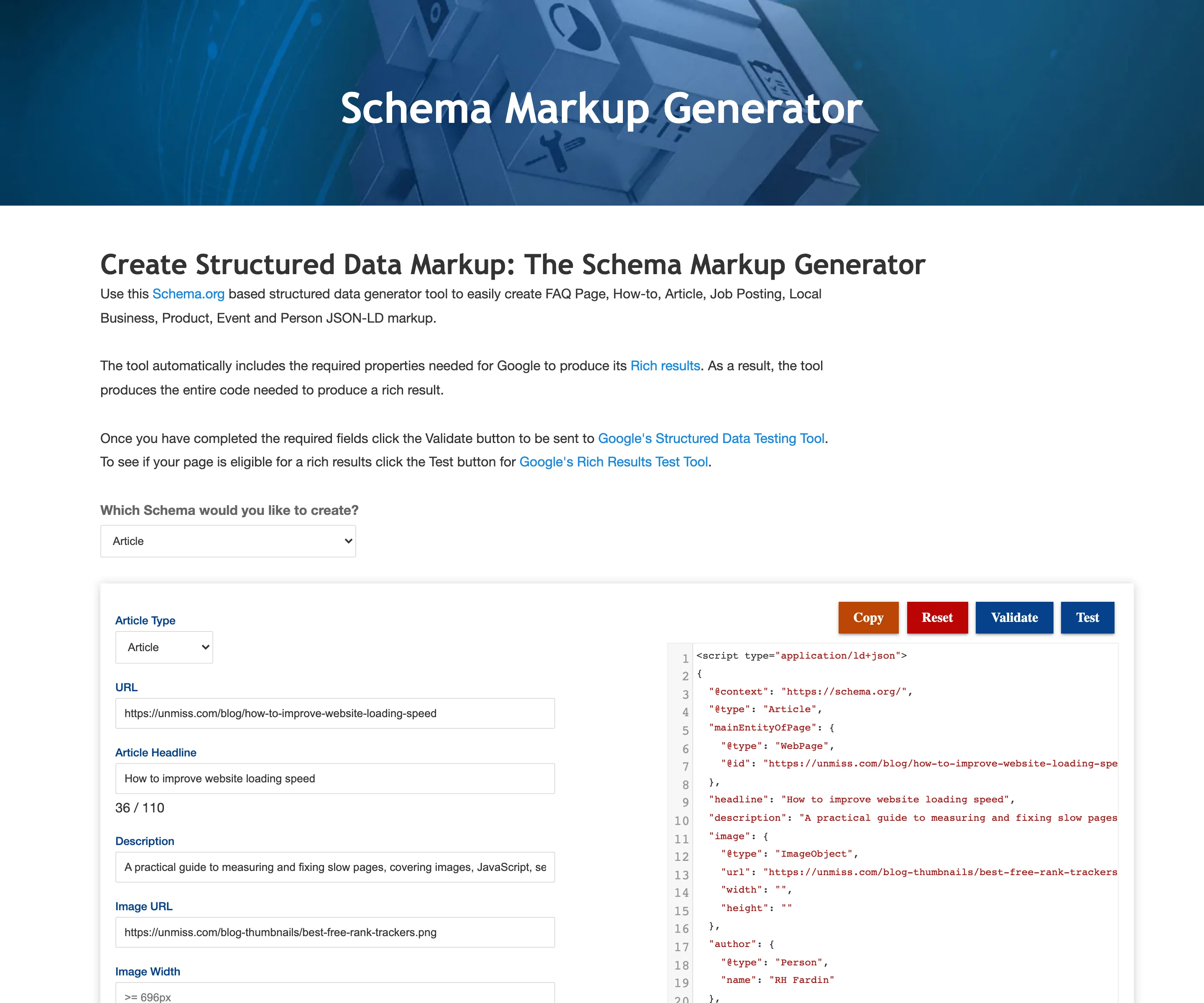
None of that fails the validator. All of it is noise you are asking a search engine to parse, and datePublished: "" in particular is an assertion that the article has a publication date and that the date is empty.
Its Article also carried only four of Google's seven recommended properties, missing datePublished, dateModified and author.url — the date fields because the form uses a date picker our harness did not operate, which is a limitation of our test rather than the tool, and we say so rather than counting it as a defect.
The more consequential gap is Product. RankRanger's output has an aggregateRating, which satisfies Google's requirement to include at least one of review, aggregateRating or offers — so it is eligible. But it has no offers block at all, which means no price and no currency. For a product snippet, the price is the point. It also emits brand as a bare string rather than a Brand object.
- 12 schema types, all free, no account
- The most granular forms in the test
- 0 validator errors on all three types
- Separate image dimension and rating-bound fields
- 5 empty values in one Article object
- No offers block on Product — no price, no currency
brandas a bare string, not a Brand object- Offers an FAQ builder for a retired feature
The FAQ problem nobody is mentioning
This deserves its own section, because it is the most actionable thing in this article and every one of the three tools gets it wrong by omission.
Google's changelog is unambiguous. The 8 May 2026 entry added a deprecation notice stating the feature "will no longer appear in Google Search starting May 7, 2026." The 15 June 2026 entry removed the documentation entirely, because "The FAQ rich result feature is no longer shown in Google Search results." FAQPage does not appear in Google's current structured data gallery at all.
How-To went the same way earlier, removed in September 2023 for the same reason.
All three generators still offer FAQPage builders. All three produce valid markup. None of them tells you that the Google feature it was built for does not exist any more.
Does that mean you should delete your FAQ markup? Not necessarily, and this is where the honest answer is more nuanced than either extreme. Valid FAQPage markup still describes your content accurately to anything that reads structured data — other search engines, assistants, and systems that consume schema for their own purposes. It is not harmful. What it will not do is produce the expandable question list in Google Search that people added it for, and it has not done so since May.
What you should stop doing is spending time adding it to new pages in the belief that it earns a Google rich result, and you should certainly stop reading guides that still promise one.
There is a second-order cost worth naming too. FAQ markup was often the reason a page carried an FAQ section at all — questions bolted onto the bottom of an article to farm the rich result rather than because readers were asking them. With the result gone, those sections have to justify themselves on their own merits, and a good number of them will not. If you are auditing old content, the retired feature is a reasonable prompt to ask whether the FAQ block at the foot of each page was ever for the reader.
What Google actually requires, quoted
A remarkable amount of schema advice describes requirements that are not requirements. Here is what Google's current documentation says, which is worth reading because it is looser than the folklore.
Article has no required properties at all. Google's documentation states plainly: "There are no required properties; instead, add the properties that apply to your content." The recommended set is author, author.name, author.url, dateModified, datePublished, headline and image. Publisher and publisher.logo, which older guides insist are mandatory, are not in the current list.
Product requires a name, plus at least one of three things. "Product snippets require either review or aggregateRating or offers." Price and priceCurrency are recommended rather than required, along with availability and priceValidUntil. Google adds a useful caveat: supplying offers without review or aggregateRating may produce a warning in the Rich Results Test.
FAQPage requires nothing, because the feature is gone.
That matters for how you read our scoring. Only one output in this test actually failed the validator. On Google's own rules, all three tools produce Product markup that is technically eligible for a snippet. The differences between them are differences of completeness and hygiene, not of pass and fail — with the single exception of that empty @type.
Which types are still worth generating in 2026
If FAQ and How-To are gone, the obvious follow-up question is what is left. Google's current structured data gallery lists roughly twenty-five features, and the ones that matter for most sites are a much shorter list than the type menus in these generators suggest.
Product is the one with the clearest commercial return. A price, an availability state and a rating in the search listing changes how the result looks in a way people actually respond to, and it is well supported. If you sell anything, this is the markup to get right first, and it is the type where the differences between the three tools in this test matter most.
Breadcrumb is quietly one of the highest-value types and almost nobody argues about it. It replaces the raw URL in your search listing with a readable hierarchy. It is simple to generate, hard to get wrong, and supported across the board. All three tools offer it.
Organization earns its place for a different reason: it is how you tell Google what your business is, what its logo is and which social profiles belong to it. It feeds knowledge panel information rather than a per-page rich result, so the payoff is site-wide rather than page-level.
Article is worth adding and worth having realistic expectations about. It has no required properties and it does not produce a dramatic visual change for most publishers. What it does is describe authorship and dates in a machine-readable way, which matters more as search surfaces lean harder on provenance.
Local Business matters enormously if you have a physical location and not at all if you do not. The same is true of Event, Job Posting and Recipe: high value inside their niche, irrelevant outside it.
The types to be sceptical about are the ones whose Google feature has been retired or was never broadly supported. FAQ and How-To are the clear cases. Generating them is not harmful, but it is not the work you think it is.
How to actually add the markup once you have it
Every generator hands you a block that starts with <script type="application/ld+json">. What you do with it is simpler than most tutorials suggest.
Paste it into the page's HTML, anywhere. JSON-LD does not need to sit near the content it describes, which is the whole advantage of the format over microdata. The <head> is conventional and the end of <body> works identically. One script block per schema object, or several objects in one block using an array — both are valid.
Make sure it survives rendering. This is where most implementations quietly fail. If your markup is injected by JavaScript after the page loads, Google may or may not see it depending on how the page renders. Server-rendered or statically embedded markup avoids the question entirely. If you must inject it client-side, verify with a live URL test rather than assuming.
Keep it honest against the visible page. The price in your markup has to be the price on the page. The rating has to be a rating you actually collected and display. This is the single most common way sites earn a structured data manual action, and no generator can protect you from it because none of them can see your page.
Re-check after you change the page. Markup goes stale silently. A price change, a rebrand, an author leaving — none of those update the JSON-LD block unless something makes them. Templated markup generated from your real data is far more robust than hand-pasted blocks, which is the argument for a schema plugin or a CMS field over a generator once you are past a handful of pages.
Reading a validator's output without panicking
The Schema.org validator distinguishes errors from warnings, and the difference is worth understanding before you start chasing them.
An error means the vocabulary is wrong. A property that does not exist on that type, a value of the wrong shape, an object with an invalid type. TechnicalSEO's empty @type is a textbook error: author expects a Person, Organization, Role or Thing, and an empty string is none of those. Errors are worth fixing because a parser genuinely cannot interpret them.
A warning usually means something is missing. Not invalid, just absent — a recommended property you did not supply. Warnings are advisory. Nothing in this test produced any, because our fixture filled every field the forms offered.
Zero errors is not a quality score. This is the trap. RankRanger's Article scored zero errors while containing five empty values, and every FAQ sample scored zero errors while describing a retired feature. The validator answers one narrow question correctly and stays silent on everything else.
A practical order of operations: validate for errors first, because they are unambiguous; then read your own output line by line and delete anything empty; then check the type against Google's current documentation to confirm the feature still exists. The third step is the one almost nobody does, and it is the one that would have caught the FAQ problem years before a comparison article did.
Our own inconvenient number
We put our tool first. Here is the case against it.
We fixed it the week of the test. That is the big one, and it is covered in full above. The competitors were tested as they stood; ours was repaired first. The results are real and independently checkable, but the sequence is not flattering and pretending otherwise would be worse.
Five of our eight types are paid. Article, FAQ and Product are free with no account. Local Business, How-To, Breadcrumb, Organization and Person need a plan. Both competitors give you every type they offer for nothing — twelve types at RankRanger, thirteen at TechnicalSEO. On breadth of free access, we are last by a wide margin.
Our free tier is capped at 5 generations a day. Neither competitor imposes a daily cap at all.
Download is behind the paywall. You can copy the markup to your clipboard free, which is what most people do, but saving it as a file is a paid feature. That is a slightly awkward line to draw and we know it.
We do not validate inside the tool. TechnicalSEO puts buttons in its interface to send your markup straight to Google's testing tools. We do not, which means nothing in our product would have caught the empty-@type class of bug if we had shipped one.
And we still build FAQ markup for a rich result Google retired, exactly like the other two, without saying so in the tool. We are writing the article that points this out, which makes it a slightly strange thing to still be doing.
What a validator cannot tell you
Four limits worth holding onto, whichever tool you use.
Valid does not mean eligible. The Schema.org validator checks vocabulary. It passed all three FAQ objects in this test, none of which can produce a Google rich result under any circumstances. Passing it is a floor, not a finish line.
Eligible does not mean shown. Google's documentation is explicit that meeting the requirements makes you eligible for a rich result, not guaranteed one. Whether it appears depends on the query, the competition and Google's own judgement about your page.
Neither checks whether you are telling the truth. Structured data that says your product costs $49 when the page says $79, or that claims a rating you invented, will validate perfectly and can earn a manual action. The tools cannot see your page; they only see the form you filled in.
Markup does not fix a weak page. Schema describes content; it does not improve it. If the underlying page does not deserve to rank, no amount of correctly nested JSON-LD will change that. Pair it with a site audit if rankings, not appearance, are the actual problem.
Which one should you use
If you want output you can paste without reading it: ours — zero errors, zero empty values, full recommended coverage, with the caveats about our free tier above.
If you want the best interface and the most types free: TechnicalSEO.com, and delete the empty @type from the author object before you ship Article markup.
If you need a type the others do not offer: RankRanger, and strip the empty values out of the output first.
If you are generating FAQ markup for Google rich results: stop. The feature was retired on 7 May 2026.
Frequently asked questions
Which schema markup generator produces the most valid output?
In this test, the seotools.pro generator was the only one with zero validator errors and zero empty values across Article, FAQPage and Product. TechnicalSEO.com matched it on FAQ and Product but produced two severe errors on Article from an empty @type. RankRanger produced no errors but padded its output with empty values.
Do FAQ rich results still work in Google?
No. Google's changelog states the feature stopped appearing in Google Search on 7 May 2026, and the documentation was removed on 15 June 2026. FAQPage is no longer listed in Google's structured data gallery. The markup is still valid and still readable by other systems, but it will not produce the expandable questions in Google Search.
Should I remove FAQPage markup from my site?
You do not have to. It is valid, it is not penalised, and it still describes your content accurately to anything else that reads structured data. What you should stop doing is adding it to new pages expecting a Google rich result, since that has not been available since May 2026.
What does Google actually require for Article markup?
Nothing. Google's current documentation says: "There are no required properties; instead, add the properties that apply to your content." It recommends author, author.name, author.url, dateModified, datePublished, headline and image. Guides insisting that publisher and publisher.logo are mandatory are describing older requirements.
What does Google require for Product markup?
A name, plus at least one of review, aggregateRating or offers. Price, priceCurrency, availability and priceValidUntil are recommended rather than required. Google notes that supplying offers without a review or aggregate rating may trigger a warning in the Rich Results Test.
Why do empty values in schema matter if it still validates?
Because structured data is judged on what it asserts. "datePublished": "" does not mean "no date supplied" — it claims the property exists and that its value is empty. The validator tolerates it, but it is noise you are asking a parser to interpret, and it can mask a field you meant to fill. An absent property is cleaner than an empty one.
Is JSON-LD better than microdata for schema markup?
For Google, yes. JSON-LD is Google's explicitly recommended format, and it has a practical advantage: it lives in one script block rather than being woven through your HTML, so it can be added, changed or removed without touching the page markup. All three generators in this test output JSON-LD.
Does adding schema markup improve rankings?
Not directly. Structured data makes you eligible for rich results, which change how your listing looks and can improve click-through rate. It is not a ranking factor in itself. A page that does not deserve to rank will not rank because its markup is well-formed.
Can I be penalised for schema markup?
Yes, if it misrepresents the page. Markup claiming a price, rating or review that the visible page does not support violates Google's structured data guidelines and can earn a manual action. No generator can check this for you, because none of them can see your page — they only see the values you type in.
Why did the Rich Results Test not appear in this comparison?
Testing pasted code in Google's Rich Results Test now requires signing into a Google account, and we do not create accounts or sign in to run comparisons. Instead we validated every output in Google's own Schema.org validator, which needs no login, and checked each one against Google's published property requirements — the same rulebook, stated in Google's own words.
Do I need a paid schema tool?
For Article, FAQ, Product and the other common types, no. All three tools here generate those for free, and two of them impose no daily limit. Paid schema platforms are aimed at generating markup at scale across thousands of pages and keeping it in sync, which is a different problem from writing one block by hand.
How often should I re-check my structured data?
Whenever Google changes a feature, which is more often than most people track. FAQ was retired in May 2026 and How-To in September 2023, and markup generated before those dates is still sitting on thousands of pages doing nothing. Re-validating once or twice a year, and checking Google's changelog when a rich result stops appearing, is enough.
How to check any of this yourself
Every claim in this article is reproducible in about ten minutes, and the whole point of using a third-party validator is that you do not have to trust us. Here is the exact procedure.
Generate the markup. Open any of the three tools, pick Article, and fill in every field it offers. Use whatever values you like — the point is to leave nothing blank, so that anything empty in the output came from the generator rather than from you. Copy the JSON-LD it produces.
Validate it. Go to validator.schema.org, paste the markup into the code tab, and run it. It needs no account. You will get a count of errors and warnings, and clicking into a flagged node shows the specific property at fault. For TechnicalSEO's Article you should see two errors on the author object, reported as an invalid object and an invalid item type.
Count the empty values. Read the output. Every "" is a property the generator emitted with nothing in it. This takes ten seconds and no tool, and it is the check that separates the three outputs most clearly.
Check the type still exists. Search Google's structured data gallery for the type you generated. If it is not listed, the rich result it was built for is not available. FAQPage and HowTo are both absent as of August 2026.
One caution about pacing, learned the hard way while researching this piece. The Schema.org validator is operated by Google and rate-limits aggressively. Firing eight validations in quick succession earned us a redirect to a CAPTCHA page and then hours of HTTP 429 responses. If you are checking a batch, leave a gap of fifteen or twenty seconds between requests and you will not trip it.
The fixture we used — the exact article, questions and product values given to all three tools — is published in our repository as scripts/fixtures/schema-test-input.json, so you can run the identical inputs rather than approximating ours.
What would change this ranking
Since we ranked ourselves first, here is what would move us, so the ranking is falsifiable rather than decorative.
TechnicalSEO fixing one line. Its empty @type is the only thing separating it from a clean sweep of its own, and it has a better interface than ours, more free types than ours and no daily cap. The day that bug is fixed, the honest recommendation for most people probably becomes TechnicalSEO, and we would rather say that now than be caught pretending otherwise later.
RankRanger dropping empty values. The same change we made to our own builders last week — omit a property rather than emit it empty — would take its Article from five empty values to none, and it would then be a genuinely strong option with the widest type coverage in the test.
Us opening up the paid types. Five of our eight types need a plan while both competitors give everything away. That is the weakest part of our position and no amount of clean output offsets it if the type you need is one of the five.
Any of the three adding a deprecation notice to their FAQ builder would be the single most useful change any of them could ship, and it would say something good about how closely that team tracks what Google actually supports.
The verdict
The headline result is narrow and objective: eight of nine outputs passed the Schema.org validator, and the one failure was TechnicalSEO's Article, which emits an empty @type on the author object and earns two severe errors for it. That is a one-line bug in an otherwise excellent tool, and it is the single most fixable thing in this article.
The more useful result is what passing does not tell you. RankRanger passed every check while writing five empty values into one Article and shipping a product with no price. All three tools passed on FAQ markup that cannot produce a Google rich result at all, because Google retired the feature on 7 May 2026 and none of them mention it.
Ours came out first on the measures we set — no errors, no empty values, full coverage of Google's recommended properties — and it did so a week after we fixed three defects of our own, including a live bug that showed an upgrade prompt for a free feature. Both of those things are true, and you should weigh them together.
All nine markup samples were generated on 19 August 2026 from one fixed set of inputs, and validated in Google's Schema.org validator on 20 August 2026. Google's requirements are quoted from its structured data documentation and developer changelog as published on 20 August 2026. Google's Rich Results Test was not used, because testing pasted code there requires an account. Requirements and rich-result availability change often; check Google's changelog before relying on any of this.
Generate markup that validates on the first try. Article, FAQ and Product free with no account, and empty fields left out rather than shipped empty.
Try the free Schema Markup Generator →