Surfer SEO's cheapest plan is $49 a month. There is no free tier, there is no free trial in the ordinary sense, and the "Start for Free" button on its pricing page leads to a signup form rather than a free plan. If you are here because you just saw the invoice, that is the first thing worth knowing: the tool you are trying to replace never had a free version to fall back to.
So we took one 1,232-word draft, gave it the same target keyword, and put it through every content optimizer we could actually reach without creating an account. Same text, same keyword, same afternoon. Then we read the pricing page of every tool we could not reach, and wrote down exactly what it costs and what its free tier does — or does not — contain.
The surprise was not which tool won. It was how few of them let you try anything at all. Of the seven tools below, two will score a draft for you without an account, and only one of those looks at the search results page while it does it.
One disclosure before anything else, because it should change how you read the rest: seotools.pro makes one of the tools below, and we ranked it first. That is a conflict of interest. The only honest way to handle it is to show you the actual screenshots, name the tiers precisely so nothing paid is allowed to look free, and give you a section called "Our own inconvenient number" that spells out where our tool is weaker and where the score it prints is not what you think it is. Discount our opinion accordingly — the numbers are checkable, and that is the point.
The best free Surfer SEO alternative is the seotools.pro Content Optimizer: unlimited scoring with no account, plus 3 SERP analyses a day that return real competitor word counts and a list of terms to cover. MarketMuse is the only other tool here with a genuine free plan — 10 queries a month, account required. Hemingway is free and needs no signup, but only reads readability. Surfer ($49+), Clearscope ($129+), Frase ($39+) and NeuronWriter ($23+) have no free tier at all.
That middle number is the one worth sitting with. "Best free Surfer SEO alternative" is a phrase tens of thousands of people search, and the honest answer is that most of the tools ranking for it are not free. They have a trial. A trial is a countdown, not a price.
What a content optimizer actually does
Strip the branding off and every tool in this category does some subset of four jobs. Knowing which four helps enormously when you are deciding what you actually need to pay for.
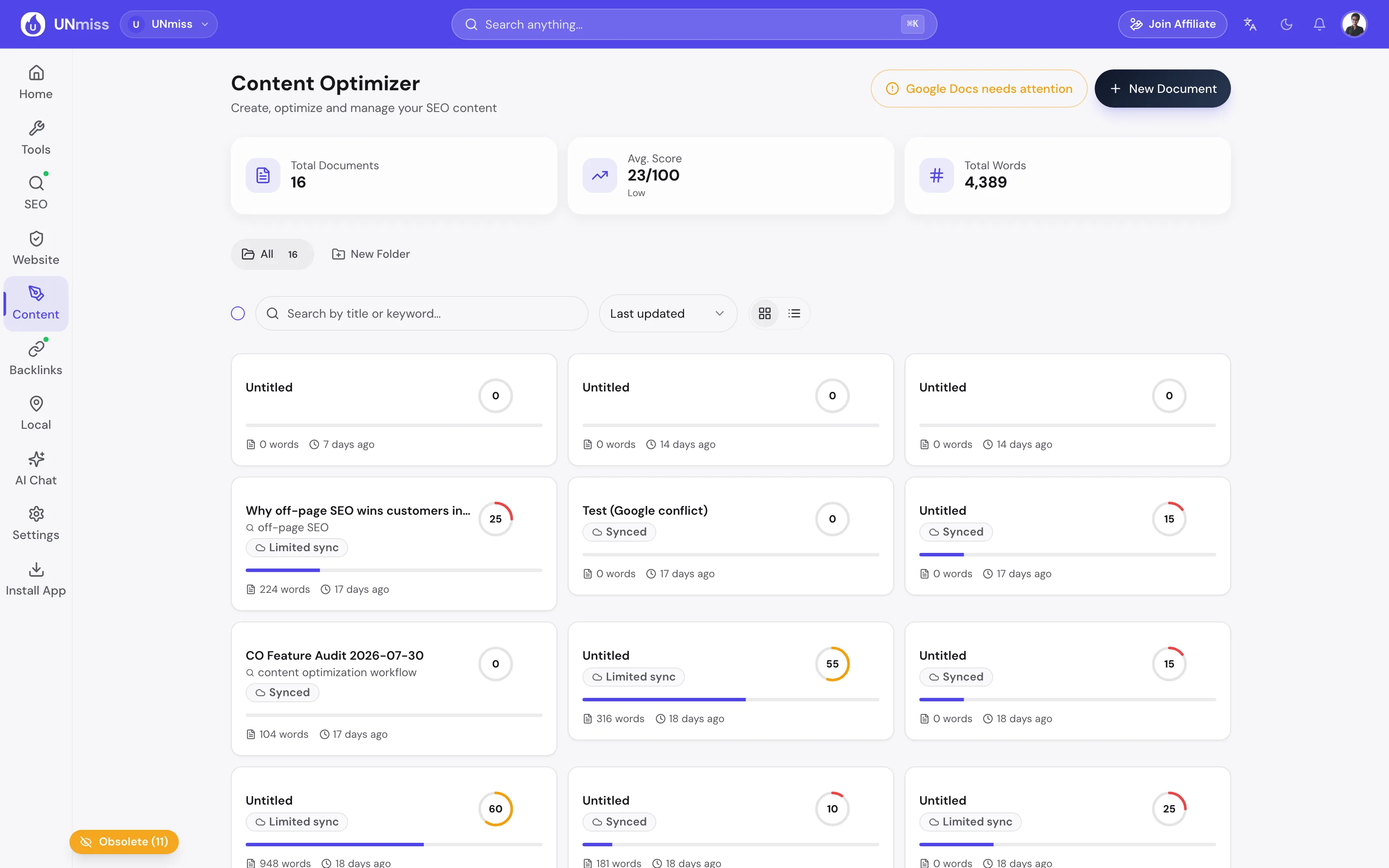
It scores your draft. Word count, headings, paragraphs, images, keyword placement, reading level. This is arithmetic on the text in front of it. It costs the vendor essentially nothing, which is why the tools that charge for it are charging for something else.
It reads the competition. The tool fetches the pages currently ranking for your keyword and measures them — how long they are, how many headings they use, what they talk about. This is the expensive part. Every fetch costs money, which is why free tiers meter this and nothing else.
It extracts terms. From those competing pages it derives a list of words and phrases the winners have in common, with a suggested number of uses for each. This is the feature Surfer built its reputation on, and it is the one people most often assume is unavailable for free.
It rewrites for you. AI drafting, expanding, tightening, or generating a whole article. This is a separate product bolted onto the first three, and it is where almost every vendor puts its paywall.
The first job is nearly free to provide. The second is genuinely costly. Keep that in mind as you read the pricing: you are mostly paying for step two, and any tool charging you $129 a month for step one alone is charging for a spreadsheet.
How this comparison was put together
Two kinds of evidence, kept strictly separate, and labelled that way throughout.
Hands-on. One frozen draft — 1,232 words on "how to improve website loading speed" — pasted into every tool that would accept it without an account. The draft is deliberately imperfect: the exact keyword appears twice, giving 0.16% density, below every tool's floor; it is missing from the first 100 words and from every heading; and there are no images at all. The topic is deliberately not about SEO tools, so nothing in the comparison enjoys home-field advantage.
Documented. For every tool whose free tier requires a signup, we read its own live pricing and product pages on 16 August 2026 and reported what they say. We did not create accounts, so we make no claim about how those tools perform. Where a section is based on documentation rather than a run, it says so in the first line.
1. No account was created anywhere, and no CAPTCHA was answered. A signup wall is a finding, not a failure. 2. Every hands-on tool received the identical draft, byte for byte. 3. Every screenshot of our own tool is labelled with the tier it came from — free, account, or paid — and nothing behind a paywall is described as free.
The 7 tools at a glance
| Tool | Free tier | Account to start? | Reads the SERP free? | Term targets free? | Entry price |
|---|---|---|---|---|---|
| seotools.pro Content Optimizer | Yes | No | Yes — 3/day | Yes | Free |
| MarketMuse | Yes — 10 queries/mo | Yes | Yes, within quota | Yes, within quota | Free plan |
| Hemingway Editor | Yes | No | No | No | Free |
| Surfer SEO | None | Yes | No | No | $49/mo |
| Clearscope | None | Yes | No | No | $129/mo |
| Frase | None — 7-day trial | Yes | No | No | $39/mo |
| NeuronWriter | None — 7-day trial | Yes | No | No | $23/mo |
1. seotools.pro Content Optimizer — the only free SERP analysis with no account
seotools.pro Content Optimizer is our own tool, ranked first by us, so read this section with that firmly in mind and read the inconvenient-number section below before you believe any of it.
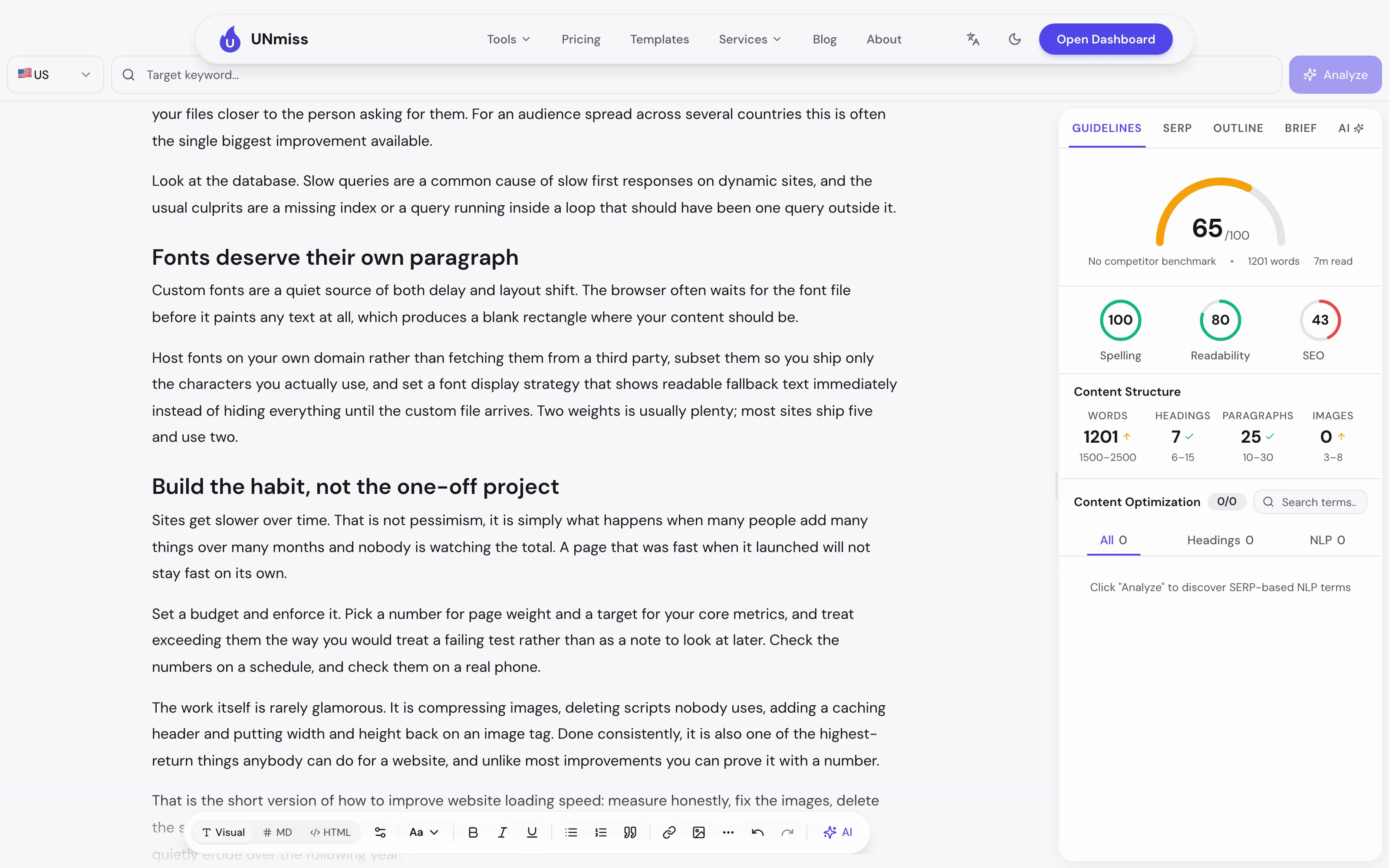
Here is what actually happened when we pasted the draft in, signed out, with no account of any kind.
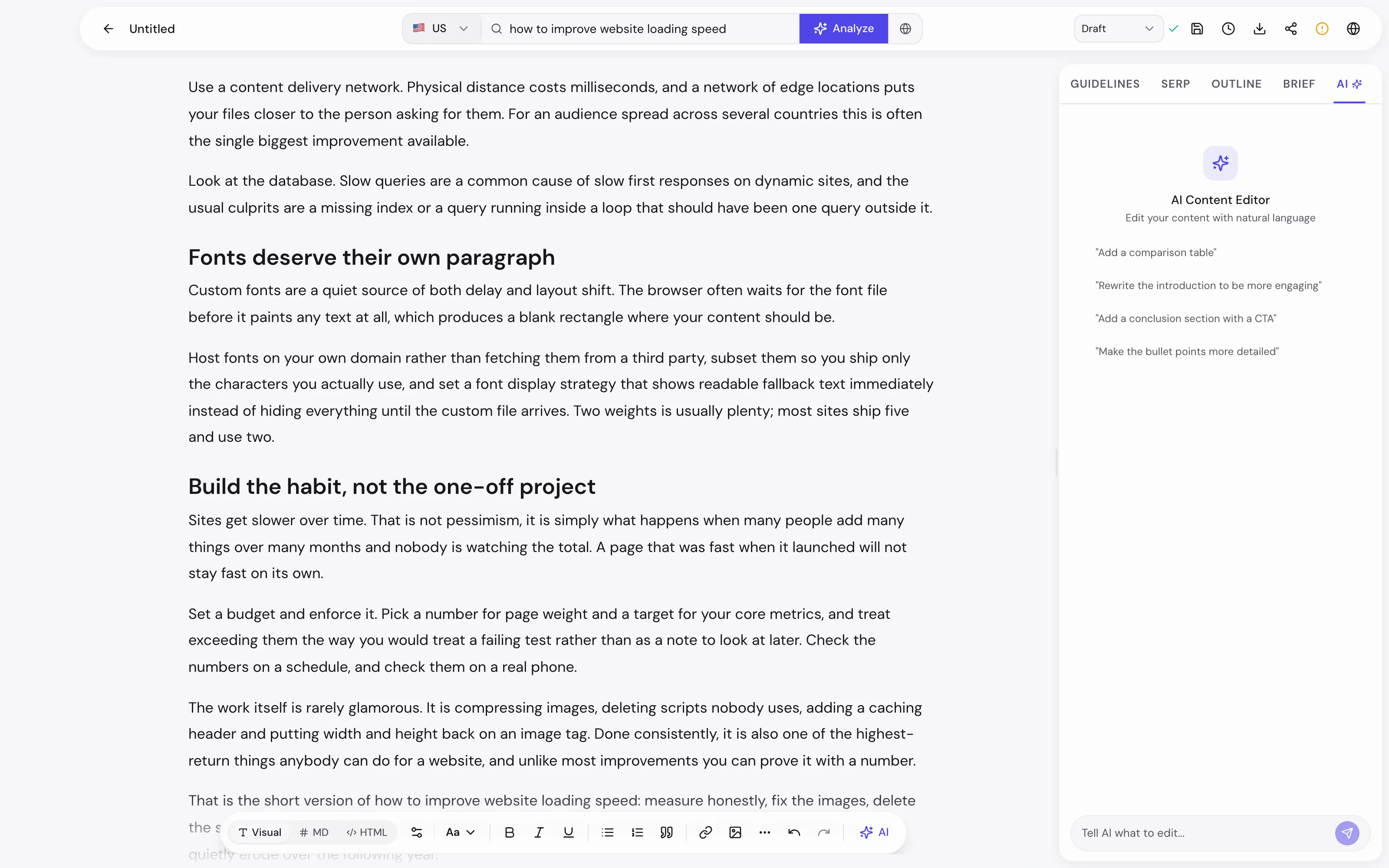
The scoring appeared immediately: 65 out of 100, broken into Spelling 100, Readability 80 and SEO 43. The structure panel showed 1,201 words, 7 headings, 25 paragraphs and 0 images against generic target ranges, and the competitor benchmark line read "No competitor benchmark" — because at that point no research had been run, and the panel refuses to invent one.
Then we typed the keyword into the bar at the top and pressed Analyze. That is the part most people assume is impossible without paying.
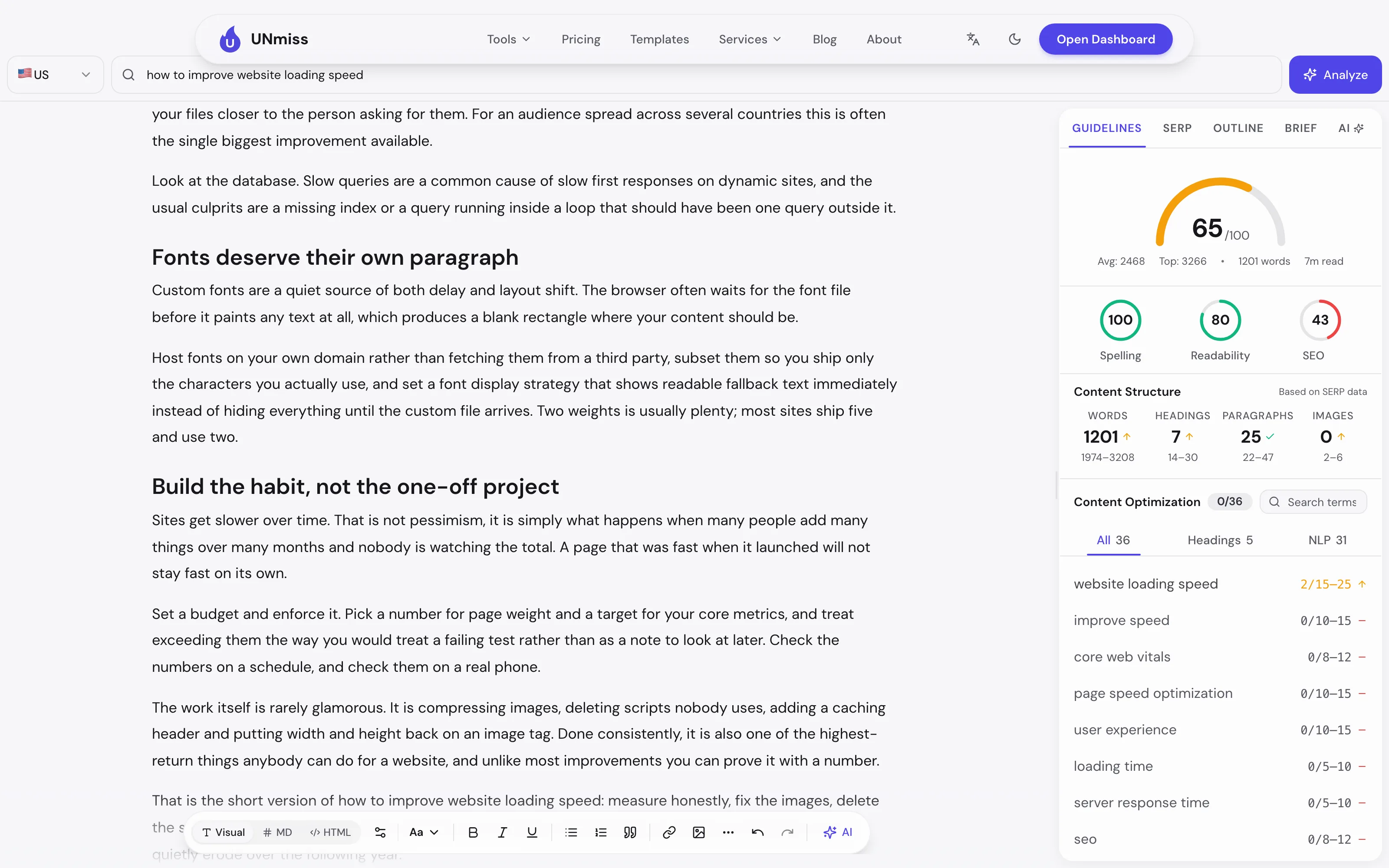
It returned 8 competing pages with each one's word and heading count — 2,611 words for one, 3,252 for another, 3,266 for the longest. The benchmark line filled in with Avg: 2,468 and Top: 3,266. Every structure target relabelled itself "Based on SERP data" and moved: the word target went from a generic 1,500–2,500 to 1,974–3,208, and headings from 6–15 to 14–30. And the terms panel filled with 36 recommended terms — 5 heading terms and 31 body terms — each with its own suggested range: website loading speed 2/15–25, core web vitals 0/8–12, server response time 0/5–10, and so on.
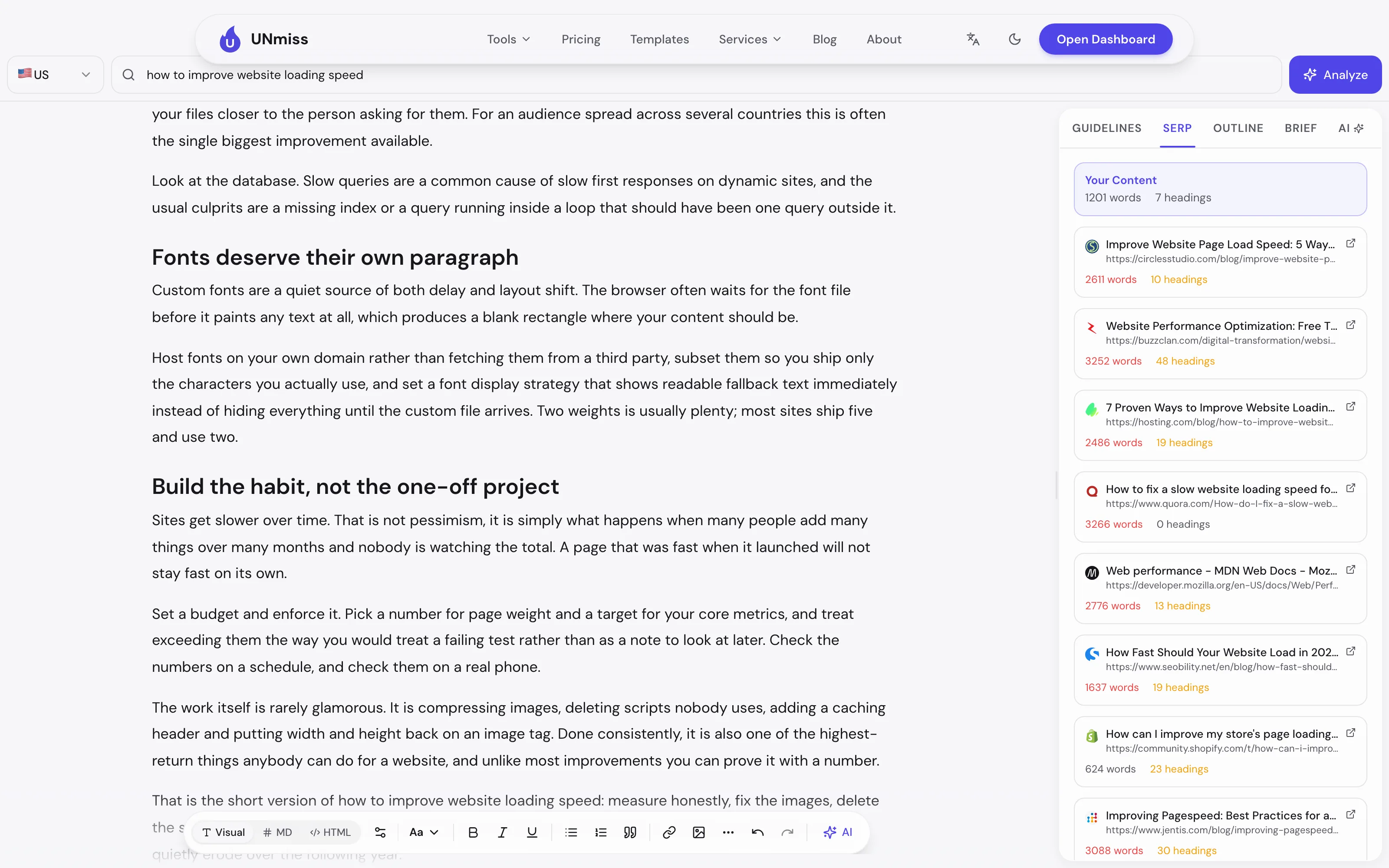
That is the Surfer-shaped output — competitor lengths, adjusted targets, term list with ranges — obtained for nothing, without an email address. The cap is 3 of those analyses per rolling 24 hours. The scoring either side of it is unlimited, because it runs in your browser and costs us nothing to give away. Spell checking is unlimited too.
- 3 SERP analyses per 24 hours, no account
- Real competitor word and heading counts
- 36 term targets with per-term ranges, on our test
- Targets that adjust to the SERP instead of staying generic
- Unlimited scoring and unlimited spell checking
- Visual, Markdown and HTML editing
- Outline navigation and structure targets
- Export, save and version history need an account
- AI writing and one-click fixes are paid
- Scores stay hidden until 50 words
- The score is capped in a way we explain below
- "Spelling" is not a grammar checker
Unlimited scoring, plus 3 competitor analyses a day with real word counts and term targets. No account, no card.
Open the free Content Optimizer →2. MarketMuse — the only real free plan in the paid group
Documented, not tested: the free plan requires an account, and we created none.
MarketMuse is the one genuinely surprising entry here, because in a category that has almost entirely abandoned free tiers, it still publishes one. The plan is simply called Free, and its published limits are 1 user and 10 queries per month, described on its own pricing page as "Limited" applications and "Best for individuals with a low content volume."
Ten queries a month is not a working tool for an agency, but it is a real, permanent allowance rather than a countdown, and the free plan's feature list includes Topic Navigator, SERP x-ray, the SERP and site heatmaps, and Connect. For somebody publishing a couple of pieces a month and wanting a second opinion on topical coverage, that is a legitimate option that costs nothing indefinitely.
The trade is the account, and the ten-query ceiling arrives quickly — a single article researched properly can consume several queries.
- A permanent free plan, not a trial
- Topic Navigator and SERP x-ray included free
- Site and SERP heatmaps
- Strong topical-authority modelling
- Account required before anything runs
- 10 queries a month, 1 user
- Export limited to saved writing on the free plan
- Paid pricing is not published on the plan table
3. Hemingway Editor — free, no signup, and only half the job
Hemingway is the other tool in this comparison you can open and use immediately with no account, so we ran the identical draft through it.
It returned Grade 9 readability, labelled "Good." It counted 1,419 words, flagged 19 of 82 sentences as very hard to read and 14 of 82 as hard to read, found 17 weakeners and 2 words with simpler alternatives. As a prose diagnostic that is genuinely useful, and the highlighting makes the problem sentences obvious at a glance in a way no score out of 100 does.
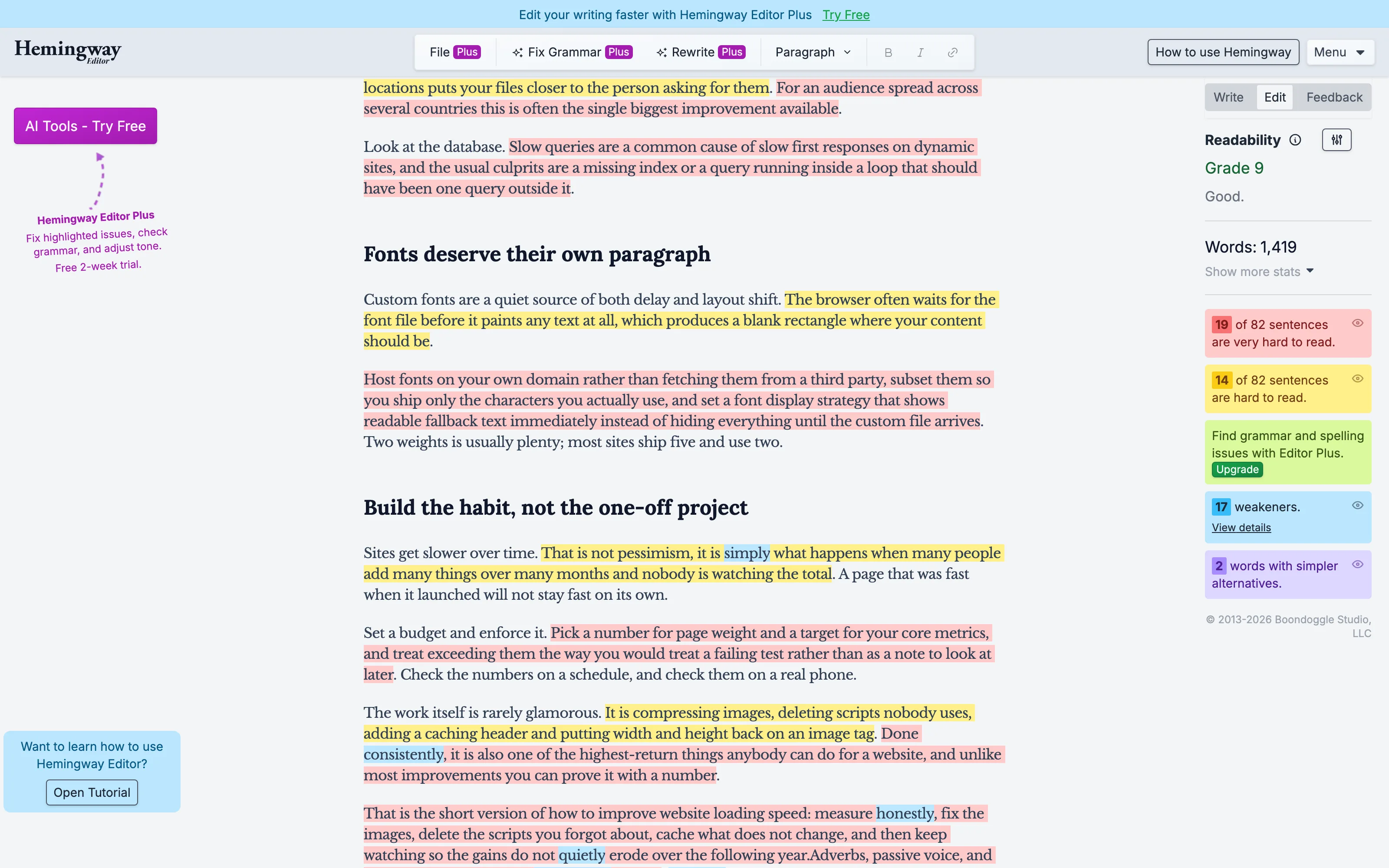
What it does not do is anything to do with search. There is no keyword field. It never looks at the SERP, never tells you how long the ranking pages are, and never suggests a term to cover. It also gates its own spelling and grammar checking behind Editor Plus — the free version tells you "Find grammar and spelling issues with Editor Plus" rather than finding them — and File, Fix Grammar and Rewrite all carry a Plus badge.
So Hemingway is not really a Surfer alternative. It is an excellent free readability editor that solves one of the four jobs, and if readability is your actual problem it will serve you better than anything else on this list.
- Completely free, no account, no card
- Sentence-level highlighting of hard prose
- Reading grade, weakeners and adverb counts
- Instant, no waiting on any API
- No keyword field and no SERP data
- No term targets or competitor comparison
- Spelling and grammar are Plus-only
- Rewriting is Plus-only
4. Surfer SEO — the tool you are trying to replace
Documented, not tested: there is no free tier to test.
Surfer's published plans start at $49 a month for Discovery and run through $99 Standard, $182 Pro, $299 Peace of Mind and $999 Enterprise. Its separate AI Search Analytics product is listed at $158 a month for 100 prompts tracked daily. There is no free plan; the "Start for Free" buttons lead to signup.
It is worth being fair about why Surfer became the category default. Its Content Editor is genuinely well built, the term list is the most refined in the category, and the guidance is specific enough that a non-expert writer can follow it. If you are producing content at volume and the tool saves an hour per article, $49 is not the expensive part of your week.
One thing genuinely free from Surfer: Keyword Surfer, its Chrome extension, listed under Free Tools on its own site. It shows search volumes and keyword ideas directly in the results page. It is useful and it costs nothing — but it is a keyword tool, not a content editor, and it will not score your draft or give you term targets.
- The most polished content editor in the category
- Detailed, writer-friendly term guidance
- Keyword Surfer extension, genuinely free
- Large, mature feature set
- No free tier at all
- $49/mo before you score one draft
- Account required to see anything
- AI Search Analytics is a separate $158/mo
5. Clearscope — the most expensive door
Documented, not tested: no free tier.
Clearscope starts at $129 a month for Essentials, with Business at $399 and Enterprise custom. There is a 14-day free trial. It is the priciest entry point in this comparison by a wide margin.
Clearscope's reputation is for report quality rather than breadth — a clean, well-organised term report that content teams find easy to hand to freelance writers. Its integrations with Google Docs and WordPress are the part regular users tend to mention first. If you run an editorial team and the tool is standardising output across a dozen writers, the price is a per-team cost rather than a per-person one.
For an individual comparing it against a free alternative, though, $129 a month is roughly $1,550 a year for the same four jobs described at the top of this article.
- Clean, readable term reports
- Google Docs and WordPress integrations
- 14-day trial before committing
- Popular with editorial teams for consistency
- No free tier
- $129/mo entry, the highest here
- Account required for the trial
- Narrower feature set than cheaper rivals
6. Frase — the cheapest of the trial-only group
Documented, not tested: the trial requires an account.
Frase lists Starter at $39 a month billed yearly, or $49 month to month, with Professional at $103 and Scale at $239. Its trial is explicitly described as "Free 7-day trial. No credit card", capped at 5 articles, 50 audit pages, 25 AI prompts and 3 seats.
The no-credit-card trial is worth calling out because it is genuinely more generous than the norm here — you can evaluate it properly without handing over a card and remembering to cancel. Frase's strength is the brief-building workflow: it is oriented around turning SERP research into an outline you hand to a writer, which is a different emphasis from Surfer's in-editor scoring.
It is still not free. Seven days is a countdown.
- 7-day trial with no credit card
- Strong brief and outline generation
- Cheapest full-feature plan of the paid group
- Combined research and AI drafting
- No free tier once the 7 days end
- Account required
- Trial caps at 5 articles
- AI prompts limited to 25 on trial
7. NeuronWriter — the cheapest subscription, still not free
Documented, not tested: the trial requires an account.
NeuronWriter is the cheapest recurring plan in the comparison at $23 a month for Bronze, rising through $45 Silver, $69 Gold, $93 Platinum and $117 Diamond. Its own FAQ describes the trial precisely: "You can test the tool for free after creating an account for 7 days under the Gold plan terms."
For price-sensitive users this is the obvious paid pick. $23 a month buys SERP analysis and NLP term data of the kind Surfer charges $49 for, and the interface, while less polished, covers the same ground. People running a handful of sites on a tight budget consistently land here.
But the answer to "is there a free version" is no — there is a week under Gold terms, and then a card.
- Cheapest recurring plan here at $23/mo
- SERP analysis and NLP terms on every plan
- 7-day trial under Gold terms
- Frequent lifetime deals on third-party marketplaces
- No free tier
- Account required before the trial starts
- Interface is less polished than Surfer's
- Report volumes are tiered
Our own inconvenient number
We put our tool first. Here is the case against it, made as strongly as we can make it, and two places where the number on screen is not what a reader would assume.
Our score cannot reach 100. The content score is additive across eight checks, and those checks total 95 points, capped at 100. So a flawless draft tops out at 95 and the last five points are unreachable by construction. Our draft scored 65; a perfect one would score 95 and still look like it had failed something. That is a real flaw in the design, not a rounding artefact, and knowing it changes how you should read the gauge.
The "Spelling" gauge is not a grammar checker. It is arithmetic on spelling errors alone: 100 minus 20 points for each misspelling, floored at zero. The server that produces those errors is explicitly instructed not to flag grammar or style. Our draft scored 100 there — which means it contains no misspellings, and says nothing whatsoever about its grammar. Hemingway, by contrast, found 19 very hard sentences and 17 weakeners in the same text. If prose quality is your problem, our gauge will not find it and Hemingway will.
Our readability figure is an approximation. The Flesch score is computed in your browser from an estimated syllable count, not by a language service. It is a reasonable proxy and it is not a measurement.
Avg and Top sit next to a score out of 100 and are not scores. After research the panel shows "Avg: 2468, Top: 3266" beside a 65/100 gauge. Those are competitor word counts. Placed where they are, they read like competitor scores, and that is a genuine interface wart we have not fixed.
Three analyses a day is a real ceiling. If you are optimizing five articles in an afternoon, you will hit it, and the answer at that point is an account or a plan. MarketMuse's 10 a month is smaller in total but resets predictably; ours is more generous day to day and less generous over a month.
And the word counts here do not agree. Identical text: our tool counted 1,201 words, Hemingway counted 1,419, and a raw count gives 1,232. Tools count headings, list items and hyphenated words differently. Never compare a word count from one tool against a target from another — only against its own.
What each tier actually gives you
Since we are the tool being ranked first, here is our own pricing structure stated plainly, with the boundary marked, so nothing paid is allowed to look free.
| Capability | Free, no account | Free account | Paid plan |
|---|---|---|---|
| Visual, Markdown and HTML editing | Yes | Yes | Yes |
| Content, Spelling, Readability and SEO scores | Yes, unlimited | Yes | Yes |
| Spell checking | Yes, unlimited | Yes | Yes |
| SERP analysis and term targets | 3 per 24 hours | More | Unlimited |
| Saved documents, folders, autosave | No | Yes | Yes |
| Version history | No | Yes | Yes |
| Export to DOCX, HTML, Markdown, text | No | Yes | Yes |
| AI Write, rewrite modes, Magic Write | No | No | Yes |
| One-click readability and SEO fixes | No | No | Yes |
| WordPress publishing | No | No | Yes |
The line worth noticing is the fourth row. Scoring is free everywhere because it is cheap to provide. SERP analysis is metered everywhere because it is not. Any tool that gives you unlimited scoring and calls itself generous is being generous with the part that costs nothing.
What no content optimizer can tell you
Every tool here shares the same four blind spots, and knowing them will stop you optimizing your way into a worse article.
A term list is a correlation, not an instruction. The terms these tools suggest are words the currently-ranking pages happen to share. Some of them matter because they signal genuine topical coverage. Others are there because five of the ten winners are from the same industry and use the same jargon. Stuffing all 36 of ours into a draft would produce something worse than the draft we started with.
Word-count targets describe the winners, not the requirement. Our tool told us to write 1,974–3,208 words because that is the range the ranking pages occupy. It does not follow that length caused their ranking. Very often the causation runs the other way: pages that earned links and coverage grew longer over time.
None of them can judge whether you are right. A factually wrong article can score 95. Accuracy, originality and genuine expertise are invisible to every tool in this comparison, and they are increasingly the things that separate pages that hold their rankings from pages that do not.
A score is not a ranking. Optimizing from 65 to 90 changes what a tool thinks of your page. Whether it changes what Google thinks depends on competition, links, site authority and intent — none of which is in the editor. Pair the optimizer with a site audit and a rank tracker if you want to know whether any of it worked.
Why the free tier disappeared from this category
It is worth understanding why four of these seven tools have no free version, because it is not simply greed and it tells you something about which features to expect free anywhere.
Content optimizers were among the first SEO products to be squeezed from both ends. On one side, the data they resell got more expensive: fetching and processing ten ranking pages per query costs real money, and doing it at the scale of a free tier with no conversion attached is a straight loss. On the other side, the AI features every vendor added between 2023 and 2025 cost money per generation, and unlike a scraped SERP they cannot be cached and reused across customers.
So the category converged on the same answer: give away the arithmetic, charge for the fetch and the generation. That is exactly the boundary you can see in the table above, and it is why the free tier that survives tends to be the one attached to a business with another reason to want you in the door.
Ours is a case in point, and it would be dishonest not to say so. The Content Optimizer is free because seotools.pro sells a broader toolset and this is a reasonable way to introduce it. MarketMuse's free plan exists for a similar reason. Neither is charity, and you should read both accordingly — the correct question is never "why is this free" but "what is capped, and will I hit the cap".
The practical consequence for you: expect unlimited scoring anywhere, expect any SERP-reading feature to be metered or paid, and be suspicious of any tool that advertises a free tier without saying which of the two it is being generous about.
A free workflow that replaces most of Surfer
If you have just cancelled a subscription, here is the sequence that recovers most of the value at zero cost. It takes longer than one tool would, and it covers the same four jobs.
1. Get the structural targets. Run the draft and keyword through a free SERP analysis to learn how long the ranking pages actually are and how many headings they use. On our test that turned a generic "1,500–2,500 words" into a measured 1,974–3,208, which is a materially different instruction. This is the step that genuinely needs a tool, and it is the one worth spending your free daily allowance on.
2. Take the term list, then argue with it. Export or copy the recommended terms and go through them by hand. Mark the ones that name a subtopic you genuinely skipped — on our draft, "core web vitals" was a fair hit, because the article discusses the metrics without ever naming them collectively. Discard the ones that are only there because several ranking pages happen to be from the same vendor. This ten-minute manual pass is the single highest-value thing you can do with a term list, and no tool does it for you.
3. Fix the structure before the words. Headings, paragraph length and images move more of the score than phrasing does, and they are faster to fix. Our draft's biggest gaps were 7 headings against a target of 14–30, and zero images against 2–6. Neither requires rewriting a sentence.
4. Run the prose through a readability pass. This is where Hemingway earns its place: it will flag the sentences that are too long far more usefully than a single readability score will. Fixing 19 very hard sentences improves an article for humans whether or not any score moves.
5. Check the keyword mechanics last. Is the phrase in the first 100 words, in at least one heading, and used at a sane density? Our draft failed all three at 0.16% density, and fixing that is a five-minute job once the article is otherwise right. Doing it first is how people end up with keyword-stuffed drafts that read badly.
6. Then stop. The remaining points on any score are usually bought by making the article worse. A tool that wants 36 terms in 1,200 words is describing a different article, not a better version of yours.
What would change our ranking
Since we ranked ourselves first, it is only fair to say what would move us down, so the ranking is falsifiable rather than decorative.
If MarketMuse raised its free plan from 10 queries a month to something a working writer could live on, it would have a strong claim to the top spot on data quality alone. If Surfer introduced a genuine free tier — even one analysis a week — it would likely take first place outright, because its editor is better built than ours. If a reader's main problem is prose rather than search, Hemingway already beats us today and the article says so.
And our own weakest points are specific and fixable: a score that cannot reach 100, competitor word counts displayed where they look like scores, and a three-a-day ceiling. None of those is a reason to avoid the tool, and all of them are reasons to read its output with your eyes open.
Which one should you use
If you want SERP-based targets without paying or signing up: our Content Optimizer. It is the only tool here that does it.
If your problem is prose, not search: Hemingway, free, today, no account.
If you publish a couple of articles a month and will make an account: MarketMuse's free plan, 10 queries a month, permanently.
If you have a budget and want the best-built editor: Surfer at $49.
If you have a small budget: NeuronWriter at $23.
If you brief freelance writers: Frase, for the outline workflow.
If you run an editorial team and consistency matters more than price: Clearscope.
Tools we left out, and why
Several names come up constantly in this conversation and are missing above. Each was excluded for a specific reason, and knowing the reason may still point you somewhere useful.
Semrush SEO Writing Assistant. Frequently recommended as a free alternative, and it does have a free mode, but it lives inside Semrush and requires a Semrush account to reach. It is also a companion to a much larger paid platform rather than a standalone optimizer, which makes a like-for-like comparison misleading.
Keyword Surfer. Genuinely free, made by Surfer, and covered in the Surfer section above. It is excluded from the ranking because it answers a different question: it shows search volumes and related keywords in the results page, and never looks at your draft.
Yoast SEO and Rank Math. Both are free WordPress plugins with real-time content analysis, and for anybody writing directly in WordPress they are a sensible first stop that costs nothing. They are excluded because they only exist inside WordPress and because their analysis is rule-based — keyword in the title, keyword in the first paragraph, sentence length — with no SERP research behind it. They check your page against a checklist, not against the competition.
ChatGPT and other general assistants. People increasingly paste a draft and ask for SEO advice. The output reads plausibly and is unanchored: without a live SERP fetch, any term list it produces is recalled from training data rather than measured from the pages currently ranking. It is a reasonable editor and a poor optimizer, and the distinction matters most precisely when it sounds most confident.
Frequently asked questions
Is there a free version of Surfer SEO?
No. Surfer's plans start at $49 a month and its pricing page lists no free tier; the "Start for Free" buttons lead to signup. The one genuinely free thing Surfer offers is Keyword Surfer, a Chrome extension showing search volumes, which is a keyword tool rather than a content editor.
What is the best free Surfer SEO alternative?
For SERP-based optimization with no account, the seotools.pro Content Optimizer: unlimited scoring plus 3 competitor analyses per 24 hours that return real word counts and term targets. If you will create an account, MarketMuse's free plan gives 10 queries a month permanently. If you only need readability, Hemingway is free and needs no signup.
Can I get NLP term suggestions for free?
Yes, though from very few tools. On our test the free seotools.pro tier returned 36 recommended terms with individual usage ranges, at no cost and with no account. MarketMuse's free plan also includes term data within its 10-query monthly limit. Surfer, Clearscope, Frase and NeuronWriter all require a paid plan or an active trial.
Why do free content optimizers limit SERP analysis but not scoring?
Because the two cost wildly different amounts to provide. Scoring is arithmetic on text you already supplied and can run in your browser for nothing. A SERP analysis fetches and processes the pages currently ranking, which costs the vendor money on every single run. That is why almost every free tier here is unlimited on one and metered on the other.
Is a 7-day trial the same as a free tier?
No, and the distinction matters when you are choosing a tool to rely on. A free tier is a permanent allowance you can return to indefinitely. A trial is a countdown that ends in a payment decision. Frase and NeuronWriter offer trials; MarketMuse offers a genuine free plan; Surfer and Clearscope offer neither.
Do these tools need a credit card?
Not always. Frase states "Free 7-day trial. No credit card". Our free tier needs neither card nor account. MarketMuse's free plan needs an account but not a card. Clearscope's 14-day trial and most paid signups will ask for payment details.
How accurate are content scores out of 100?
Treat them as a checklist summary, not a measurement. Our own score, for example, is additive across eight checks totalling 95 points, so 100 is unreachable and a flawless draft scores 95. Every tool builds its score differently, which is why scores from different tools are not comparable with each other — only against their own previous readings on the same document.
Should I use all the recommended terms?
No. Term lists are correlations drawn from pages that currently rank, and some entries reflect shared industry jargon rather than genuine topical requirements. Cover the ones that represent real subtopics you have skipped, ignore the ones that would make a sentence worse, and never write to satisfy a counter.
Does hitting the recommended word count improve rankings?
Not by itself. A word-count target describes the length of the pages that currently rank; it does not establish that length caused the ranking. Long pages often grew long because they succeeded, not the other way round. Use the range as a signal that you may have skipped subtopics, not as a quota.
What does a content optimizer not check?
Whether you are correct. Factual accuracy, originality and real expertise are invisible to every tool in this comparison. So are backlinks, site authority and search intent. A wrong article optimized well will score highly and still deserve to lose.
Can I optimize content without any SEO tool at all?
Yes, and it is worth knowing how. Search your target phrase, open the top ten results, and note what every one of them covers that your draft does not. That is precisely what these tools automate. They are faster and more systematic; they are not doing anything you could not do by hand in half an hour.
Which free tool should I pick if I only want one?
If your draft needs to compete in search, take the tool that reads the SERP — on this list, free and without an account, that is ours. If your draft is already researched and simply reads badly, take Hemingway. Those solve genuinely different problems, and a great many drafts need the second one more than the first.
The verdict
The category's honest summary is short: four of these seven tools have no free tier at all, and the phrase "free Surfer SEO alternative" is mostly answered by trials that expire. Surfer starts at $49, Clearscope at $129, Frase at $39, NeuronWriter at $23, and none of them will score a single draft for you before you hand over an email address.
Against that, two tools ask for nothing. Hemingway will tell you your prose is too dense, free and instantly, and nothing about your keyword. Ours will score the draft, read the pages currently beating you, adjust its targets to what they actually do, and hand you a list of terms they share — three times a day, with no account — and it is the only tool here that does that for free. MarketMuse sits between them with a real but small free plan behind a signup.
Whichever you choose, remember what the last section said: the score is a checklist, the term list is a correlation, and neither knows whether your article is any good. Those remain your job.
Hands-on runs were performed on 17 August 2026 against a fixed 1,232-word draft, signed out and without creating any account. Competitor pricing and free-tier terms were read from each vendor's own live pricing pages on 16 August 2026, and tools without a free tier were not run at all. Prices and limits change often; check the vendor's page before relying on any figure quoted here.
Score a draft against the pages already ranking. Unlimited scoring, 3 free SERP analyses a day, no account and no card.
Try the free Content Optimizer →