A free rank tracker answers one question: where does my site sit in Google for this phrase? Seven tools answer it, all of them free, and no two of them give you the same thing around that answer.
The comparison below is about features, not opinions. How many keywords you can check at once. How deep the tool looks — the top 10, or the top 100. How many countries it can search from. Whether you need an account before it will tell you anything. And the one nobody advertises: whether it reports every position your domain holds, or quietly shows you only the best one.
That last feature is the one that surprised us, because it changes what the number means. If your domain appears at position 3 and again at position 9 for the same phrase, a tool that reports "3" has told you something true and something incomplete. You have two listings competing for the same search, and the tool that only prints your best rank has hidden the second one from you.
One disclosure before anything else, because it should change how you read the rest: seotools.pro makes one of the tools below, and we ranked it first. That is a conflict of interest. The only honest way to handle it is to be specific about what every tool has, name the places where the others beat us outright, and give you a section called "Our own inconvenient number" that spells out exactly where our tool is the weaker choice. Discount our opinion accordingly — the feature lists are checkable, and that is the point.
The best free rank tracker for most people is the seotools.pro Rank Tracker: 3 checks a day with no account, 3 keywords per check, 24 country targets, and a full top-10 table with every one of your positions flagged rather than just the best. Seobility is the strongest alternative and the one to choose when you need depth — it reads the top 100 and adds city-level localization. Ahrefs covers the most countries at 187. SERProbot takes the most keywords in one submission. Semrush, WhatsMySERP and SmallSEOTools each do one thing well and leave the rest out.
That middle number deserves a moment. Depth is the feature that decides whether a rank checker is useful to you at all, and it splits this group cleanly in half. A top-10 tool answers "am I on page one?" A top-100 tool answers "am I anywhere, and how far do I have to climb?" Those are different questions, and if you are working on a site that is not yet ranking, the shallow tools — including ours — will keep telling you nothing at all.
What a rank tracker actually does
Strip the branding off and every tool here performs the same four steps. It takes your keyword. It fetches a search results page for that keyword from some location. It looks down the list for your domain. It prints the position where it found you.
Everything that distinguishes these tools happens inside those four steps, and it is worth knowing where, because it explains every difference in the table further down.
Step 2 is where the money goes. Fetching a real search results page is the expensive part — it is the reason no free tool gives you unlimited checks, and the reason every one of them has a daily allowance, an account wall, or both. When a tool offers you 5 free checks a day and 200 for $200 a month, you are looking at the cost of that fetch.
Step 3 is where tools quietly differ. Matching "your domain" against a result list sounds trivial and is not. Does blog.example.com count as example.com? Does notexample.com get counted by mistake? Does the tool keep looking after it finds you once? Vendors rarely document any of this, which is why the "reports every position" column below is the one we care most about.
Step 4 is where the honesty lives. When your domain is not in the results at all, a tool can say "not found in the top 10", which is true and useful, or it can print a number like 100 or 0 or ">100", which looks like data and is not.
The five features that actually separate them
Ignore the marketing pages and there are five things worth comparing. Every difference in this article reduces to one of them.
Depth. How far down the results the tool reads. Top 10 means page one only. Top 100 means roughly the first ten pages. Deeper costs the vendor more, so depth and free allowance tend to trade against each other.
Locations. Rankings are not global. A tool that only searches from one country is fine if that is your country, and useless if it is not. The range here runs from a single region to 187 countries, and two tools add city or state targeting on top.
Keywords per check. Whether you can submit one phrase or a batch. This is the difference between a five-minute job and a fifty-minute one when you have a real keyword list.
What it costs you to start. No account, an account, or a card. All three exist in this group, and the wall is not always where you expect it.
What it reports back. Only your best position, every position you hold, or the whole results page with your rows marked. This is the least advertised feature and the one that changes your decisions most.
How this comparison was put together
Two sources, both checkable. Every feature claim about another vendor's tool comes from that vendor's own live page — the tool form itself, the settings it exposes, and the pricing table attached to it, all read on 16 August 2026. Every claim about our own tool comes from the source code that runs it, not from our marketing copy, and the specific limits are named so you can hold us to them.
1. Free tiers only. No paid seat was used and no vendor was contacted, so what you see is what a stranger sees. 2. Features are reported as the vendor's own interface presents them — if a setting is not in the form, it is not in the table. 3. Where our own tool is weaker, it is said plainly and in the same words we would use about a competitor.
One thing this article deliberately does not do: rank these tools by accuracy. Grading a rank tracker's accuracy properly means holding a real search results page next to it as a control, from the same location, in the same minute, and repeating that enough times to mean something. Anything less is one anecdote dressed up as a benchmark. We would rather give you a feature comparison that is completely solid than an accuracy score that is mostly vibes.
The 7 free rank trackers at a glance
| Tool | Free allowance | Keywords per check | Depth | Locations | Account to start? | Reports every position? |
|---|---|---|---|---|---|---|
| seotools.pro Rank Tracker | 3 checks/day | 3 | Top 10 | 24 countries | No | Yes — plus the full top 10 |
| Seobility Ranking Checker | 5 checks/day | 1 | Top 100 | Country + city/state | Yes | Best position |
| Ahrefs Keyword Rank Checker | Not stated | 1 | Top 10 | 187 countries | No | Best position |
| Semrush Keyword Rank Checker | Not stated | 1 | Not stated | Country | No | Best position |
| SERProbot Free SERP Checker | Not stated | 5+ | Not stated | Global / US | No | Best position |
| WhatsMySERP SERP Checker | Not stated | 1 | Top 10 per page, paged | Country + language + area | No | Shows the results page |
| SmallSEOTools Keyword Position | Not stated | Multiple | Not stated | Not exposed | No | Best position |
"Not stated" is doing real work in that table. Five of the seven publish no free allowance anywhere on the tool page, which means you find out where the limit is by hitting it. That is a legitimate design choice and it is also the single most common complaint about free SEO tools, so it is worth knowing which ones tell you the rules up front.
1. seotools.pro Rank Tracker — the only one that shows you every position
seotools.pro Rank Tracker is our own tool, ranked first by us, so read this section with that firmly in mind and read the inconvenient-number section below before you believe any of it.
The feature that puts it here is the one nothing else in this group does. When it looks down the results for your domain, it keeps looking after it finds you. If example.com sits at position 3 and again at position 9, you get both numbers, not just the 3. The tool then hands you the entire top 10 for the keyword — every competing URL, in order, with your own rows flagged — so you are reading a search results page with yourself marked on it rather than a single figure with no context.
That matters more than it sounds. Two of your own URLs on one search results page usually means two pages of yours are competing for the same phrase, and the fix is a merge or a redirect, not more links. A tool that prints only your best position will never show you that problem exists.
The rest of the feature set is deliberately small. 3 checks a day on the free tier, 3 keywords in each check, which works out to 9 keyword lookups a day without an account of any kind. 24 country targets. Domain matching counts subdomains as yours and rejects lookalike domains, so blog.example.com is you and notexample.com is not. Results come back in one pass rather than a queue you have to return to. When your domain is not in the top 10, it says so, instead of printing a number that implies a measurement it never made.
Paid raises both ceilings to 10 checks a day and 10 keywords per check and adds the ranking history chart, which is the part that turns a spot check into tracking.
- Every position you hold, not just the best one
- The full top 10 with your rows flagged
- 3 checks a day, 3 keywords each, no account
- 24 country targets
- Subdomain-aware, lookalike-safe domain matching
- An honest "not in the top 10" instead of a filler number
- Reads only the top 10 — Seobility reads 100
- 24 countries, against Ahrefs' 187
- No city or state targeting
- 3 keywords per check, against SERProbot's 5 or more
- History chart is paid only
3 checks a day, 3 keywords each, 24 countries, no account. Every position you hold in the top 10, with the full results page around it.
Open the free Rank Tracker2. Seobility Ranking Checker — the one that reads the top 100
Seobility's Ranking Checker is the strongest tool here on the feature that matters most to a site that is not yet winning, and it is the one we would send you to over our own in a specific case.
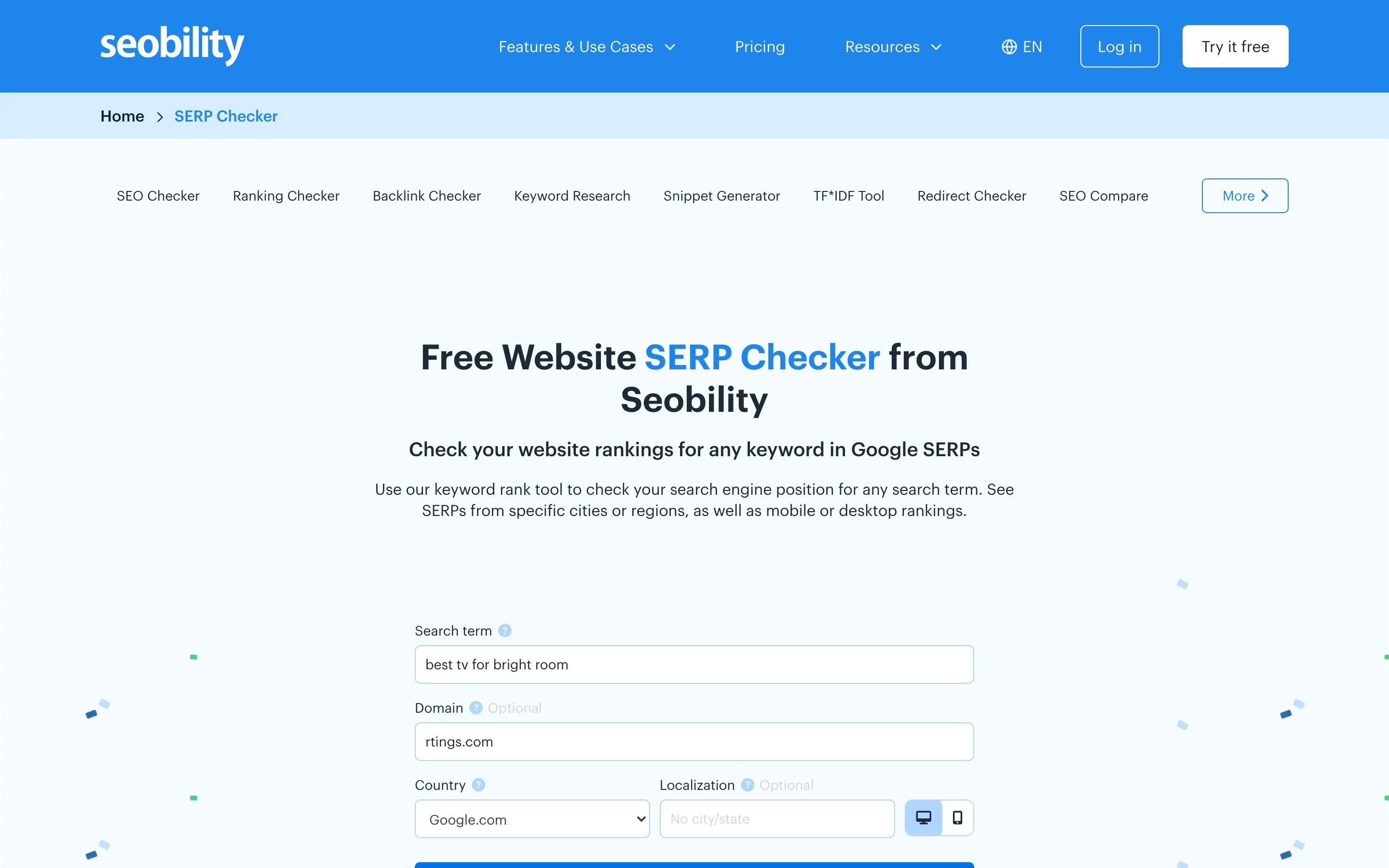
It reads the top 100. That is the whole argument. If your site sits at position 34, every top-10 tool in this comparison — ours included — will tell you that you are not ranking, which is technically true and practically useless. Seobility will tell you 34, and next month it will tell you 28, and that difference is the entire feedback loop of early SEO work.
Its location handling is the second-best here and the most precise. Beyond the country setting, it exposes an optional city or state field, so you can ask what the results look like from a specific place rather than a whole country. For anyone doing local SEO, that single field is worth more than a hundred extra countries.
The tool also carries a desktop and mobile switch, competitor benchmarking, ranking fluctuation over time, and PDF and share-link export on the report.
The cost is the entry. Seobility's own plan table on the tool page sets the free tier at 5 checks per day, listed as "Free forever" and reached by signing up for an account. Premium moves that to 50 checks a day at $50 per month, and Agency to 200 a day at $200 per month. So the free allowance is larger than ours, and it costs an email address to reach.
- Top 100 depth — the deepest here
- City and state localization, not just country
- Desktop and mobile switch
- 5 free checks a day, more than ours
- Competitor benchmarking and fluctuation over time
- PDF and share-link export
- Free tier needs an account first
- One keyword per check
- Reports your best position, not every position
- Paid tiers are the most expensive in this group
3. Ahrefs Keyword Rank Checker — the widest geographic reach
Ahrefs' free Keyword Rank Checker takes a keyword, a domain and a country, and its distinguishing feature is the size of that third box. Ahrefs' own page describes checking who ranks in the top 10 for a keyword across 187 countries, which is comfortably the widest reach in this comparison and roughly eight times our own 24.
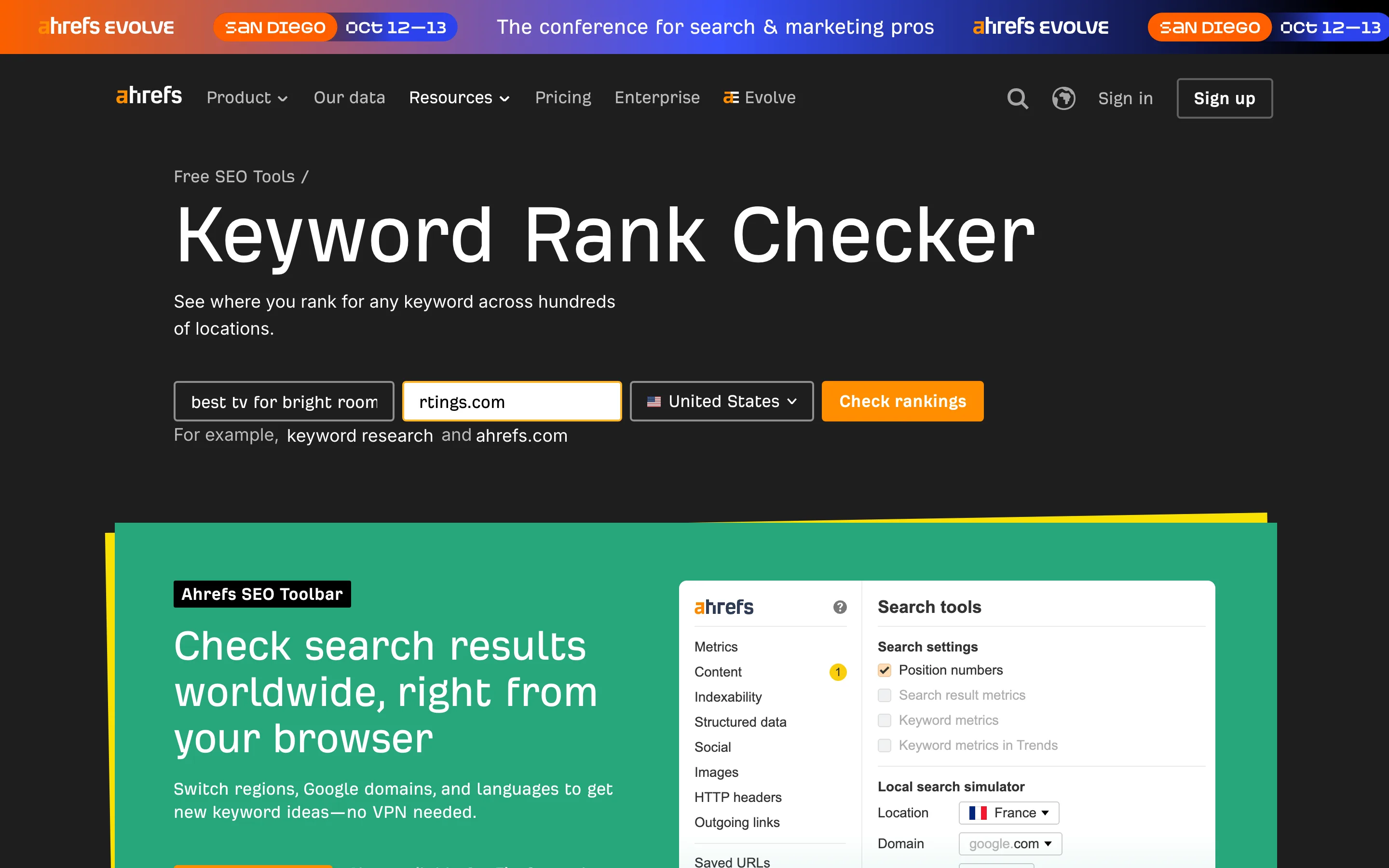
If your work is genuinely international — a product sold in forty markets, an agency with clients on three continents — that number is the reason to have this tool bookmarked, and no amount of feature polish elsewhere makes up for a country you cannot search from.
The free tool sits inside a much larger paid product, and it is worth knowing what lives on which side of that line. The free checker covers the top 10. The paid Site Explorer reports every keyword a site ranks for in the top 100 across 155 countries, and the paid Rank Tracker follows up to 10,000 keywords over time with desktop and mobile positions and average-position reporting. The free tool is a door into that, and it behaves like one.
The form itself is one keyword at a time, and it carries a Cloudflare human-verification step before it will run — standard for a free tool attached to a dataset this expensive, and something to expect rather than be surprised by.
- 187 countries — the widest reach here
- Free with no account for the checker itself
- Backed by one of the largest indexes in the industry
- A clear upgrade path to 10,000 tracked keywords
- One keyword per check
- Top 10 only on the free tool
- No stated free daily allowance
- Human verification before each run
- Best position only, no second listing
4. SERProbot Free SERP Checker — the batch tool
SERProbot's Free SERP Checker is built around one feature the rest of this group mostly lacks: it takes five keyword fields at once, with an "Add more keywords" control to extend that further. Against six tools that mostly want one phrase at a time, that is a real workflow difference. A list of fifteen keywords is three submissions here and fifteen everywhere else.
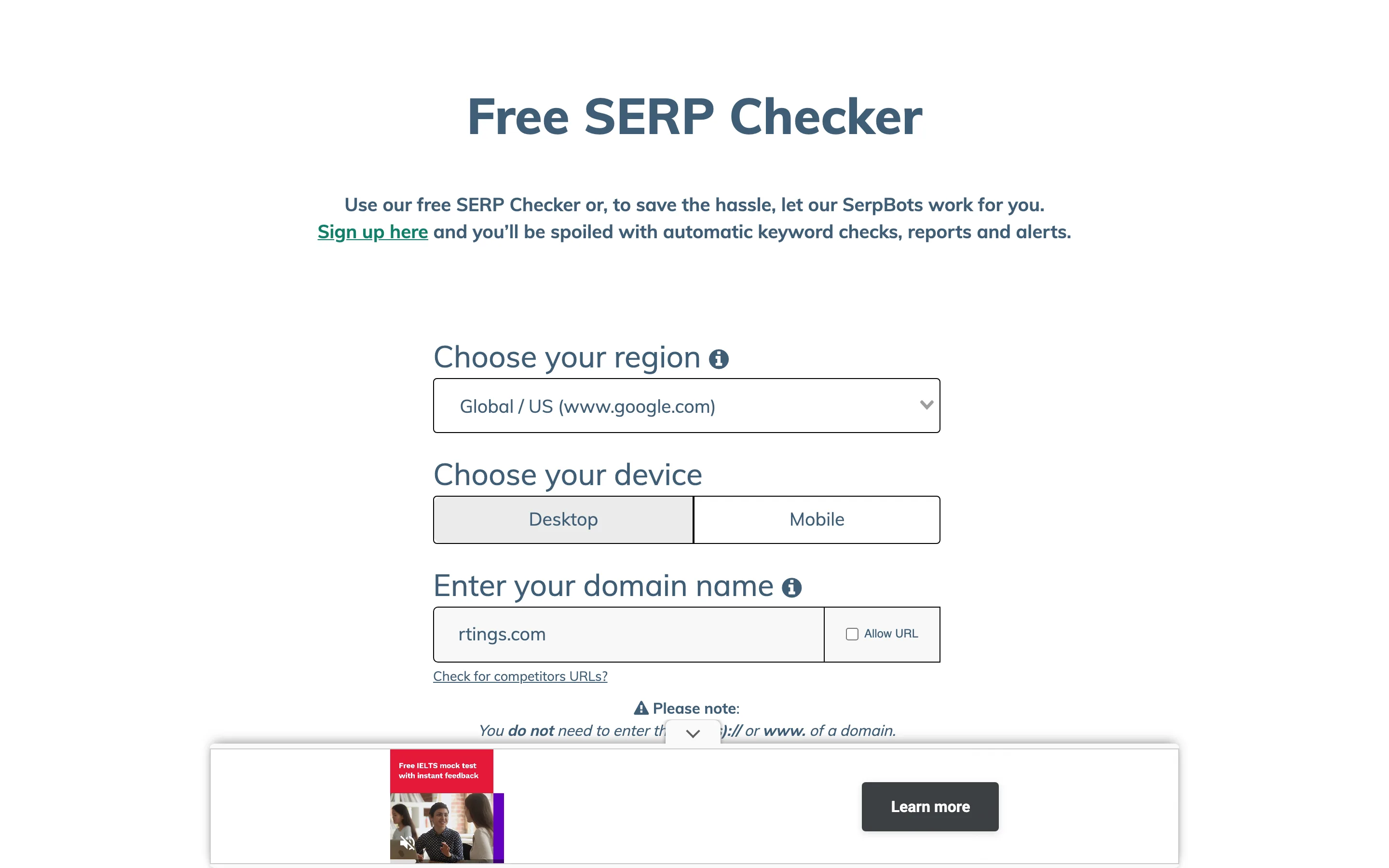
The form also exposes a desktop or mobile choice, a region selector covering Global and US, an "Allow URL" option so you can check a specific page rather than a whole domain, and a competitor-URL toggle that reports who else is on the page beside you.
What it is really selling is the automation behind it. The free checker is the manual version; the product is a "SerpBot" that runs your keyword checks on a schedule and sends reports and alerts, offered as a 14-day free trial. The free form carries a reCAPTCHA step on submission, which is the usual trade for an unmetered public tool.
- 5 keyword fields per check, extendable
- Desktop or mobile selection
- Page-level checking, not just domain
- Competitor URLs alongside your result
- Scheduled tracking on a 14-day trial
- Region choice is Global or US only
- No stated depth or free allowance
- reCAPTCHA on every submission
- Best position only
5. WhatsMySERP SERP Checker — the one that shows the page, not the number
WhatsMySERP takes a different angle to everything else here, and it is a defensible one. Instead of asking for your domain and returning your position, it asks only for a keyword and returns the search results page itself — a numbered list of positions you read down to find yourself, with pagination past the first 10.
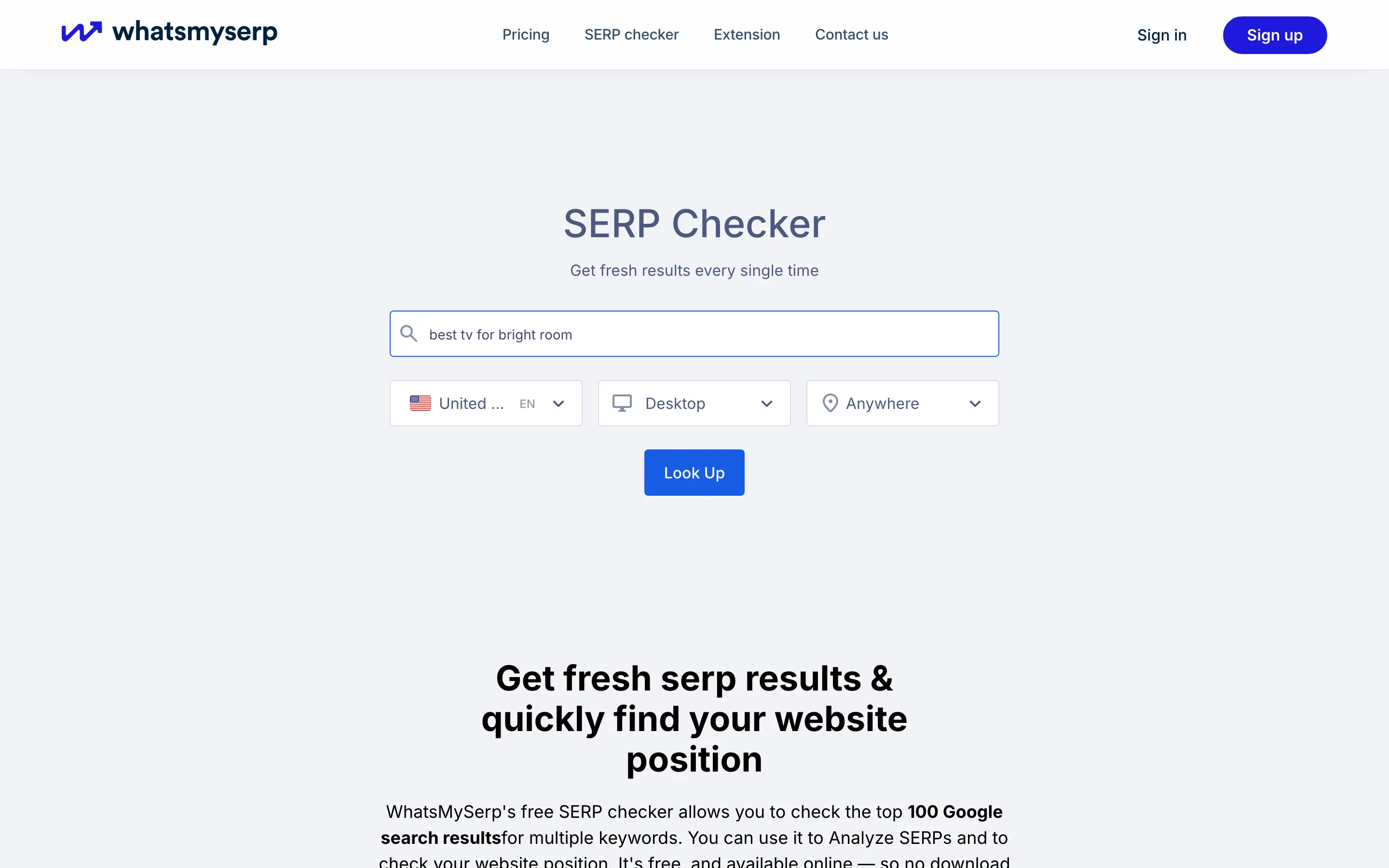
That is the same philosophy behind our own top-10 table, arrived at from the other direction: you see the competitive landscape rather than a single figure ripped out of it. The difference is that ours flags your rows for you and theirs leaves the finding to you, which is fine for one keyword and tedious for thirty.
Its settings are the most granular in the group on paper: country, language, device and area are all separate controls, with area defaulting to "Anywhere". Being able to set language independently of country is genuinely rare here and matters for bilingual markets. The tool leans on a "fresh results every single time" promise, and offers a browser extension for checking without leaving the page you are on.
- Shows the whole results page, with pagination
- Country, language, device and area as separate settings
- Language independent of country
- Browser extension
- No domain required to look up a keyword
- You find your own domain in the list
- One keyword per lookup
- No stated free allowance
- A verification step before results appear
6. Semrush Keyword Rank Checker — the simplest form here
Semrush's free Keyword Rank Checker is the most stripped-down entry in this comparison: a keyword box, a domain box, a country, and a button. There is no device switch, no localization field, no batch input and no depth setting.
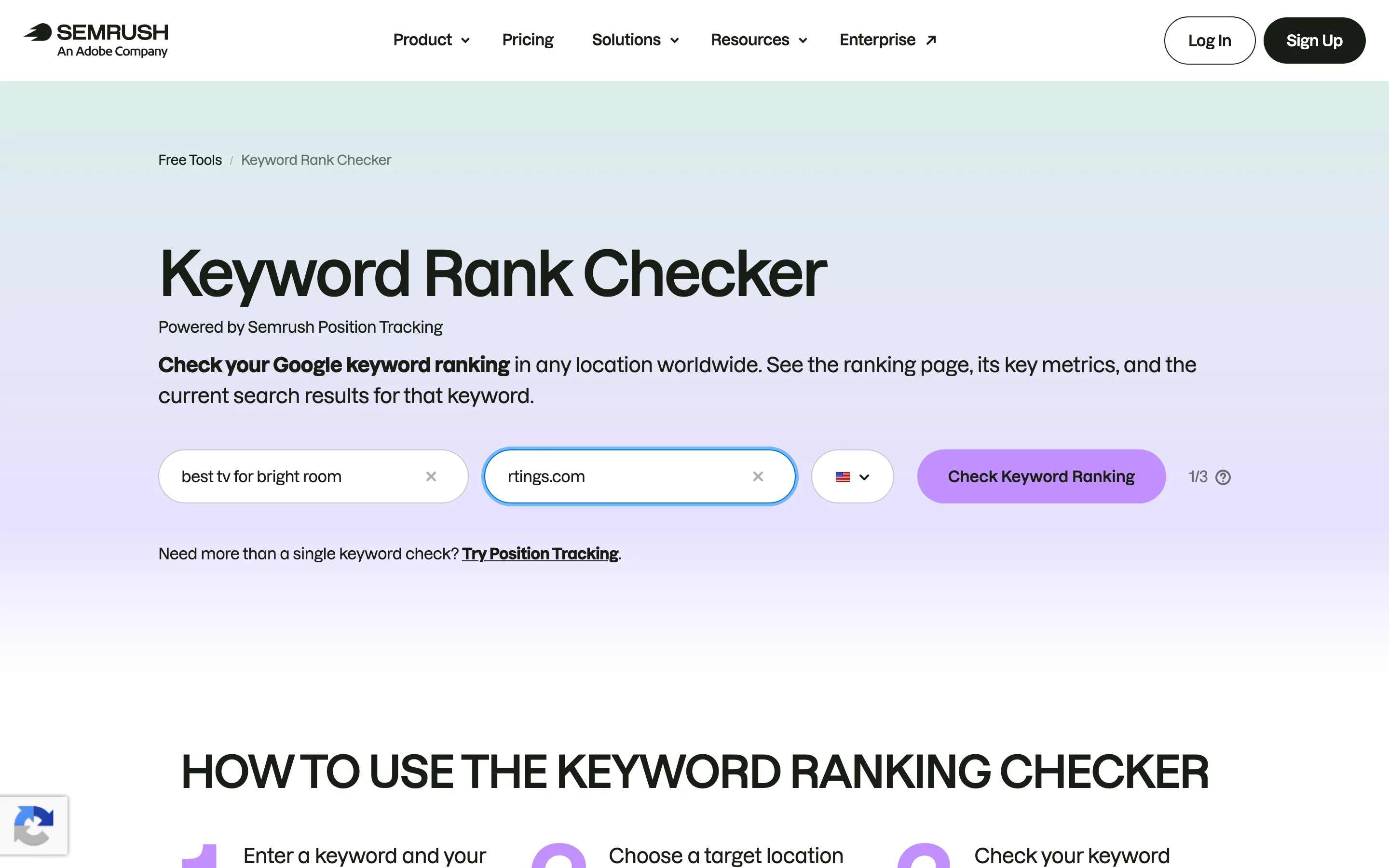
For a large number of people that is exactly right. The most common rank-checking task in the world is "one phrase, one site, is it working" and this form does that with the least friction of anything here. It is also attached to the best-known name in the category, which is worth something when you are handing a link to a client.
What you are really getting is the front door to Semrush's paid platform, where position tracking, historical data and competitor comparison live. The free tool is not trying to be a rank tracker; it is trying to be a demonstration, and it is honest about that in its own layout. Expect a human-verification step on submission.
- The simplest form in the group
- Keyword, domain and country in one screen
- No account for the free tool
- Backed by a large, well-known dataset
- No device, language or city setting
- One keyword per check
- No stated depth or free allowance
- Best position only
7. SmallSEOTools Keyword Position — the competitor-comparison one
SmallSEOTools' Keyword Position checker has one feature worth singling out: alongside your URL and a multi-keyword box, the form takes up to two competitor domains and reports them next to you. Most tools here make you run three separate checks to get that; this one asks for it up front.
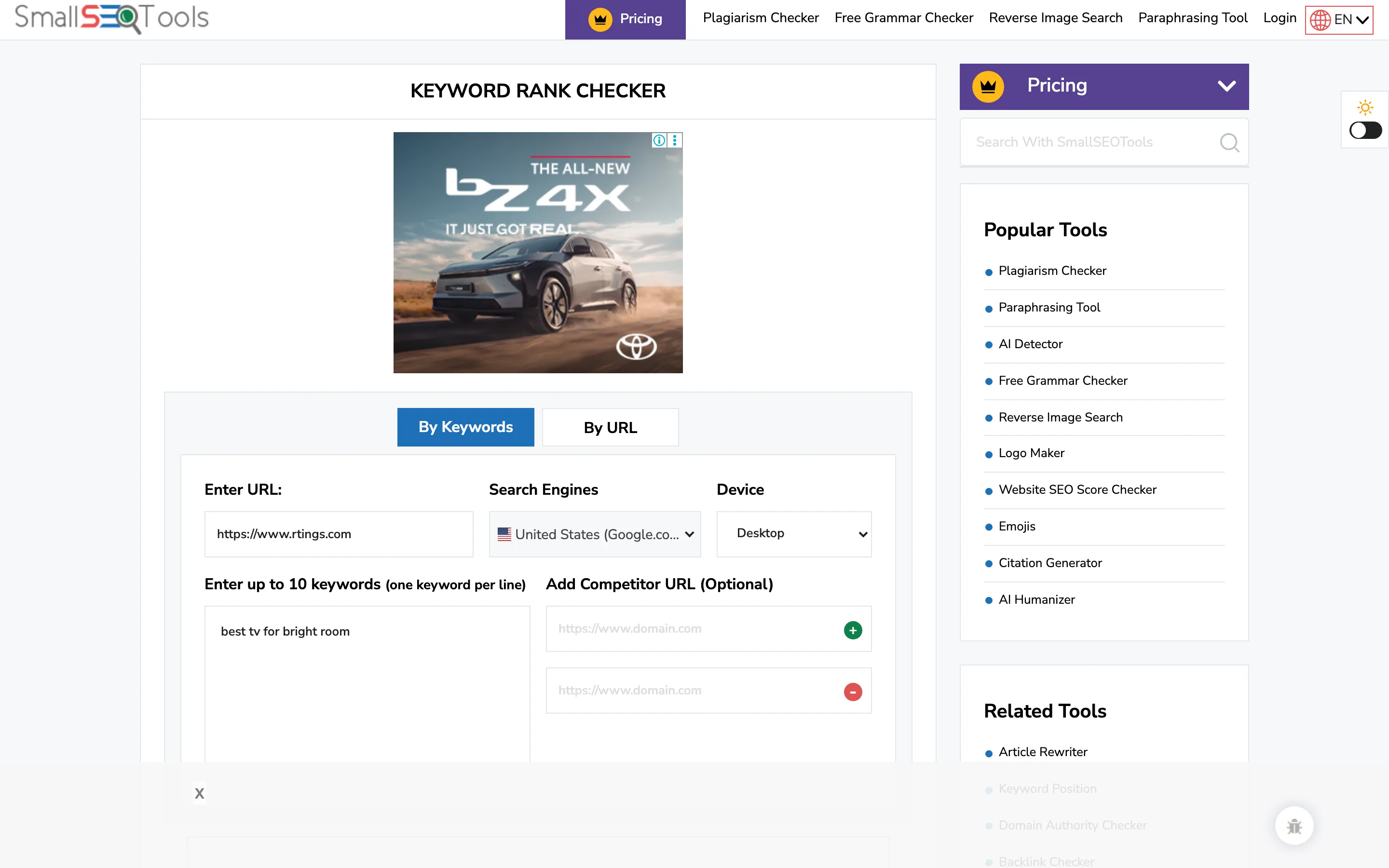
It is also the most explicitly URL-oriented entry — the field asks for a full address rather than a bare domain, which suits checking one specific page against a keyword list.
Against that, it exposes the least configuration of anything here. There is no country selector on the tool, no device switch, no depth setting and no stated allowance. It sits on a page shared with a large number of other tools, including a plagiarism checker whose controls sit close enough to the rank checker's to be worth reading carefully before you click. A reCAPTCHA guards submission.
- Up to 2 competitor domains side by side
- Multiple keywords in one box
- URL-level rather than domain-level checking
- No account
- No country, device or depth settings
- No stated free allowance
- Crowded page shared with unrelated tools
- reCAPTCHA on submission
Our own inconvenient number
We put our tool first. Here is the case against that, made as strongly as we can make it.
We read the top 10. Seobility reads the top 100. That is not a small gap, and for a large share of the people reading this it is decisive. If you are working on a newer site, or a competitive phrase, or anything where you are currently on page three, our tool will tell you "not in the top 10" every single time and Seobility will tell you 27, then 24, then 19. Ours cannot show you progress you are actually making. That is a real limitation, it is a consequence of what each search costs us, and no amount of nicer output makes up for it. If that describes your situation, use Seobility and come back to us when you are on page one.
Our free allowance is smaller. 3 checks a day against Seobility's 5. Ours needs no account, which we think is the better trade, but if you are happy to sign up then their free tier is simply bigger than ours.
We cover 24 countries. Ahrefs covers 187. If your market is not in our 24, our tool cannot help you at all and theirs can.
We take 3 keywords per check. SERProbot takes 5 or more. For anyone working through a real keyword list, that is a meaningful difference in how long the job takes.
And a caveat about all of us, us first. Rank checkers report what one search looked like from one place at one moment. Google personalises and localises results, and it changes them constantly. Any tool that hands you a position — ours, theirs, anyone's — is giving you one observation, not a fixed property of your website. Treat single readings as noisy and trends as signal.
What the free tiers actually give you
| Tool | Free tier | Account needed? | What paid adds |
|---|---|---|---|
| seotools.pro Rank Tracker | 3 checks/day × 3 keywords | No | 10 checks/day × 10 keywords, plus ranking history |
| Seobility | 5 checks/day | Yes | 50/day at $50/mo; 200/day at $200/mo |
| Ahrefs | Not stated | No | Top 100 across 155 countries; 10,000 tracked keywords |
| Semrush | Not stated | No | Position tracking, history, competitor comparison |
| SERProbot | Not stated | No | Scheduled tracking, reports and alerts; 14-day trial |
| WhatsMySERP | Not stated | No | Tracking plans and extension features |
| SmallSEOTools | Not stated | No | Paid plans across its wider tool suite |
Read that table next to the feature table and the shape of the market is clear enough. You can have a published allowance and no account, or a bigger allowance behind a signup, or an unstated allowance you discover by running out. Only two of the seven tell you the rules before you start.
What no rank tracker can tell you
Every tool in this comparison shares the same four blind spots, and knowing them will save you from over-reading any number you get.
Your rank is not one number. Results differ by location, by device, by language, by whether the searcher is signed in, and by what they searched previously. A tool reports one slice of that. Two tools disagreeing does not necessarily mean one of them is wrong; they may both be accurately reporting different search results pages.
Position is not traffic. Position 3 on a phrase nobody searches is worth less than position 8 on one that thousands do. Rank checkers do not know your click-through rate, and a rising position with flat traffic usually means the search results page around you changed, not that you did.
The page around you matters more than your number. A number 4 below three ads, an AI summary and a video carousel is a very different result from a number 4 at the top of a clean page. This is exactly why seeing the whole results page — ours flagged, WhatsMySERP's unflagged — beats seeing a lone figure.
Nothing here tells you why. A rank tracker is a thermometer. It reports the temperature and has no opinion about the illness. Pair it with a site audit when the number moves and you do not know why.
Which one should you use
If you are on page one and want to know exactly where you stand: our Rank Tracker, because it reports every position you hold and shows the page around you, with no account.
If you are not on page one yet: Seobility, without hesitation. The top 100 is the feature you need and we do not have it.
If you work across many countries: Ahrefs, for the 187.
If you have a long keyword list: SERProbot, for the batch input.
If you do local SEO: Seobility again, for city and state targeting.
If you want the results page rather than a number: WhatsMySERP.
If you want the fastest possible single check: Semrush.
If you want to see two competitors beside you: SmallSEOTools.
A free rank tracker versus Google Search Console
The most common objection to this whole category is a fair one: Google already tells you where you rank, for free, in Search Console. So why use any of these?
Because they answer different questions, and the difference is worth understanding before you spend money on either side of it.
Search Console reports your average position. Not your position — your average across every impression that query generated, over whatever date range you selected, across every device, country and personalised variation Google served. An average position of 8.4 does not mean you sit at 8 or at 9. It can mean you are 3rd for half your impressions and 14th for the other half, which are two completely different situations that Search Console will present identically.
A rank tracker reports one specific search. One keyword, one location, one moment, one results page. That is a narrower fact, and a sharper one. It is the difference between "your average temperature this month was mild" and "it is 4 degrees on the north side of the building right now".
Search Console only knows about you. This is the big one. It cannot tell you who is above you, what their pages look like, how many ads sit at the top of the page, or whether an AI summary is eating the clicks before anyone reaches the first result. Every tool in this comparison can see the competitive page; Search Console structurally cannot, because it only holds your own data.
Rank trackers cannot see your clicks. The reverse limitation, and it is just as severe. No tool here knows your impressions, your click-through rate or which queries actually bring people to your site. Search Console does, and it is the only free source of that.
The practical answer is that they are complements, not substitutes. Use Search Console to find out which queries matter and whether your traffic is moving. Use a rank tracker to look at the specific page for a specific phrase and understand what you are actually up against. A position that Search Console says is drifting downward, paired with a rank tracker view showing three new competitors above you, is a diagnosis. Either one alone is just a number.
How to get real work out of 3 checks a day
Every free tier here is small. That is a constraint worth designing around rather than resenting, and a small allowance used well beats a large one used carelessly.
Check the same keywords on the same day each week. The single most common mistake with free rank tools is checking whatever comes to mind whenever you remember. That produces a pile of unrelated readings and no trend. Three keywords checked every Monday for two months is worth vastly more than sixty scattered checks, because rank data only becomes meaningful as a series.
Pick the keywords you would actually act on. Not your brand name, which will be position 1 forever and tells you nothing. Not your most ambitious head term, which will be nowhere for a year. The useful ones are the phrases where you are close enough that movement is plausible and the traffic would matter — typically the ones already sitting somewhere on page one or the edge of it.
Write the number down somewhere permanent. Free tiers almost never include history, which means the tool will not remember last week for you. A five-column spreadsheet does the job and costs nothing. This is the single highest-value habit in this article, and it is the one that turns a free spot-check tool into an actual tracking system.
Look at the page, not only the position. When you have the whole results page in front of you, spend the extra thirty seconds reading it. New competitors appearing above you, a shift in what kind of page is winning, a results layout that suddenly has more ads — these explain position changes that the number alone never will.
Use the deep tool for the hard keywords. If some of your targets are nowhere near page one, spend your Seobility checks on those and your top-10 checks on the phrases you are actually competing for. Matching the tool's depth to the keyword's difficulty is how you get the most out of several small allowances at once.
Frequently asked questions
What is the best free rank tracker?
For checking positions on page one, the seotools.pro Rank Tracker: 3 checks a day with no account, 3 keywords each, 24 countries, and every position you hold rather than just the best one. For sites not yet on page one, Seobility is the better choice because it reads the top 100.
Can I check my Google ranking without creating an account?
Yes. Six of the seven tools here need no account for their free checker — seotools.pro, Ahrefs, Semrush, SERProbot, WhatsMySERP and SmallSEOTools. Seobility's free tier requires a signup, and gives 5 checks a day in exchange.
Why do two rank trackers give me different positions?
Because they may be reading different search results pages. Google varies results by location, device, language and personalisation, and tools fetch from different places at different moments. Disagreement between tools is normal and does not by itself mean one is broken. Trends across repeated checks are far more reliable than any single reading.
What does "top 10" versus "top 100" actually mean?
It is how far down the results the tool reads before giving up. A top-10 tool covers page one only, so anything below that comes back as "not found". A top-100 tool covers roughly the first ten pages, so it can report position 47 and show you movement long before you reach page one. Seobility is the only top-100 tool here.
Why would my domain appear twice for one keyword?
Because two of your pages are both ranking for that phrase. It usually means the two pages overlap in topic and are competing with each other, and the fix is normally to merge them or redirect one. Only a tool that reports every position will show you this; a tool that reports your best position hides the second listing entirely.
How many keywords can I check at once for free?
It varies widely. SERProbot offers 5 keyword fields with an option to add more, SmallSEOTools takes multiple keywords in one box, seotools.pro takes 3 per check, and Seobility, Ahrefs, Semrush and WhatsMySERP take one at a time.
Can free rank trackers check rankings in other countries?
Most can. Ahrefs states the widest coverage at 187 countries, seotools.pro offers 24 country targets, WhatsMySERP separates country from language, Seobility adds city and state targeting on top of country, and SERProbot offers a Global or US choice. SmallSEOTools does not expose a country setting on its tool.
Do these tools check mobile rankings separately?
Some expose a device switch on the form: Seobility, SERProbot and WhatsMySERP each let you pick desktop or mobile, and Ahrefs offers desktop and mobile positions in its paid Rank Tracker. Semrush's free form and the seotools.pro free checker do not offer a separate mobile setting.
What happens when my site is not in the results at all?
The honest answer is "not found in the top 10" or "not in the top 100", depending on how deep the tool reads. Be wary of tools that fill the gap with a number like 100 or 0, because that looks like a measurement and is not one. seotools.pro reports the absence rather than inventing a figure.
Is a free rank tracker enough, or do I need a paid one?
Free is enough for spot checks — confirming a page ranks, checking a handful of phrases, seeing who else is on the page. Paid becomes worthwhile when you need history, which is the thing free tiers almost universally withhold. A position today tells you little; the same position tracked weekly for three months tells you whether your work is working.
Why do free rank trackers have daily limits at all?
Because fetching a real search results page costs the vendor money on every single check. That cost is why every tool here has an allowance, an account wall, or an unstated cap, and why depth and free allowance tend to trade against each other — a top-100 read is far more expensive than a top-10 read.
Does a higher position always mean more traffic?
No. Traffic depends on how many people search the phrase and on what surrounds your result — ads, AI summaries, video carousels and featured snippets all take clicks before the first organic listing. This is why seeing the whole results page is more useful than seeing your position alone.
The verdict
Free rank trackers are more different from each other than their identical landing pages suggest. The one that matters most is depth, and it splits this group in two: Seobility reads the top 100 and everything else here reads the top 10. If you are not on page one yet, that single feature outranks everything else in this article, and Seobility is your tool.
If you are on page one, the useful question becomes what the tool tells you about the page you are on. That is where we think ours earns its place: the seotools.pro Rank Tracker is the only tool here that reports every position your domain holds rather than just the best one, and it hands you the full top 10 with your rows flagged, on 3 checks a day, with no account. Ahrefs wins on reach with 187 countries, SERProbot wins on batch input, WhatsMySERP gives you the page instead of a number, and Semrush gives you the shortest path to a single answer.
Whichever you pick, hold it loosely. Every tool here is reporting one search from one place at one moment, and the trend over weeks will always tell you more than the number today.
Feature details for all seven tools were read from each vendor's own live tool and pricing pages on 16 August 2026, and the seotools.pro figures come from the source code of the tool itself rather than its marketing copy. Free tiers and limits change often; check the vendor's page before relying on any allowance quoted here.
See every position you hold, not just your best one. 3 free checks a day, 3 keywords each, 24 countries, no account required.
Try the free Rank Tracker →